


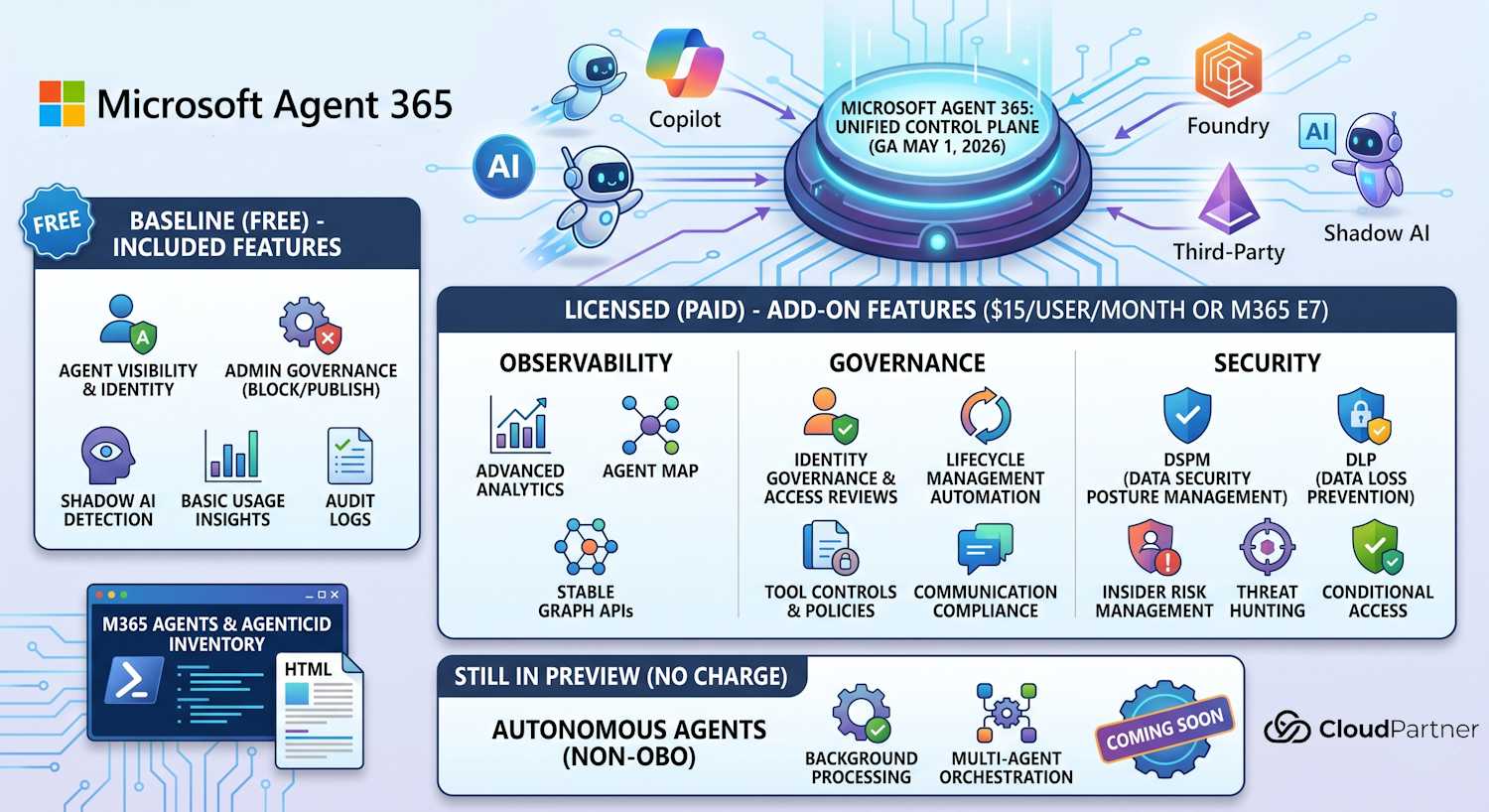
What Agent 365 Actually Is
As I covered in the Agent Registry consolidation post, Microsoft merged the standalone Entra Agent Registry blade into Microsoft Agent 365 on May 1, 2026. That's now done — the registry blade in the Entra admin center is retired, and Agent 365 is the single control plane for agent visibility, governance, and security across your Microsoft tenant.
The GA launch affects more than just where you look for agent inventory. It also clarifies the license boundary: what you get at no extra cost with any Microsoft Cloud subscription, and what requires the paid Agent 365 add-on. That distinction matters if you're trying to answer the "do we need to buy this?" question.
I've spent the past few weeks building out agent governance automation using the Graph beta APIs, building my own inventory tool, and watching Microsoft's licensing FAQ page evolve. This post is a practical breakdown of where things stand as of GA.
What You Get Without a License
A lot, actually. Microsoft's agent governance baseline is included with any Microsoft Cloud subscription — no Agent 365 license required. This covers the core visibility and control functions that most organisations will actually use day-to-day:
- Agent Identity and Agent Registry — you can see all registered agents on your tenant, including who created them and when
- Admin governance actions — publish, deploy, block, delete, approve, reassign, manage access, and pin agents directly from the portal
- Shadow AI detection — visibility into agents running in your tenant that weren't formally sanctioned
- Block unsanctioned agents — you can act on shadow AI detections, not just observe them
- Basic usage insights — active users and response count per agent
- Audit logs for agent activity
- eDiscovery via Content Search — includes agent-generated content in your existing compliance workflows
If you're an identity admin or security admin who just wants to know what agents are running on your tenant and have basic controls over them, this is enough. The AI Administrator role in Entra gives you the right level of access for these functions without needing a Global Admin.
What Requires the Agent 365 License
The paid Agent 365 license enables three capability areas: observability, governance, and security. Here's what sits behind the paywall:
Observability
- Advanced usage insights — beyond just active users and response count; granular analytics per agent, per user, per time range
- Agent Map — a visual representation of how agents connect to data sources, users, and other agents in your tenant
- Registry sync — keeping agent inventory in sync across Microsoft 365 admin center, Copilot Studio, Foundry, and Entra
- Graph API access — the stable versioned API for programmatic agent management at GA (the preview endpoint is being superseded)
Governance
- Identity Governance for agents — access reviews, entitlement management, and governance workflows applied to agent identities, not just human users
- Lifecycle management — automated agent provisioning and deprovisioning tied to business events
- Automate lifecycle actions — policy-driven rules: if an agent hasn't been used in 90 days, deprovision it; if an agent's sponsoring user leaves, flag it for review
- Tool controls — granular policies over which tools and APIs each agent can call
- Policy templates — prebuilt governance policy bundles for common agent scenarios (Copilot agents, Foundry agents, third-party plugins)
- Data Lifecycle Management for agents — retention and deletion policies applied to agent-generated content
- Communication Compliance — agent communication reviewed within your existing compliance policy framework
Security
- DSPM for agents — Data Security Posture Management: continuous assessment of what data each agent can access
- Insider Risk Management for agents
- Label-based DLP — sensitivity label enforcement in agent responses
- DLP for agents — data loss prevention policies applied specifically to agent outputs and tool calls
- Conditional Access and Identity Protection for agents
- SASE for agents — Secure Access Service Edge controls applied to agent network traffic
- Device compliance for agent Conditional Access
- Agent Security Posture Management
- Threat Detection and Blocking
- Threat Hunting for agents
This is where Agent 365 starts to overlap with your existing security stack. Not everything here is standalone — some of it requires other licenses you may already have or need separately.
Pricing and Packaging
The standalone Agent 365 license costs $15 per user per month. It's also included in Microsoft 365 E7 at $99/user/month — alongside E5 security, E5 compliance, Microsoft 365 Copilot, and agent governance in one bundle.
Microsoft confirmed EU Data Boundary compliance is met with M365 E7 including Agent 365 — relevant if you're in a regulated European environment and need your agent governance data to stay in the EU.
Key Caveats
Before you price this out, a few things that aren't obvious from the marketing page:
- Agent 365 does not grant E5 security to E3 users. It's not an uplift license. If your tenant is on M365 E3 and you add Agent 365, you get agent governance features — you don't suddenly get the full E5 security stack for your human users.
- Conditional Access for agents (delegated flow) requires M365 E3 at minimum. Identity Protection for agents requires M365 E5.
- Threat Hunting for agents requires a separate Microsoft Defender for Cloud Apps (MDA) license.
- Windows 365 for Agents is priced separately — $0.40/VM/hour pay-as-you-go. That provides the runtime environment for autonomous agents. Agent 365 governs them; Windows 365 runs them. Two different things, two different price tags.
- Foundry vs. Copilot Studio agents — no difference in licensing model. The $15/user/month covers agents regardless of which Microsoft platform they were built on.
What's Still in Preview
GA doesn't mean everything is done. The part of the agent story I'm watching most closely — autonomous agents and non-OBO agents — is still in preview. These are agents that act without a delegated user context (not acting "on behalf of" a specific user), which covers most of the interesting agentic AI scenarios: background processing, scheduled tasks, multi-agent orchestration.
Microsoft's current position: no charge for autonomous/non-OBO agents until they reach GA. The free preview period continues.
This matters because the identity model for these agents is different from delegated agents. As I covered in the agent identity creation channels post, autonomous agents use service principals or workload identities rather than delegated credentials. Governance for these agents — especially around what tools they can call autonomously — is the area where the existing controls are still being worked out. Expect the security features around SASE for agents and Agent Security Posture Management to mature significantly before those agents hit GA.
The lessons from the McKinsey Lilli incident are directly relevant here — autonomous agents with broad tool access and insufficient governance are the exact failure mode that post documents.
M365 Agents & AgenticID Inventory
Agent 365 now has a proper portal — and it's good for what it does. But I built the M365 Agents & AgenticID Inventory tool to go well beyond what the portal exposes, and there really isn't anything else quite like it. If you have an Agent 365 license, the tool picks that up and unlocks the full Graph-backed node visualisation: a live dot graph of your agent estate — agent identities, their connections to service principals, data sources, and other agents — rendered directly from the Microsoft Graph. It's the kind of view the portal doesn't give you. Under the hood it queries the Graph APIs directly to enumerate:
- Agent blueprints in your tenant
- Agent identities (service principals registered as agents)
- Agent users (delegated agent user objects)
- Registry entries across Entra, MAC, and Copilot Studio
Beyond enumeration, it evaluates each agent against a set of governance checks: credential health, privilege exposure, sponsorship assignment, and audit trail completeness. Output is an HTML report, CSV, and JSON — useful when you want something more scriptable than a portal screenshot.
Where the portal gives you a list, the tool gives you a graph. Where the portal shows you current state, the tool gives you history. And where the portal stops at the UI boundary, the tool can run headless in a CI/CD pipeline, write to a SIEM, or diff snapshots between runs. There's nothing in the portal that replaces that.
The tool runs in two modes. There's an interactive web UI with three tabs — inventory, health checks, and export — which works well for one-off assessments or walking through findings with a team. The second mode is headless CLI output: no browser, writes straight to stdout or a file. That's what you'd reach for in scheduled jobs or when piping results into a SIEM. Both modes hit the same underlying Graph queries; the difference is only in how you consume the output.
If you want a diff-able snapshot of your agent estate on a schedule, the headless mode is the practical choice — the portal has no export history. Point it at a storage account or log analytics workspace, run it nightly, and you'll have a record of when agents appeared or their credential state changed. That kind of audit trail doesn't exist anywhere else right now.
The Bottom Line
The free tier of Agent 365 is genuinely useful. If you haven't already looked at your agent inventory in the Microsoft 365 admin center, now is a good time — you'll probably find agents you didn't know were there.
The $15/user/month license is harder to justify unless you're in one of three situations: you have a large Copilot deployment and need the governance audit trail for compliance, you're building Foundry agents at scale and need lifecycle automation, or you're running in a regulated environment where DSPM and DLP for agents are mandatory controls rather than nice-to-haves.
The autonomous agent story is still developing. I'd wait until non-OBO agent governance reaches GA before making any significant architectural commitments around it. The preview period has been useful for learning, but the controls aren't stable yet.
For further context: what Entra Agent ID is and how it works, Defender security controls for agents, and the AI Administrator role for identity admins managing agents without Global Admin privileges.