


I've covered what Microsoft Entra Agent ID is and how the AI Administrator role fits into agent lifecycle management. More recently, I looked at how Azure AI Foundry orchestrates agents in isolated containers for engineering workflows. In all of those posts, I treated agent identity creation as a given — agents have identities, Foundry or Copilot Studio creates them, someone manages them. Done.
What I didn't get into is the concrete question of how agent identities actually end up in your Entra tenant. That turns out to matter quite a bit for anyone responsible for identity governance or security. Agent identities don't come from one place. There are multiple channels — and some of them aren't under tight admin control unless you specifically set that up.
This post covers exactly that. The creation channels, who can use them, what permissions they require, and what an identity governance-aware admin should do about it.
Three Objects, Not One
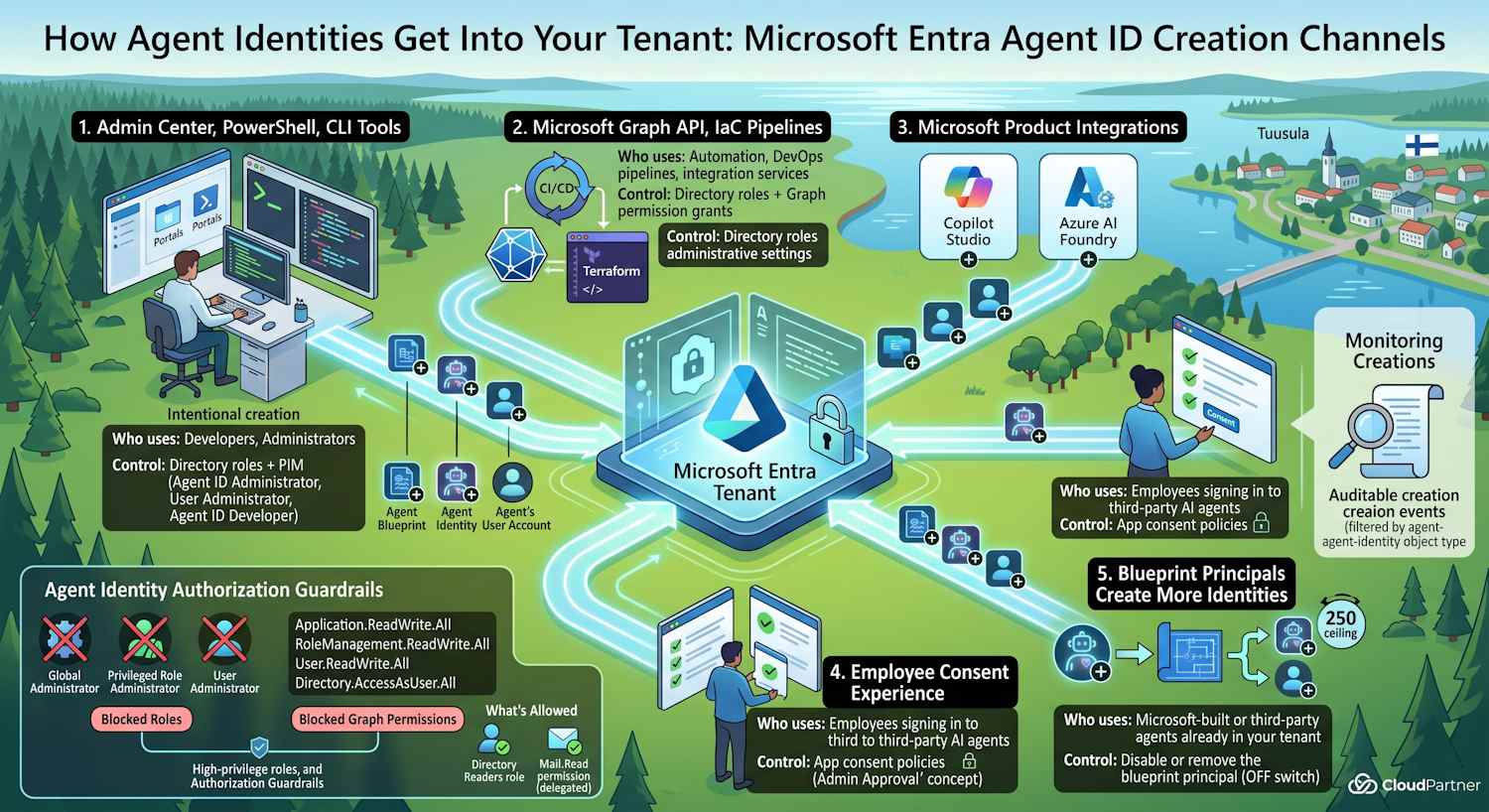
Before getting into the channels, it's worth being precise about what "agent identity" means in Entra, because there are actually three distinct objects that can be created — and each has its own creation path and permission requirements:
- Agent identity blueprint — the definition of an agent type. Think of it like an app registration: it describes what the agent is, what permissions it needs, and who can create instances of it. Stored in the app/service principal store.
- Agent identity — a specific running instance of an agent, created from a blueprint. This is the thing that actually authenticates and acts in your environment. Similar to a service principal.
- Agent's user account — a user object associated with the agent, used in delegated or interactive scenarios where the agent needs to act on behalf of a user.
Each of these can be created by different channels, requires different permissions, and has different governance implications. The channels I'll cover below can create one, two, or all three of these — depending on what they're set up to do.
The Five Channels at a Glance
Microsoft Entra Agent ID (currently in preview) defines five ways that agent identities can enter your tenant:
| Channel | Who uses it | How it's controlled |
|---|---|---|
| Entra admin center / Azure portal / CLI / PowerShell / IaC | Developers, administrators | Directory role assignments |
| Microsoft Graph API | Automation, DevOps pipelines, integration services | Directory roles + Graph permission grants |
| Microsoft product integrations | Copilot Studio, Azure AI Foundry, Security Copilot users | Per-product administrative settings |
| Microsoft Entra ID consent experience | Employees signing in to third-party AI agents | App consent policies |
| Agent identity blueprint principals | Microsoft-built or third-party agents already in your tenant | Disable or remove the blueprint principal |
The first two channels are the ones most admins expect — deliberate, controlled creation by people with the right roles. The last three are where things get more interesting from a governance perspective.
Channel 1: Admin Center, Graph API, and CLI Tools
This is the intentional path. A developer or admin opens the Entra admin center, runs a PowerShell script, pushes an IaC template, or calls the Graph API from a pipeline — and explicitly creates an agent identity blueprint or identity.
The permission requirements depend on what's being created:
| Action | Required directory role | Required Graph permission (API/automation) |
|---|---|---|
| Create an agent identity blueprint | Agent ID Developer or Agent ID Administrator |
AgentIdentityBlueprint.Create (delegated or application) |
| Create an agent identity from a blueprint | Agent ID Administrator |
AgentIdentity.Create.All |
| Create an agent's user account | Agent ID Administrator or User Administrator |
AgentIdUser.ReadWrite.All |
Two new roles were introduced specifically for this: Agent ID Developer and Agent ID Administrator. I covered what these look like in practice in the AI Administrator role post. The short version is: developers can register blueprints (what an agent is), administrators can actually instantiate and manage running identities. Keeping those separate is a sensible least-privilege design.
CLI and IaC (Bicep, ARM templates, Terraform) work the same way — they call the Graph API under the hood, so the same permission requirements apply. The identity running the script or pipeline needs to have been granted the appropriate role or permission.
Channel 2: Microsoft Products Create Them Automatically
This is where things get less obvious. When you or your users work with Copilot Studio, Azure AI Foundry, or Security Copilot, those products can automatically create agent identity blueprints, agent identities, and agent user accounts in your Entra tenant — as part of their normal operation.
You don't have to explicitly call a Graph API or assign anyone a directory role. The product integration handles it. The admin control is within that product's settings, not in Entra directly.
Azure AI Foundry
In my recent post about Autodesk MCPs and isolated containers, I described how Azure AI Foundry orchestrates agents that connect to engineering data and run in isolated environments. Each of those agents gets its own identity. What I didn't say explicitly: those identities come through this channel. When you deploy an agent in Foundry, Foundry creates the corresponding agent identity blueprint principal and agent identity in your Entra tenant automatically. The connection between "I deployed an agent in Foundry" and "there's a new agent identity in my Entra directory" is this Microsoft product integration channel.
The governance implication: if your organization is actively building and deploying agents through Foundry, you should expect new identities to appear in Entra that weren't explicitly registered through the admin center. That's not a bug — it's the intended behavior. But it means Entra audit logs and the Microsoft Agent 365 portal become your primary visibility tools.
Copilot Studio and Security Copilot
Same pattern applies to Copilot Studio. When a maker builds an agent in Copilot Studio and an admin enables that agent for the tenant, Copilot Studio creates agent identity objects in Entra. Security Copilot does the same when custom agents are added.
Each of these products has its own admin settings for controlling whether and how this happens. The Entra controls are downstream — they determine what those created identities can do, not whether they get created in the first place.
Channel 3: Employee Consent
This one follows the same pattern as the OAuth app consent problem that most identity admins have been dealing with since 2015. An employee signs in to a third-party AI agent for the first time. Entra shows a consent page. If the employee consents, an agent identity blueprint principal gets added to the tenant.
Most people think of app consent as "the app gets access to my data." With agent identity blueprints, the implication is broader: the blueprint principal that gets added to your tenant can then create up to 250 agent identities automatically (more on that in the next section). A single employee consent decision, in other words, can trigger a cascade of identity creation activity you didn't initiate.
The control mechanism is the same one you'd use for app consent: configure app consent policies to require admin approval before a new agent identity blueprint principal can be added. If you already have strict app consent policies in place for regular OAuth apps, make sure those policies cover agent identity blueprint principals as well — they might not by default if your policies predate the Agent ID preview.
Note: The existing guidance on app consent applies here. If you're not familiar with how consent policies work in Entra, the same application consent configuration documentation is a reasonable starting point.
Channel 4: Blueprint Principals Create More Identities
This is the least obvious channel, and the one worth understanding clearly. Once an agent identity blueprint principal exists in your tenant — regardless of how it got there — it can create agent identities on its own.
Specifically, any system with a blueprint principal in your tenant is automatically
granted AgentIdentity.CreateAsManager. This permission:
- Allows the principal to create up to 250 agent identities
- Allows updating and deleting those identities
- Cannot be revoked individually — to stop a blueprint principal from creating more identities, you have to disable or remove the principal entirely
An admin can also explicitly grant AgentIdUser.ReadWrite.IdentityParentedBy,
which lets the blueprint principal also create the user accounts associated with the
agents it manages. This one is not automatic — it requires a deliberate grant.
The important thing here is the ceiling: each blueprint principal can create up to 250 agent identities. But there's no published limit on how many blueprint principals can exist in a tenant. So the theoretical upper bound on auto-created identities scales with the number of blueprint principals, not with any fixed tenant quota.
For a tenant running Copilot Studio at scale, or one that has multiple Microsoft product integrations all adding blueprint principals, this is where you start to see identity sprawl. Each product integration, each consented third-party agent, each developer who registers a blueprint — all of them can potentially be running auto-creation in the background.
What Agents Can't Have
The flip side of all this creation activity is the authorization guardrail Microsoft has built in. Agent identities can't be granted certain high-privilege roles or permissions, even if an admin tries to grant them. The platform rejects it.
Blocked Entra directory roles include:
- Global Administrator
- Privileged Role Administrator
- User Administrator
- And most other high-privilege administrative roles
Blocked Microsoft Graph permissions include:
| Permission | Why it's blocked |
|---|---|
Application.ReadWrite.All |
Allows managing all app registrations and service principals |
RoleManagement.ReadWrite.All |
Full control over roles, users, groups, and directory settings |
User.ReadWrite.All |
Full control of all user accounts in the tenant |
Directory.AccessAsUser.All |
Allows sweeping directory access — effectively impersonating any user |
What agents can get: delegated permissions that are scoped to a specific user
(like Mail.Read or Files.Read), lower-privilege Entra roles
like Directory Readers, Azure RBAC roles scoped to specific resources (a Key Vault
Reader role on a specific vault, for example), and application permissions that don't
cross the tenant-wide write boundary — like User.Read.All for reading
profiles in an org chart scenario.
The design intent is clear: agents should operate with least privilege and bounded scope. An agent that reads Alice's calendar with her consent is fine. An agent that can modify any user account in the tenant is not allowed, even if an admin wants to grant that.
Detecting What's Been Created
All agent identity creations — regardless of which channel they came through — are recorded in the Entra audit log. The object type is agent-identity-specific, so you can filter on it directly.
A few practical ways to monitor this:
- Entra audit logs: In the Entra admin center, filter audit logs by the agent identity object type. New blueprint registrations, new identity creations, new user account creations — all show up here with the initiating actor and timestamp. If you see entries with a Microsoft product name (like "Copilot Studio") or an unfamiliar service as the actor, that's the product integration channel at work.
- Microsoft Graph API: Query all agent identity objects by type for a point-in-time inventory. Useful for baseline snapshots and for comparing against previous states.
- Microsoft Agent 365 portal: As I mentioned in the Agent Registry consolidation post, Agent 365 is becoming the central place to view all agents registered in your tenant. For ongoing governance, this is the most practical interface.
Note: If you're already running Sentinel or Defender for Cloud in your environment, it's worth checking whether agent identity creation events are included in your current alert rules. They're relatively new object types and may not be covered by existing analytics rules without an explicit update.
Controlling Agent Identity Creation
Once you understand the channels, the controls follow logically from each one:
For the admin tooling channel: Restrict who holds the Agent ID Developer and Agent ID Administrator roles. These are directory roles, so they go through the same assignment process as any other Entra role. Apply PIM (Privileged Identity Management) if you're already using it for other sensitive roles.
For the Microsoft products channel: Manage this at the product level. In Copilot Studio, for instance, there are tenant admin settings for which features are enabled and who can create agents. For Azure AI Foundry, access controls on the Foundry project determine who can deploy agents — and therefore who can trigger identity creation in your Entra tenant. In both cases, the Entra controls are downstream (governing what the created identities can do), so start with the product controls.
For the consent channel: Configure your app consent policies to require admin approval for agent identity blueprint principals. This is the same setting surface as for regular app consent, and the same policy that most orgs should already have tightened after the OAuth phishing era. If you haven't reviewed your consent policies recently, this is a good moment to do it.
For blueprint principals: Periodically review the list of blueprint
principals in your tenant via the Agent 365 portal or Graph API. Any principal you don't
recognise — especially ones that came in through an employee consent event — should be
investigated. If you decide it doesn't belong, disabling or removing the principal stops
the auto-creation. You can't selectively revoke
AgentIdentity.CreateAsManager from a principal that legitimately got it;
the only lever is the principal's enabled state.
How the Channels Compare on Control and Risk
| Channel | Admin control level | Risk if unmanaged | Key control lever |
|---|---|---|---|
| Admin center / Graph / CLI | High — explicit role requirement | Low | Role assignments + PIM |
| Microsoft product integrations | Medium — depends on per-product settings | Medium — identities accumulate without product-level review | Product admin settings (Copilot Studio, Foundry project access) |
| Employee consent | Low by default | High — third-party principals enter with auto-creation capability | App consent policies |
| Blueprint principals | Low — creation is automatic once principal is in tenant | High — each principal can create up to 250 identities unchecked | Disable or remove the principal |
The Bottom Line
The pattern here is not unique to Entra Agent ID — it's the same dynamic that played out with app registrations and OAuth consent over the past decade. A new identity type gets introduced, the early versions are intentional and controlled, then product integrations and user consent start adding objects that weren't explicitly reviewed.
The difference this time is that agent identities come with a built-in force multiplier: blueprint principals that auto-create identities once they're in the door. The authorization guardrails (blocked high-privilege roles, blocked Graph permissions) limit the damage a single over-privileged agent can do — but they don't limit how many agents get created, or whether anyone is watching.
The practical checklist for most orgs right now:
- Check your app consent policies and make sure they apply to agent identity blueprint principals, not just regular OAuth apps
- Review who holds Agent ID Developer and Agent ID Administrator roles — keep those lists short
- If you're using Copilot Studio or Foundry, verify the product-level admin settings match your expectations for how freely agents can be created
- Run a one-time inventory via Graph API or Agent 365 portal to see what's already in your tenant
- Set up an audit log alert for new agent identity blueprint principal creations — especially ones initiated by users rather than service accounts
Further Reading
- Microsoft Entra Agent ID: creation channels — the primary source for this post
- Authorization in Microsoft Entra Agent ID — roles, blocked permissions, permission model
- Configure user consent settings — app consent policy configuration
- Microsoft Entra Agent ID: The Identity Layer Your AI Agents Need — foundational post on what Agent ID is
- AI Administrator Role Gets Real Teeth — the role boundaries for managing agents
- Microsoft Entra Agent Registry: Consolidation into Microsoft Agent 365 — where to view and manage agents
- Autodesk MCPs, Azure AI Foundry, and Isolated Containers — Foundry agent identity creation in practice