


Current State
If you're managing agents in your Microsoft Entra tenant right now, you're probably using the Agent Registry blade in the Entra admin center. It's the place where you register, track, and govern all the AI agents running on your tenant's identity.
That's about to change.
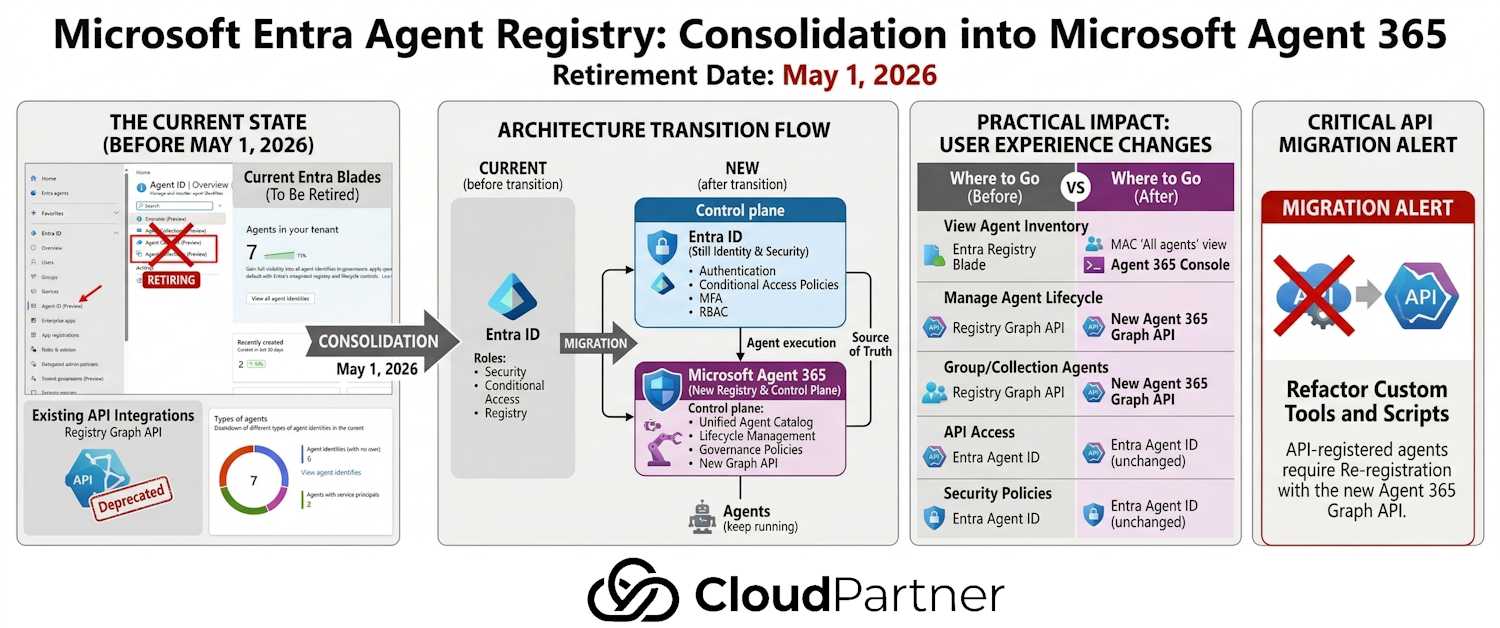
Microsoft is consolidating agent management into Microsoft Agent 365, which will become the single control plane for agent visibility, governance, and security across your entire tenant. The Agent Registry blade in Entra is retiring on May 1, 2026.
This isn't a data loss scenario — your agents will be fine, and you don't need to do anything manually. But understanding this shift matters because it changes where you'll go to manage agents, how you'll access agent governance APIs, and what you need to plan for if you've built integrations against the current registry API.
What's Actually Changing
Let's break down what Microsoft is doing here:
The Retirement Timeline
May 1, 2026: The Agent Registry blade and Agent Collections blade in the Entra admin center will be retired. You won't be able to use these interfaces anymore. Full stop.
But here's what stays working:
- Your agents keep running — no interruption to agent functionality
- Agent governance stays active through Agent ID (Entra's identity-based agent management)
- You can still see your agent inventory in the Microsoft 365 admin center (MAC) via the "All agents" view
- All access policies and security controls remain in place
The Graph API: Preview Now, Versioned at GA
This is the part that requires attention if you've built custom tooling.
Microsoft currently offers a Registry Graph API that lets you programmatically manage agents — register them, query them, assign them to groups, etc. The whole Entra Agent ID product is currently in preview, which means this API is also a preview endpoint. Microsoft preview APIs aren't final — when a product moves to GA, the API gets versioned and the preview endpoint is superseded by the stable release. The underlying capability stays, but the specific endpoint will change.
Note: Microsoft's FAQ states that "Agent registration APIs remain supported" — meaning the feature isn't going away. But as with any preview API, treat it as subject to change until GA is announced. Don't build production-critical automation against it yet.
This means if you have:
- Automation scripts that create or update agents via the Registry Graph API
- Custom dashboards that pull agent inventory from the current API
- Integrations that depend on the Registry endpoint
...keep an eye on GA announcements and be ready to update to the versioned endpoint when it ships.
The Architecture Behind This Change
This isn't just a UI refresh or a rename. Microsoft is restructuring how agent governance works across the Microsoft 365 environment.
Agent 365 Becomes the Registry
Microsoft Agent 365 is becoming the unified registry and control plane. Think of it as the new source of truth for all agent metadata, governance policies, and access controls across your tenant.
Agent 365 will provide:
- Unified agent catalog (all agents, one place)
- Consistent visibility across all agent-using apps
- Simplified management workflows
- Single API for programmatic access
Entra Still Provides the Identity Foundation
This is important: Microsoft Entra will still be the identity foundation for agents. That's where Agent ID lives.
Agent ID is the identity-based management layer that handles:
- Authentication for agents
- Authorization policies
- Conditional Access rules for agents
- Role-based access control (RBAC) for agent operations
Agent 365 manages the registry and catalog. Entra provides the security foundation so agents can't just run wild — they still have to authenticate, still have to satisfy your Conditional Access policies, still get governed by the same zero-trust principles as any other identity in your tenant.
The split makes sense: Entra focuses on identity & security. Agent 365 focuses on lifecycle and governance.
What Doesn't Change (And What You Keep)
Microsoft is being clear about the non-breaking parts:
- Agent functionality: Agents keep working exactly as before. No changes to how they authenticate, execute, or report back.
- Agent ID integration: All your Agent ID policies, roles, and governance rules stay in place and remain fully functional.
- Access control: Conditional Access, MFA, risk-based policies — all applied to agents through Entra — keep working.
- Inventory visibility: You can still see all your agents in the Microsoft 365 admin center's "All agents" view.
No manual action required: You don't need to migrate agents, re-register them, or change any configurations. Microsoft is doing the backend work.
Practical Impact for Your Team
Before May 1, 2026:
- Treat the Registry Graph API as preview — don't build production-critical automation against it until GA is confirmed
- Document any scripts or integrations using the Registry API
- Watch for Microsoft's GA announcement, which will confirm the stable versioned endpoint
After May 1, 2026:
- Use Microsoft 365 admin center (MAC) > "All agents" view for agent inventory
- Use Agent 365 console for agent lifecycle management (when generally available)
- Use the new Registry Graph API for programmatic access (once released)
- Continue using Agent ID for identity-based governance through Entra
If You Have Custom API Integrations...
If your organization has built scripts, integrations, or automation that calls the current Registry Graph API, this is standard preview-dependency hygiene:
- Audit your usage: Find all scripts, bots, and integrations using the Registry API endpoint
- Document dependent workflows: Which agents are registered via API? Which are created with automation?
- Watch for the GA announcement: Microsoft will confirm the stable versioned endpoint when Agent ID moves out of preview
- Test before switching: Once the GA API is available, validate your integrations against it before cutting over
- Update your integrations: Refactor scripts to use the versioned endpoint
Why Microsoft Is Doing This
This consolidation pattern is becoming Microsoft's go-to playbook — consolidate scattered management experiences into unified control planes. It makes sense because:
- Consistency: Admins don't have to jump between Entra and Agent 365 to see the full picture of who's running what
- Scale: A unified registry scales better as agent deployments grow across your organization
- Governance transparency: All agent access policies, audit trails, and compliance records in one place
- API simplicity: One API instead of multiple endpoints reduces complexity for developers
The split between Agent 365 (registry / catalog) and Entra (identity / security) also makes architectural sense — it separates concerns and lets each platform focus on what it does best.
Understanding Agent ID and Blueprints
Before we wrap up, it's important to understand how Agent Identity and Blueprints connect in this new consolidated approach.
Blueprints as Templates
An agent identity blueprint is a template that defines how agent identities are created, authenticated, and governed. Think of it as a class definition — it establishes the foundation for all agent instances created from it.
Each blueprint includes:
- Authentication protocols and token configuration
- Baseline permissions (inheritable across all agent identities)
- Metadata (description, verified publisher, tags)
- App roles and capability definitions
- Conditional Access policies that apply to all instances
Agent Identities as Instances
An agent identity is a specific instance of an agent created from a blueprint. Each agent gets its own:
- Unique identity in Microsoft Entra
- Individual credentials (certificate or secret)
- Distinct audit trail and sign-in logs
- Optional agent user account (mailbox, Teams presence)
- Instance-specific permissions (on top of blueprint permissions)
How They Work Together
The blueprint-to-instance relationship gives you:
- Centralized management: Define security policies, required permissions, and governance rules once in the blueprint — all instances inherit them automatically
- Scalable control: Disable a blueprint and instantly all its agent identities stop functioning (a rapid kill-switch for compromise or decommissioning)
- Granular monitoring: Each agent identity has its own audit trail, so you know which agent did what
- Flexibility: Agents can inherit baseline permissions from the blueprint but also receive additional, agent-specific permissions for their unique responsibilities
This pattern supports real-world scenarios like a retail system with three agents (store inventory, product comparison, supplier inventory). All three run under one blueprint, inherit the same security posture, but each gets its own agent identity with distinct permissions for its domain.
For a deeper dive into Agent ID design patterns and governance, check out my previous post on Microsoft Entra Agent ID: Agentic Identity for AI Agents.
Frequently Asked Questions
Which registry should I use today?
Use Agent 365 to discover and manage all agents in your organization and monitor operational activity. Use Microsoft Entra to manage agent identities (Agent ID), apply identity governance and Conditional Access policies, and monitor identity-related security signals.
What happens to the features announced as part of the Microsoft Entra Agent Registry?
The capabilities introduced with the Microsoft Entra Agent Registry continue to exist. Specifically:
- Agent identity capabilities remain part of Microsoft Entra Agent ID
- Agent registration APIs remain supported
- Identity governance and security controls for agents remain unchanged
The change simplifies where customers see and manage all agents, while Microsoft Entra continues to provide identity and access management.
Will I see the same agent inventory in the Microsoft Entra admin center?
The Microsoft Entra admin center focuses on identity and access management for agents. Identity administrators can see agents that have a Microsoft Entra Agent ID for viewing and managing them. The comprehensive agent inventory, including agents without a Microsoft Entra agent identity, is available in Agent 365.
What can I manage in the Microsoft Entra admin center?
In the Microsoft Entra admin center, administrators can:
- View agents with Microsoft Entra agent identities
- Manage agent identities, blueprints, and permissions
- Apply Conditional Access, identity governance, and network security controls
- Monitor identity-related security signals
Why should I go to Microsoft Agent 365 if I'm an identity administrator?
Identity administrators can optionally use Agent 365, via the Microsoft 365 admin center, to view all agents in the organization, while continuing to use the Microsoft Entra admin center to manage agent identities, access policies, and identity governance controls. This gives you a complete picture of agent activity across your tenant.
Do I need a different role to view agents in Agent 365?
To see all agents in Agent 365, users need the AI Administrator role. To see all agents with a Microsoft Entra Agent ID in the Microsoft Entra admin center, users need the Agent ID Administrator role. Identity administrators can be assigned these roles for complete agent visibility.
For a detailed explanation of the AI Administrator role and its relationship to agent governance, see my previous post on AI Administrator Role and Agent Management in Entra.
Is a license required?
Viewing all agents in the Microsoft 365 admin center doesn't require a specific license. Administrators only need the appropriate role, such as AI Reader (recommended least-privilege role) or AI Administrator, to access the inventory view.
Applying security and governance controls for agents, such as Conditional Access or identity governance policies, requires the appropriate licensing for Microsoft Entra Agent ID.
How do I view the complete agent inventory?
To view the complete inventory of agents in your organization:
- Go to the Microsoft 365 admin center as at least an AI Administrator
- Select Agents from the navigation menu
- Select All agents to view the comprehensive list of agents in your tenant
The Bottom Line
Agent Registry is moving off Entra and into Agent 365 on May 1, 2026. Your agents won't stop working, your governance policies stay active, and Entra's identity foundation doesn't change.
What you need to do:
- Get familiar with the Agent 365 console for agent management (once generally available)
- Learn to use Microsoft 365 admin center's "All agents" view as your new inventory source
- If you've built API integrations, start planning for migration to the new Registry API (details coming from Microsoft)
- Keep using Agent ID for identity-based governance — that's not changing
For the full technical details and always-current information, check out Microsoft's Agent Registry convergence guide.