


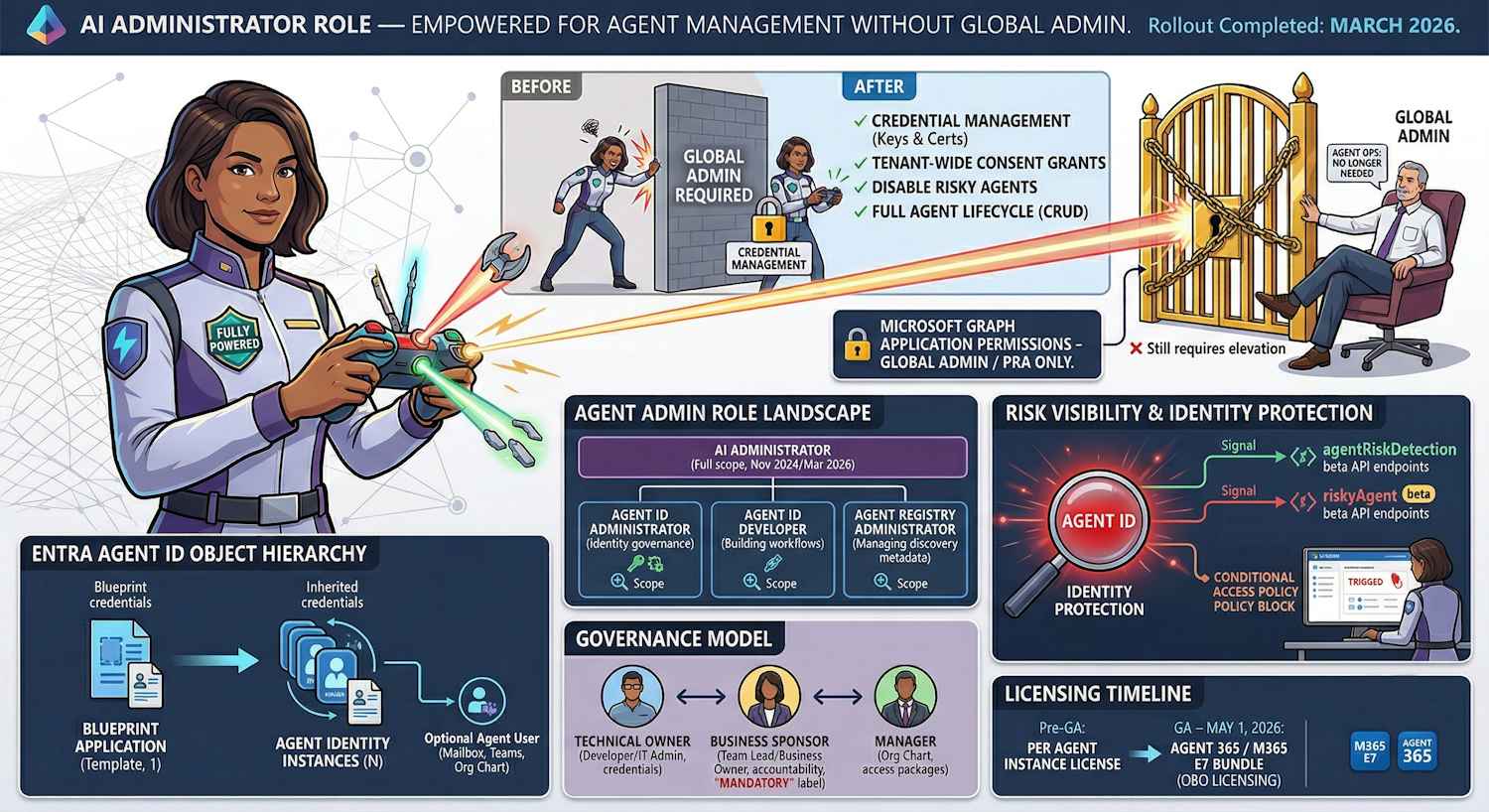
When the AI Administrator role landed back in November 2024, it was a placeholder more than a finished product. Yes, it existed. Yes, you could assign it. But the moment an AI admin tried to do anything beyond the basics — credential management, full agent lifecycle operations, consent grants — they'd hit a wall and need to call in a Global Administrator. Not exactly the clean separation of duties the role promised.
Microsoft has now fixed that. The AI Administrator role has been substantially updated with the permissions it always should have had for day-to-day agent operations. The rollout completed by the end of March 2026, so if you're on this role or you've been avoiding delegating agent management because of these gaps, it's worth revisiting.
But to understand why any of this matters, you need to understand what's actually happening with agent identities in Entra. The permission changes make a lot more sense in that context.
First, What Even Is an Agent Identity?
This is one of those areas where the marketing ("AI agents in Microsoft 365") runs ahead of the infrastructure reality, so let me ground it properly.
Microsoft has introduced a new identity object type in Entra: the Agent Identity. It's a service principal, but one with a fundamentally different lifecycle model than a traditional app registration. Where an app registration is long-lived, manually created by IT or a developer, and carries its own credentials — an Agent Identity is designed to be created programmatically at scale, dynamically, and governed by a Blueprint.
The Blueprint is a template — an application registration of type
Microsoft.Graph.AgentIdentityBlueprint — that defines the credential
profile and authorization scope for a family of agents. Individual Agent Identities
inherit their credential chain from the Blueprint rather than carrying their own
secrets. That delegation is the architectural difference that makes managing hundreds of
agent instances operationally feasible.
The comparison below is worth internalising because it explains why agent governance needs different tooling than traditional app registrations:
| Aspect | Application Identity | Agent Identity |
|---|---|---|
| Lifecycle | Long-term, stable | Dynamic, potentially ephemeral |
| Creation | Manual by IT or developer | Automated at scale via Blueprint |
| Credentials | Own secrets / certificates | Inherits via Blueprint (FIC) |
| Governance | Owners only | Owners + Sponsors (required) + optional Manager |
| Scale | One registration per app | One Blueprint, many Agent Identities |
What Changed for the AI Administrator Role
The core problem with the original AI Administrator role was that it sat between two worlds — it was more than a read-only observer but less than what was needed to actually run agent operations day-to-day. The practical result was that AI admins constantly had to escalate to Global Administrators for routine tasks. That friction defeats the point of having a dedicated role.
The updated role now covers the full operational lifecycle of agents without that escalation dependency:
| Capability | Before Update | After Update |
|---|---|---|
| Create / update / delete agents | Partial or not available | ✓ Full CRUD |
| Manage agent credentials | Required GA escalation | ✓ Included |
| Grant tenant-wide consent for apps/agents | Required GA escalation | ✓ Included (see exception below) |
| View subscription info and agent risk flags | Limited | ✓ Included |
| Microsoft Graph application permissions consent | Required GA / PRA | ✗ Still requires Privileged Role Admin or Global Admin |
The exception for Microsoft Graph application permissions is the right call, and it's
worth understanding why. Application permissions grant app-only access (no user context)
to tenant-wide data — Mail.ReadWrite across all mailboxes,
Directory.ReadWrite.All, and so on. Granting those without Privileged Role
Admin or Global Admin involvement would be a meaningful privilege escalation path.
Keeping that gate in place is a sensible boundary.
Everything else — creating agents, rotating credentials, granting delegated permission consent, disabling risky agents — is now within scope for the AI Administrator role. The management surface spans the Microsoft 365 admin center, the Entra admin center, PowerShell, and the Graph API.
The Agent Admin Role Space — Four Roles, Different Scopes
The AI Administrator update doesn't happen in isolation. Microsoft introduced three additional, more narrowly scoped agent admin roles in November 2025. This is worth mapping out clearly because the answer to "which role should I assign?" depends on how much access you actually need:
| Role | Introduced | Scope | Best fit for |
|---|---|---|---|
| AI Administrator | Nov 2024, expanded Mar 2026 | Full agent lifecycle, credentials, consent (excl. Graph app permissions) | Dedicated AI / agent team leads |
| Agent ID Administrator | Nov 2025 | Entra Agent ID provisioning and governance — Blueprint + Agent Identity management | Identity platform admin, DevOps roles |
| Agent ID Developer | Nov 2025 | Read access to Agent ID objects; limited create/update on own agents | Developers building agent workflows |
| Agent Registry Administrator | Nov 2025 | Manages the Entra Agent Registry — agent discovery metadata, collections, and publishing | Governance/compliance teams managing agent catalogues |
The principle of least privilege applies here just as it does everywhere else in Entra. The AI Administrator role is powerful — the November 2025 roles exist specifically because Microsoft recognised that not every person involved in agent operations needs that full scope. A developer building a new agent integration doesn't need the same access as someone managing tenant-wide consent decisions.
Action item: Review your current AI Administrator role assignments. If people have been given AI Administrator because it was the only option available at the time, some of those assignments may now be better served by one of the narrower November 2025 roles. Fewer permissions than needed is always the right starting point.
Governance Model: Owners, Sponsors, and Managers
One of the things I find genuinely well-designed about the Entra Agent ID governance model is the separation it enforces between technical control and business accountability. This is something traditional app registrations handle poorly — an app owner is typically the developer who created it, and there's often no formal thread back to a business owner who can make lifecycle decisions if that developer leaves.
Agent Identities have three governance roles with explicitly different responsibilities:
| Role | Responsibilities | Required? | Typical Person |
|---|---|---|---|
| Owner | Modify credentials, update config, manage authentication, delete the agent identity | No (but recommended) | Developer, DevOps, IT admin |
| Sponsor | Enable/disable the agent, lifecycle decisions, access reviews, security incident response | Yes — required at creation | Product manager, team lead, business owner |
| Manager | Org chart position for Agent Users, visible in admin center, can request access packages | No — only relevant if an Agent User exists | Direct manager of the agent's sponsoring function |
The Sponsor role is the one that tends to cause friction when organisations first encounter it. Every Agent Identity creation requires a Sponsor — a real user object — to be provided at creation time. The intent is deliberate: no agent should exist without a human accountable for its business lifecycle. If the agent does something it shouldn't, or if it needs to be disabled in a security incident, there's a named person whose job it is to make that call.
There's also a known implementation gap worth flagging here. When you create a Blueprint Application and the corresponding Blueprint Service Principal is automatically created, that service principal gets zero owners assigned. This is a governance risk — an ownerless service principal with credentials and permissions is exactly what shows up in security reviews as an unaccounted-for identity. The fix is to explicitly assign an owner to the Blueprint SP immediately after creation:
POST https://graph.microsoft.com/beta/servicePrincipals/{blueprintSpId}/owners/$ref
Authorization: Bearer {admin_token}
Content-Type: application/json

{ "@odata.id": "https://graph.microsoft.com/beta/directoryObjects/{ownerUserId}" }
This uses the admin token — not the Blueprint's own T1 token — and requires the
Application.ReadWrite.All permission. Don't skip it.
Risk Visibility: Identity Protection Now Covers Agents
One of the additions in the AI Administrator permission set is the ability to view agents flagged as potentially risky by Entra Identity Protection. This is worth explaining because it represents a meaningful extension of the Identity Protection surface.
Microsoft has extended their Identity Protection model to Agent Identities with two new Graph beta resource types that mirror the familiar user risk model:
| Resource Type | User Equivalent | What It Captures | API Endpoint |
|---|---|---|---|
| agentRiskDetection | riskDetection | Anomalous agent behavior signals — credential misuse, token replay, unusual access patterns | GET /beta/identityProtection/agentRiskDetections |
| riskyAgent | riskyUser | Current risk state of an agent — risk level (high / medium / low / none) and risk state (atRisk / confirmed / dismissed) | GET /beta/identityProtection/riskyAgents |
These risk signals feed into Conditional Access policies targeting agents — the same adaptive policy model that already applies to users and workload identities, now extended to cover the agent identity plane. An AI Administrator can see which agents are currently flagged at risk, which is exactly the information needed to decide whether an agent should be suspended while a security investigation runs.
The available security controls for agents span the same Zero Trust posture you'd apply to any sensitive identity:
- Location-based Conditional Access — block agents from operating outside trusted network ranges
- Risk-based blocking — automatically block agent sign-ins when Identity Protection flags high-risk signals
- Access reviews — periodic recertification of what an agent identity actually has access to
- Expiration policies — time-bound agent access through Identity Governance access packages, preventing orphaned agent identities from accumulating over time
- Global Secure Access integration — web filtering and prompt injection detection at the network layer for agents accessing external APIs or MCP servers
Where Agents Live in the Admin Center
Worth a practical note here. The Microsoft 365 admin center now has a dedicated Agents page. What it shows is the union of two object types — Blueprint Service Principals and Agent Identity Service Principals — which are the same objects queryable through the Microsoft Graph beta API:
| What Admin Center Shows | Graph Type | Graph Query |
|---|---|---|
| {name}-Blueprint | microsoft.graph.agentIdentityBlueprintPrincipal | GET /beta/servicePrincipals?$filter=isOf('microsoft.graph.agentIdentityBlueprintPrincipal') |
| {name}-Agent | microsoft.graph.agentIdentity | GET /beta/servicePrincipals?$filter=isOf('microsoft.graph.agentIdentity') |
These are live beta API endpoints — which means the spec evolves, parameters change, and what works today may need adjustment next month. The admin center surface abstracts some of that, but if you're building any automation around agent management, build in the expectation of churn on the API layer and use the admin center as your source of truth for what the current objects actually look like.
Licensing Reality: Agent 365 and M365 E7
This section matters because agent management without understanding the licensing model behind it leads to surprises. The picture is changing, so here's where it stands as of late March 2026:
| Phase | License Model | Who Needs a License | Access Path |
|---|---|---|---|
| Now (Frontier) | Per agent instance | Each agent instance requires its own license before creation | M365 Copilot license + Copilot Frontier enabled in admin center |
| GA — May 1, 2026 | Per user (Agent 365 or M365 E7) | The human user the agent acts on behalf of (OBO). Agents acting OBO a licensed user are covered. | Microsoft 365 E7 or standalone Agent 365 SKU |
A few things worth noting about the May 1 model: the OBO (on behalf of) licensing is clear — the human user's Agent 365 or E7 license covers agents acting in their context. What's not yet specified is the licensing model for purely autonomous agents — agents that run with app-only permissions, no user context, no OBO relationship. That's the monitoring agent, the scheduled compliance scan, the automated incident response playbook. Microsoft's official FAQ as of now only covers OBO. Expect clarification before or at May 1.
M365 E7 (announced March 9, 2026, GA May 1, 2026) is the bundle that rolls this all together: M365 E5 + M365 Copilot + Entra Suite + Agent 365. If you're already evaluating E5-to-E7 migration paths, Agent 365 is the new addition in that SKU that enables the agentic control plane as part of the bundle rather than as a separate purchase.
Note: Entra Agent ID is a component of Agent 365 — it is not a standalone product. You get it through the Agent 365 SKU (standalone or as part of E7), or through the Copilot Frontier program while in the pre-GA state.
My Take
The AI Administrator role update is the kind of change that doesn't generate headlines but has a real day-to-day impact on the teams running agent infrastructure. The original design left a gap between what the role was supposed to do and what it could actually do — and that gap meant Global Administrator got pulled into routine agent operations. That's exactly the situation dedicated roles are supposed to prevent.
What I find more interesting than the role update itself is the broader picture it sits within. The three November 2025 roles — Agent ID Administrator, Agent ID Developer, Agent Registry Administrator — reflect a more mature thinking about agent governance. Different people in your organisation have different relationships to agent infrastructure: the developer building the integration, the identity admin managing provisioning, the governance team maintaining the agent catalogue, and the AI team making product decisions. They don't all need the same access level.
The governance model for Agent Identities (owners, sponsors, managers) is one of the more thoughtful things in this whole stack. The mandatory Sponsor requirement forces the question of business ownership at creation time rather than leaving it as an optional afterthought. In my experience, orphaned service principals without a clear owner are one of the most persistent problems in large Entra environments. Baking accountability into the data model rather than relying on process is a meaningful improvement.
What to do now: review AI Administrator assignments against whether the narrower November
2025 roles are a better fit for some of those people. Make sure your Blueprint Service
Principals have owners assigned after creation — the default is none, and that's a
governance gap. And if you're managing agents at any scale, get familiar with the
riskyAgents and agentRiskDetections beta API resources —
they're the observability layer for agent identity security and you'll want to know
they're there before you need them in an incident.