


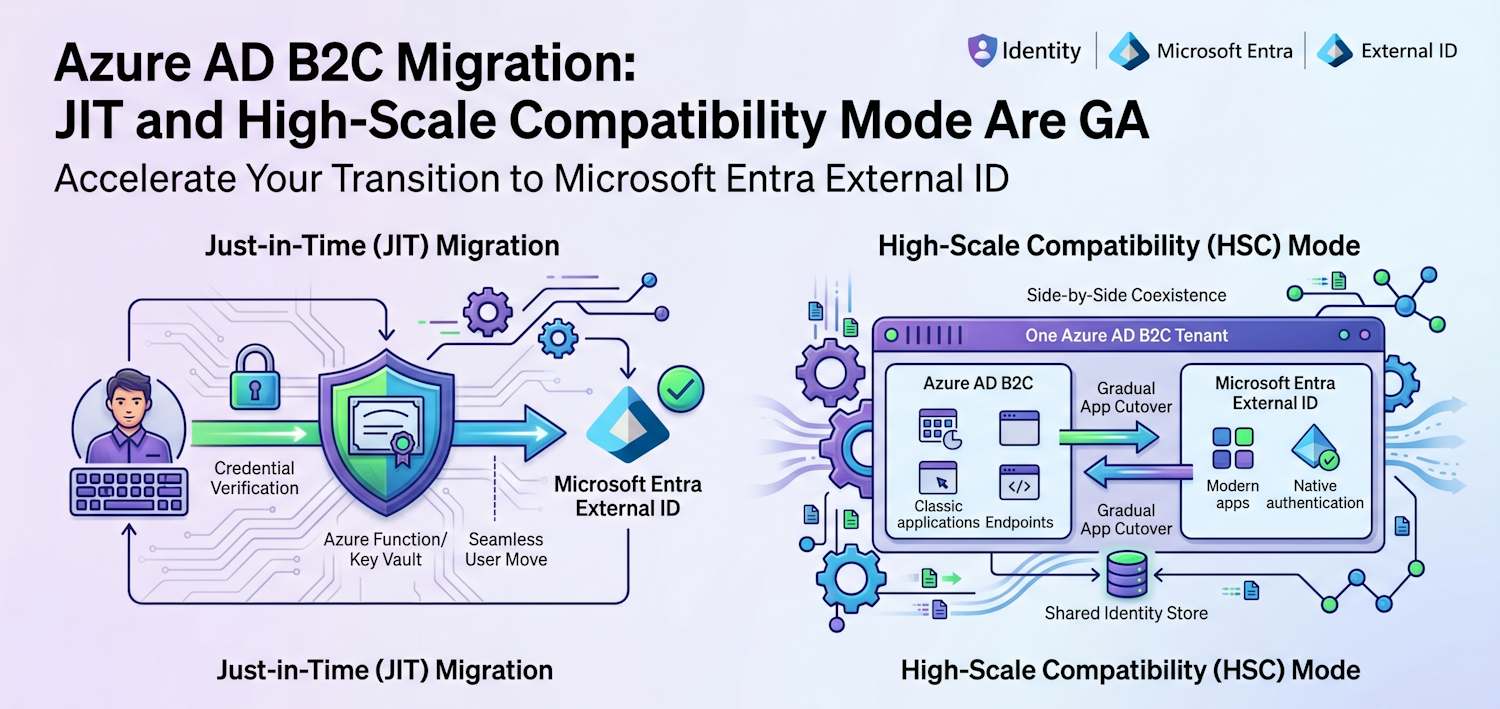
Context: On 8 June 2026, Microsoft published an update on the Azure AD B2C to Microsoft Entra External ID migration: just-in-time (JIT) password migration and High-Scale Compatibility (HSC) mode are both generally available, alongside a batch of native authentication and federation features. I've covered this migration before in my overview post, the deployment strategy post, and the three-part series that walked through the actual migration tooling. This post picks up where that series left off, and goes deeper on the two paths Microsoft now considers production-ready.
Where Azure AD B2C actually stands now
Worth restating before anything else, because I still see teams treat this as "it still works, so we're fine." Azure AD B2C hit end of sale on 1 May 2025: no new B2C tenants can be created from that date. Existing tenants keep running and stay supported, but they get no new features. Every new investment, including everything in this post, lands in Microsoft Entra External ID instead.
That gap is what's been quietly widening for the last year. If your B2C tenant relies on social sign-in inside a mobile app, or you've been waiting for passkeys, or your Conditional Access policies need the newer customer identity surface, none of that is coming to B2C. The only way to get it is to move.
| Item | Status |
|---|---|
| New B2C tenant creation | Closed since 1 May 2025 |
| Existing B2C tenants | Continue to run and remain supported |
| New features and roadmap items | All going to Microsoft Entra External ID, not B2C |
| Migration tooling for B2C to External ID | JIT password migration and HSC mode are now GA |
What shipped alongside the migration tooling
The migration announcement didn't arrive on its own. A set of native authentication and federation features moved to GA at the same time, and a few of them directly close gaps that used to push teams toward keeping a B2C tenant around for mobile sign-in.
Native authentication, the API-driven sign-in/sign-up flow used by mobile and desktop apps that don't want to hand off to a browser, picked up:
- Email and SMS one-time passcode as an MFA factor inside native authentication flows.
- Social identity provider sign-in surfaced inside native auth through an embedded browser, with single sign-on carried between the native app session and that embedded view.
- Refresh token transfer to companion devices, for example handing a session from a phone to a paired Apple Watch.
Web and federated sign-in picked up:
- Sign-in and sign-up using an alias attribute, not just the primary email or UPN.
- Federation from a workforce Microsoft Entra ID tenant into an External ID tenant (public preview), useful for B2B-flavored scenarios sitting next to a CIAM tenant.
- Self-service password reset using an SMS one-time passcode sent to a registered phone number.
The social sign-in and SMS OTP additions matter most for migration planning: they were two of the bigger reasons B2C tenants with mobile-first social login stayed on B2C longer than planned. If that was your blocker, it's worth re-checking now.
Two supported migration paths
Microsoft now frames the decision as a choice between two approaches, not a single linear path. Standard migration moves users, credentials, and applications to a new External ID tenant. High-Scale Compatibility (HSC) mode keeps your existing B2C tenant as the user and credential store, and lets External ID endpoints run alongside the B2C endpoints in that same tenant while you migrate applications one at a time.
| Aspect | Standard migration (JIT) | HSC mode |
|---|---|---|
| Recommended for | Most tenants | Tenants at roughly 5 million+ directory objects |
| Where users and credentials live | Migrated into a new External ID tenant, on first sign-in via JIT | Stay in the existing B2C tenant; External ID endpoints read the same identities |
| Tenant topology | New, separate External ID tenant | B2C and External ID run side by side in the same tenant |
| Application cutover | Apps move to the new tenant; users migrate as they sign in | Apps move to External ID endpoints one at a time, in any order |
| Feature coverage during migration | Full External ID feature set from day one | Significant gaps today: no social IdPs, no passkeys, no age gating, limited Conditional Access, no admin portal |
| Admin experience | Full Microsoft Entra admin center | Microsoft Graph and automation only, plus a Microsoft-managed allowlisting step before you can enable it |
If your tenant is below the high-scale threshold, Microsoft's own guidance is blunt about it: HSC mode "provides no additional benefit" and you should use the standard approach. So let's go through both, starting with the one most readers will actually use.
JIT password migration in practice
I covered the bulk-export and import steps in Part 2 of the migration series using the B2C to External ID migration tool. JIT is the piece that runs after that bulk import: user objects already exist in External ID, each flagged with a custom attribute (toBeMigrated: true), but with no usable password yet. The password only moves the moment a user actually signs in.
Setting up the encryption certificate
The part that trips people up is the encryption step. External ID never sends a password in plaintext to your function. It encrypts the user-password, username, and a nonce as a JWE payload using the public key from a certificate you control, and the matching private key never leaves Key Vault.
The certificate needs to be generated inside Key Vault, not uploaded from elsewhere, so the private key is HSM-protected from the start:
Key Vault > Certificates > Generate/Import
  Method: Generate
  Certificate name: JitMigrationEncryptionCert
  CA type: Self-signed certificate
  Subject: CN=JitMigration
  Content type: PKCS #12

Advanced policy configuration:
  Key type: RSA
  Key size: 2048 or 4096
  Reuse key: unchecked
  Exportable private key: yes (required so the function can use it)
Your Azure Function needs a system-assigned managed identity with Get on Key Vault secrets, so it can read the certificate's private key at runtime without you ever handling key material directly. Once the certificate exists, export the public key and register it on the app registration that represents your custom authentication extension:
# Export the public key from the certificate downloaded as .cer
$cert = New-Object System.Security.Cryptography.X509Certificates.X509Certificate2(
    "C:\certs\jitmigrationencryptioncert.cer")
$certBase64 = [Convert]::ToBase64String($cert.RawData)
$certBase64

# Then PATCH the custom extension app registration's keyCredentials,
# using the same GUID for keyId and tokenEncryptionKeyId so External ID
# knows which key to encrypt the password payload with.
The custom extension app registration also needs the CustomAuthenticationExtension.Receive.Payload Graph application permission, with admin consent granted, so External ID is allowed to call your endpoint during sign-in.
Wiring up the custom authentication extension
This part is unchanged from what I walked through in Part 2, and it's worth re-reading if you haven't built one of these before. Two Graph calls do the work: one creates the onPasswordSubmitCustomExtension pointing at your function, and one creates an authenticationEventListener that ties the extension to your application using an onPasswordMigrationCustomExtensionHandler.
POST https://graph.microsoft.com/beta/identity/customAuthenticationExtensions

{
    "@odata.type": "#microsoft.graph.onPasswordSubmitCustomExtension",
    "displayName": "JIT Password Migration",
    "description": "Validates credentials against B2C during migration",
    "endpointConfiguration": {
        "@odata.type": "#microsoft.graph.httpRequestEndpoint",
        "targetUrl": "https://your-function.azurewebsites.net/api/JitMigration"
    },
    "authenticationConfiguration": {
        "@odata.type": "#microsoft.graph.azureAdTokenAuthentication",
        "resourceId": "api://your-function.azurewebsites.net/{app-id}"
    }
}
POST https://graph.microsoft.com/beta/identity/authenticationEventListeners
{
"@odata.type": "#microsoft.graph.onPasswordSubmitListener",
"conditions": {
"applications": {
"includeAllApplications": false,
"includeApplications": [
{ "appId": "your-app-client-id" }
]
}
},
"priority": 500,
"handler": {
"@odata.type": "#microsoft.graph.onPasswordMigrationCustomExtensionHandler",
"migrationPropertyId": "extension_00000000_toBeMigrated",
"customExtension": {
"id": "custom-extension-id"
}
}
}The migrationPropertyId is the same custom attribute you set to true for every user during the bulk import in Part 2. External ID checks this attribute on every sign-in: if it's true and the password the user typed doesn't match what's on file (because nothing is on file yet), the listener fires.
Response actions
| Action | When to return it | What External ID does |
|---|---|---|
MigratePassword |
Password validated successfully against B2C | Stores the password, sets toBeMigrated to false, signs the user in |
UpdatePassword |
Password is correct but doesn't meet External ID's strength policy | Routes the user through a forced password reset |
Retry |
Password didn't validate against B2C | Lets the user try again, same as a normal failed sign-in |
Block |
Account is locked or blocked in B2C | Shows a block screen with a message your function controls |
Note: JIT only fires once per user. Once
MigratePasswordhas settoBeMigratedtofalse, every later sign-in is validated directly against External ID and the legacy IdP is never called again for that account. Users who never sign in won't migrate this way, so plan a final bulk migration or forced reset for stragglers before you decommission B2C.
A claims gotcha you'll hit either way
Whichever path you use, the user object created in External ID gets its own oid, separate from the one it had in B2C, and the sub claim is not the same as oid in External ID. If your applications stored B2C's sub as a stable per-user key (a very common B2C pattern), that mapping breaks on cutover. Request the profile scope and switch your applications to key off oid before you migrate, and build a B2C-to-External-ID ID mapping table as part of the bulk import in Part 2 so existing application data can be re-keyed.
High-Scale Compatibility mode
This is the part that wasn't really documented in detail when I wrote Part 2, and it's the headline addition in this GA wave. HSC mode is for tenants where a one-time bulk migration of users and credentials simply isn't realistic.
Eligibility and what "side by side" actually means
Your tenant is eligible if it's at or above roughly 5 million directory objects (users, groups, and applications combined). You can check your current count against the Graph directoryObject resource type. If you're under that threshold, Microsoft's own guidance says HSC mode gives you no benefit and you should use standard JIT migration instead.
The detail that surprised me: HSC mode does not create a second tenant. Azure AD B2C and Microsoft Entra External ID run side by side within the same tenant. Your existing users, groups, and credentials stay exactly where they are. What changes is that External ID endpoints become available against that same identity store, so you can move applications to External ID one at a time while everything else keeps using B2C endpoints unchanged.
Enabling HSC mode
Before any API call, you need to be allowlisted. Contact your Microsoft account team or open a support request, and budget a few days for it; you can't proceed until the EnableHybridUpgradeApi flag is set on your tenant. While you wait, check one thing that silently breaks the enable call: every custom attribute on your B2C user flows needs a non-empty description (the AdminHelpText field). Many B2C custom attributes were created without one, and the enable call fails for any attribute missing it.
# Check for custom attributes missing a description
GET https://graph.microsoft.com/v1.0/identity/userFlowAttributes

# Patch any attribute where description is null or empty
PATCH https://graph.microsoft.com/v1.0/identity/userFlowAttributes/{id}
Content-Type: application/json

{
  "description": "Customer loyalty tier, used for pricing rules"
}
Once allowlisted and your attributes are clean, enabling HSC mode itself is a single call against your B2C tenant (not a workforce or CIAM tenant context), with the Policy.ReadWrite.AuthenticationFlows Graph permission and Global Administrator or External ID User Flow Administrator rights:
POST https://graph.microsoft.com/beta/policies/authenticationFlowsPolicy/externalIdHybridModeConfiguration

{}
A 201 Created response is your confirmation that it worked. Don't immediately follow up with a GET to check status: tenant metadata is cached for up to an hour, so a GET right after the POST can still show the pre-migration state. Trust the 201, then give it up to an hour before you start onboarding applications.
The three-stage rollout
| Stage | State |
|---|---|
| 1 | All applications run on B2C exactly as they do today. Nothing changes for users. |
| 2 | HSC mode is enabled on the existing B2C tenant with no impact to running apps. You register new, single-tenant External ID applications and start onboarding them, validating token claims and sign-in flows against the shared identity store. Other apps stay on B2C until you move them. |
| 3 | All applications run on External ID endpoints. The tenant is ready for B2C retirement, subject to whatever HSC limitations still applied to your last few apps. |
Microsoft is explicit that HSC mode never migrates an application for you. Every app moves because you registered a new External ID app, built and tested its user flow, and pointed traffic at it. Existing B2C app registrations can't be reused for External ID endpoints; new registrations must be single-tenant ("Accounts in this organizational directory only"), and multitenant registrations aren't supported on External ID endpoints at all.
What you give up while in HSC mode
This is the section to read closely before committing, because some of these gaps affect exactly the kind of large consumer tenant that needs HSC mode in the first place.
| Area | Not available in HSC mode today |
|---|---|
| Authentication and access control | Advanced Conditional Access (authentication context, step-up, session controls), application assignment via groups, passkeys (FIDO2) |
| Federation and identity providers | Social identity providers (Google, Facebook, Apple, etc.), any custom OIDC federation built through B2C custom policies (standard enterprise OIDC IdPs are still supported) |
| Fraud prevention | Third-party fraud protection on browser-based sign-in/sign-up. Native authentication API flows can still front a WAF for bot and account-takeover protection |
| User experience and compliance | Age gating built on B2C custom-policy attributes needs an alternate approach |
| Administration | No admin center experience for the hybrid configuration; everything is Microsoft Graph and automation |
If your tenant leans heavily on social sign-in or passkeys for the apps you'd migrate first, HSC mode as it stands today won't get you there without a workaround. That's not necessarily a reason to wait: it's a reason to migrate the apps that don't depend on those features first, and keep the social-login-heavy apps on B2C until the gap closes.
Token claims and custom domains during coexistence
The same oid/sub distinction from the JIT section applies here too, with one extra wrinkle: during coexistence, the same application might be reachable through both a B2C endpoint and an External ID endpoint depending on which stage of migration it's in. Before moving an app, check whether it depends on email or sub, whether mail is populated for local accounts, and whether any claims are only populated through B2C custom-policy logic that doesn't exist on the External ID side. Use JWT claims customization or a custom extension to backfill anything missing rather than discovering it in production.
For custom domains, the pattern is the same one I described in the deployment strategy post: separate hostnames for B2C and External ID (for example login.b2c.contoso.com and login.contoso.com), fronted by Azure Front Door with explicit routing rules per hostname and path. Because HSC mode runs both stacks in the same tenant, it's tempting to assume one domain can serve both, but Front Door still routes to one backend per rule, so plan the domain split before you onboard your first External ID application.
Choosing your path
| If this describes your tenant | Go with |
|---|---|
| Well under 5 million directory objects, no exotic custom-policy logic | Standard migration with JIT password migration |
| Around or above 5 million directory objects, full migration would take too long or be too risky to do in one go | HSC mode, after requesting allowlisting and reviewing the limitations table above |
| High-scale tenant, but the first apps you'd migrate depend heavily on social IdPs or passkeys | HSC mode, but sequence those apps last, or hold standard migration as the long-term target |
| Don't actually need to preserve passwords (social sign-in only, or comfortable forcing a reset) | Skip JIT entirely. Bulk-migrate user data, then let users reset via SSPR or sign in with a social IdP |
Architecture and security carryovers
Everything I covered in the deployment strategy post still applies, regardless of which path you pick: tenant segmentation across prod/dev/test/qa, custom domains with a WAF in front, IRSF fraud mitigations (favor email/TOTP over SMS where you can, rate-limit and CAPTCHA registration and sign-in), account takeover monitoring, and feeding sign-in logs into Azure Monitor or Sentinel.
HSC mode adds one operational wrinkle on top: for as long as coexistence lasts, those controls need to cover two sets of endpoints against the same identity store. A WAF rule tuned for the B2C custom domain won't automatically apply to the new External ID custom domain, and your IRSF and account-lockout monitoring needs to correlate sign-in attempts across both, since an attacker probing one endpoint can affect accounts visible through the other.
Practical checklist
- Confirm your B2C tenant's directory object count via the Graph
directoryObjectresource to know whether HSC mode is even on the table. - If you're near the threshold, open the allowlisting request with Microsoft now. The few-day turnaround is the easiest thing to start in parallel with everything else.
- Audit custom user flow attributes for empty
descriptionfields before attempting to enable HSC mode. - Inventory which applications depend on
subas a stable identifier, social identity providers, passkeys, or B2C custom-policy claims. Sequence your migration so the apps without these dependencies move first. - If using JIT, generate the encryption certificate inside Key Vault (don't import an externally generated key), and grant your function's managed identity Get on secrets only.
- Plan custom domain and Front Door routing for two coexisting login hostnames before onboarding the first External ID application.
- Re-evaluate any "we kept B2C because of X" decisions against the native authentication features that just went GA. Social sign-in and SMS OTP in native auth close two common gaps.
- Set a hard cutover date for users who never sign in during the JIT window, with a final bulk migration or forced password reset before that date.
Source links
- Microsoft Tech Community: Tools for Azure AD B2C migration now available
- Microsoft Learn: Plan your migration from Azure AD B2C to External ID
- Microsoft Learn: Migrate from Azure AD B2C to External ID
- Microsoft Learn: Just-in-time password migration to Microsoft Entra External ID
- Microsoft Learn: Enable External ID High Scale Compatibility (HSC) mode
- Microsoft Learn: Troubleshoot High Scale Compatibility (HSC) mode
- Microsoft Learn: Capability support by scale and deployment mode
- Microsoft Learn: Services and integration partners for External ID
- GitHub: B2C to Microsoft Entra External ID migration tool
Related posts in this series: From B2C to External ID: what you need to know, Part 1: Introduction and feature comparison, Part 2: Migration tools and process, Part 3: Roadmap, best practices, and recommendations, and deployment strategy and B2C transition.