


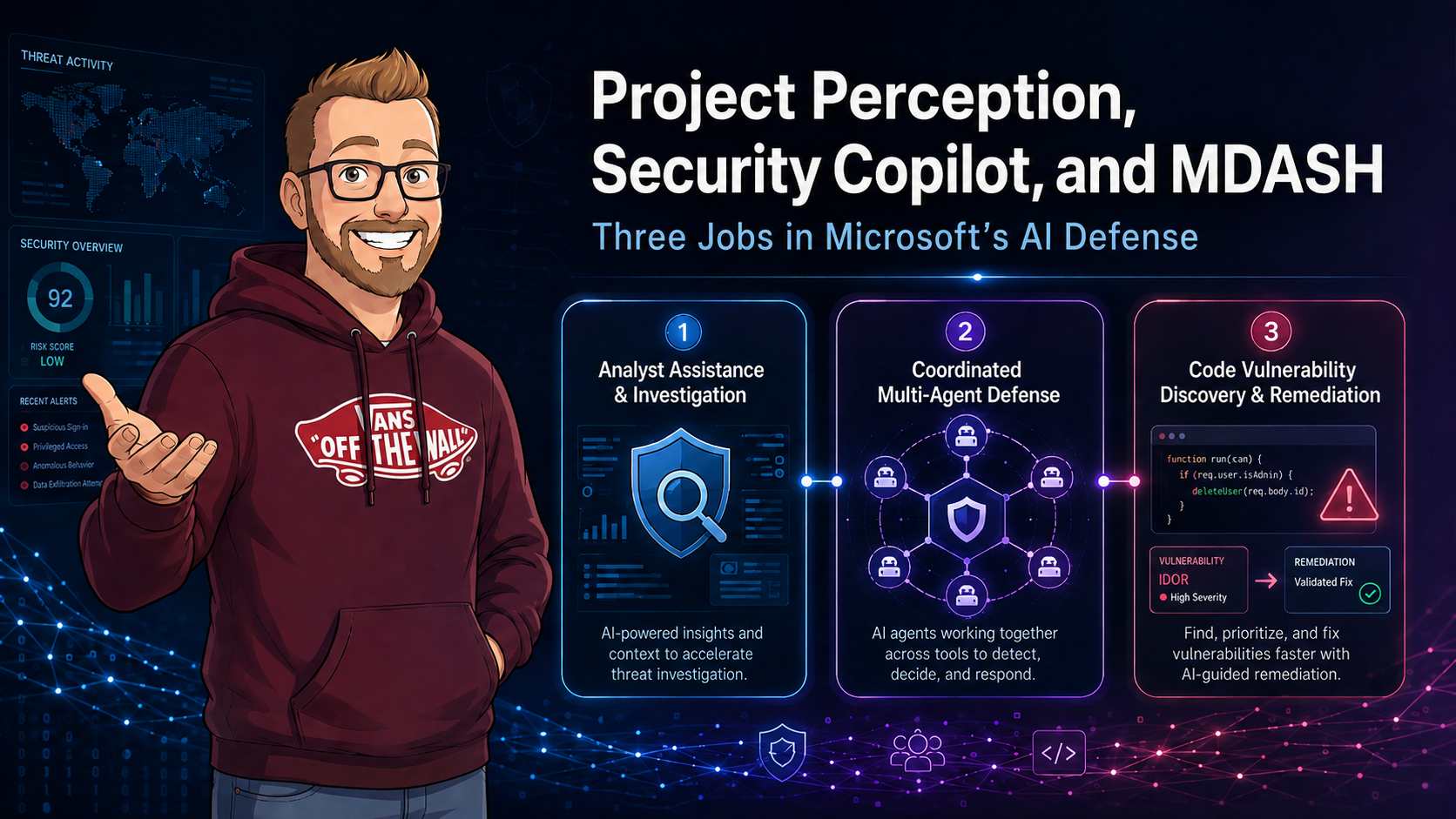
Microsoft's August 24 Unified AI Defense post is useful because it draws a boundary that has been blurry in security conversations. Security Copilot, Project Perception, and MDASH all use AI for security work, but they are not three names for the same product.
Security Copilot helps a person investigate and operate. Project Perception coordinates specialist agents across the defense cycle. MDASH concentrates on finding, proving, and helping fix source-code vulnerabilities. That distinction matters when someone asks what to pilot, who needs to own it, and which actions can safely happen without a human pressing a button.
The three jobs
The simplest mental model is based on where the work begins and where it ends.
| Capability | Primary job | Typical user | Output |
|---|---|---|---|
| Security Copilot | Assist investigation, reporting, hunting, and security administration. | SOC analyst, threat hunter, identity or data-security administrator. | Answers, summaries, queries, recommendations, and agent results. |
| Project Perception | Coordinate Red, Blue, and Green agents through a defense workflow. | Security operations, exposure management, incident response, and platform teams. | Prioritized findings, investigation conclusions, hardening proposals, and governed actions. |
| MDASH | Find, validate, and prioritize exploitable weaknesses in code. | Application security, DevSecOps, product security, and engineering. | Vulnerability evidence, affected paths, proof details, and repair guidance. |
Microsoft describes MDASH as a multi-model, agentic code-scanning harness. It is not an all-purpose SOC assistant. Project Perception is not a new label for Security Copilot either. It is a coordinated defense system that can consume richer inputs, including validated software findings, then work out which ones matter in the wider environment.
Where Security Copilot fits
Security Copilot remains the most practical entry point for most teams. It sits close to the analyst and existing Microsoft Security experiences. Ask it to summarize an incident, explain a suspicious entity, prepare a handover, help draft KQL, or support a repeatable process through an agent. The person stays in the loop and has the context to accept, reject, or investigate further.
I wrote earlier about the Security Copilot capacity included with Microsoft 365 E5. That licensing change made experimentation easier, but it did not remove the need to measure use. A broad prompt, an investigation flow, and a recurring agent do not have the same cost or risk profile.
For implementation details, my post on Security Copilot custom agents and the OpenAPI plugin model is still the right place to start. It covers the practical question this announcement does not answer for you: what data, tools, and permissions should an agent receive?
Project Perception is a defense cycle
Project Perception adds a different model. Microsoft frames it as a continuous cycle to perceive risk, reason over security context, and act under human oversight. Its Red, Blue, and Green agents mirror familiar security responsibilities, though they are working from shared context rather than separate queues and handoffs.
- Red agents look for exposures, attack paths, risky configuration, and opportunities an attacker could use.
- Blue agents investigate and validate whether a finding is meaningful in the environment.
- Green agents prepare or coordinate remediation and hardening work once the risk has been established.
The useful part is not that these roles have colour names. It is the pressure to connect discovery, validation, and remediation. Most organisations already own tools for each stage. The slow part is deciding whether an exposure is reachable, who owns the affected service, what change is safe, and whether the change actually reduced risk.
My recent Cyber Stack analysis for AI-era security goes further into that operating model. The agents are only one layer. Signals, current security context, identity, tool permissions, policy gates, and audit data decide whether a defense workflow is useful or dangerous.
MDASH belongs with AppSec
MDASH changes the quality of the signal that can enter the wider defense workflow. Traditional scanners often leave teams with a large list of findings and a familiar argument about exploitability. Microsoft positions MDASH around vulnerability discovery, validation, proof, prioritization, and remediation guidance, with output that can include HTML and SARIF evidence.
That makes it most relevant to application-security teams that need more than a severity score. A code finding gets more valuable when it includes the affected path, a credible proof, and enough context for engineering to decide whether a fix is needed now. Project Perception can then place that finding alongside exposed assets, identities, attack paths, and threat intelligence instead of treating the repository as a separate world.
Keep the boundary clear: MDASH can improve confidence in a code finding. It does not automatically approve a production change. A Green-agent workflow still needs ownership, change control, and a rollback path.
The finding contract between AppSec and operations
A code scanner result is not immediately useful to a SOC workflow. The missing piece is a stable contract that joins a repository finding to a deployed workload, its owner, its exposure, and the identity that can change it. SARIF is a useful transport format for code analysis, but it does not contain all of that operational context by itself.
Before a validated MDASH finding enters a broader defense workflow, I would normalize it into a record that keeps both the technical proof and the operating context. The exact schema is up to your platform team. These fields are the ones I would not leave out:
{
  "findingId": "md-2026-004182",
  "source": "MDASH",
  "repository": "payments-api",
  "commit": "4f9d3b7",
  "ruleId": "unsafe-deserialization",
  "severity": "high",
  "confidence": "high",
  "exploitability": "validated",
  "affectedPath": "src/api/imports.ts:84",
  "proofReference": "sarif://runs/0/results/41",
  "workload": {
    "resourceId": "/subscriptions/.../Microsoft.App/containerApps/payments-api",
    "environment": "production",
    "internetExposed": true,
    "dataClassification": "confidential"
  },
  "ownership": {
    "serviceOwner": "payments-platform",
    "onCall": "payments-sre"
  },
  "remediation": {
    "suggestedFix": "Replace unsafe parser with allow-listed deserialization.",
    "changeRisk": "medium",
    "rollbackAvailable": true
  }
}
The important fields are commit, resourceId, and ownership. A finding tied
only to a branch is hard to investigate. A finding tied to a production resource, an exposed route,
and a team can be prioritised against real attack paths. This is where a Red agent can add exposure
evidence and a Blue agent can decide whether the issue is reachable in the current deployment.
Deduplication and lifecycle
Finding duplication becomes painful once SAST, dependency scanning, cloud posture, and agentic analysis all report into the same queue. Use a durable finding key based on the source, repository, rule, affected location, and a code fingerprint. Keep the lifecycle separate from severity:
new: technical evidence exists but has not been mapped to a deployed workload.triaged: exposure, owner, and business context have been attached.approved: a remediation plan has a named approver and implementation window.remediated: the code or configuration change is deployed.verified: a rescan and runtime check show the condition is gone.
Do not close on pull-request merge alone. A merged fix may not be deployed, a feature flag may retain the route, or a downstream service may still accept the vulnerable input. Verification needs the commit, release, rescan, and runtime evidence linked to the same finding record.
Agent authorization is more than RBAC
RBAC answers whether an identity may call a service. An agentic security workflow also has to decide whether this agent should call this tool for this case, against this target, at this time. Those are different checks. Treat the tool call as a policy decision, not an implementation detail hidden in a prompt.
allow(toolCall) only when
  agent.identity is registered
  and agent.owner is active
  and tool is allow-listed for agent.role
  and target.environment is permitted
  and finding.confidence meets action.threshold
  and action.risk is within agent.autonomyLimit
  and changeWindow is open
  and requiredApproval is recorded
For example, a Green agent may open a work item, collect deployment configuration, and produce a patch candidate without an approval. Disabling an external endpoint, rotating a shared secret, or changing a production access policy should require an approval object that is checked by the tool gateway immediately before execution. Do not accept a statement in the model output as proof that approval happened.
Log the decision with the agent identity, delegated user where applicable, tool name, target resource, finding ID, policy version, approval ID, request hash, result, and correlation ID. This provides an investigation trail when a tool action is disputed or fails halfway through.
Action classes should be explicit
| Action class | Examples | Agent boundary |
|---|---|---|
| Read-only | Query logs, retrieve SARIF, inspect resource configuration. | Allow after identity and scope checks. Record the query and result reference. |
| Reversible low impact | Create ticket, add a Defender indicator, apply a temporary tag. | Allow only from a documented playbook with rate limits and a rollback action. |
| Material change | Rotate a secret, change a firewall rule, quarantine a workload. | Require an approval, target validation, and post-change health check. |
| Irreversible or broad impact | Delete data, revoke tenant-wide access, disable a production service. | Agent may prepare evidence and a plan. A human executes the final action. |
An end-to-end example
Consider a validated deserialization weakness found in a public API. MDASH identifies the affected commit and proves the unsafe code path. That is the start of the security work, not the finish.
- MDASH emits the technical finding and SARIF evidence.
- A Red workflow maps the repository to its deployed Container App, public ingress, exposed API route, and linked identity.
- A Blue workflow checks Defender and Sentinel for requests matching the route, signs of probing, and whether the service handles confidential data.
- Security Copilot helps the analyst summarise the evidence, build a timeline, and prepare the owner handover.
- A Green workflow creates a patch candidate and deployment plan, runs the test suite, and states the proposed rollback method.
- The service owner approves the production change. The deployment identity applies it through the existing pipeline, not through a broadly privileged interactive credential.
- The workflow rescans the commit, checks deployment health, and links the evidence before moving the finding to verified.
This is a much stronger workflow than passing a scanner result from one queue to another. It also explains why the three Microsoft offerings belong in the same conversation without pretending they are interchangeable.
A workable operating model
I would start with a narrow loop, rather than try to automate the whole SOC. Pick one class of finding where the asset inventory is reasonable and the remediation action is reversible. Exposed application secrets, risky workload identities, or a known high-impact code pattern are good candidates.
- Use Security Copilot to help analysts understand the incident or exposure and document the investigation.
- Feed validated AppSec findings and environment context into the prioritization process.
- Require a named owner and an approval for a material action.
- Let automation create the ticket, gather evidence, propose the change, and verify the result.
- Measure false actions, time to validation, time to remediation, and the number of findings closed with evidence.
This is also where existing Defender work matters. Security Copilot's email intelligence in Microsoft Defender is a good example of analyst-facing assistance. My article on Defender coverage for AI agents covers the other side: agents themselves create a workload that needs visibility, detection, and an accountable identity.
Controls before autonomy
The announcement repeatedly keeps humans in control of critical decisions. That is not a small caveat. It is the design constraint. A security agent can be quick and still be wrong, work from stale context, or call a tool with permissions that are too broad.
| Control area | Minimum standard | Evidence to retain |
|---|---|---|
| Identity | One scoped workload identity per agent or agent role, with an owner. | Identity, owner, assigned permissions, and access-review history. |
| Tool access | Allow-listed tools with least privilege and environment separation. | Tool-call logs, authorization decision, and effective permission. |
| Actions | Explicit approval for high-impact or irreversible changes. | Approval, action record, target, result, and rollback record. |
| Context | Defined sources, freshness expectations, and data classification. | Sources used, retrieval time, and any excluded data. |
| Quality | Evaluate recommendations before expanding autonomous scope. | Test cases, false-action rate, and exception review. |
Security Copilot can help accelerate the human work. Project Perception can coordinate the flow. MDASH can raise the confidence of software findings. None of them remove the need for a control plane around identity, permissions, and change authority.
What to do now
Do not wait for a perfect product boundary before preparing. Most of the groundwork has value with the Microsoft tools you already use.
- List every production security automation and agent with its owner, data sources, tools, and permissions.
- Review which remediation actions are reversible and which require an approval gate.
- Make sure Defender, Sentinel, and engineering findings can be correlated by asset and identity.
- Run a small Security Copilot use case and record quality, analyst time, and Security Compute Unit consumption.
- Ask AppSec whether current findings contain enough proof for an operations team to prioritize them.
The architecture is moving toward connected security agents, but the useful question is still ordinary: can your team explain why a finding mattered, who authorised the action, and whether the fix worked? Build that evidence trail first.
Sources and further reading
- Unified AI Defense: Security Copilot, Project Perception, and MDASH (Microsoft Tech Community, August 2026)
- Getting started with Project Perception (Microsoft Learn)
- Codename MDASH overview (Microsoft Learn)
- Introducing MAI-Cyber-1-Flash inside MDASH (Microsoft AI)
- Getting started with Security Copilot (Microsoft Learn)