


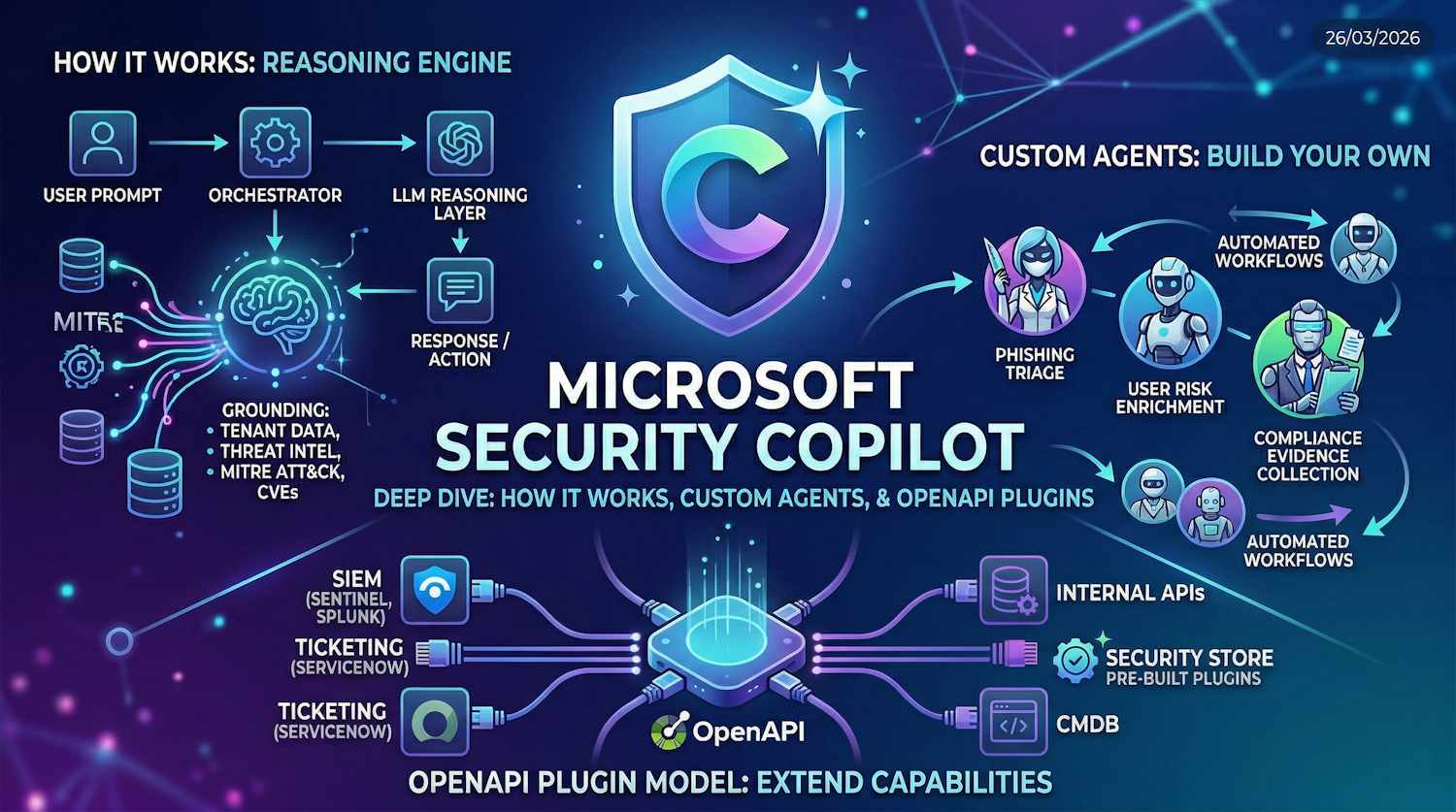
Security Copilot has been on a lot of people's radar for a while, but honestly, it's the kind of product where the marketing tends to move faster than practitioner understanding. That changed somewhat for me when two things landed in quick succession: Ignite 2025 brought a meaningful wave of new agentic capabilities, and now Microsoft has confirmed that Security Copilot will be bundled into Microsoft 365 E5 starting April 20, 2026. So if you've been watching from the sidelines, this is the moment to actually understand what you're getting.
This post is a proper detailed look — how Security Copilot functions under the hood, what the built-in agents do, how custom agents work, how the OpenAPI plugin model lets you extend it with your own tools, and exactly what the E5 inclusion gives you (and, importantly, what it doesn't).
What Is Security Copilot, Really?
The elevator pitch is "an AI assistant for security tasks," but that description undersells the architecture. Security Copilot is built on top of OpenAI's large language models, but what makes it interesting isn't the LLM itself — it's the layer of security-specific grounding, the plugin system, and increasingly, the agentic capabilities that let it take action rather than just produce answers.
At its core, Security Copilot maintains a security-specific knowledge base: Microsoft's global threat intelligence, the MITRE ATT&CK framework, CVE databases, and a continuously updated understanding of how attacks actually unfold. When you ask it a question or trigger an agent, it doesn't just run the prompt through a generic model. It grounds the response against this context and, crucially, against your tenant's actual security data pulled through plugins.
There are two ways you interact with it:
- Standalone portal — The dedicated Security Copilot experience at securitycopilot.microsoft.com, where you get a promptbook library, session history, and full plugin management
- Embedded experiences — Security Copilot functionality surfaced directly inside Defender XDR, Entra, Intune, Purview, and other products without leaving the tool you're already in
The embedded experiences are where most practitioners will actually spend time. You're investigating an incident in Defender, and Security Copilot is right there to summarize it, suggest remediation, or correlate it with other signals — without context-switching to a separate portal.
How the Reasoning Engine Works
Understanding this is worth the time, because it explains both the power and the limits of the tool.
When you submit a prompt (or when an agent triggers a reasoning cycle), Security Copilot runs through a sequence of steps: it takes your input, enriches it via the orchestrator, calls the relevant plugins to retrieve live data from your environment, feeds all of that grounded context into the LLM reasoning layer, and returns a response — or in agentic mode, takes an action and loops again.
A few things worth calling out in this flow:
Grounding is what separates this from a generic LLM. The orchestrator's job isn't just to relay your prompt to the model — it selects which plugins to invoke, what context to pull in from your environment, and how to assemble the enriched prompt. A question about a specific user's sign-in risk pulls relevant Entra data before the LLM ever sees it. The model is reasoning over your actual data, not just general knowledge.
Security Compute Units (SCUs) are the unit of work. Each reasoning cycle consumes SCUs proportional to its complexity — how many plugins were called, how much data was returned, how many tokens the reasoning took. Simple prompts consume less; multi-step agentic workflows with several plugin calls consume more. This is the capacity model underlying both the paid provisioning and the new E5 inclusion.
The loop is iterative for agents. For agentic scenarios, the reasoning cycle repeats. The agent checks the result of a previous action, decides what to do next, and runs another cycle. That autonomy is what distinguishes agents from regular ask-and-answer interactions — and it's also why SCU consumption for agents needs thoughtful planning.
Built-In Agents Across Microsoft Security Products
At Ignite 2025, Microsoft announced a significant expansion of Security Copilot agents embedded across their security product portfolio. These aren't chatbots — they're purpose-built agents designed to run autonomously within specific workflows, with a defined scope and a clear output.
| Product | Agent / Feature | What It Does |
|---|---|---|
| Defender XDR | Incident Summary + Guided Response | Auto-summarises incidents, correlates entities, proposes remediation steps with context |
| Defender XDR | Threat Intel Agent | Proactively hunts for indicators related to active threats; maps findings to MITRE ATT&CK |
| Microsoft Entra | Identity Risk Investigation Agent | Analyses risky sign-ins and risky users; surfaces risk context, recent activity, and remediation options in one view |
| Microsoft Intune | Device Security Agent | Surfaces non-compliant device details, recommends policy changes, walks through remediation steps |
| Microsoft Purview | Data Security Investigations (agentic) | Autonomous investigation of potential data exfiltration or insider risk events across content sources |
| SC Portal | Vulnerability Management Agent | Prioritises CVEs in your environment by exploitability and exposure rating; suggests patching order |
The common thread across all of these is autonomy with a defined scope. You don't prompt them step by step — you trigger them (or they trigger automatically based on a condition), they run a multi-step reasoning cycle over your tenant data, and come back with findings and a proposed action. You retain the decision to approve or execute the action, but the investigative heavy lifting is done.
Note: The embedded Entra identity risk agent is particularly interesting if you're already working with Entra ID Protection. It correlates sign-in logs, risk detections, device compliance state, and recent privileged actions in one pass — the kind of picture that previously took significant manual querying to assemble during an active incident.
Custom Agents — Building Your Own
This is where Security Copilot starts getting genuinely interesting for teams that want to go beyond what Microsoft ships out of the box. Microsoft has opened up the ability to build custom agents directly in the Security Copilot portal, and these are first-class objects — not workarounds.
A custom agent is a named, reusable reasoning workflow. When you define one, you specify:
- A system prompt / operating context — the agent's persona and scope ("You are a tier 1 SOC analyst focused on phishing triage for this organisation...")
- Which plugins to use — the agent can only access data sources you explicitly authorize for it
- Trigger conditions (optional) — agents can be triggered manually, on a schedule, or via an external event through the API
- Output format — what the agent produces: a structured report, a portal session, a Logic Apps callback, or an API response
The practical use cases I see organisations reaching for first:
- Phishing triage automation — an agent that takes new reports from a shared mailbox, queries Defender for related indicators, enriches them against threat intelligence, and produces a structured triage report with a recommended disposition
- User risk enrichment — triggered when Identity Protection raises a risk event, the agent correlates sign-in history, device compliance state, and recent privileged activity, then creates a pre-populated investigation case
- Compliance evidence collection — a scheduled agent that queries specific Purview and Defender controls, confirms their current status, and generates a summary document for audit purposes
These are workflows that previously required custom Logic Apps development with significant effort to maintain. Custom agents in Security Copilot replace much of that with a lower technical barrier — though you still need to think carefully about what data access you're authorizing and what actions you're allowing the agent to initiate.
The OpenAPI Plugin Model
Plugins are how Security Copilot reaches into data sources — Microsoft's own products and anything else you want to connect. The OpenAPI plugin model is the mechanism for adding non-Microsoft data sources, your own internal APIs, or third-party security tools to the reasoning context — including those always-moving beta APIs where the spec is half-finished, the endpoint behaviour changes between releases, and someone in your organisation is already depending on it before it ever reaches GA.
The concept borrows from the broader OpenAI function-calling pattern: you define what an API does, what parameters it accepts, and what it returns — in an OpenAPI 3.0 specification — and Security Copilot's orchestrator can call that API during a reasoning cycle when it determines the data would be relevant to answering the prompt.
Here's what a custom plugin requires:
- An OpenAPI 3.0 specification — describing your API's endpoints, parameters, and response schemas
- A plugin manifest — a JSON file that tells Security Copilot what the plugin does and when it might be useful. The description here is critical — the orchestrator uses it for semantic matching to decide when to call the plugin
- A reachable API endpoint — the API must be accessible from Security Copilot's infrastructure, either externally published or behind Azure API Management
- Authentication configuration — API key, OAuth 2.0, or no-auth (for testing); credentials are stored in the plugin configuration, not in the spec
The plugin description is everything. The orchestrator decides whether to call your plugin based on semantic matching between the current reasoning context and your plugin's description in the manifest. A vague or overly technical description results in the plugin being skipped. Be specific: what data does this plugin surface, under what conditions is it useful, and what questions is it designed to help answer?
Once registered, the plugin appears in your plugin library in the Security Copilot portal. Admins control which users and agents have access to it. Plugins can also be marked as always-on for specific agents, meaning the orchestrator always includes that plugin's context in the reasoning cycle rather than calling it conditionally.
Microsoft has also shipped the Security Store: a marketplace for third-party Security Copilot plugins from vendors including CrowdStrike, ServiceNow, Splunk, and others. These are pre-built and tested plugins that can be added to your tenant without any development work. Worth reviewing what's already in the store before building a custom plugin for a tool that might already be covered.
Developer Tools and the API Surface
For teams building on top of Security Copilot programmatically, Microsoft has expanded the developer surface considerably. The key pieces available as part of the E5 entitlement:
- Security Copilot REST APIs — for submitting prompts, managing sessions, triggering agents, and retrieving results programmatically. This is how you embed Security Copilot reasoning into your own SOAR playbooks or custom tooling.
- Promptbook API — allows you to manage and execute saved promptbooks (sequences of prompts) at scale, useful for repeatable investigation workflows
- Azure Logic Apps connector — a pre-built connector for Logic Apps, making it straightforward to include Security Copilot reasoning steps in existing automated workflows
- Microsoft Graph integration — for agents operating on Entra and M365 data, Graph is the underlying data channel; the orchestrator handles this transparently via the Entra and M365 plugins
One thing worth flagging here: Logic Apps execution costs are billed separately, even under the E5 entitlement. This is the kind of detail that catches teams mid-project when Azure billing shows up unexpectedly. If you're building Logic Apps workflows that incorporate Security Copilot, budget for the connector execution charges separately from the SCU allocation.
The E5 Inclusion — What You're Actually Getting
On March 25, 2026, Microsoft published Message Center notice MC1261596 confirming that Security Copilot will be included with Microsoft 365 E5 from April 20, 2026, via a phased rollout through June 30, 2026. Eligible tenants transition automatically — no action required. You'll receive a notification 7 days before your specific tenant is enabled, and again on the enablement date.
This is a meaningful shift. Security Copilot was previously a separately provisioned and separately billed product — the kind of thing that required an explicit purchase decision before you could even evaluate it properly in your environment. The E5 inclusion changes the dynamic entirely.
Here's the breakdown of what's included:
| What | Detail | Notes |
|---|---|---|
| SCU Allocation | 400 SCUs/month per 1,000 M365 E5 licenses | Capped at 10,000 SCUs/month for the tenant regardless of license count |
| Products Covered | Defender XDR, Entra, Intune, Purview, SC Portal | Core agentic experiences across all five products |
| Developer Tools | APIs, custom agents, custom OpenAPI plugins | Full developer toolset included |
| Rollout Timeline | Phased: April 20 – June 30, 2026 | Automatic; 7-day advance notice before per-tenant enablement |
| Access Control | Security Copilot owner and contributor roles | Admins control who can access and consume SCUs within the tenant |
The SCU math is worth a moment. At 400 SCUs per 1,000 licenses:
- 1,000 users → 400 SCUs/month
- 5,000 users → 2,000 SCUs/month
- 10,000 users → 4,000 SCUs/month
- 25,000+ users → capped at 10,000 SCUs/month
For reference, Microsoft documents a standard Security Copilot session as consuming roughly 1–5 SCUs depending on complexity. The included allocation won't sustain heavy continuous use for a large security team — but it's meaningful for running the embedded agents, conducting targeted investigations, and getting your team properly familiar with the platform before having an informed conversation about purchasing additional capacity.
What's Not Included — The Catches
Microsoft is clear about what falls outside the E5 entitlement. Worth listing these explicitly because they're exactly the kind of thing that shows up as unexpected billing:
- Microsoft Sentinel data lake compute and storage — if you're using Sentinel as your SIEM and routing logs through it for Security Copilot queries, the underlying Sentinel ingestion and compute charges remain separate
- Non-agentic Data Security Investigations in Purview — the agentic version is included in E5; the classic non-agentic DSI experience requires an additional Purview add-on license
- Azure Logic Apps execution — connector calls from Logic Apps workflows that invoke Security Copilot are billed as standard Logic Apps execution charges against your Azure subscription
- Third-party agents from the Security Store — these are licensed separately by the vendor; check the store listing for pricing before enabling them in your tenant
- Additional SCUs beyond the included allocation — if your team exhausts the included SCU quota, additional capacity is available as a paid add-on at the standard per-SCU rate
Important: The inclusion applies to tenants on the Microsoft 365 E5 SKU specifically. If your E5 comes through a specific partner agreement or bundle, or if you're on E5 Security as a standalone add-on rather than the full E5 suite, verify your eligibility in the Microsoft 365 admin center before April 20. The 7-day advance notification is your signal that you're in scope.
My Take
I think the E5 inclusion is a genuine inflection point for Security Copilot adoption. The previous model — separate provisioning, separate billing, justify-the-purchase-before-you-really-understand-it-in-your-environment — was a real barrier for a lot of organisations. The new model lets you actually run it for a while, understand where it adds value in your specific context, and make a more informed decision about additional capacity if and when you need it.
The parts I find most compelling aren't the "chat with your security data" use cases (useful, but incremental). It's the agentic layer — the ability to define a custom agent that runs a multi-step workflow over your environment, produces structured output, and feeds that into your operational playbooks. That's where the genuine efficiency gains will show up.
The OpenAPI plugin model is also underrated. If you have internal tooling — a CMDB, a homegrown asset inventory, a ticketing system with a REST API — the ability to pull that data into Security Copilot's reasoning context without writing custom integration code is significant. The barrier to extending the platform is much lower than it looks from the outside.
What I'd recommend before your tenant is enabled: bookmark the Security Copilot Adoption Hub, assign the Security Copilot owner role to the right people (you don't want every user able to burn through your SCU allocation on day one), and identify two or three specific investigative workflows in your environment that you want to evaluate on the included allocation. That gives you something concrete to measure against before the question of additional capacity comes up.