


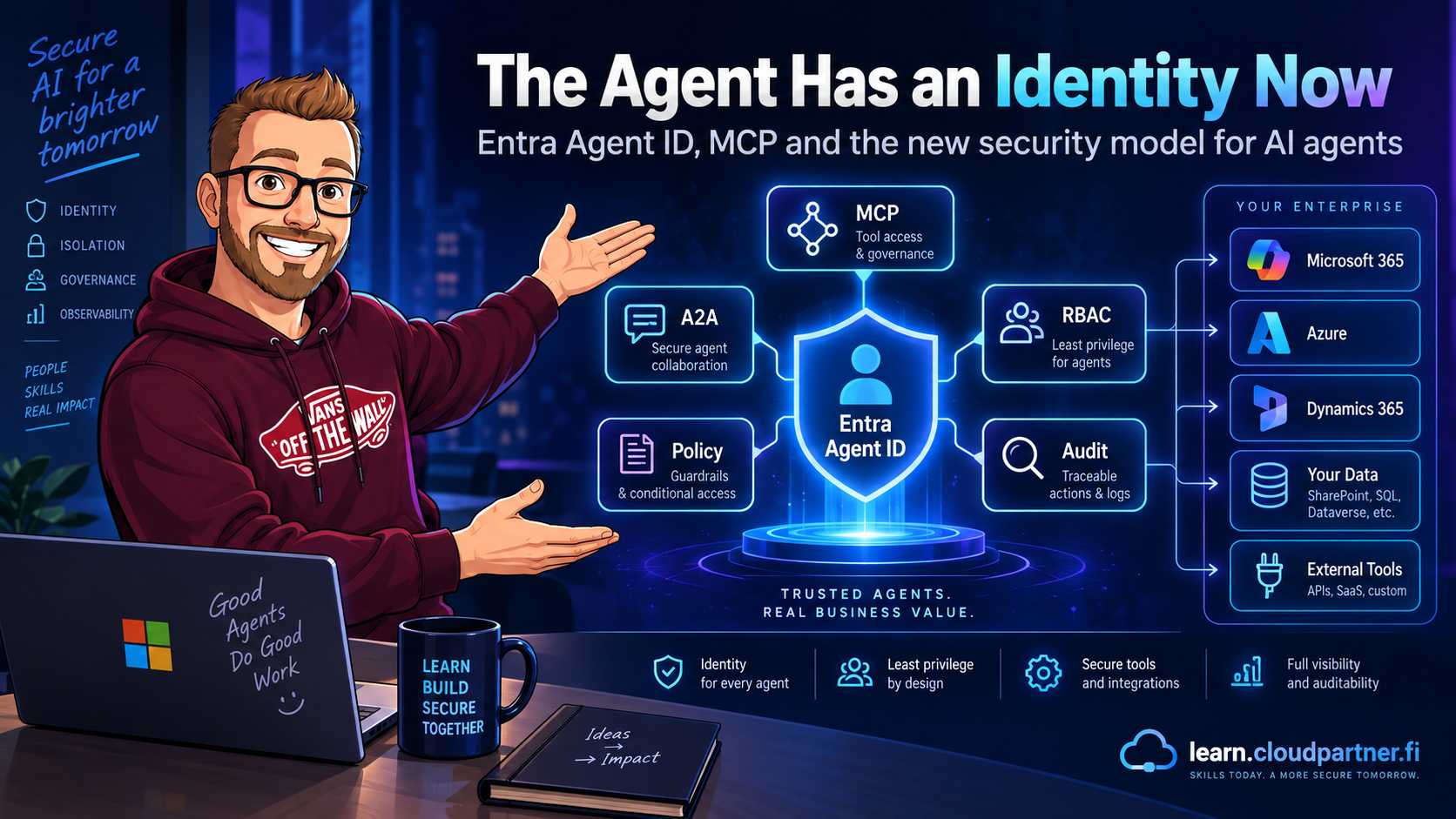
A year ago, securing an enterprise AI application often meant securing the user, the API endpoint and the model. Then agents arrived. The architecture changed. The AI was no longer just answering questions. It was calling APIs, opening files, connecting to MCP servers, talking to other agents and, in some cases, acting without a human sitting in front of it.
Picture a Monday morning in a customer service team. A customer asks for a refund, the assistant checks the account, opens a ticket and hands the payment step to a second agent. The workflow feels like one conversation, but the backend has several actors making decisions and calling tools. When the refund is questioned later, "the AI did it" is not an audit answer.
That creates a simple security question: who is actually doing the action? A user has an identity. A workload has an identity. A service principal has an identity. Permissions can be assigned, actions can be logged and access can be revoked. But what about an AI agent?
The agent becomes a first-class actor
Until recently, many implementations solved the problem by giving the agent access to an existing application identity, managed identity or API key. That works technically, but it gets messy quickly. Imagine ten agents using the same backend identity: one reads customer data, one writes to a database, one calls Microsoft Graph and one talks to an external MCP server. The logs tell you the application acted, but not which agent, why, or whether that agent was supposed to have the permission.
Microsoft Entra Agent ID starts to address this. Microsoft Foundry supports agent identities through Microsoft Entra ID, giving an agent its own dedicated identity.
That customer-service example is the point where an assistant stops being a feature and starts being a security principal. The workflow now has a nameable actor whose permissions and activity can be reviewed separately from the user and the hosting application.
Once an agent has an identity, familiar security principles work again: least privilege, authorization, auditing, lifecycle management, revocation and separation of duties. We spent years moving applications away from shared credentials and static secrets. AI agents should not take us backwards.
When the refund agent makes a call, the log can point to the refund agent, its effective permissions and the tool it used. The story now has a responsible character, not just a generic application name.
I covered the underlying identity model in my earlier Microsoft Entra Agent ID overview. For the hosting platform around that identity, Microsoft's Foundry Agent Service overview explains how agents connect models, tools and enterprise resources.
Why shared identities become a problem
Consider a customer service platform with three agents: one looks up customer information, one handles refunds and one creates support tickets. A shared application identity usually inherits the combined permissions.
Individual identities reduce the blast radius. If one agent is compromised through prompt injection or malicious tool output, it does not automatically gain everything available to the application.
The permission lifetime matters too. In my post on short-lived access packages for Agent IDs, I walk through scoped assignments, approvals, expiry and revocation for agents that should not retain standing access.
Agent Identity Blueprints
An Agent Identity Blueprint is the identity definition for a class of agents. A finance assistant blueprint could govern many individual instances:
Instead of manually governing thousands of dynamically created identities one by one, policies can be applied to the blueprint. The identity is individual, while governance remains centralized. That matters for agents that are permanent, short-lived, user-triggered or autonomous.
For the creation side, my earlier guide to Entra Agent ID creation channels separates blueprints, agent identities and agent user accounts, and explains how each can enter your tenant.
MCP changes the problem again
Now give the same team an MCP server. The assistant can reach customer files, the CRM and a ticketing system through one protocol. The workflow gets more useful, but the agent's authority expands with every tool the server exposes.
Model Context Protocol gives agents a standardized way to discover and use tools. Files, databases, GitHub, CRM systems, ticketing, internal APIs and cloud resources all expand the agent's authority.
A basic implementation might use an API key. Where is it stored? Which agents use it? Can it be copied? How do you rotate it? How do you distinguish five agents sharing the same key?
Microsoft's direction is to use the agent's identity, an OAuth token and an MCP server. The MCP
server knows who the caller is, authorization can be based on identity and different agents can
receive different permissions. Microsoft uses the authentication mechanism
AgenticIdentityToken for this scenario.
I explored the gateway side in MCP Goes Stateless, Part 2: per-tool authorization and risk controls need to distinguish the requested operation as well as the authenticated caller.
Agent-to-agent delegation
A research agent might delegate a financial question to a finance agent. A service desk agent might delegate an identity task to an IAM agent. At that point, identity chains matter: who initiated the request, which agent delegated it and which identity reaches the final resource?
Microsoft supports user-delegated and autonomous patterns. In an On-Behalf-Of scenario, the agent works with the user's authority. In an autonomous scenario, it acts with its own identity. The distinction tells you whether the action happened on behalf of a user, independently, through another agent or against an approved tool.
My post on Conditional Access for AI agents goes further into the policy targets for delegated calls, autonomous agent identities and agent user accounts. That distinction matters when deciding which policy evaluates a request.
Then Microsoft added an MCP firewall
Identity answers, "Who is the agent?" It does not answer, "Which tools is that agent allowed to use?" A valid identity can still be connected to the wrong MCP server or to a tool it should never call.
Microsoft's September update introduces Microsoft Entra Global Secure Access MCP Firewall. The announced controls include discovering MCP usage and allowing or blocking individual MCP servers, tools, resources and prompts.
Connecting an MCP server is easy. Understanding what it lets an agent do is much harder. Shadow MCP could become a major enterprise AI governance problem.
The real shift
We started with an AI application using shared credentials for everything. The healthier model is an agent with an Entra Agent ID, policy and an approved MCP server, agent or resource.
AI agents are becoming first-class actors in enterprise systems. Once they become actors, they need identity, authentication, authorization, least privilege, auditability, lifecycle management and revocation.
The next security problem is bigger: once an agent has an identity and access to tools, what happens when it decides to do something dangerous? That is where Part 2 begins.
Continue with Part 2: When AI Starts Acting for why agent security has to move beyond prompts.
Identity also needs an execution environment and a tenant governance model. Microsoft's hosted-agent documentation covers the managed runtime, while its Tenant Governance announcement addresses visibility and governance across tenants. Part 2 brings those boundaries into the action path.