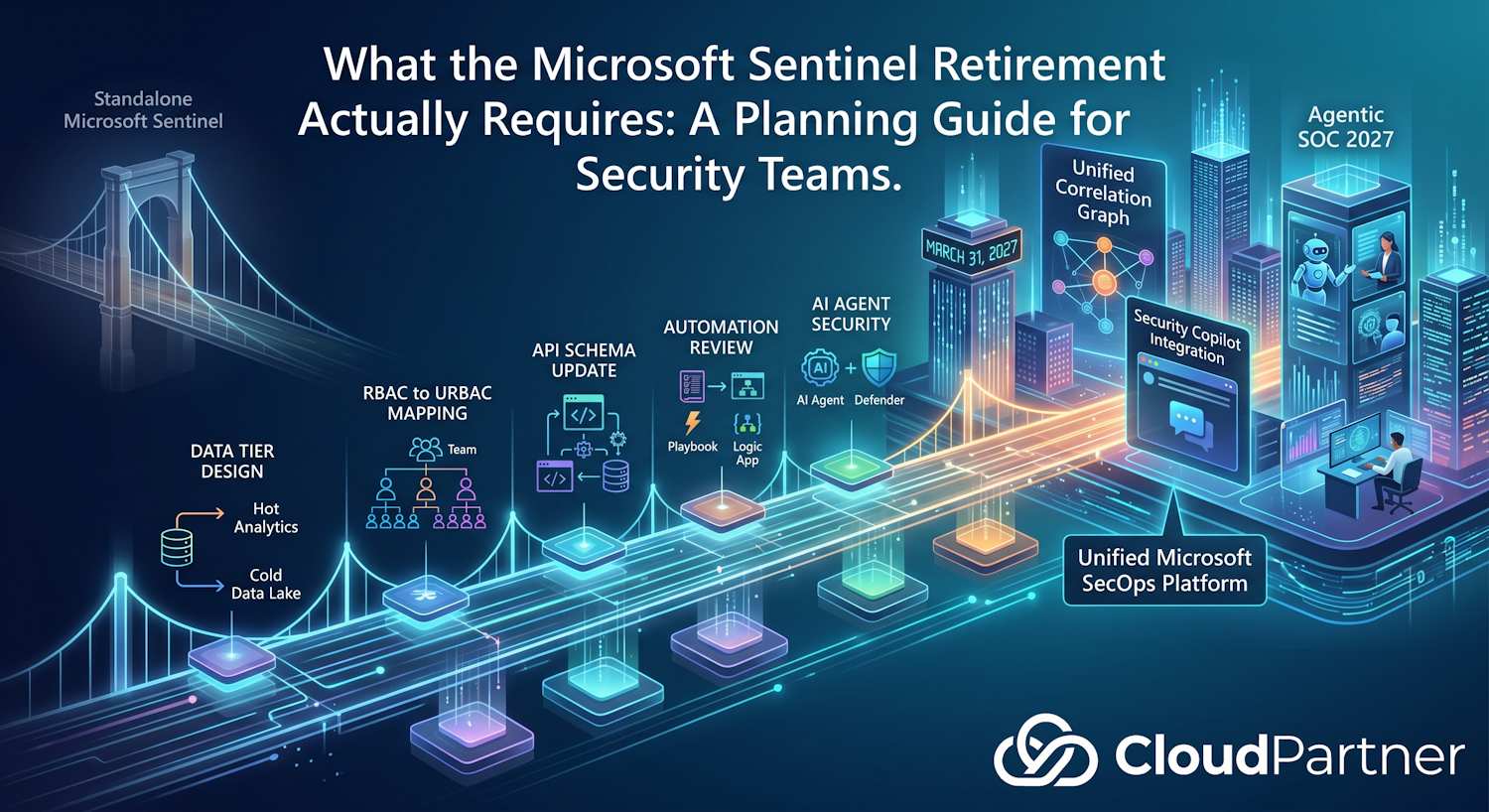
This Isn't a UI Migration
March 31, 2027 is the retirement date for the standalone Microsoft Sentinel experience. I've been getting a lot of questions about what this actually means for organizations that have been running Sentinel for a few years — mostly because the framing keeps shifting between "this is just a portal change" and "this is the foundation for the future of SOC operations." Both are technically true and both are incomplete.
What I've found when working through this with customers is that the difficulty level correlates almost entirely with how much they've built on top of Sentinel. A light Sentinel deployment with a few analytics rules and no API integrations? Genuinely manageable. A mature setup with custom Fusion rules, ServiceNow integration, and Azure RBAC carefully mapped across multiple teams? That's a real project, and eleven months is tight if you don't start the planning work now.
Microsoft published a detailed post on the architecture considerations alongside the work I've been doing on the Defender for AI agents integration. This is my take on what actually matters — particularly for partners who need to explain to customers why this is worth treating seriously before the deadline pressure arrives.
The Data Architecture Decision
The most consequential decision you'll make during this transition is how you tier your data. The unified platform gives you two storage tiers, and the cost difference between them is significant:
| Tier | Cost | Use For | Retention |
|---|---|---|---|
| Analytics (hot) | ~$4.30/GB | Active detection, real-time correlation, KQL queries | Up to 2 years |
| Data Lake (cold) | ~$0.05/GB | Long-term hunting, compliance, AI training, forensics | Up to 12 years |
That 20x gap matters more than it looks on paper. I've worked with organizations whose Sentinel costs had grown beyond what security leadership expected, and the root cause was almost always the same: no one ever made a deliberate decision about data placement. Everything went into the Analytics tier by default, and it just accumulated that way. The transition gives you a natural reason to fix that.
The mechanics work through Data Collection Rules with dual-ingest, routing the same data stream to both tiers simultaneously. Entra sign-in logs are the cleanest example: you want them in Analytics for real-time detection (password spray patterns need fast alerting), and in the Data Lake for long-horizon behavioral analysis. One DCR, two destinations. But the decision about which data goes where isn't primarily a technical question — it's a detection design question. What does each source actually contribute to your alerting logic? Does it need sub-five-minute correlation, or is it reference data you'd only pull during a post-incident investigation?
Getting this wrong — putting everything into Analytics by default — is how organizations end up with Sentinel bills that are hard to justify. The transition is a good forcing function to review what you're actually ingesting and whether each data source is in the right tier.
What You Actually Get
The portal consolidation isn't just cosmetic. There are capabilities in the unified portal that didn't exist in standalone Sentinel at all.
Cross-Domain Incident Correlation
The Defender XDR correlation engine ties incidents across identity, endpoint, email, cloud apps, and Sentinel data into a single incident graph. If you've been running Sentinel alongside any Defender products in parallel, you'll have experienced what this replaces: related activity appearing as disconnected alerts across two or three different interfaces, with no automatic link between them.
The scenario I see most often is business email compromise crossing three products: Defender for Office 365 catches the initial phishing delivery, a Sentinel analytics rule flags a sign-in from an impossible-travel location, and Defender for Cloud Apps detects the subsequent SharePoint data download. Three alerts, three portals, no incident thread unless an analyst manually connects them. In the unified portal, the correlation engine builds that thread automatically — one incident with the full attack sequence, not three tickets in three places.
It's also why Fusion analytics rules become less relevant after the transition. The unified correlation engine handles what Fusion was trying to do with better cross-domain coverage, and Fusion rules don't carry over anyway.
Sentinel Graph
The unified portal adds graph-based analysis on top of your Sentinel data: blast radius mapping, attack path visualization, entity relationship traversal. If you've been doing this manually with KQL pivot queries and then drawing diagrams separately, the Graph capability builds it automatically from your telemetry.
This matters most during incident investigation. Understanding which entities are connected to a compromised account or device, and how far a potential breach could spread, is significantly faster with a visual graph than with a sequence of lookup queries.
Security Copilot Embedded
Security Copilot is integrated directly into the unified portal rather than being a separate standalone experience. For organizations with Microsoft 365 E5, this includes a free SCU allocation — I covered what that allocation actually means in practice in my earlier post on E5 SCU allocation.
In the context of the unified portal, the Copilot integration means you can ask natural language questions about incidents, get automated summaries, run guided investigations, and trigger playbooks — all from within the same interface where your detection data lives, rather than switching to a separate Copilot portal.
MCP and the Agent Framework
The unified platform supports the Model Context Protocol and Microsoft's security agent framework, which means you can build custom security agents that operate across your Sentinel and Defender data. Microsoft's own example is a phishing enrichment agent that completes its analysis in under 60 seconds — pulling domain reputation, checking sender history, correlating against known campaigns — without an analyst having to do any of that manually.
This is the infrastructure the agentic SOC of 2027 runs on, and it's worth thinking through the security implications of it (more on that below).
What the Transition Actually Involves
Microsoft is clear on one point: this isn't a data migration. Your Sentinel workspace, your historical data, your Log Analytics tables don't move anywhere. What changes is how you access and work with them.
What does need attention:
Automation Rules and Playbooks
Sentinel automation rules that trigger Logic Apps playbooks still work after the transition, but it's worth reviewing them in the context of the unified correlation engine. Some rules that existed to bridge gaps between Sentinel and Defender alerts may be redundant once correlation happens natively.
Analytics Rules
Fusion rules don't carry over — the unified portal uses the Defender XDR correlation engine instead. This isn't necessarily a problem (the XDR engine is more capable), but it does mean you need to review your Fusion detections and confirm you have equivalent coverage from the new engine. Scheduled and near-real-time (NRT) analytics rules migrate cleanly.
RBAC to URBAC
The unified portal uses Unified RBAC (URBAC) rather than the separate Azure RBAC roles
used in standalone Sentinel. Roles like Microsoft Sentinel Reader and
Microsoft Sentinel Responder need to be mapped to the equivalent unified
roles. For organizations with complex permission structures, this is a real piece of
work — plan for it rather than discovering it the day you flip the switch.
API Schema Changes
This is the one that catches integrations off guard. The incident and alert APIs have schema changes between the standalone Sentinel API and the unified Defender XDR API. If you have ServiceNow, Jira, or other ITSM integrations pulling incident data from the Sentinel API, those integrations will break when you switch to the unified portal's API. You need to update the API endpoints and adjust for schema differences — field names, ID formats, and alert correlation structures change between the two.
The good news: there's no extra licensing cost for the transition itself. Microsoft's Sentinel Cost Estimator can help you model your data tier configuration before you commit to a design.
March 2027 Is Really About Agents
The deadline isn't just product lifecycle housekeeping. Microsoft is building toward a SOC model that runs on AI agents, and the unified portal is where that infrastructure lives.
What Microsoft is building toward — and what the March 2027 deadline is really about — is a SOC operating model where automated agents handle the volume work and analysts handle judgment calls. The unified portal is where that model runs. Standalone Sentinel isn't part of that infrastructure, which is why the transition matters beyond just avoiding a deprecated interface.
The Sentinel Data Lake gives agents long-retention context — 12 years of historical data available for threat hunting that goes well beyond the typical 90-day lookback window. The Sentinel Graph gives agents relationship awareness so they can reason about blast radius and lateral movement, not just raw event data. The MCP framework gives agents tool access — the ability to take action, not just generate text.
If your organization is planning to use Security Copilot agents, custom agents via Azure AI Foundry, or any of the built-in Defender agentic capabilities, the unified portal is where that happens. Standalone Sentinel doesn't participate in this architecture at all.
Securing the Agents
Here's the part that's easy to overlook when you're focused on migration work: as you move to an agentic SOC model, you're introducing a new attack surface that your existing security tooling wasn't designed for.
AI agents in a SOC context have access to a lot. They can read security telemetry, invoke playbooks, query graph relationships, call MCP-connected external services, and take remediation actions. An agent with those capabilities and no security monitoring around it is a significant risk.
The specific threats are different from traditional threats:
- Prompt injection is the most direct threat: malicious content in data the agent processes (emails, alerts, log entries) can redirect what the agent does. An agent reading a phishing email to triage it could be instructed by that email to exfiltrate data or miscategorize real threats.
- MCP tool access creates a misuse surface. Agents can be manipulated into calling tools in ways you didn't intend, with consequences that depend entirely on what those tools can do.
- Without deliberate instrumentation, an agent's actions can be invisible. If something goes wrong, there may be nothing to investigate.
- Agents published without requiring user authentication are publicly reachable by anyone who finds the endpoint, with full access to whatever tools they have configured.
I covered the Defender for AI agents integration in detail in my post on the Agent365 Defender integration, but the short version: Microsoft Defender XDR now has an integration with Agent365 that extends detection and protection to cover AI agents directly.
The key piece is the AIAgentsInfo table in Advanced Hunting. Once you have
the Power Platform connector enabled (for Copilot Studio agents) or Agent365 onboarded
(for everything else), you can query your agent inventory and surface the obvious risk
configurations. Two queries worth running as a starting point:
The Agent Tooling Gateway (ATG) in Defender can block tool invocations in real time — credential exfiltration attempts, sensitive data leakage via tool calls, routing to malicious destinations. When something is blocked, you get a detailed alert with enough context to understand what was actually being attempted.
The point here: "build agents for your SOC" and "secure those agents with Defender" aren't separate workstreams. They're the same project, and the unified portal is where both sides of that work happen.
The Investigation Maturity Ladder
A useful way to think about where your organization ends up after this transition is in terms of which investigation surfaces you're actually using. The platform opens up four of them — and in practice, most Sentinel environments I've seen are only working with the first:
| Level | Surface | What It Enables |
|---|---|---|
| 1 | KQL | Traditional log querying, scheduled analytics rules, ad-hoc hunting |
| 2 | Graph Analytics | Relationship traversal, blast radius mapping, attack path visualization |
| 3 | Notebooks (PySpark) | ML-based detection, statistical anomaly analysis, custom models |
| 4 | Agent / MCP | Autonomous investigation, enrichment, and response — agents with tool access |
Standalone Sentinel gave you solid level 1 and limited level 2. The unified portal opens up all four — but it doesn't automatically move you up the ladder. Most organizations completing the transition will land at level 1 in the new portal. That meets the March 2027 deadline, but it misses the actual opportunity. Using the graph, notebooks, and agent surfaces is a deliberate choice you have to make after the migration, not something the migration gives you for free.
MITRE ATT&CK coverage is a useful measurement tool alongside this: map your current detection coverage against the ATT&CK matrix, identify the gaps, and use the transition as an opportunity to address them with better-placed analytics rules and agent-driven enrichment.
The Partner Opportunity
For partners and MSSPs, the transition creates a clear service opportunity. The work breaks into two categories.
On the transactional side, most customers need the same core set regardless of maturity: readiness assessment, execution support for the migration work itself (URBAC mapping, analytics rule review, API integration updates, data tier design), and ongoing monitoring once the transition is complete.
The differentiated work is advisory: detection coverage analysis against MITRE ATT&CK, SOC operating model alignment with unified portal workflows, cost and licensing architecture, and agentic SOC readiness assessment. That last one is where the March 2027 deadline becomes a planning conversation rather than just a technical deadline.
The conversation that tends to land best with security leadership is straightforward: the platform is moving toward a model where agents handle the volume work and analysts handle the judgment calls. Partners who can show that operating model with actual working agents — not just describe it on a slide — are the ones who'll win the advisory engagement rather than just the migration project. The transition is a natural opening for that conversation.
On the competitive side: no extra licensing cost for the transition itself, Gartner SIEM Magic Quadrant Leader and Forrester Wave Leader positioning for 2025, built-in multi-tenancy support for MSSPs via the Defender MSSP portal. The platform is there; the question is whether the service model around it is.
Before You Start Planning
March 31, 2027 sounds comfortable until it isn't. Organizations that leave this until late 2026 consistently find the API integration updates and RBAC remapping take longer than expected — especially when a third party owns the ServiceNow connector. A few things worth starting on now:
- Run an ingestion audit. Work out what actually needs to be in the Analytics tier ($4.30/GB) and what can live in the Data Lake ($0.05/GB). The 20x cost difference is real, and most environments are over-ingesting into the expensive tier.
- List your API integrations. ServiceNow, Jira, any custom scripts pulling from the Sentinel API — the schema changes between Sentinel API and Defender XDR API will break them silently, and fixing integrations that involve external vendors adds lead time you can't control.
- Review your Fusion rules. They don't carry over. The XDR correlation engine is genuinely better, but it needs its own tuning to cover what Fusion was doing (and wasn't).
- Map RBAC to URBAC before the cutover, not during it. Roles like
Microsoft Sentinel ReaderandMicrosoft Sentinel Responderneed explicit remapping. Complex permission structures take longer than you'd think. - If you're deploying AI agents — or if anyone in your organization already has —
run the
AIAgentsInfoqueries now. You might find agents already published with no authentication and no system prompt. Better to find out during planning than during an incident.
The transition itself costs nothing extra. Your Sentinel workspace and all your historical data stay exactly where they are. What takes time is the detection rethink, the role mapping, and the integration updates. Plan for those specifically, and the deadline becomes manageable.
Related Resources
- Microsoft: The Unified SecOps Transition — Why It Is a Security Architecture Decision
- Cloudpartner: Microsoft Defender Now Covers Your AI Agents — What the Agent365 Integration Does
- Microsoft Learn: Defender Security for AI — Overview
- Microsoft Learn: AIAgentsInfo Table Reference
- Microsoft Learn: Microsoft Sentinel in the Microsoft Defender Portal
- Microsoft Learn: Migrate to the Unified SecOps Platform