


A phishing incident doesn't necessarily end when the employee changes their password. The attacker may already have a browser session, an application credential, or access to a build workflow. Those are different access paths, with different owners and different ways to stop them. Treating the first compromised account as the whole incident leaves too much unanswered.
That is the useful thread I take from the 2026 Microsoft Digital Defense Report. Microsoft's published summary describes threat activity crossing identities, applications, infrastructure, and software supply chains. Individual signals become more useful when a defender can connect them to the next action.
I've narrowed this series to two questions. First, how does trusted access turn into an intrusion path? Second, how do we keep AI agents and recovery processes from inheriting the same weaknesses? Part 2 covers agent authorization and a tested recovery plan. Here, the focus is the path from a person or software dependency to business data.
Start with what the identity can do
Authentication establishes who or what is presenting a credential. Authorization decides what that caller may do. A successful sign-in only answers the first question. It doesn't establish that the device is safe, that the operator is the expected person, or that the next request matches the reason access was granted.
In Microsoft Entra ID, a human user and an application's service principal are separate identities. A service principal is the application's local identity in a tenant. It may act with delegated permissions on behalf of a user, or with application permissions without a signed-in user. Responders need to distinguish those modes before deciding which account or grant to contain.
A user with ordinary document access can't automatically create a highly privileged application. The path requires an existing permission, consent policy, administrative role, or exposed credential that permits the next step. Write down that precondition. Otherwise, an attack diagram becomes a list of frightening possibilities rather than a description of your environment.
For a finance workflow, I would start with the supplier records and payment instructions. Which users can read them? Which application can change them? Who can grant that application access? Which build identity can deploy a replacement version? Those questions expose the permissions that can turn a small incident into a larger one.
The lure matters less than the action it causes
Phishing can lead a person to enter credentials, approve an authentication prompt, install software, or run a command. A QR code can move the interaction from a managed laptop to a personal phone. A fake troubleshooting page can persuade someone to paste a command into a terminal. The delivery format changes, but each attempt needs a consequential action.
For a suspicious command, preserve the process tree, command line, download source, file hashes, and network connections. Establish whether execution actually happened. An email report without execution evidence is different from a browser spawning a script interpreter followed by an unfamiliar background service. The investigation should reflect that difference.
An unexpected remote monitoring and management (RMM) agent deserves a similar examination. Remote support tools have legitimate uses, but can also provide unattended access, file transfer, and command execution. Check the installer account, parent process, service creation time, remote operator, and approved support request. A signed executable is evidence about its publisher, not approval for this particular session.
Phishing-resistant authentication reduces an important entry path, but doesn't make an already compromised device or stolen session harmless. Pair authentication controls with endpoint protection, restrictions on unnecessary execution, and application access policy. For payment changes, verify the request through a known contact channel rather than a number supplied in the suspicious message.
Work through a user-to-application incident
Consider a finance employee who reports a fake support prompt. Shortly afterwards, an application receives a new permission grant and accesses supplier documents. The example assumes the compromised identity could authorize that grant under the tenant's policy, or that the attacker gained a sufficiently privileged identity. Without that condition, investigate another explanation.
Build a timeline you can defend
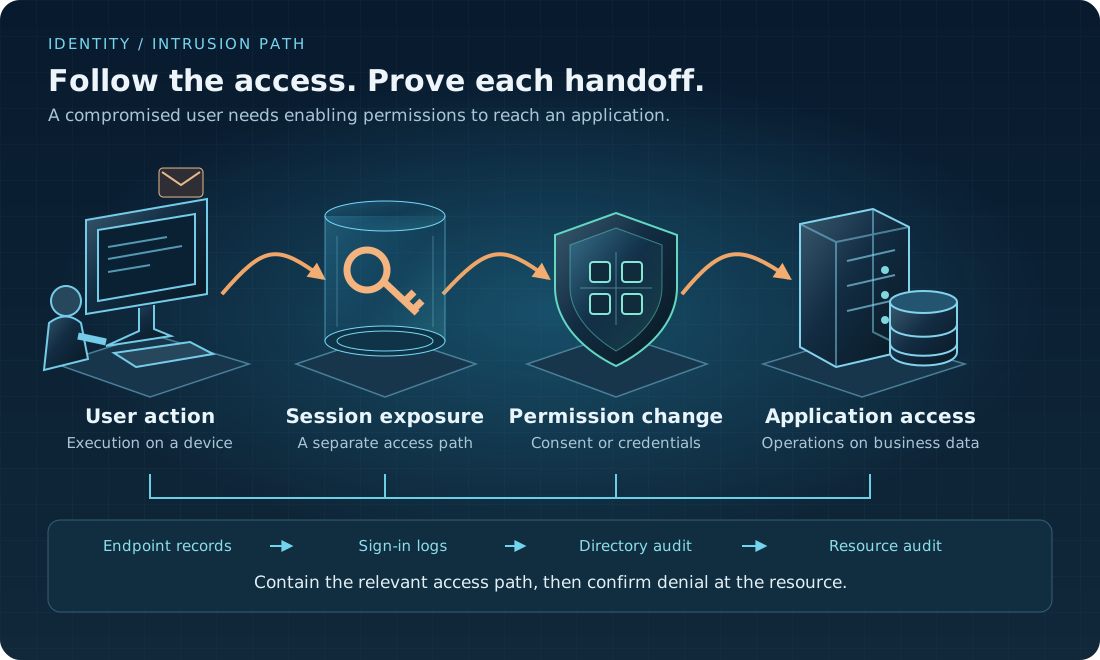
Start with the reported device and user. In endpoint records, find execution and outbound activity. In Microsoft Entra sign-in logs, compare the user, device context, client application, target resource, and authentication details with normal work. An unfamiliar IP address is a lead, not proof; VPNs, mobile networks, and shared infrastructure can change the apparent location.
Next, use directory audit records to establish who changed the application. Inspect permission grants, application credentials, owners, and relevant role changes. Record the tenant ID, user object ID, application ID, and service-principal object ID. Display names can change and aren't reliable join keys. Use request or correlation IDs where the services expose them.
| Stage | Evidence to preserve | What would strengthen the link? |
|---|---|---|
| User execution | Process tree, command line, device ID, download and network records | The reported prompt led to the observed executable on that device. |
| Identity activity | Sign-in details, resource, authentication result, available session context | Activity differs from the user's expected device and application pattern. |
| Privilege change | Initiator, changed object, permission grant, credential or role change | The actor had the authority to make the change and used it in the relevant window. |
| Data access | Resource audit events, caller identity, operation, object IDs, result | The affected application accessed the identified records using that authority. |
| Business impact | Record changes, external delivery records, payment approval history | Evidence establishes what left the service or what changed, not just a token request. |
Don't equate a token request with data theft. A token indicates an opportunity to call a resource; resource-side audit logs show which operations were recorded. Even a recorded read doesn't always prove where data went next. Separate confirmed activity, reasonable hypotheses, and gaps that retention or missing logging prevents you from resolving.
Look for access that outlives the user session
Delegated access and app-only access require different questions. For delegated access, inspect the user's consent and session context. For app-only access, identify the application permission and credential used. Also check whether a new owner, secret, certificate, or federated identity credential was added. Removing the first user doesn't automatically remove those changes.
Check the target service too. Depending on the workload, look for mailbox rules, sharing changes, automation schedules, new role assignments, or modified integration destinations. Not every artifact will exist in every incident. Prioritize the operations the affected identities could actually perform, and ask the service owner which normal jobs might resemble them.
Contain access, then prove the boundary holds
Microsoft's user-access revocation guidance explains why blocking sign-in and revoking sessions aren't interchangeable. Refresh-token revocation, issued access tokens, and an application's own session cookies have different behavior. Continuous access evaluation can shorten the response for supported services; it isn't a promise of immediate revocation across every application.
In the Microsoft Entra admin center, the user route is Entra ID > Users > All users. With an appropriate administrative role, a responder can disable the affected account and use Revoke sessions. That is one containment step, not a complete response. Investigate the enterprise application and affected resources separately before changing their grants or credentials.
| Access path | Containment to consider | Verification |
|---|---|---|
| Compromised user or device | Block sign-in, revoke sessions, isolate the affected device, remediate exposed credentials | New authentication is denied and the relevant resource no longer accepts the tested access path. |
| Application grant or credential | Remove the unwanted grant or credential; suspend the affected integration if necessary | New token acquisition fails where expected; resource access is denied, including any residual issued-token window. |
| Application-owned session | Invalidate the session through the application's controls | The application rejects that session independently of the identity-provider login. |
| Remote-management foothold | Isolate the device and disable unauthorized remote access while preserving evidence | No remote session remains usable; exposed identity access is contained separately. |
Use controlled test access and documented resource behavior to verify containment, not live stolen credentials on an ordinary workstation. Record when each action was taken and when denial was confirmed. If access remains usable, restrict it at the resource or network boundary where supported and safe, rather than assuming the portal's successful revocation message ended it.
Containment needs a business owner. Disabling an application might stop invoice processing or a customer-facing integration. Agree who can authorize that interruption, how to use a restricted fallback, and what evidence permits restoration. During an active incident, preserve what you can without delaying an urgent action needed to stop ongoing harm.
A compromised build is another identity incident
Software supply-chain risk belongs in this discussion because build systems often hold authority to publish artifacts or deploy services. A malicious dependency can run in a job that has credentials, network access, or a trusted release identity. The dependency's execution context determines the possible impact; the package name alone doesn't.
Map the build and release stages separately. Does a pull-request job receive production secrets? Can a changed workflow request a deployment identity? Which repository, branch, and environment is allowed to authenticate? Short-lived workload credentials reduce secret storage, but a broad federation trust can still authorize an unwanted job. Review the trust conditions as well as the credential lifetime.
For a suspect build, preserve the workflow revision, lockfile, resolved dependency versions, runner logs, artifact digest, and deployment history. Establish which secrets or token privileges the job could access. Identify services that consumed the artifact and separate them from repositories that merely referenced the same package name. That difference affects the containment scope.
A rebuild is trustworthy only if its inputs and execution environment are trustworthy. Use a clean runner and verified source and dependencies, check the publishing identity, then compare the resulting artifact with the release record. Reinstalling the same compromised inputs on a new machine doesn't fix the cause. An SBOM helps find affected components, but doesn't by itself prove that an artifact is safe.
Choose visibility around a critical workflow
Collecting every log indefinitely is expensive and creates its own sensitive-data store. Identity, endpoint, application, and build records may require different licensing, ingestion, and retention choices. Estimate those costs before promising a full reconstruction of every event. In particular, confirm whether the resource-side audit events you need are enabled and retained.
Start with one workflow that can cause material harm, such as supplier-bank-detail changes or production deployment. Document its identities and permissions, the evidence at each handoff, the retention window, and the person who can contain it. Test whether a responder can follow a synthetic event across those records. Missing evidence becomes a specific engineering task instead of another dashboard alert.
Keep raw tokens and secrets out of investigation exports. Restrict access to collected records, record evidence handling, and involve legal or privacy owners where personal data is involved. Security telemetry supports an investigation; it doesn't remove GDPR obligations or establish compliance on its own.
Make the next review answer a smaller question
I would leave the first review with a short set of deliverables: one access-path map, a record of the enabling permissions, a tested event timeline, and a containment procedure with a named approver. Include a test that checks application access after the human session has been revoked. That is a better measure of progress than counting password resets.
The same authority and evidence problem appears when an AI agent can read those documents or invoke those integrations. Part 2 applies this model to retrieved content, tool calls, memory, and recovery. The question stays practical: which trusted action can cause harm, and where can we stop it?