


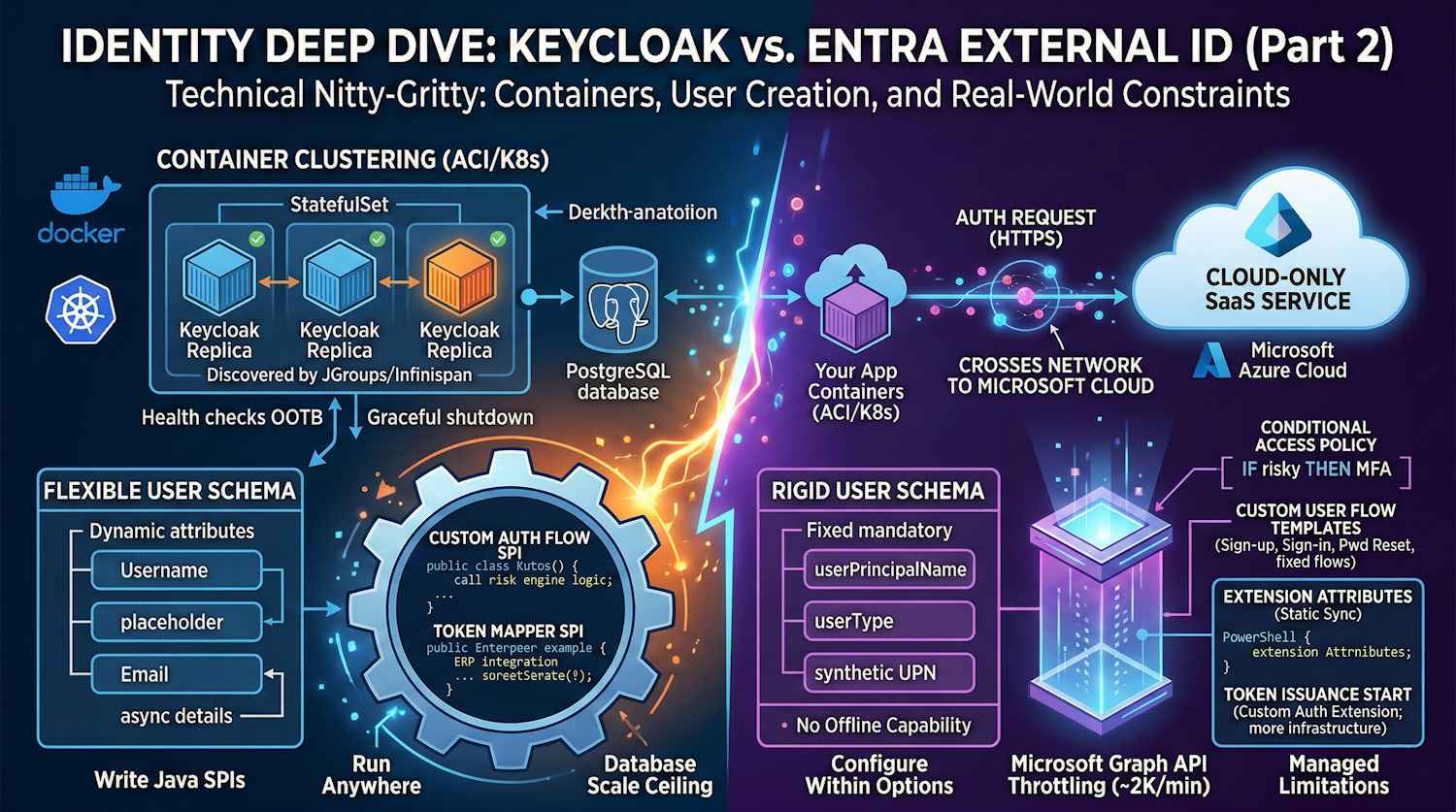
Let's dig into the technical nitty-gritty. This part focuses on what actually matters when you're building production systems: container orchestration, user creation requirements, customization capabilities, and what happens when you hit real-world constraints.
If you haven't read Part 1, start there to understand the architectural foundations.
User Creation & Management: What's Actually Required?
This is where theory meets practice. Let's look at what you must provide to create a user in each system, versus what's optional. This matters more than you'd think.
Keycloak User Creation Requirements
Absolute Minimum to Create a User:
| Field | Required | Type | Notes |
|---|---|---|---|
| Username | YES | String | Must be unique within realm |
| NO | String | Can be unique or allow duplicates | |
| First Name | NO | String | Often required by business logic |
| Last Name | NO | String | Often required by business logic |
| Password | NO | String | Can be set during creation or user updates later |
| Enabled | NO | Boolean | Defaults to true if not specified |
| Email Verified | NO | Boolean | Defaults to false |
What this means in practice:
// Absolute minimum JSON to create a Keycloak user
{
  "username": "john.doe@example.com",
  "enabled": true
}

// This user can exist, but:
// - Has no password (can't log in)
// - Email unverified
// - Missing personal attributes
You can then update the user later with:
{
  "username": "john.doe@example.com",
  "email": "john.doe@example.com",
  "firstName": "John",
  "lastName": "Doe",
  "emailVerified": true,
  "credentials": [
    {
      "type": "password",
      "value": "temporaryPassword123!"
    }
  ]
}
The beauty of this flexibility:
- Create users from LDAP/AD first (username only), then enrich attributes later
- Invite users without passwords (they set their own during first login)
- Bulk-create placeholder users and populate details asynchronously
- Onboard from external systems without needing all data upfront
Entra External ID User Creation Requirements
What You Must Provide:
| Field | Required | Type | Notes |
|---|---|---|---|
| Identity (email/phone/user ID) | YES | String | At least one identity type required |
| User Type | YES | String | "Member" or "Guest" |
| Password | NO* | String | *Unless password policy requires it |
| Display Name | NO | String | Auto-generated if not provided |
| Given Name | NO | String | |
| Surname | NO | String | |
| Country Code | NO | String | Required for phone-based auth |
What this looks like via Graph API:
{
  "accountEnabled": true,
  "displayName": "John Doe",
  "mailNickname": "johndoe",
  "userPrincipalName": "john.doe@contosoorg.onmicrosoft.com",
  "passwordProfile": {
    "forceChangePasswordNextSignIn": true,
    "password": "Xk8@_bKL9mN2pQ"
  }
}
The hidden constraint:
You must have userPrincipalName even if the user doesn't actually use email.
This is a hidden requirement that trips up many teams. If you're importing social identities
(Google, Facebook), Entra creates a synthetic UPN behind the scenes. It's inelegant but necessary.
Side-by-Side Comparison
| Scenario | Keycloak | Entra External ID |
|---|---|---|
| Bulk create users from LDAP | Direct LDAP sync, no mandatory fields | Need synthetic UPN for each user |
| Create user without password | Simple, user sets own password later | Requires passwordProfile object structure |
| Import from CSV with partial data | Fine with just username + email | Needs email or phone for every record |
| Update user attributes later | Trivial, fully flexible schema | Partial attributes sometimes trigger validation |
| Federated user (no local creds) | Works natively | Needs userType: "Guest" + external IdP |
| Create 100K users programmatically | Straightforward API calls, no rate surprises | Hit Microsoft Graph throttling at ~2K/min |
Real-world impact:
A team I worked with was migrating from AD to Keycloak. In Keycloak, they synced all 50K users with just username and email in one batch. With Entra? They had to generate UPNs for each user, set password policies, and stagger the import over several days to avoid throttling.
Container Apps Deployment: Where Keycloak Shines
Let's talk about how these systems actually run in modern infrastructure. This is where the philosophical differences become concrete. Azure Container Apps (Isolated) is the primary deployment target we'll focus on — it gives you managed containers without the ops overhead of full Kubernetes clusters. Kubernetes is also a fully supported option, covered below.
Keycloak in Azure Container Apps: Primary Deployment
Keycloak is purpose-built for containerized environments. First, build and push a custom image to ACR, then deploy to Container Apps — see the next section for the full walkthrough.
Keycloak in Kubernetes (Alternative Option)
For teams already running AKS or self-hosted Kubernetes, Keycloak works equally well as a StatefulSet. Here's a production-grade manifest:
Kubernetes Manifest - StatefulSet with PostgreSQL:
apiVersion: v1
kind: ConfigMap
metadata:
  name: keycloak-config
  namespace: identity
data:
  KC_DB: postgres
  KC_DB_URL: jdbc:postgresql://postgres-service:5432/keycloak
  KC_DB_USERNAME: keycloak
  KC_PROXY: edge
  KC_HOSTNAME_STRICT: "false"
  KC_HOSTNAME_STRICT_BACKCHANNEL: "false"
  KC_HTTP_RELATIVE_PATH: /auth
  KC_LOG_LEVEL: INFO

---
apiVersion: apps/v1
kind: StatefulSet
metadata:
  name: keycloak
  namespace: identity
spec:
  serviceName: keycloak
  replicas: 3
  selector:
    matchLabels:
      app: keycloak
  template:
    metadata:
      labels:
        app: keycloak
    spec:
      affinity:
        podAntiAffinity:
          preferredDuringSchedulingIgnoredDuringExecution:
          - weight: 100
            podAffinityTerm:
              labelSelector:
                matchExpressions:
                - key: app
                  operator: In
                  values:
                  - keycloak
              topologyKey: kubernetes.io/hostname
      containers:
      - name: keycloak
        image: quay.io/keycloak/keycloak:latest
        command:
          - /opt/keycloak/bin/kc.sh
          - start
        ports:
        - name: http
          containerPort: 8080
          protocol: TCP
        envFrom:
        - configMapRef:
            name: keycloak-config
        env:
        - name: KEYCLOAK_ADMIN
          valueFrom:
            secretKeyRef:
              name: keycloak-admin
              key: username
        - name: KEYCLOAK_ADMIN_PASSWORD
          valueFrom:
            secretKeyRef:
              name: keycloak-admin
              key: password
        - name: KC_DB_PASSWORD
          valueFrom:
            secretKeyRef:
              name: postgres-secret
              key: password
        - name: KC_CACHE
          value: "ispn"
        - name: KC_CACHE_CONFIG_FILE
          value: "cache-ispn-ha-local.xml"
        livenessProbe:
          httpGet:
            path: /auth/health/live
            port: http
          initialDelaySeconds: 60
          periodSeconds: 10
          timeoutSeconds: 5
          failureThreshold: 3
        readinessProbe:
          httpGet:
            path: /auth/health/ready
            port: http
          initialDelaySeconds: 30
          periodSeconds: 5
          timeoutSeconds: 5
          failureThreshold: 3
        resources:
          requests:
            memory: "512Mi"
            cpu: "250m"
          limits:
            memory: "1Gi"
            cpu: "500m"
        volumeMounts:
        - name: cache-config
          mountPath: /opt/keycloak/cache-ispn-ha-local.xml
          subPath: cache-ispn-ha-local.xml
      volumes:
      - name: cache-config
        configMap:
          name: keycloak-cache-config

---
apiVersion: v1
kind: Service
metadata:
  name: keycloak-service
  namespace: identity
spec:
  selector:
    app: keycloak
  ports:
  - protocol: TCP
    port: 80
    targetPort: http
    name: http
  type: LoadBalancer

---
apiVersion: autoscaling/v2
kind: HorizontalPodAutoscaler
metadata:
  name: keycloak-hpa
  namespace: identity
spec:
  scaleTargetRef:
    apiVersion: apps/v1
    kind: StatefulSet
    name: keycloak
  minReplicas: 3
  maxReplicas: 10
  metrics:
  - type: Resource
    resource:
      name: cpu
      target:
        type: Utilization
        averageUtilization: 70
  - type: Resource
    resource:
      name: memory
      target:
        type: Utilization
        averageUtilization: 80
What makes this powerful:
- Health checks built-in:
/health/liveand/health/readyendpoints work out of the box - No initialization surprises: Keycloak automatically migrates the database on startup
- Clustering works out of the box: Multiple replicas automatically discover each other via JGroups/Infinispan
- Externalize configuration: All settings via environment variables or ConfigMaps
- Graceful shutdown: Keycloak drains connections properly during pod termination
- Automatic scaling: HPA scales based on actual load
Running this in production:
You get automatic scaling, zero-downtime deployments, and self-healing. If a pod crashes, Kubernetes restarts it. Simple.
Keycloak with Azure Container Registry (ACR) & Container Apps (Detailed Walkthrough)
Most teams don't run Keycloak's official image directly. You build a custom image and push it to ACR, then deploy it to Azure Container Apps — this is the recommended path:
Building and Pushing to ACR:
# Dockerfile - Custom Keycloak with themes and extensions
FROM quay.io/keycloak/keycloak:latest as builder

# Copy custom theme
COPY themes/my-company-theme /opt/keycloak/themes/my-company-theme

# Copy custom authentication SPI
COPY providers/custom-auth-spi.jar /opt/keycloak/providers/

# Copy additional libraries
COPY libs/*.jar /opt/keycloak/lib/

# Build stage - optimizes JAR for runtime
RUN /opt/keycloak/bin/kc.sh build --cache=ispn --db=postgres

FROM quay.io/keycloak/keycloak:latest

# Copy optimized build
COPY --from=builder /opt/keycloak/lib /opt/keycloak/lib
COPY --from=builder /opt/keycloak/themes /opt/keycloak/themes

EXPOSE 8080
Then push to ACR:
az acr build -r myregistry \
  --registry myregistry.azurecr.io \
  -t keycloak:custom-v1.0 \
  -f Dockerfile .

# Now available at: myregistry.azurecr.io/keycloak:custom-v1.0
Deploy to Azure Container Apps (via CLI):
# Deploy Keycloak to Azure Container Apps
az containerapp create \
  --name keycloak-app \
  --resource-group my-rg \
  --environment my-container-app-env \
  --image myregistry.azurecr.io/keycloak:custom-v1.0 \
  --registry-server myregistry.azurecr.io \
  --target-port 8080 \
  --ingress external \
  --min-replicas 2 \
  --max-replicas 10 \
  --cpu 0.5 \
  --memory 1Gi \
  --env-vars \
    KC_DB=postgres \
    KC_DB_URL=jdbc:postgresql://postgres-host:5432/keycloak \
    KC_DB_USERNAME=keycloak \
    KC_PROXY=edge \
    KC_HOSTNAME_STRICT=false

# Set secrets separately
az containerapp secret set \
  --name keycloak-app \
  --resource-group my-rg \
  --secrets postgres-password=<your-db-password>
The key point: You control everything. Custom SPIs, themes, database migrations—all baked into your image.
Entra External ID: No Container Story
Here's the reality: Entra External ID is cloud-only. There is no container.
You can't:
- ❌ Run it in your AKS cluster
- ❌ Host it in Azure Container Apps
- ❌ Push a custom image to ACR
- ❌ Deploy to your private cloud
- ❌ Control the infrastructure layer at all
This is Microsoft's stance: "We handle the ops, you don't." For teams running isolated container workloads—whether Azure Container Apps, AKS, or self-hosted—this is a hard constraint. You're always making an external call to Microsoft's cloud, regardless of where your containers live.
The architecture looks like this (shown with Container Apps as the primary client, though Kubernetes clusters face the same topology):
You're making network calls to Microsoft's cloud for every authentication request. No local caching, no offline capability, no control.
Advanced Customization: Keycloak Community Edition vs. Red Hat Keycloak
There's an important distinction here that affects your long-term strategy.
Keycloak Community Edition (Free/Open Source)
This is what most people deploy. It's Apache 2.0 licensed, fully featured, and genuinely powerful:
What you get:
- All core features (SSO, OAuth, SAML, WebAuthn, MFA)
- Custom authentication flows and actions
- Theme and branding customization
- User storage SPIs (LDAP, custom databases)
- Event listeners and webhooks
- Full source code control
- Community support via forums and GitHub
Real cost: Your time and engineering effort
Limitations:
- No guaranteed support SLA
- Security updates depend on volunteer/community efforts
- Performance optimizations are community-driven
- You're responsible for production stability
Red Hat Keycloak (Enterprise)
Red Hat offers a hardened, supported version:
What changes:
- 24/7 professional support (phone, email, Slack)
- Guaranteed security patches within SLA
- Performance-tuned, hardened builds
- Additional tools and dashboards
- Tested and certified on Red Hat environments
- SLA guarantees (99.9% uptime for managed services)
- Production-grade deployment patterns
Real cost: $15,000-$50,000/year per organization, depending on support level
When it matters:
- Customer-facing authentication (SLA requirements)
- Regulated industries (HIPAA, PCI-DSS, FedRAMP)
- Mission-critical internal systems
- Teams that can't absorb security patch delays
- Organizations with compliance audits
Entra External ID: All Enterprise Features, Fixed Pricing
Entra gives you enterprise features out of the box. No tiering:
- Microsoft's 24/7 support and SLA
- Regular feature updates (automatic, you can't control timing)
- Built-in security and compliance
- Automatic scaling and patching
The trade-off: You can't customize. It's all-or-nothing.
Real-World Customization Scenarios
Let's look at what you actually want to customize and what each platform supports.
Scenario 1: Custom Authentication Flow with Risk-Based Decisions
Requirement: For high-value transactions, require additional authentication based on risk scoring from your custom system.
Keycloak Implementation
// Custom Authenticator SPI
public class RiskBasedAuthenticator implements Authenticator {

    private static final Logger logger = LoggerFactory.getLogger(RiskBasedAuthenticator.class);

    @Override
    public void authenticate(AuthenticationFlowContext context) {
        String userId = context.getUser().getId();
        String ipAddress = context.getConnection().getRemoteAddr();

        // Call YOUR risk engine
        RiskScore risk = yourCompanyRiskEngine.evaluate(userId, ipAddress);

        logger.infof("Risk score for user %s from IP %s: %f", userId, ipAddress, risk.getScore());

        if (risk.isHigh()) {
            // High risk: Force WebAuthn verification
            context.challenge(context.form()
                .setAttribute("riskLevel", "high")
                .createForm("webauthn-challenge.ftl")
                .createResponse());
        } else if (risk.isMedium()) {
            // Medium risk: Require OTP
            context.challenge(context.form()
                .setAttribute("riskLevel", "medium")
                .createForm("otp-challenge.ftl")
                .createResponse());
        } else {
            // Low risk: Standard password auth
            context.challenge(context.form()
                .createLoginForm()
                .createResponse());
        }
    }

    @Override
    public void action(AuthenticationFlowContext context) {
        // Handle form submission
    }
}
Wire it into your flow:
{
  "alias": "risk-based-login",
  "description": "Risk-based authentication with custom scoring",
  "builtIn": false,
  "topLevel": true,
  "steps": [
    {
      "id": "risk-evaluation",
      "providerId": "risk-based-authenticator",
      "requirement": "REQUIRED"
    }
  ]
}
Result: Fully integrated. Users don't know the difference. Your risk engine is the source of truth.
Entra External ID Implementation
You can't do this directly. Entra has Conditional Access policies, but they're limited:
{
  "displayName": "Risk-based MFA",
  "conditions": {
    "signInRiskLevels": ["high", "medium"],
    "clientAppTypes": ["all"]
  },
  "grantControls": {
    "operator": "OR",
    "builtInControls": ["mfa"]
  }
}
The limitations:
- You can't use custom risk algorithms
- Limited to Microsoft's built-in risk signals (sign-in risk, user risk based on Microsoft's telemetry)
- The built-in risk signals are part of the Entra External ID platform; additional Identity Protection (workforce) features require Entra ID P2
- Forces MFA as the only control (can't do custom step-up auth)
- Can't integrate your own scoring engine via the standard flows
Real situation: A fintech company wanted to use behavioral biometrics for risk assessment. With Keycloak? Custom authenticator in half a day. With Entra? Not possible—they're stuck with Microsoft's risk signals.
Scenario 2: Custom Claims Based on Business Logic
Requirement: Add a department claim that's calculated real-time from
your ERP system, plus a costCenter claim from your accounting system.
Keycloak Implementation
// Token Mapper SPI - Custom Claims
public class ERPDepartmentMapper implements OIDCProtocolMapper {

    private static final Logger logger = LoggerFactory.getLogger(ERPDepartmentMapper.class);

    @Override
    public void transformIDToken(IDTokenResponse token,
                                 ProtocolMapperModel mappingModel,
                                 UserSessionModel userSession,
                                 ClientSessionModel clientSession) {
        UserModel user = userSession.getUser();
        String userId = user.getId();

        try {
            // Call ERP API for department
            String department = erpClient.getDepartment(userId);
            token.setOtherClaims("department", department);

            // Call accounting system for cost center
            String costCenter = accountingClient.getCostCenter(userId);
            token.setOtherClaims("costCenter", costCenter);

            logger.infof("Added claims for user %s: dept=%s, cost_center=%s",
                userId, department, costCenter);

        } catch (Exception e) {
            logger.errorf("Failed to fetch claims for user %s: %s", userId, e.getMessage());
            // Decide: fail auth or continue without these claims?
            // token.setOtherClaims("department", "UNKNOWN");
        }
    }

    @Override
    public void transformAccessToken(AccessTokenResponse token,
                                    ProtocolMapperModel mappingModel,
                                    UserSessionModel userSession,
                                    ClientSessionModel clientSession) {
        // Same logic for access token if needed
        transformIDToken((IDTokenResponse) token, mappingModel, userSession, clientSession);
    }
}
Register in your client:
{
  "protocolMappers": [
    {
      "name": "ERP-based Claims",
      "protocol": "openid-connect",
      "protocolMapper": "custom-erp-claims-mapper",
      "consentRequired": false,
      "mapperType": "oidc-script-based-protocol-mapper",
      "config": {
        "erp.system.url": "https://erp.company.com/api",
        "accounting.system.url": "https://accounting.company.com/api",
        "cache.ttl": "300"
      }
    }
  ]
}
Result: Every token includes real-time data from your ERP. Updates automatically. Cache it if you want to reduce load.
Entra External ID Implementation
You have extension attributes, but they're static:
# Create extension attributes
$app = Get-MgApplication -Filter "displayName eq 'MyApp'"

New-MgApplicationExtensionProperty -ApplicationId $app.Id `
  -Name "department" `
  -DataType "String"

New-MgApplicationExtensionProperty -ApplicationId $app.Id `
  -Name "costCenter" `
  -DataType "String"
Then you populate them manually... but standard extension attributes require external sync. Your options are:
- Custom authentication extension (TokenIssuanceStart event) - Register a REST API endpoint; Entra calls it at token issuance time. This is real-time, but requires hosting and maintaining the API. More setup than Keycloak's SPI.
- Batch jobs - Run a script every hour to sync from ERP to extension attributes
- Manual updates - Someone updates these when data changes
- Graph API webhooks - Get notified of changes, update Entra (complex, not real-time from ERP side)
The TokenIssuanceStart extension is the right approach for real-time claims, but it's significantly more infrastructure than Keycloak's built-in token mapper SPI. You're now building, deploying, and maintaining a separate API service.
Real situation: A manufacturing company wanted hourly sync from SAP. With Keycloak, they wrote a token mapper calling SAP's REST API—done in a morning. With Entra? They're running PowerShell scripts every hour, dealing with sync lag, and manual error correction.
Performance & Scalability: What Actually Breaks
Keycloak at Scale
What you need to know:
When things get slow in Keycloak, it's usually the database. The auth server itself scales linearly.
Realistic numbers:
- Single PostgreSQL instance: ~5,000 login requests/sec
- Add read replicas: More throughput
- After ~50,000 req/sec per database: Multi-region replication (complex, eventual consistency)
Real example from a customer:
They had 50K concurrent users. At peak (lunch hour, everyone logging in):
- 3 Keycloak pods: 50% CPU utilization
- PostgreSQL primary: 80% CPU (the bottleneck!)
- Solution: Read-only replica for authentication queries, master for user creation
What they learned:
- Caching is critical (Redis, local)
- Database indexing matters
- Connection pooling is essential
- Monitoring the database is as important as monitoring Keycloak
Entra External ID at Scale
What you need to know:
Entra has hard limits that you'll hit. You don't control infrastructure, so you hit walls:
Microsoft Graph API Throttling:
├── 2,000 requests/minute per application
├── 5,000 request/minute per tenant
└── Burst: 5,000-10,000 per 30-second window
Real example from a customer:
They needed to migrate 1 million users. Calculations:
- At 2K users/minute (max), it'd take 500 minutes = 8+ hours
- With parallel uploads? Hit tenant-level limits
- Solution: Spread the import across 3 days with careful rate limiting
The lesson: You're not rate-limited by your infrastructure—you're rate-limited by what Microsoft allows. There's no way to increase these limits.
Limitations You'll Actually Hit
Keycloak Limitations (Community Edition)
The honest parts:
-
No phone-based authentication OOTB
- You need Twilio, AWS SNS, or similar
- Adds cost ($0.01-0.05 per SMS)
- Entra has this built-in
-
Database is your scale ceiling
- You can't magically make PostgreSQL handle unlimited users
- Multi-region is hard (eventual consistency nightmares)
- Entra just scales transparently
-
Community security patches take time
- When a CVE drops, it's not immediate
- Enterprise/Red Hat responds faster
- Entra patches automatically
-
No built-in push notifications
- You're integrating with Twilio, Firebase, etc.
- That's extra infrastructure and cost
- Entra has Microsoft Authenticator native
-
You own the operations
- Backups, disaster recovery, monitoring
- That's engineering time
- Entra handles it
Entra External ID Limitations (Hard Constraints)
The things you literally can't do:
-
Can't customize authentication logic
- You get their flows or nothing
- Want to check a custom business rule before issuing a token? Not possible
- Want risk-based auth? Limited to their signals
- Keycloak handles this trivially
-
Data residency is limited
- US or EU. That's it.
- Healthcare in Australia? Data goes to US. GDPR problem? Possible.
- Keycloak runs anywhere—on-premises, sovereign clouds, etc.
-
No offline capability
- Every auth request goes to Microsoft
- Network down? Your users can't log in
- Keycloak can have local caching/failover
-
Rate limiting and throttling
- Graph API has hard limits
- Bulk operations are frustratingly slow
- You can't negotiate or increase these limits
-
Can't run in your infrastructure
- No Kubernetes, no on-premises, no private cloud
- It's Microsoft's SaaS or nothing
- Keycloak is entirely under your control
-
Costs at scale
- MAU-based pricing: first 50,000 monthly active users are free, then ~$0.016/MAU for standard features (or ~$0.018/MAU for premium). 100K MAUs ≈ $800/month — a fraction of what on-premises licensing would cost in equivalent effort
- Costs can grow if you exceed free MAU thresholds significantly, but it scales proportionally
- Watch for hidden multipliers: additional Microsoft 365 or Identity Protection licenses if you layer workforce identity features on top
Advanced Feature Comparison Table
| Feature | Keycloak Community | Keycloak Enterprise | Entra External ID |
|---|---|---|---|
| Custom Authentication Flows | ✅ Full control | ✅ Full control | ❌ Conditional Access only |
| Custom Token Mappers | ✅ Write Java SPIs | ✅ Write Java SPIs | ⚠️ Via TokenIssuanceStart custom auth extension (REST API call; more setup than
native SPI) |
| Risk-Based MFA | ✅ Custom algorithms | ✅ Custom algorithms | ✅ But limited signals |
| LDAP/AD Sync | ✅ Full bidirectional | ✅ Full bidirectional | ✅ Read-only federation |
| Custom Email Templates | ✅ FreeMarker | ✅ FreeMarker | ❌ Variables only |
| Container-Native (K8s/ACI) | ✅ Purpose-built | ✅ Purpose-built | ❌ Cloud-only |
| On-Premises Deployment | ✅ Fully supported | ✅ Fully supported | ❌ SaaS only |
| Professional Support | ❌ Community only | ✅ 24/7 SLA | ✅ Microsoft support |
| GraphQL/REST API | ✅ REST | ✅ REST | ✅ Microsoft Graph |
| Passwordless Phone Sign-in | ❌ Not OOTB | ❌ Not OOTB | ✅ Built-in |
| Push Notifications | ❌ Integration needed | ❌ Integration needed | ✅ Microsoft Authenticator |
| Data Residency Control | ✅ Full | ✅ Full | ⚠️ Limited (US/EU) |
| Horizontal Scaling | ✅ Unlimited pods | ✅ Unlimited pods | ✅ Auto (you don't control) |
| Rate Limiting | ✅ You control | ✅ You control | ❌ Microsoft limits you |
Real-World Recommendation
Here's when to pick each one:
Choose Keycloak (Community) When:
✅ You control your infrastructure ✅ You need custom authentication logic ✅ You have complex, non-standard requirements ✅ You want zero per-user licensing costs ✅ You need on-premises or sovereign cloud ✅ You're willing to manage operations ✅ Your team has Java/Spring expertise ✅ You're comfortable with open-source operations
Cost your time: ~2-3 engineers to run it properly in production
Choose Keycloak (Enterprise/Red Hat) When:
✅ All of the above, PLUS: ✅ You need guaranteed support ✅ You want SLA commitments (99.9% uptime) ✅ You have compliance requirements (HIPAA, FedRAMP, PCI-DSS) ✅ You want hardened, optimized builds ✅ You need guaranteed security patch response time
Cost your money: $20K-$50K/year for support, $15K-30K/year per seat for consulting
Choose Entra External ID When:
✅ You're already deep in Azure ✅ You want zero ops burden ✅ Your requirements fit OOTB flows (sign up, sign in, password reset) ✅ You don't need deep customization ✅ You're okay with Microsoft controlling the roadmap ✅ You prefer letting Microsoft patch automatically ✅ Your team is small and prefers SaaS solutions
Cost your flexibility: You're locked into their capabilities
Migration Scenarios
From Keycloak to Entra (The Hard Way)
You're migrating because management says "Microsoft everything", cost optimization, or reduced ops burden.
The painful parts:
-
Custom flows disappear
- That risk-based authenticator? Rewrite as limited Conditional Access
- Custom email flows? Can't do it
- Custom user creation logic? Entra doesn't have webhooks
-
User attributes mapping
- Keycloak's flexible schema → Entra's rigid schema
- Custom attributes become extension properties
- Likely need to refactor application code to handle missing data
-
User migration itself
- 100K users? Plan 2-3 weeks
- Entra throttles you hard (2K/min max)
- Password reset for everyone (most teams make users set new password)
-
Application integration changes
- Different token format
- Different claim names
- Different error responses
From Entra to Keycloak (The Escape)
You're migrating because vendor lock-in concerns, need customization, or on-premises requirement emerged.
The easier parts:
-
User export via Graph API
# Microsoft Graph PowerShell SDK $users = Get-MgUser -All $users | Export-Csv -Path users.csv -
Import to Keycloak
bin/kc.sh import-users --file users.json --realm myrealm -
Authenticate against Keycloak
- Just update your OIDC client configuration
- Applications don't care where the tokens come from
- Zero code changes if you're standards-compliant
The Bottom Line
Keycloak is powerful. Maybe too powerful for teams that don't want to think about ops. You get full control, full customization, full responsibility. Best for teams with infrastructure expertise and complex requirements.
Entra External ID is simple. Maybe too simple for complex needs. You get managed ops, managed limitations, managed frustration. Best for teams that want simplicity and don't need customization.
Many large organizations run both—Keycloak for complex flows, Entra for straightforward user authentication. That's a valid strategy too.
Pick based on your constraints, not on hype.
What's your situation? Are you building something that needs deep customization, or would you rather let Microsoft handle it? Comment below—I can probably help you figure out which path makes sense.