


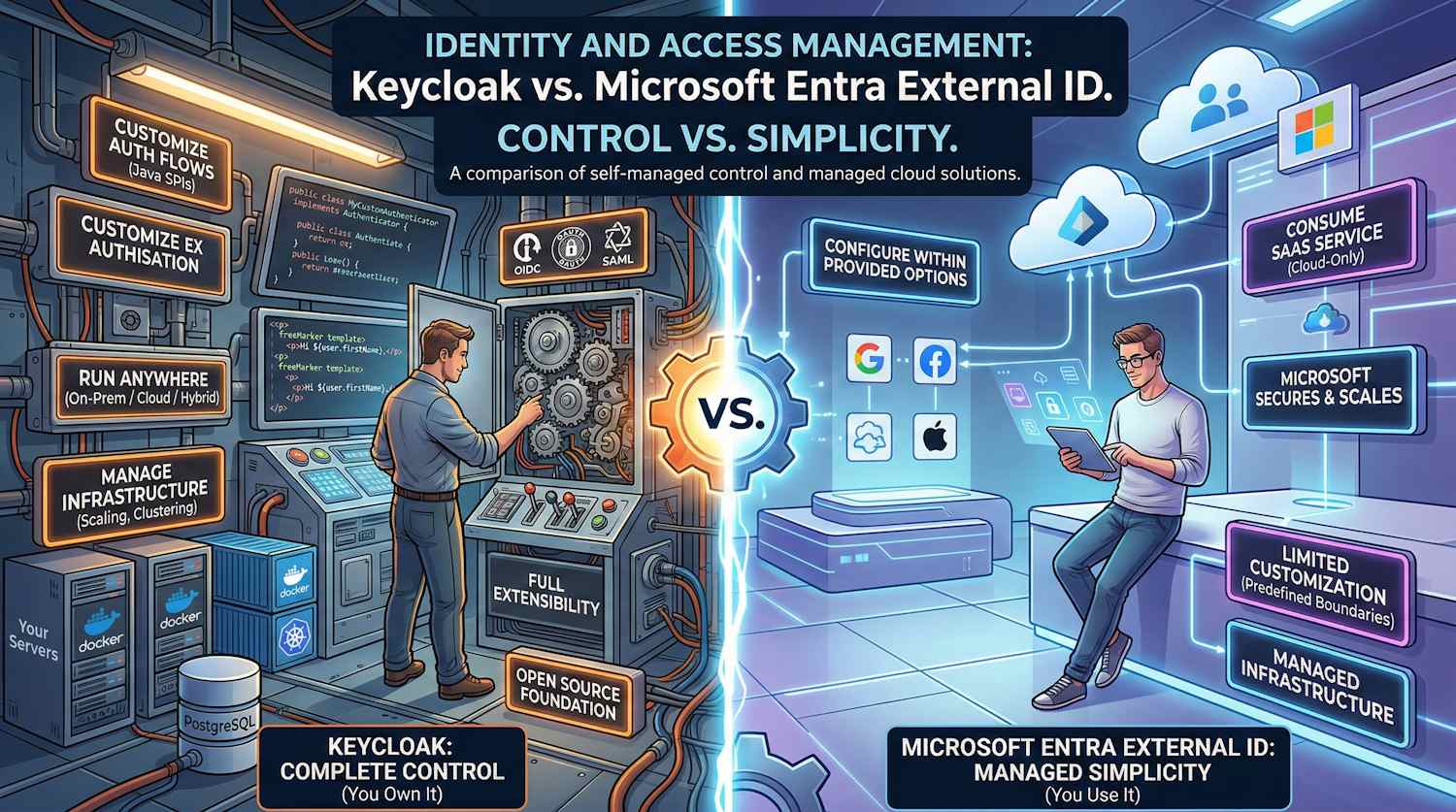
Identity and access management doesn't have to be complicated. But let's be honest—when you're building production systems, simplicity often comes at the cost of control.
We're going to compare two fundamentally different approaches to solving the same problem: Keycloak, the open-source identity platform that gives you complete control, and Microsoft Entra External ID, Microsoft's managed cloud solution that handles everything for you.
This isn't a marketing comparison. It's based on real implementations, real constraints, and real trade-offs.
The Core Philosophy: Control vs. Simplicity
Before we get into the specifics, understand this fundamental difference:
Keycloak's Philosophy: You own it. All of it.
- You run it (Docker, Kubernetes, on-premises, anywhere)
- You customize it (Java SPIs, themes, authentication flows)
- You secure it (your certificates, your firewall rules)
- You scale it (your infrastructure decisions)
Entra External ID's Philosophy: You use it. That's it.
- Microsoft runs it (their datacenters, their infrastructure)
- You configure it (within provided options)
- Microsoft secures it (their policies, their infrastructure)
- You consume it (pay per user or per MAU)
Both philosophies are valid. Which one fits your situation?
Architecture: The Foundation
Keycloak Architecture
Keycloak is a self-contained authentication server that you deploy and manage. Here's what that actually looks like:
Keycloak standard authentication endpoints (replace {realm} with your
realm name):
/auth/realms/{realm}/.well-known/openid-configuration/auth/realms/{realm}/protocol/openid-connect/token/auth/realms/{realm}/protocol/openid-connect/userinfo
Key characteristics:
- Stateless auth servers: You can run 1, 10, or 100 instances—they're all identical
- External database: All state lives in PostgreSQL (or MySQL, etc.)
- Clustering automatic: Multiple instances discover each other and synchronize state
- Full extensibility: Want to add custom logic? Write a Java SPI
Entra External ID Architecture
Entra External ID is a multi-tenant SaaS service where you configure policies in the cloud. You don't run anything:
Key characteristics:
- Fully managed: Microsoft handles infrastructure, scaling, patching
- No provisioning: You create a tenant, configure it, you're done
- Cloud-only: No way to run it on-premises or in private cloud
- Limited customization: You work within Microsoft's framework
Identity Models: How Each Stores & Manages Users
Keycloak's Flexible User Model
Keycloak thinks of identity in terms of realms, users, roles, and attributes:
Realm: "myrealm" (Your tenant)
├── Users
│   └── User: "john.doe"
│       ├── Email: "john@company.com"
│       ├── First Name: "John"
│       ├── Last Name: "Doe"
│       ├── Attributes (Flexible)
│       │   ├── department: "engineering"
│       │   ├── costCenter: "12345"
│       │   ├── manager: "jane.smith"
│       │   └── custom_field_xyz: "anything"
│       ├── Credentials
│       │   ├── Password (hashed)
│       │   ├── TOTP secret
│       │   └── WebAuthn keys
│       └── Role Mappings
│           ├── admin (realm-level)
│           ├── user (realm-level)
│           ├── app-manager (client-level)
│           └── ...
├── Roles
│   ├── admin (realm role)
│   ├── user (realm role)
│   └── app-manager (client role for specific app)
├── Clients (Applications)
│   └── Client: "myapp"
│       ├── Client ID: "myapp-client"
│       ├── Client Secret: "xxxxx"
│       ├── Protocol: "openid-connect"
│       ├── Redirect URIs: ["https://app.com/callback"]
│       └── Scope Mappings: ["openid", "profile", "email"]
└── Identity Providers
    ├── Google (OIDC)
    ├── GitHub (OIDC)
    ├── Corporate SAML
    └── Custom LDAP
What this means:
- User attributes are flexible: Add any field you want
- Roles are hierarchical: Realm roles, client roles, composite roles
- Everything is customizable: You decide what matters
Example: Real-World User in Keycloak
{
  "id": "f:3a6c7f11-3b2e-4e7d-8c1a-9f4b2e8d3c1a",
  "username": "john.doe",
  "email": "john.doe@company.com",
  "emailVerified": true,
  "firstName": "John",
  "lastName": "Doe",
  "enabled": true,
  "attributes": {
    "department": ["Engineering"],
    "costCenter": ["12345"],
    "manager": ["jane.smith@company.com"],
    "employeeId": ["EMP-00123"],
    "office": ["San Francisco"],
    "securityClearance": ["SECRET"]
  },
  "groups": ["developers", "platform-team"],
  "roles": {
    "realmLevel": ["user", "admin"],
    "clientLevel": {
      "myapp": ["app-admin", "app-developer"]
    }
  }
}
Entra External ID's Structured User Model
Entra thinks of users in terms of object types, properties, and extension attributes:
Tenant: "contosoorg.onmicrosoft.com"
├── Users
│   └── User Object
│       ├── User Principal Name: "john.doe@contosoorg.onmicrosoft.com"
│       ├── Display Name: "John Doe"
│       ├── Given Name: "John"
│       ├── Surname: "Doe"
│       ├── Email: "john@company.com"
│       ├── Account Enabled: true
│       ├── Standard Properties (Fixed)
│       │   ├── Mobile Phone
│       │   ├── Office Location
│       │   └── Job Title
│       ├── Extension Attributes (Custom, Limited)
│       │   ├── extension_aabbccddeeff_department
│       │   ├── extension_aabbccddeeff_costCenter
│       │   └── extension_aabbccddeeff_manager
│       └── Group Memberships
│           ├── developers
│           ├── platform-team
│           └── ...
├── Applications
│   └── App Registration
│       ├── App ID: "12345678-1234-1234-1234-123456789012"
│       ├── API Permissions: ["User.Read"]
│       └── Token Configuration
├── Roles
│   └── Custom Roles
│       └── app-admin
└── External Identities
    ├── Social Providers (Google, Facebook, etc.)
    ├── SAML Providers
    └── OIDC Providers
What this means:
- User properties are mostly fixed: Display name, job title, mobile, etc.
- Extension attributes are limited: You can add custom fields, but they have character limits
- Roles are simple: Either assigned or not assigned
- Less flexible: You work within Microsoft's schema
Example: Real-World User in Entra
{
  "id": "12345678-1234-1234-1234-123456789012",
  "userPrincipalName": "john.doe@contosoorg.onmicrosoft.com",
  "displayName": "John Doe",
  "givenName": "John",
  "surname": "Doe",
  "mail": "john.doe@company.com",
  "mobilePhone": "+1-555-0123",
  "jobTitle": "Senior Engineer",
  "officeLocation": "San Francisco",
  "accountEnabled": true,
  "extension_aabbccddeeff_department": "Engineering",
  "extension_aabbccddeeff_costCenter": "12345",
  "extension_aabbccddeeff_employeeId": "EMP-00123",
  "memberOf": [
    "developers",
    "platform-team"
  ]
}
The difference matters:
| Scenario | Keycloak | Entra |
|---|---|---|
| Add a custom field | Easy—just add it | Tedious—need extension attribute |
| Store structured data | Yes, any JSON | Limited to strings (256 chars) |
| Query by custom attribute | Yes, programmatically | Possible, but limited |
| Migrate custom schema | Easy—export/import | Hard—rebuild extensions |
Authentication Protocols: What Actually Gets Used
Keycloak Protocol Support
Keycloak implements all the major protocols, plus you can write custom ones:
OpenID Connect 1.0 (Modern, JWT-based)
User redirects to Keycloak
    ↓
Logs in with password/social/SAML
    ↓
Keycloak redirects back with authorization code
    ↓
App exchanges code for ID token + access token
    ↓
App validates token signature (locally)
    ↓
App uses claims in token (sub, email, roles, custom claims)
OAuth 2.0 (Authorization framework)
App requests access token
    ↓
Keycloak validates credentials (password, client cert, etc.)
    ↓
Issues access token (can be JWT or opaque)
    ↓
App uses token to call resource API
SAML 2.0 (Enterprise, XML-based)
User redirects to Keycloak
    ↓
Keycloak generates SAML assertion (XML)
    ↓
Keycloak redirects back with assertion
    ↓
App validates assertion signature
    ↓
App extracts claims from assertion
Custom Protocols (Because you own the code)
You write a custom authenticator
    ↓
You handle your specific auth logic
    ↓
You issue tokens however you want
Entra External ID Protocol Support
Entra focuses on modern, cloud-native protocols:
OpenID Connect (Standards-compliant)
Similar to Keycloak, but:
- Always JWT tokens
- Claims determined by Entra
- Token validation uses Microsoft's endpoints
OAuth 2.0 (Limited)
Supports standard Authorization Code flow
- No SAML auth (Entra is the IdP, not auth server for SAML)
- Client credentials for service-to-service
SAML 2.0 (Limited support)
You can federate to SAML providers
- But you can't act as SAML IdP easily
- Entra is primarily OIDC-first
Key difference:
- Keycloak: Can be IdP or SAML IdP, full flexibility
- Entra: Primarily OIDC, federation for external providers
If your organization heavily uses SAML (common in enterprises), Keycloak is more flexible.
Customization & Extensibility: Where They Diverge
Keycloak's Extensibility
Keycloak was built for customization. Here's what you can actually extend:
1. Authentication Flows (SPIs)
// You write this
public class MyCustomAuthenticator implements Authenticator {
    @Override
    public void authenticate(AuthenticationFlowContext context) {
        // Your logic: call your risk API, check device posture, etc.
        // Then either succeed or redirect to another auth method
    }
}
2. Token Mappers (Claims transformation)
// You write this
public class MyClaimsMapper implements ProtocolMapper {
    @Override
    public void transformToken(AccessTokenResponse token,
                              ProtocolMapperModel mappingModel,
                              UserSessionModel session) {
        // Add custom claims by calling your business logic
        // token.setOtherClaims("department", getDepartmentFromERP(user));
    }
}
3. User Storage (LDAP, custom databases)
Want to store users in your legacy system? Write a UserStorageProvider
- Keycloak queries your system
- Your system returns user data
- No duplication needed
4. Email Templates (FreeMarker)
themes/mytheme/email/html/email-verification.ftl

<html>
  <body>
    <p>Hi ${user.firstName},</p>
    <p>Click <a href="${link}">here</a> to verify your email.</p>
    <p>Custom branding goes here</p>
  </body>
</html>
5. Event Listeners (Webhooks)
// React to any event
@Override
public void onEvent(Event event) {
    if (event.getType() == EventType.LOGIN) {
        sendToAnalytics(event);
        checkForSuspiciousActivity(event);
    }
}
Entra External ID's Customization
Entra offers guided customization within predefined boundaries:
1. Custom Claims (Extension attributes)
# Create extension (Microsoft Graph PowerShell)
$app = Get-MgApplication -Filter "displayName eq 'MyApp'"
New-MgApplicationExtensionProperty -ApplicationId $app.Id `
  -Name "department" `
  -DataType "String"

# That's it. Now populate it.
2. Conditional Access Policies (Rules-based)
IF user is risky
THEN require MFA

IF user is not in trusted network
THEN block access

IF using legacy authentication protocol
THEN block
3. Custom User Flows (Pre-built templates)
✓ Sign up and sign in
✓ Sign up only
✓ Sign in only
✓ Password reset

You can customize what attributes to collect, but the flow structure is fixed.
4. Branding (Limited)
- Logo
- Primary color
- Background image
- Favicon

That's about it. Layout is Microsoft's.
Side-by-Side: What You Can Actually Build
| Use Case | Keycloak | Entra |
|---|---|---|
| Risk-based authentication | ✅ Write custom authenticator | ❌ Limited to built-in signals |
| Progressive profiling | ✅ Custom flows with hooks | ⚠️ Partial — via OnAttributeCollectionStart/Submit extension
events |
| Legacy system integration | ✅ Custom user storage SPI | ❌ Sync via external tool |
| Custom token claims | ✅ Any claims you want | ⚠️ Via custom auth extensions — REST API call to external system at token
issuance (TokenIssuanceStart event) |
| Biometric authentication | ✅ Custom authenticator | ❌ Not supported |
| Custom registration flow | ✅ Full control | ❌ Predefined templates only |
| On-premises deployment | ✅ Yes | ❌ SaaS only |
Federation & Integration
Keycloak's Federation
Keycloak supports rich federation scenarios. You can:
Trust External Identity Providers:
- Google (OIDC)
- GitHub (OIDC)
- LinkedIn (OIDC)
- Corporate SAML IdP
- Custom LDAP/Active Directory
- Custom OIDC providers
- Custom HTTP GET/POST endpoints
User Federation:
- LDAP (directory becomes source of truth)
- Kerberos (for corporate Windows environments)
- Custom user storage (your database)
Example:
Corp employee logs in
  ↓
Keycloak checks: is this LDAP user?
  ↓
Yes, validate against corporate LDAP
  ↓
If first login, create account in Keycloak
  ↓
Issue token with claims from LDAP
Entra External ID's Federation
Entra supports curated federation options:
- Google (OIDC)
- Facebook (OAuth)
- Apple (OIDC)
- Microsoft Account / personal accounts (Hotmail, Outlook, Xbox)
- Custom SAML/WS-Fed providers
- Custom OIDC providers
Key limitation: Entra doesn't have transparent LDAP integration. You're importing users or federating to LDAP via Microsoft Entra Connect.
Summary
| Aspect | Keycloak | Entra |
|---|---|---|
| Control | Complete | Limited |
| Customization | Extensive | Constrained |
| Deployment | Anywhere (K8s, on-prem, cloud) | Cloud-only SaaS |
| Operations | You manage everything | Microsoft manages |
| Licensing | Open source / Red Hat enterprise | Per-user or per-MAU |
| Learning curve | Steeper (Java SPIs, protocols) | Easier (portal-driven) |
| Time to value | 2-4 weeks | 1-2 weeks |
| Flexibility | Unlimited | Bounded |
What's Coming in Part 2
In Part 2, we're getting technical:
- Container Deployment: Kubernetes manifests, Azure Container Apps, scaling strategies
- User Creation Requirements: What fields are actually mandatory?
- Real Customization Scenarios: Risk-based auth, ERP integration, advanced token mappers
- Performance at Scale: Where do these systems actually break?
- Technical Limitations: What you literally can't do in each platform
- Migration Paths: How to move between them (spoiler: it's easier than you'd think)
Your situation matters. Before you pick one, ask yourself:
- Do I need to customize authentication logic?
- Do I need to run this on-premises?
- Do I have infrastructure expertise in-house?
- How many users will I have?
- What regulations apply (HIPAA, GDPR, etc.)?
The answer to these questions will guide you toward the right choice.
See you in Part 2.