


Series Navigation
📍 You are here: Part 2 - GitHub Advanced Security Native Integration
This is the second post in a 2-part series on modern cloud security operations:
- Part 1: Defender for Cloud in Unified Security Portal - Portal migration, unified experience, and complete feature set
- Part 2: GitHub Advanced Security Native Integration (This post) - Code-to-runtime security with DevSecOps automation
🔒 Development at Scale: The Security Challenge
The pace of development has scaled dramatically. Organizations now build more than they ever have, releasing faster than they ever did. Developers commit code, pipelines build containers, infrastructure gets provisioned—and somewhere in that acceleration, vulnerabilities slip through.
The problem isn't a lack of tools. Security teams have scanners. Development teams have CI/CD pipelines. But they operate in isolation. Security finds a critical vulnerability in production, but can't trace it back to the code that introduced it. Developers fix bugs, but don't know which ones are actively exploited in runtime. The disconnect slows response, creates friction, and leaves risk unaddressed.
The fundamental problem: Working in separate tools with no shared context means you can't prioritize effectively, you can't collaborate efficiently, and you can't fix what matters fast enough.
Microsoft Ignite 2025 announcement: Microsoft Defender for Cloud now integrates natively with GitHub Advanced Security. This isn't just about connecting two platforms—it's about unifying the entire security lifecycle from the moment code is written to every second it runs in production.
But here's what's even bigger: Defender for Cloud is now available in the unified Microsoft Defender security portal at security.microsoft.com. That means your GitHub organizations, cloud infrastructure, endpoints, and identities are monitored from one control center. We covered this portal transition in Part 1 of this series—if you haven't read it yet, start there to understand the complete unified experience.
We start where every application does: in the code – and with a major step forward in how security and development actually work together.
Understanding the Problem: Why Code-to-Runtime Security Matters
Software supply chain attacks have become increasingly sophisticated, targeting the earliest stages of development. Attackers know that a vulnerability introduced in code will propagate through build pipelines, container images, and runtime environments—affecting every deployment.
The statistics are sobering:
- Supply chain attacks increased 742% between 2019 and 2022 (Sonatype)
- 82% of exploited vulnerabilities exist in application code, not infrastructure (Verizon DBIR)
- Mean time to exploit a published vulnerability: 7 days (Kenna Security)
- Mean time to patch in most organizations: 60+ days
Recent years have seen explosive growth in supply chain attacks:
- SolarWinds breach (2020): Compromised build system infected 18,000 organizations
- Codecov attack (2021): Modified bash uploader script exposed CI/CD credentials
- Log4Shell (2021): Ubiquitous library vulnerability exploited within hours of disclosure
- Dependency confusion attacks: Typosquatting and internal package name hijacking
Traditional point solutions address only part of this problem:
- Code scanners find vulnerabilities but can't tell you which ones are exploitable in your runtime
- Runtime security detects threats but can't trace them back to source code for remediation
- Vulnerability management systems track CVEs but lack context about actual risk and developer ownership
The Developer-Security Team Disconnect
Another critical challenge is the disconnect between developers who build applications and security teams who protect them:
- Different tools: Developers work in GitHub, security teams work in security consoles
- Different priorities: Developers optimize for velocity, security teams optimize for risk reduction
- Different languages: Security speaks CVEs and CVSS scores, developers speak features and backlogs
- Different timelines: Security wants immediate remediation, developers balance security against feature commitments
This cultural and operational gap creates friction that slows remediation, frustrates both teams, and leaves vulnerabilities unpatched.
The Solution: Unified Code-to-Runtime Security
The native integration between Microsoft Defender for Cloud and GitHub Advanced Security addresses these challenges by creating a continuous security feedback loop:
1. Code-level scanning (GitHub Advanced Security) identifies potential vulnerabilities during development
2. Runtime correlation (Defender for Cloud) determines which vulnerabilities are actually exploitable in production
3. AI-powered remediation (GitHub Copilot) suggests fixes in the developer's workflow
4. Automated collaboration (GitHub Issues + Defender alerts) connects security teams with developers
5. Continuous monitoring validates that fixes actually resolve runtime threats
How It Works
When Defender for Cloud detects a critical vulnerability in a running workload, it automatically:
1. Correlates the vulnerability back to the source code repository in GitHub
2. Opens a GitHub Issue assigned to the repository maintainer
3. Includes runtime context: Which workload is affected, whether it's exploitable, threat intelligence
4. Triggers Copilot analysis to generate suggested code fixes
5. Tracks remediation from code commit through deployment validation
Together, security, development, and AI now move as one, finding and fixing issues faster than manual processes ever could.
Three Tangible Benefits for Organizations
1. Collaborate Without Friction
The Benefit: Security teams can open and track GitHub issues directly from Defender for Cloud alerts, while developers receive practical context in their workflow.
What this means:
- Security team spots exploitable vulnerability in production → Creates GitHub Issue automatically
- Developer receives issue with full context: affected code, runtime behavior, risk level
- Conversation happens in GitHub where developers already work
- No context switching between security consoles and development tools
- Clear ownership and accountability for remediation
Impact: Reduced time to triage and assignment, faster developer response
2. Accelerate Remediation with AI
The Benefit: Copilot-assisted fixes make it faster and safer to resolve security vulnerabilities without deep security expertise.
What this means:
- Developer opens the GitHub Issue and sees Copilot suggestions for fixes
- AI understands the vulnerability type, affected code, and application context
- Suggested fix includes code changes, explanation, and security rationale
- Developer reviews, adjusts if needed, and commits the fix
- Automated testing validates the fix doesn't break functionality
Impact: Remediation time reduced from days to hours
3. Prioritize What Matters Most
The Benefit: By mapping runtime threats directly to their source in code, organizations focus on vulnerabilities that are actually exploitable and business-critical.
What this means:
- Not all CVEs are equally dangerous—runtime context shows which ones matter
- Attack path analysis reveals how vulnerabilities chain together
- Business impact assessment highlights what's protecting critical data
- Developers fix high-priority issues first, not just the easiest ones
- Security team stops chasing false positives and theoretical risks
Impact: 10x improvement in vulnerability triage efficiency
Three Major Features
1. Real-Time Visibility Across the App Lifecycle
The Challenge: Security and development teams work in isolation, seeing only partial visibility into application security.
The Solution: Native integration creates a unified view of security across the entire application lifecycle:
For Security Teams
- Code scanning results from GitHub visible in Defender for Cloud dashboard
- Runtime threat correlation shows which code vulnerabilities are exploitable
- Attack path analysis traces threats from code through deployment to production
- Incident management unified across code, cloud, endpoint, and identity
For Developer Teams
- Security alerts delivered as GitHub Issues in their workflow
- Copilot-assisted remediation with AI-generated fix suggestions
- Branch protection prevents risky code from merging
- Visibility into runtime impact of their code changes
Real-World Scenario: A security team detects a critically exploitable SQL injection vulnerability in a production API. Within minutes, Defender for Cloud correlates this to the specific code commit in GitHub, opens an issue assigned to the developer who wrote it, and Copilot suggests a parameterized query fix. The developer commits the fix within hours—validated by automated testing—and the vulnerability is patched before any exploitation occurs.
2. Critical Alert Prioritization: From Code to Runtime Context
The Challenge: Security teams receive thousands of potential vulnerabilities—most are false positives or non-exploitable in their specific environment.
The Solution: By connecting runtime context to code, organizations can prioritize based on actual risk rather than theoretical vulnerability counts.
Runtime Context as the Differentiator
Traditional vulnerability scanners report every potential issue with a CVSS score. But CVSS doesn't account for:
- Is the vulnerable code path actually executed in production?
- Is the vulnerable service exposed to the internet or isolated in a private network?
- Are there compensating controls (WAF, network segmentation) that mitigate the risk?
- Is this vulnerability being actively exploited in the wild?
Defender for Cloud answers these questions by correlating code-level findings with:
- Runtime behavior analysis: Which code paths execute, how services communicate
- Network exposure assessment: Public vs. private endpoints, ingress/egress rules
- Threat intelligence: Known exploitation in the wild, active campaigns
- Attack path analysis: How this vulnerability chains with others for potential compromise
Prioritization in Action
Consider a typical scenario:
Before integration: GitHub Advanced Security identifies 500 potential vulnerabilities across your codebase. Security team manually reviews each, tries to understand business impact, and eventually creates a backlog developers mostly ignore because "everything is critical."
After integration: Defender for Cloud correlates those 500 findings with runtime data and identifies:
- 12 vulnerabilities in code paths that actually execute in production
- 3 vulnerabilities in internet-exposed services with no compensating controls
- 1 vulnerability being actively exploited according to threat intelligence
- That 1 vulnerability is in a service with access to sensitive customer data
The security team opens a single high-priority GitHub Issue for that 1 critical vulnerability with full context. The developer fixes it immediately. The other 499 findings are tracked but not urgent.
Result: 10x improvement in triage efficiency, 100x improvement in developer trust
3. AI-Powered Remediation: From Alert to Fix in Hours
The Challenge: Even when developers know about a vulnerability, creating a secure fix requires security expertise they may not have.
The Solution: GitHub Copilot analyzes vulnerabilities and suggests contextual fixes—turning every developer into a security-aware developer.
How Copilot Autofix Works
When a security vulnerability is identified:
1. Copilot analyzes the vulnerability: Type (SQL injection, XSS, etc.), affected code, context
2. Generates a suggested fix: Secure code that resolves the vulnerability
3. Explains the rationale: Why this fix works and what it prevents
4. Considers the application context: Doesn't break functionality or introduce new issues
5. Creates a pull request: Developer reviews, adjusts if needed, and merges
Example: SQL Injection Fix
Vulnerable code detected by GitHub Advanced Security:
def get_user(user_id):
    query = f"SELECT * FROM users WHERE id = {user_id}"
    return db.execute(query)
Copilot Autofix suggestion:
def get_user(user_id):
    query = "SELECT * FROM users WHERE id = ?"
    return db.execute(query, (user_id,))
Explanation provided: "This fix uses parameterized queries to prevent SQL injection. The `?` placeholder ensures user input is properly escaped and cannot modify the query structure."
Developer action: Reviews the fix, validates it with unit tests, merges the pull request. Total time: 15 minutes.
Example: Cross-Site Scripting (XSS) Fix
Vulnerable code:
function displayUserComment(comment) {
    document.getElementById('comment').innerHTML = comment;
}
Copilot Autofix suggestion:
function displayUserComment(comment) {
    const element = document.getElementById('comment');
    element.textContent = comment;  // Auto-escapes HTML
}
Explanation provided: "Using `textContent` instead of `innerHTML` automatically escapes HTML entities, preventing XSS attacks while preserving intended functionality."
Impact: Developers without deep security expertise can implement secure fixes confidently.
Technical Architecture: How the Integration Works
Understanding the technical architecture helps you implement and troubleshoot the integration effectively.
Integration Components
GitHub Repository
    ↓ (Code scanning results)
GitHub Advanced Security
    ↓ (Vulnerability data)
Integration Bridge
    ↓ (Runtime context correlation)
Microsoft Defender for Cloud
    ↓ (Threat intelligence)
Microsoft Sentinel (optional)
    ↓ (SIEM integration)
Security Operations Center
Data Flow
1. GitHub Advanced Security scans code and identifies potential vulnerabilities
2. Defender for Cloud monitors runtime behavior and identifies actual threats
3. Integration Layer correlates code vulnerabilities with runtime context
4. Risk Scoring Engine prioritizes issues based on exploitability and threat level
5. Notification System alerts developers and security teams with useful information
Security Considerations
The integration maintains security through:
- Encrypted Communication: All data in transit is encrypted
- Identity-Based Access: Integration respects GitHub and Azure RBAC
- Audit Logging: All correlation and alerting activity is logged for compliance
- Data Residency: Data remains in customer-designated regions
- No Code Exposure: Runtime analysis doesn't require storing application code in Defender
Getting Started: Making the Connection
Ready to connect your GitHub organizations to Defender for Cloud? Here's what you need in place. Don't worry—none of this is particularly complex.
What You'll Need
On the GitHub side:
- GitHub Advanced Security enabled (it's included with GitHub Enterprise or you can enable it on public repositories)
- GitHub Actions enabled so automation can run
- Either a GitHub organization admin or someone with the appropriate permissions to create the integration
On the Azure side:
- An Azure subscription with workloads that Defender for Cloud should monitor
- Defender for Cloud enabled (you probably already have this, but confirm)
- Appropriate permissions to create the connection (typically Identity Governance Administrator or Security Administrator)
For the connection itself:
- Basic network connectivity between GitHub and Azure (this happens over standard internet, no special networking required)
- A GitHub Personal Access Token or GitHub App for secure authentication
Getting the Connection Working
Step 1: Make GitHub Ready
You'll want code scanning turned on first. Jump into your GitHub repository settings and enable Advanced Security features—specifically code scanning, secret scanning, and dependency scanning. This starts the intelligence gathering.
Step 2: Wire It Into Defender
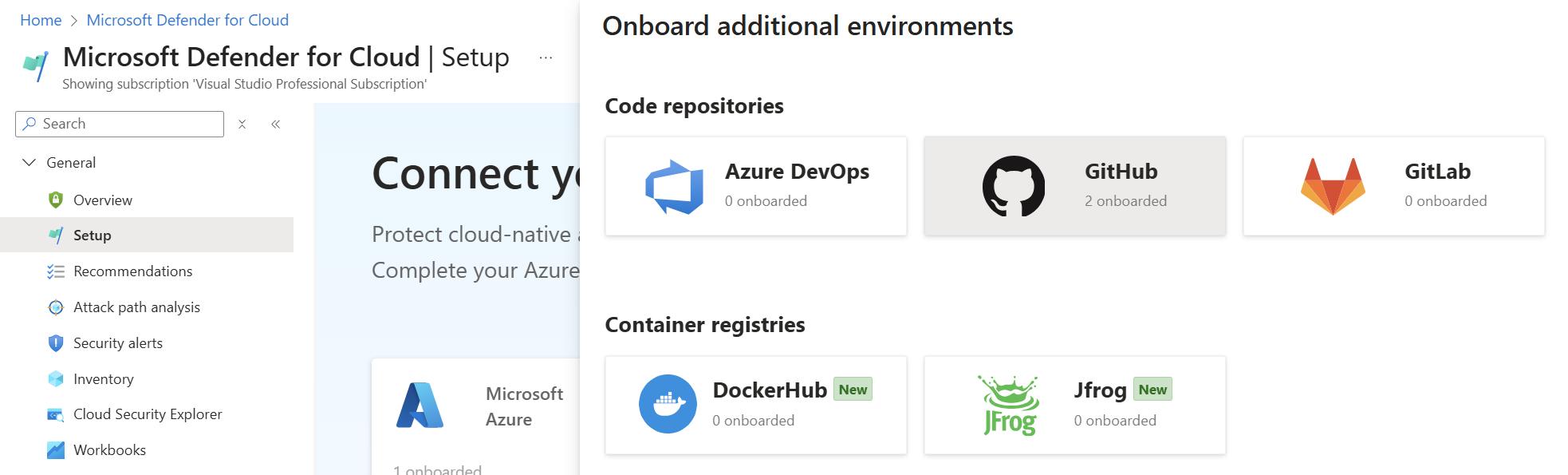
Head to Defender for Cloud (in Azure portal), find Environment Settings, and look for GitHub Connectors. Create a new connection and authenticate with GitHub. This is where the two platforms start talking.
Step 3: Decide What Matters
Configure which code scanning results should bubble up as priority in Defender. You don't need every finding with the same urgency—customize the prioritization so what reaches your security team is actually important.
Step 4: Enable Your Developers
Set up GitHub Actions to run automated remediation suggestions. Enable Copilot Autofix if you're using GitHub Copilot. Configure branch protection so risky code doesn't merge without security review. This turns security from a gate into part of the workflow.
Step 5: Keep Your Eyes Open
Monitor how well this is working. Look at your mean time to remediation (MTTR). Adjust rules if you're seeing noise. Update policies as your organization and threat environment evolve.
That's it. Nothing revolutionary, just sensible security automation.
Best Practices for DevSecOps
1. Integrate Early, Fail Fast
- Enable scanning on new repositories from day one
- Use branch protection rules to catch issues before merge
- Require security reviews for high-risk changes
2. Enable Developers
- Provide security training focused on common vulnerabilities
- Use AI suggestions as teaching opportunities
- Share lessons learned from security incidents
3. Automate Everything Possible
- Automatic scanning on every commit
- Automated remediation suggestions through Copilot
- Automated testing to validate fixes
4. Maintain Context
- Keep security discussions in development tools (GitHub)
- Document security decisions and rationale
- Make security a part of code review culture
5. Measure and Improve
- Track mean time to remediation (MTTR) for vulnerabilities
- Monitor false positive rates and adjust rules accordingly
- Regularly review security metrics and trends
Addressing Common Concerns
"Will this slow down development?"
No, quite the opposite. By catching issues early and providing automated fixes, the integration actually accelerates development:
- Fewer late-stage security findings means fewer rework cycles
- Automated remediation reduces manual security review burden
- Clear prioritization means less time wasted on non-critical issues
"What about false positives?"
GitHub Advanced Security and Defender for Cloud both use runtime context and machine learning to minimize false positives. When correlated together, false positive rates decrease further because:
- Code-level findings are validated against runtime behavior
- Only actually exploitable issues are prioritized
- Historical data improves ML model accuracy over time
"How does this affect compliance?"
The integration improves compliance posture by:
- Creating complete audit trail from vulnerability discovery to remediation
- Enabling policy enforcement at the code level
- Providing evidence of security monitoring and remediation
- Supporting regulatory requirements for secure development practices
"What about legacy applications or on-premises workloads?"
The integration works across hybrid environments:
- On-premises applications can be monitored by Defender for Cloud via Arc
- GitHub repositories can contain code for any platform or technology
- The correlation works regardless of where code runs or how it's deployed
Real-World Implementation Scenarios
Scenario 1: SaaS Company with Rapid Release Cycle
Challenge: Releases happen multiple times per week, and security concerns slow down development
Solution:
- GitHub Advanced Security catches code issues at commit time
- Copilot Autofix suggests remediation automatically
- Developers merge with confidence knowing issues are addressed
- Defender for Cloud provides runtime validation
- Result: No reduction in velocity, improved security posture
Scenario 2: Financial Services Organization
Challenge: Strict compliance requirements and extensive security review processes
Solution:
- Automated code scanning ensures compliance violations are caught early
- Runtime context from Defender shows which vulnerabilities actually pose risk
- Clear audit trail of all security decisions supports compliance audits
- AI-suggested fixes accelerate remediation without compromising quality
- Result: Compliance requirements met with less manual effort
Scenario 3: Enterprise with Complex Supply Chain
Challenge: Multiple teams, multiple vendors, complex dependencies
Solution:
- Centralized visibility in Defender for Cloud across all repositories
- Automated alerts when vulnerable dependencies are introduced
- Coordinated remediation across dependent systems
- Supplier security posture visible in Defender dashboards
- Result: Supply chain risk significantly reduced
Where This Actually Takes You
Let's be direct: this integration represents a fundamental shift in how application security works. You're not just getting two tools talking to each other; you're getting a complete security framework that understands your applications from the moment code is committed through every moment it runs in production.
The practical reality:
- Vulnerabilities get fixed before they become production incidents
- Your development teams stop thinking of security as an obstruction and start seeing it as enablement
- Your security team reduces alert fatigue from thousands of false positives and focuses on what actually matters
- Your organization builds applications that are fundamentally more secure—not because of compliance requirements, but because security is woven into the development process
This is DevSecOps that actually works, powered by cloud-native architecture and AI-assisted remediation. It's not a theoretical best practice; it's what modern application security looks like in 2025.
The unified portal in security.microsoft.com is the control center (covered in Part 1 of this series). Start in Azure portal for configuration. Build your implementation. Then watch as Microsoft rapidly brings parity features to the unified experience. This is where your organization's security operations is headed—one integrated dashboard, complete visibility, and the ability to see threats from code to runtime.
Resources & Next Steps
Want to dive deeper? Here are the resources to get you started:
- Microsoft Ignite 2025 Book of News: The official announcement and context
- Defender for Cloud Documentation: Complete reference guide
- GitHub Advanced Security Documentation: Everything you need to enable and configure GitHub's security features
- DevSecOps Best Practices: Learn the mindset and practices behind this integration
Ready to bring your development and security teams together? Start with the GitHub integration in Defender for Cloud. Connect your first repository. See how code-scanning findings correlate with runtime threats. Experience the difference that unified visibility actually makes.
Your future security operations are waiting—starting with a single integration, expanding to complete visibility, ending with code and runtime threats handled together instead of in silos.

Read Part 1: Defender for Cloud in Unified Security Portal - Understand the complete unified experience and portal transition that makes this integration even more powerful.