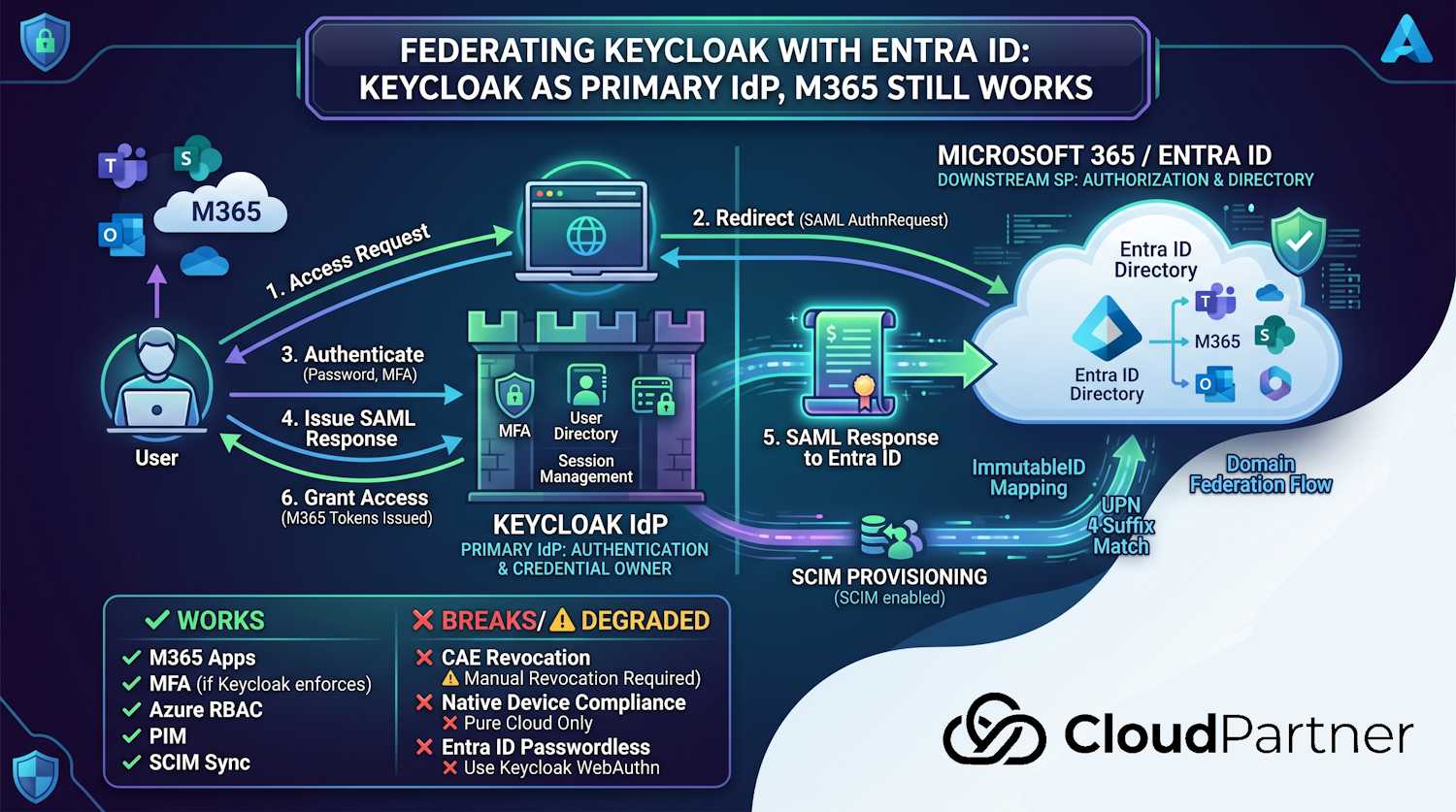
In Part 5 I covered how to federate Keycloak as your primary IdP so Microsoft 365 keeps working — Entra ID delegates authentication to Keycloak, users sign in through Keycloak, and M365 apps get their tokens from Entra ID as usual. That post ended with a caveat: the hybrid design only holds together if Entra ID user objects are kept current. Governance lifecycle workflows, device compliance signals, and sensible access reviews all depend on Entra ID's directory being an accurate reflection of who actually works at your organisation.
So this part is about the provisioning side of that equation: how you get user records into Entra
ID from Keycloak (and keep them up to date),
what attributes matter for Governance to fire correctly,
and what happens at the edges: renames,
leavers,
identity conflicts,
and drift. There's also a specific
anchor problem that catches people out the first time: the SAML NameID from Keycloak has to match
the Entra ID user's onPremisesImmutableId. If those values drift, sign-in fails even
though the user exists in both directories. We'll work through that.
Why federation alone isn't enough
Federation handles the authentication moment. What it doesn't handle is anything that happens before or after that: creating the Entra ID user account, keeping their department and manager correct, disabling them when they leave, or triggering the automated tasks (mailbox provisioning, group membership, license assignment) that Entra ID Governance runs based on identity lifecycle events.
In a standard Entra ID-only deployment, Microsoft Entra Connect Sync (or Microsoft Entra Cloud Sync for hybrid environments) feeds user data from on-premises Active Directory. In a Keycloak-primary setup, there's no native connector from Keycloak to Entra ID — you need to build or configure one.
The main things that break without sync:
- Governance lifecycle workflows don't fire. Joiner, mover,
and leaver workflows in Entra ID Governance trigger on specific attribute values in the Entra ID
user object —
employeeHireDate,employeeLeaveDateTime, andmanager. If those fields aren't being written by your provisioning process, the workflows sit idle. - New users can't sign in. A Keycloak user with no matching Entra ID object can't complete federation-based authentication — there's nobody to issue M365 tokens for.
- Leavers can keep M365 access longer than you expect. CAE helps for supported Microsoft 365 services and clients, but don't treat federation as instant session termination. If you don't disable the Entra ID user object when someone leaves, their existing M365 tokens run until they expire — up to an hour for access tokens, longer for refresh tokens.
- Access reviews are reviewing stale data. If Entra ID still shows someone in the Engineering group three months after they moved to Finance, your access review is reviewing fiction.
The ImmutableID anchor problem
Before covering the sync approaches,
it's worth being clear about an identity anchor
issue you'll hit. The federation setup from Part 5 requires that every Keycloak
user's immutableid attribute matches the corresponding Entra ID
user object's onPremisesImmutableId. Microsoft Graph also expects
onPremisesImmutableId to be supplied when you create a new user whose UPN uses a
federated domain, so don't rely on a create-then-patch flow for new federated users.
The clean pattern is to make Keycloak the source of the anchor. Use a stable Keycloak value, for example the Keycloak user ID or another immutable HR-backed identifier, and write that same value to both places:
- Pick a stable source anchor from Keycloak, such as
kc_user.id - Create the Entra ID user and set
onPremisesImmutableIdin the initial GraphPOST /usersrequest - Store the same value as the
immutableidattribute on the Keycloak user object - Configure the Keycloak SAML NameID mapper to emit that
immutableidvalue
Steps 3 and 4 must happen before the user attempts to sign in via federation. If they don't, the SAML
assertion arrives at Entra ID with a NameID that doesn't match any
onPremisesImmutableId value,
and authentication fails with a generic error.
# Step 1: Use a stable Keycloak user ID as the federation anchor
KC_USER_ID=$(kcadm.sh get users -r $REALM -q email=$UPN --fields id | jq -r '.[0].id')
IMMUTABLE_ID="$KC_USER_ID"

# Step 2: Create the user in Entra ID with onPremisesImmutableId set at creation time
USER_RESPONSE=$(curl -s -X POST "https://graph.microsoft.com/v1.0/users" \
    -H "Authorization: Bearer $GRAPH_TOKEN" \
    -H "Content-Type: application/json" \
    -d '{
        "displayName": "'"$DISPLAY_NAME"'",
        "userPrincipalName": "'"$UPN"'",
        "mailNickname": "'"$MAIL_NICK"'",
        "onPremisesImmutableId": "'"$IMMUTABLE_ID"'",
        "accountEnabled": true,
        "passwordProfile": {
            "password": "'"$(openssl rand -base64 24)"'",
            "forceChangePasswordNextSignIn": false
        }
    }')

# Step 3: Store the same value on the Keycloak user
kcadm.sh update users/$KC_USER_ID \
    -r $REALM \
    -s "attributes.immutableid=[\"$IMMUTABLE_ID\"]"
Important: If you're adopting an existing Entra ID user, don't blindly create a second account. Read the existing object, decide which system owns the anchor, and write the chosen value consistently to both Entra ID and Keycloak. The exact value matters less than stability and a clean one-to-one match.
Two ways to do outbound sync
Once you understand the sequencing requirement, there are two ways to build the ongoing sync:
| Approach | How it works | Pros | Cons |
|---|---|---|---|
| Keycloak SCIM provider plugin | Installs as a Keycloak extension and exposes SCIM endpoints so other systems can provision users into Keycloak | Useful if another identity system is provisioning into Keycloak; standard SCIM protocol | Community-maintained; outbound Keycloak-to-Entra provisioning still needs custom code or version-specific SCIM client support; less control over retry logic |
| Custom sync process (Keycloak Admin API + Graph) | A lightweight service reads Keycloak events or runs periodic polls; writes to Entra ID via Microsoft Graph directly | Full control over ImmutableID handling, ordering, retry logic, and attribute mapping; easier to add custom logic | You build and operate it; more moving parts |
For most organisations I'd lean toward the custom sync process. The ImmutableID anchor step (you pick a stable Keycloak value and write it to both systems) doesn't map cleanly to a standard SCIM flow — SCIM assumes the source of truth already has a stable external identifier. You can work around it with a SCIM adapter that handles the anchor, but at that point you're essentially writing custom code anyway. Might as well have it as a first-class service you understand and control.
Option A: Keycloak SCIM provider plugin
The most widely used community SCIM plugin for Keycloak is scim-for-keycloak by Captain-P-Goldfish. It installs as a Keycloak provider JAR and adds a SCIM 2.0 server endpoint to Keycloak (so other systems can provision into Keycloak). That is useful, but it is not the same as reliable outbound provisioning from Keycloak to Entra ID.
For this use case, you need Keycloak-originated changes to create or update Entra ID users through Microsoft Graph. If your Keycloak version or plugin build has outbound SCIM client support, you still need an adapter that translates SCIM calls into Graph calls and handles the ImmutableID anchor. In many environments, that means you're building the custom sync path anyway.
# Install the plugin — copy JAR to Keycloak providers directory # Check https: //github.com/Captain-P-Goldfish/scim-for-keycloak/releases for latest version
                wget https: //github.com/Captain-P-Goldfish/scim-for-keycloak/releases/download/keycloak-scim-v4.x.x/scim-for-keycloak-kc-24-b1.jar \
                -O /opt/keycloak/providers/scim-for-keycloak.jar # Restart Keycloak to load the provider /opt/keycloak/bin/kc.sh build /opt/keycloak/bin/kc.sh start # After restart, configure the SCIM server connection via Admin Console # Realm Settings → SCIM → Service Provider Configuration # Or via Admin REST API: kcadm.sh create components -r $REALM \
 -s name="entra-scim-target" \
 -s providerId="scim-sdk" \
 -s providerType="de.captaingoldfish.scim.sdk.keycloak.provider.ScimProvider" \
 -s 'config.enabled=["true"]'
Note: The plugin version must match your Keycloak major version. Keycloak has moved aggressively since the Quarkus migration; a JAR built for Keycloak 24 won't load on Keycloak 26. Check the releases page for the build matching your deployed version before installing.
If you do have outbound SCIM available, point it at an adapter endpoint rather than directly at Microsoft Graph. The adapter handles the ImmutableID anchor and the Graph-specific attribute names that don't map 1:1 to SCIM schema.
Option B: Custom sync with the Keycloak Admin API and Graph
The custom sync approach gives you explicit control over every step. The basic shape of the service is:
- Subscribe to Keycloak Admin Events (via the Events API or webhook extension)
- On
USER_CREATE: get the Keycloak user ID, create the Entra ID user withonPremisesImmutableIdset, then write the same anchor back to Keycloak - On
USER_UPDATE: PATCH the Entra ID user object with changed attributes - On
USER_DELETEor group membership change (leaver flow): disable the Entra ID user, setemployeeLeaveDateTime, revoke sessions
# !/usr/bin/env python3 "" "
 Minimal Keycloak → Entra ID sync handler. Reads Keycloak Admin Events and applies changes via Microsoft Graph. Run as a webhook endpoint or polled worker. "" "
 import uuid, base64, os, requests from datetime import datetime, timezone GRAPH_TOKEN_ENDPOINT=f"https://login.microsoftonline.com/{os.environ['TENANT_ID']}/oauth2/v2.0/token"

                KEYCLOAK_BASE=os.environ['KEYCLOAK_URL'] REALM=os.environ['KEYCLOAK_REALM'] def get_graph_token(): resp=requests.post(GRAPH_TOKEN_ENDPOINT, data= {
                        "grant_type": "client_credentials",
                        "client_id": os.environ['GRAPH_CLIENT_ID'],
                        "client_secret": os.environ['GRAPH_CLIENT_SECRET'],
                        "scope": "https://graph.microsoft.com/.default",
                    }) resp.raise_for_status() return resp.json()["access_token"] def provision_user(kc_user: dict, token: str): "" "Provision with a Keycloak-owned ImmutableID anchor." ""

                headers= {
                    "Authorization": f"Bearer {token}", "Content-Type": "application/json"
                }

                upn=kc_user["email"] # must use the federated domain immutable_id=kc_user["id"] # stable Keycloak source anchor # Step 1: Create user in Entra ID payload= {

                    "displayName": f"{kc_user.get('firstName', '')} {kc_user.get('lastName', '')}" .strip(),
                    "userPrincipalName": upn,
                    "mailNickname": upn.split("@")[0],
                    "onPremisesImmutableId": immutable_id,
                    "accountEnabled": kc_user.get("enabled", True),
                    "department": kc_user.get("attributes", {}).get("department", [None])[0],
                "jobTitle": kc_user.get("attributes", {}).get("jobTitle", [None])[0],
            "employeeHireDate": kc_user.get("attributes", {}).get("employeeHireDate", [None])[0],
        # Temporary random password — users authenticate via federation, not password "passwordProfile": {
            "password": base64.b64encode(os.urandom(24)).decode(),
            "forceChangePasswordNextSignIn": False,
        }

        ,
        }

        # Remove None values payload= {
            k: v for k, v in payload.items() if v is not None
        }

        r=requests.post("https://graph.microsoft.com/v1.0/users", json=payload, headers=headers) r.raise_for_status() entra_guid=r.json()["id"] # Step 2: Write the same ImmutableID to Keycloak user attributes kc_token=get_kc_admin_token() requests.put(f"{KEYCLOAK_BASE}/admin/realms/{REALM}/users/{kc_user['id']}",
            json= {
                "attributes": {
                    **kc_user.get("attributes", {}), "immutableid": [immutable_id]
            }
        }

        ,
        headers= {
            "Authorization": f"Bearer {kc_token}", "Content-Type": "application/json"
        }

        ,
        ).raise_for_status() return entra_guid, immutable_id def update_user(entra_guid: str, kc_user: dict, token: str): "" "Sync changed attributes to Entra ID user object." ""

        headers= {
            "Authorization": f"Bearer {token}", "Content-Type": "application/json"
        }

        patch= {}

        attrs=kc_user.get("attributes", {}) if "department" in attrs: patch["department"]=attrs["department"][0] if "jobTitle" in attrs: patch["jobTitle"]=attrs["jobTitle"][0] if "employeeHireDate" in attrs: patch["employeeHireDate"]=attrs["employeeHireDate"][0] if "employeeLeaveDateTime" in attrs: patch["employeeLeaveDateTime"]=attrs["employeeLeaveDateTime"][0] if not kc_user.get("enabled", True): patch["accountEnabled"]=False if patch: r=requests.patch(f"https://graph.microsoft.com/v1.0/users/{entra_guid}",
            json=patch, headers=headers) r.raise_for_status() def get_kc_admin_token() -> str: r=requests.post(f"{KEYCLOAK_BASE}/realms/master/protocol/openid-connect/token",
            data= {
                "grant_type": "client_credentials",
                "client_id": os.environ['KC_ADMIN_CLIENT_ID'],
                "client_secret": os.environ['KC_ADMIN_CLIENT_SECRET'],
            }) r.raise_for_status() return r.json()["access_token"]
Attribute mapping for Governance lifecycle workflows
Entra ID Governance's lifecycle workflows won't fire unless the right attributes are present and correctly formatted on the user object. These are the ones that actually matter:
| Workflow trigger | Entra ID attribute | Format | Keycloak source |
|---|---|---|---|
| Joiner (new hire) | employeeHireDate |
ISO 8601 with time and UTC offset —
2026-05-01T00:00:00Z |
Custom user attribute; populate from your HR system |
| Mover (role/org change) | manager,
department, jobTitle |
Use Graph manager relationship
endpoint (PUT /users/ {
id
}
/manager/$ref) with @odata.id |
Keycloak doesn't model manager natively; store manager's UPN as a custom attribute |
| Leaver (offboarding) | employeeLeaveDateTime
|
ISO 8601 UTC —
2026-06-30T17:00:00Z |
Set when a leaver date is known; Governance triggers pre-offboarding tasks N days before |
A few things that will silently fail if you get the formatting wrong:
employeeHireDateandemployeeLeaveDateTimemust be full ISO 8601 datetime strings with a timezone offset. A bare date like2026-05-01gets rejected by Graph with a validation error. Use2026-05-01T00:00:00Z.- The
managerrelationship uses a dedicated endpoint, not a simple string field. UsePUT /users/{id}/manager/$refwith body{"@odata.id":"https://graph.microsoft.com/v1.0/users/{managerUpnOrId}"}. - Lifecycle workflow execution depends on the workflow being enabled and the user
matching the workflow's scope conditions
(department, employee type). If your user objects don't have
employeeTypeset, a workflow scoped to "employees only" won't match.
# Set manager relationship via Graph (recommended endpoint)
curl -s -X PUT "https://graph.microsoft.com/v1.0/users/$USER_GUID/manager/$ref" \
  -H "Authorization: Bearer $GRAPH_TOKEN" \
  -H "Content-Type: application/json" \
  -d '{
    "@odata.id": "https://graph.microsoft.com/v1.0/users/'"$MANAGER_UPN"'"
  }'

# Update additional profile attributes
curl -s -X PATCH "https://graph.microsoft.com/v1.0/users/$USER_GUID" \
  -H "Authorization: Bearer $GRAPH_TOKEN" \
  -H "Content-Type: application/json" \
  -d '{
    "department": "'"$DEPT"'",
    "jobTitle": "'"$TITLE"'",
    "employeeHireDate": "'"$HIRE_DATE_UTC"'",
    "employeeType": "Employee"
  }'
The offboarding runbook
Offboarding under federated auth has more steps than in a native Entra ID deployment, because you're managing two systems and CAE behavior can vary across clients and services, so handle real-time session termination. Here's the full sequence:
# !/usr/bin/env bash # Offboarding runbook: disable a user in both Keycloak and Entra ID # Run with: ./offboard.sh anna@corp.example.fi UPN="$1"
        REALM="corp"

        echo "=== Offboarding $UPN ==="

        # Step 1: Disable the user in Keycloak (stops new authentications immediately) KC_USER_ID=$(kcadm.sh get users -r $REALM -q email=$UPN --fields id | jq -r '.[0].id') kcadm.sh update users/$KC_USER_ID -r $REALM -s enabled=false echo "✓ Disabled in Keycloak (ID: $KC_USER_ID)"

        # Step 2: Disable the user in Entra ID (stops new tokens from being issued) ENTRA_ID=$(curl -s "https://graph.microsoft.com/v1.0/users/$UPN?\\$select=id" \
 -H "Authorization: Bearer $GRAPH_TOKEN" | jq -r '.id') curl -s -X PATCH "https://graph.microsoft.com/v1.0/users/$ENTRA_ID" \
 -H "Authorization: Bearer $GRAPH_TOKEN" \
 -H "Content-Type: application/json" \
 -d '{"accountEnabled": false}'
        echo "✓ Disabled in Entra ID (ID: $ENTRA_ID)"

                # Step 3: Revoke all active Entra ID sessions (session revocation should be done explicitly)
curl -s -X POST "https://graph.microsoft.com/v1.0/users/$ENTRA_ID/revokeSignInSessions" \
    -H "Authorization: Bearer $GRAPH_TOKEN" \
    -H "Content-Length: 0"
echo "✓ Revoked Entra ID sign-in sessions"

# Step 4: Set employeeLeaveDateTime for Governance leaver workflow
LEAVE_DATE=$(date -u +"%Y-%m-%dT%H:%M:%SZ")
curl -s -X PATCH "https://graph.microsoft.com/v1.0/users/$ENTRA_ID" \
    -H "Authorization: Bearer $GRAPH_TOKEN" \
    -H "Content-Type: application/json" \
    -d "{\"employeeLeaveDateTime\": \"$LEAVE_DATE\"}"
echo "✓ Set employeeLeaveDateTime ($LEAVE_DATE)"

# Step 5 (optional): Remove M365 licenses immediately
# Licenses auto-reclaim after grace period, but you may want to free them now
# List and remove assigned licenses here if needed

echo "=== Offboarding complete for $UPN ==="
Heads up: revokeSignInSessions invalidates existing refresh tokens
and session cookies, but access tokens issued before revocation can still be used until they
expire (normally 60–90 minutes, with variation by client and resource). CAE can enforce
supported events near real time for CAE-capable services like Exchange Online, SharePoint
Online, and Teams, but it isn't a blanket guarantee for every client flow. Your risk acceptance
here should be documented: a leaver's M365 access can persist until the current access token is
no longer accepted.
Edge cases worth planning for
UPN changes (name changes and restructuring)
If a user's name changes — marriage, legal name change, rebranding — their
UPN typically changes too (from anna.virtanen@corp.example.fi to
anna.makinen@corp.example.fi). In Entra ID, UPN is mutable and can be updated via
Graph. The federation link is maintained through the ImmutableID, not the UPN, so the
federation itself doesn't break
as long as the ImmutableID stays constant. The steps are:
- Update the UPN in Entra ID:
PATCH /users/ { id }with{"userPrincipalName":"new@corp.example.fi"} - Update the UPN in Keycloak (username and email)
- Do not change the
immutableidattribute in Keycloak — this must remain stable throughout the user's lifecycle
Order matters: update Entra ID first, then Keycloak. If someone signs in with the old UPN during the switchover, they get the Keycloak login page (because the domain is still federated). If Keycloak still has the old username, they can authenticate successfully — the ImmutableID match will still work and Entra ID will issue tokens for the updated user object. So there's a brief window where both UPNs work, which is usually fine.
Identity conflicts (duplicate email addresses)
If a user exists in Entra ID with the same UPN you're trying to provision
from Keycloak, Graph will reject the POST /users with a 409 Conflict. This
happens when someone was manually provisioned in Entra ID before the sync was set up, or when a
rehire joins with a UPN that was previously used.
The right response depends on the case:
- Pre-existing manual account for the same person: Don't create a new user. Instead, choose the anchor you want to keep, write it to the existing Entra ID user and the Keycloak user. The existing account gets "adopted" by the sync process.
- Soft-deleted user (same UPN, different person): The UPN may be in use by a
deleted user in the Entra ID recycle bin. Hard-delete the old object first, then create the new
one. Graph:
DELETE /directory/deletedItems/{id}for permanent deletion. - Rehire with the same UPN: Treat as adoption if the same person is returning. Create a new user and new ImmutableID if it's a coincidental UPN reuse.
Drift detection
Even a well-built sync process will drift over time — failed retries, manual changes in either system, edge cases in the event pipeline. A periodic reconciliation pass is worth running, especially for the attributes that Governance depends on.
# Drift check: compare Keycloak users against Entra ID objects
        # Flags users where immutableid in Keycloak doesn't match onPremisesImmutableId in Entra ID
        KC_USERS=$(kcadm.sh get users -r $REALM --fields id, username, attributes | \
            jq -r '.[] | [.username, (.attributes.immutableid[0] // "MISSING")] | @tsv')

        echo "Checking ImmutableID alignment..."

        while IFS=$'\t' read -r upn kc_immid; do
            entra_immid=$(curl -s \
                "https://graph.microsoft.com/v1.0/users/${upn}?\\$select=onPremisesImmutableId" \
                -H "Authorization: Bearer $GRAPH_TOKEN" | jq -r '.onPremisesImmutableId // "NOT_FOUND"')

            if [[ "$kc_immid" != "$entra_immid" ]]; then
                echo "DRIFT: $upn — Keycloak: $kc_immid | Entra ID: $entra_immid"
            fi
        done <<< "$KC_USERS"
Where this leaves you
At this point in the series you have the full provisioning and federation picture: Keycloak as your EU-controlled IdP, M365 accessing via federated auth, and a sync process keeping Entra ID's directory current enough for Governance workflows and access reviews to function. The authentication credential — the password, the MFA device, the session token — lives in Keycloak, under your control, on infrastructure you operate.
What's left unaddressed is the operational side of running this setup long-term. The SAML signing certificate in Keycloak has an expiry date. The federation configuration in Entra ID references that specific certificate. When you rotate it — which you must, eventually — there's a careful sequence to follow or you break M365 authentication for everyone at once. And when something goes wrong mid-rotation, or when Keycloak goes down during working hours, you need a break-glass procedure that doesn't require calling Microsoft support.
In Part 7 I'll cover the operational hardening: certificate rotation without an outage, monitoring the federation health, Conditional Access policies that hold up under federation, and a break-glass pattern for when Keycloak is unavailable but your team still needs M365 access.
Archives
Share this: