


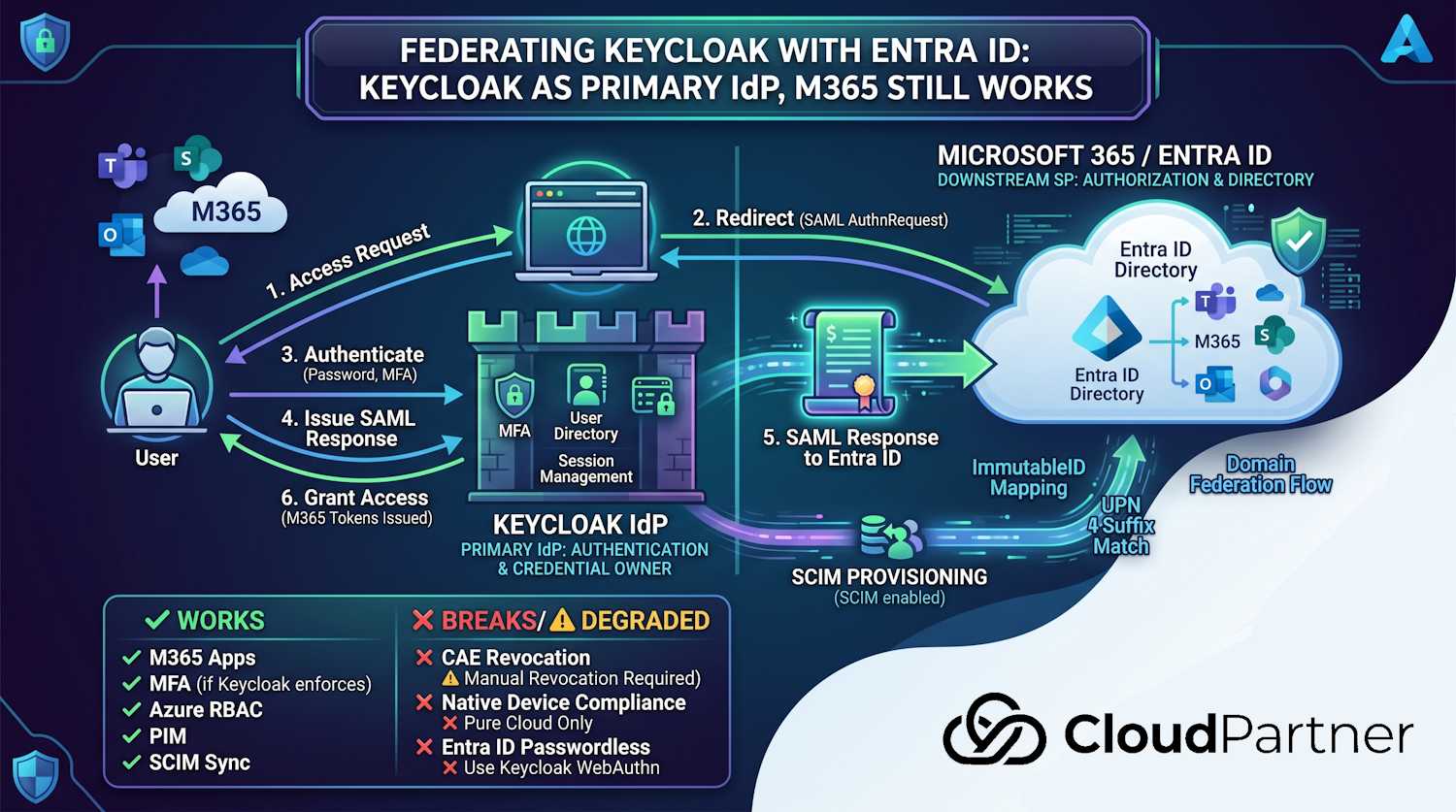
In Part 4 I covered the three identity options — Entra ID, Entra External ID, and Red Hat Keycloak — and where each one makes sense. One of the nuances I flagged was that if you're moving workforce identity to Keycloak but you're still running Microsoft 365, you can't just unplug Entra ID. Teams, SharePoint, Exchange Online, Intune — they're all anchored to Entra ID as the identity backbone. But that doesn't mean you're stuck with Entra ID as your authoritative identity source.
The pattern that actually works in practice: Keycloak as your primary IdP (the thing that authenticates users and owns the identity record), with Entra ID as a downstream service provider that trusts SAML assertions from Keycloak. Your organisation's users authenticate through Keycloak, and Entra ID gets a signed token it trusts — so M365 keeps working. This is called domain federation or external federation in Entra ID terminology.
So that in mind, this post covers what the architecture actually looks like, how to set it up end-to-end with real commands, and — importantly — what degrades or breaks when you're no longer doing native Entra ID authentication. That last part tends to get omitted, which leads to unpleasant surprises post-migration.
The Architecture: How the Pieces Fit
The standard pattern is Entra ID domain federation. Here's what happens at a high level:
- Your Entra ID tenant's custom domain (e.g.,
corp.example.fi) is converted from "managed" to "federated". This tells Entra ID that authentication for users with that domain suffix should be handled externally. - Entra ID stores the metadata for your external IdP (the SAML signing certificate and endpoint URLs) so it knows where to redirect authentication requests and how to validate the responses.
- When a user signs into a Microsoft 365 app with
user@corp.example.fi, Entra ID detects the federated domain and redirects them to your Keycloak sign-in page. - The user authenticates in Keycloak. Keycloak issues a SAML Response signed with its SP key, sending the user's UPN back to Entra ID.
- Entra ID validates the signature, finds the matching user record (by UPN or
ImmutableID), and issues tokens for the M365 application.
The user record still exists in Entra ID — you're not removing it. Entra ID is still the directory that M365 uses for authorisation (groups, licenses, SharePoint permissions). You're just replacing the authentication step with an external one. Entra ID becomes a flat directory that trusts your Keycloak for login.
A few things to get clear before diving into setup:
- ImmutableID matters: For federated users, Entra ID compares the SAML
NameIDfrom Keycloak with the user'sonPremisesImmutableId. Use a stable source anchor, such as the Keycloak user ID, set it on the Entra ID user during provisioning, and map the same value into the SAML assertion. Don't derive it from the Entra ID object GUID in a new pure-cloud federation design. - UPN suffix must match the federated domain: The UPN in Entra ID
(e.g.,
anna@corp.example.fi) must use the domain you're federating. The default.onmicrosoft.comdomain can't be federated — Microsoft requires at least one verified custom domain. - You can federate one domain at a time: If your tenant has multiple custom domains, you can choose to federate some and leave others managed. Good for phased migrations or multi-entity tenants.
Configuring Keycloak as a SAML IdP
On the Keycloak side, you're creating a SAML service provider (SP) configuration that represents Entra ID. Entra ID will be the relying party; Keycloak is the IdP that handles authentication and returns signed assertions.
Step 1: Create a SAML Client in Keycloak
Log in to the Keycloak Admin Console for your realm. Create a new Client with the following settings (these match Entra ID's SAML federation requirements):
# Keycloak Admin CLI (kcadm.sh) — run from within the Keycloak pod or container
# Set your realm name
REALM="corp"

# Create the SAML client representing Entra ID
kcadm.sh create clients -r $REALM -s clientId="urn:federation:MicrosoftOnline" \
  -s protocol=saml \
  -s enabled=true \
  -s "redirectUris=[\"https://login.microsoftonline.com/login.srf\"]" \
  -s "attributes.saml_name_id_format=urn:oasis:names:tc:SAML:2.0:nameid-format:persistent" \
  -s "attributes.saml.force.name.id.format=true" \
  -s "attributes.saml.authn.statement=true" \
  -s "attributes.saml.server.signature=true" \
  -s "attributes.saml.signing.certificate=true"
The clientId must be exactly urn:federation:MicrosoftOnline —
that's the entity ID Entra ID uses when it sends the AuthnRequest.
Step 2: Add the ImmutableID Mapper
The SAML assertion's NameID must carry the user's onPremisesImmutableId.
The simplest approach is to store the chosen stable source anchor as a
custom attribute on the Keycloak user object (immutableid), set the same
value on the Entra ID user during provisioning, then map it
into the assertion.
# Add a User Attribute mapper for the NameID
kcadm.sh create clients/$CLIENT_ID/protocol-mappers/models -r $REALM \
  -s name="immutableid-nameid" \
  -s protocol=saml \
  -s protocolMapper=saml-user-attribute-mapper \
  -s "config.\"user.attribute\"=immutableid" \
  -s "config.\"attribute.name\"=NameID" \
  -s "config.\"attribute.nameformat\"=Basic" \
  -s "config.\"friendly.name\"=ImmutableID"
Important: The
immutableidattribute must be populated on every Keycloak user that will sign into M365. In this design, the value should come from the Keycloak-owned anchor used by your provisioning flow, and Microsoft Graph should set it asonPremisesImmutableIdwhen the Entra ID user is created. For hybrid-synced users, the value is already set inonPremisesImmutableId.
Step 3: Export the Keycloak Signing Certificate
Entra ID needs Keycloak's public signing certificate to validate the SAML Response. Get it from the Keycloak realm's SAML metadata endpoint:
# Download Keycloak's SAML signing certificate
curl -s "https://keycloak.corp.example.fi/realms/corp/protocol/saml/descriptor" \
  | grep -oP '(?<=<ds:X509Certificate>)[^<]+' \
  | head -1 \
  | sed 's/.\{64\}/&\n/g' \
  | awk 'BEGIN{print "-----BEGIN CERTIFICATE-----"} {print} END{print "-----END CERTIFICATE-----"}' \
  > keycloak-signing.pem
Configuring Domain Federation in Entra ID
Now the Entra ID side. You're converting your custom verified domain from managed
(Entra ID handles auth) to federated (external IdP handles auth). This is done via
Microsoft Graph — the older Set-MsolDomainAuthentication PowerShell
cmdlet works but is part of the deprecated MSOnline module. Use Graph where you
can.
Prerequisites check
# Check that your custom domain is verified and currently managed
Connect-MgGraph -Scopes "Domain.ReadWrite.All"

Get-MgDomain | Select-Object Id, AuthenticationType, IsVerified | Format-Table
# Look for your domain with AuthenticationType = Managed and IsVerified = True
# If it shows Federated already, it was previously configured
Set the domain to federated
# Variables — fill in your values
$domain          = "corp.example.fi"
$issuerUri       = "https://keycloak.corp.example.fi/realms/corp"
$metadataUrl     = "https://keycloak.corp.example.fi/realms/corp/protocol/saml/descriptor"
$passiveSignInUrl = "https://keycloak.corp.example.fi/realms/corp/protocol/saml"
$signingCert     = (Get-Content keycloak-signing.pem | Where-Object { $_ -notmatch "---" }) -join ""

# Build the federation settings body
$body = @{
    issuerUri                            = $issuerUri
    metadataExchangeUri                  = $null
    passiveSignInUri                     = $passiveSignInUrl
    preferredAuthenticationProtocol      = "saml"
    signingCertificate                   = $signingCert
    isSignedAuthenticationRequestRequired = $false
} | ConvertTo-Json

# POST to Graph to configure federation
Invoke-MgGraphRequest -Method POST `
  -Uri "https://graph.microsoft.com/v1.0/domains/$domain/federationConfiguration" `
  -Body $body `
  -ContentType "application/json"
When you set a domain to federated, all users with that UPN suffix immediately start being redirected to Keycloak on their next sign-in. There's no gradual rollout — it's a binary switch for the whole domain. Test this on a non-production domain first, or create a test domain alias (e.g.,
corp-test.example.fi) before cutting over production users.
Verify the federation configuration
# Check the domain's authentication type
Get-MgDomain -DomainId $domain | Select-Object Id, AuthenticationType

# Retrieve the federation configuration to confirm settings
Invoke-MgGraphRequest -Method GET `
  -Uri "https://graph.microsoft.com/v1.0/domains/$domain/federationConfiguration"
Testing end-to-end
# Quick sign-in test using a Graph token — authenticates through the federation
# Open this in a private browser window to force a fresh sign-in
$testUrl = "https://login.microsoftonline.com/<your-tenant-id>/oauth2/v2.0/authorize?" +
           "client_id=00000002-0000-0000-c000-000000000000" +
           "&response_type=token" +
           "&redirect_uri=https%3A%2F%2Flogin.microsoftonline.com%2Fcommon%2Foauth2%2Fnativeclient" +
           "&scope=openid" +
           "&login_hint=anna@corp.example.fi"
Start-Process $testUrl
When you open this link, Entra ID should redirect you to Keycloak's sign-in page. After authenticating in Keycloak, you should land back in the Entra ID session. If you see Entra ID's own login page instead, the domain federation isn't applied yet or the UPN doesn't match the federated domain.
What Keeps Working
The good news: for the core M365 experience, federation is surprisingly transparent to end users.
Standard M365 app access
Teams, SharePoint Online, Exchange Online, OneDrive, Outlook on the web — all of these work. The user signs in through Keycloak, gets redirected back to Entra ID with a valid SAML assertion, and Entra ID issues OAuth 2.0 tokens for the M365 applications as normal. From the app's perspective, nothing changed. Groups, SharePoint permissions, Teams channel memberships, Exchange mailboxes — all still controlled through Entra ID objects.
Azure RBAC and subscription access
Works fine. RBAC authorisation is still Entra ID's job. Authentication is delegated to Keycloak, but role assignments, subscription access, and resource group permissions all live in Entra ID as before. So an engineer who authenticates through Keycloak can still access their Azure subscriptions with the same roles they had before.
App registrations and first-party OAuth flows
Applications registered in Entra ID (app registrations) that use delegated user flows work with federation, as long as the user can successfully authenticate through Keycloak and come back with a valid SAML assertion. The app's access token and refresh token are issued by Entra ID as usual. Applications that use the on-behalf-of flow or client credentials (M2M, no user involved) are not affected — those don't go through the federated auth path at all.
MFA — but Keycloak's, not Entra's
If Keycloak enforces MFA (which it should), users complete MFA during the Keycloak
authentication step. Entra ID will see the completed authentication and — if Keycloak
includes the correct AuthnContextClassRef claim in the SAML assertion
indicating multi-factor authentication — Entra ID's Conditional Access policies that
require MFA will be satisfied. The assertion needs to include
urn:oasis:names:tc:SAML:2.0:ac:classes:MultiFactor (the correct
SAML standard class) or the Microsoft-specific claim
http://schemas.microsoft.com/claims/multipleauthn.
Note: urn:oasis:names:tc:SAML:2.0:ac:classes:MFA is not a
recognised SAML class — Entra ID will ignore it. Use
MultiFactor or the Microsoft claim URI.
What Actually Breaks (or Degrades)
This is the section that matters. I want to be direct about what you're trading away, because these aren't edge cases — several of them affect enterprise deployments meaningfully.
1. Continuous Access Evaluation stops working
Continuous Access Evaluation (CAE) is one of Entra ID's better security features from the last few years. It lets Entra ID push a real-time revocation signal to participating applications (Exchange Online, Teams, SharePoint) — so when a user is disabled, their active sessions in those apps are cut off within minutes rather than waiting for the token to expire (normally up to an hour). This doesn't work under domain federation. CAE depends on Entra ID as the issuing authority evaluating current user state on every token refresh. With a federated domain, Entra ID isn't doing live evaluation of the user's authentication state — it issued the session based on Keycloak's assertion and then largely trusts it. If you disable a user in Keycloak, their active M365 sessions continue until the Entra ID access tokens expire.
The workaround is to disable the user in both Keycloak and Entra ID, and
explicitly revoke sessions via Graph
(POST /users/{id}/revokeSignInSessions). That's a manual step you'll
want in your offboarding runbook.
2. Entra ID Conditional Access loses device compliance signals
Conditional Access policies that require device compliance (Intune-managed, compliant device) evaluate those signals at the Entra ID token issuance layer. When a user authenticates through a federated domain, Entra ID doesn't perform its own interactive authentication — the SAML assertion arrives and Entra ID processes it. Entra ID can evaluate some signals from the assertion context (IP address, whether MFA was claimed), but the native device compliance check requires the device to present its authentication via Entra ID's own authentication flows, not via a federated SAML assertion.
In practice: policies requiring compliant device will fail for federated users unless you're also doing Entra ID hybrid join (Microsoft Entra Connect Sync) alongside the federation, and the device presents a Primary Refresh Token (PRT). Hybrid-joined devices can still get PRTs, so if you're in a hybrid environment with AD Connect running, device compliance works. Pure cloud-only with Keycloak federation and no Intune hybrid join — device compliance signals are gone.
3. Entra ID Governance JML workflows won't fire
Lifecycle workflows in Entra ID Governance (joiner, mover, leaver automations) are triggered on changes to the Entra ID user object's attributes — department, manager, employment start/end dates, job title. If your authoritative HR/identity source is Keycloak and you're not syncing attribute changes back into Entra ID user objects, those workflows won't trigger. The Entra ID user object needs to be kept current for Governance to function — which means you need a process to push relevant attributes from Keycloak (or your upstream HR system) into Entra ID via Graph.
4. passwordless and FIDO2 (passkeys) through Entra ID don't work
Entra ID's passwordless authentication — Windows Hello for Business, FIDO2 security keys, the Microsoft Authenticator app as a passwordless method — depends on Entra ID handling the interactive authentication. With domain federation, Entra ID forwards authentication to Keycloak; it's no longer evaluating the Windows Hello credential or FIDO2 assertion. If your security strategy depends on hardware-bound passkeys via Entra ID, you'd need to either implement FIDO2 directly in Keycloak (via Keycloak's built-in WebAuthn Authenticator, available in current Keycloak releases) or accept that passwordless only works for non-federated domains.
5. Seamless SSO and modern authentication edge cases
Entra ID Seamless SSO allows Windows domain-joined machines to authenticate silently (Kerberos ticket via AD) without a login prompt. This is an on-premises AD feature that works alongside Entra ID sync. It doesn't apply to Keycloak federation — if you want silent SSO for Windows machines, you'd implement Kerberos federation directly in Keycloak (Keycloak supports this via the Kerberos/SPNEGO authenticator) rather than relying on Entra ID's Seamless SSO mechanism.
6. Access reviews and entitlement management lose some automation
Entra ID Governance's access reviews can still run — they review Entra ID group memberships and app assignments, so as long as those objects exist in Entra ID the reviews work. What you lose is any automation that's triggered by identity lifecycle events happening in your federated IdP. Entitlement management's connected organisation feature (auto-granting external users access via a pre-approved package) still functions for guest users, but internal federated users won't benefit from new entitlement request flows that require Entra ID native auth.
Summary: What Changes Under Federation
| Feature / Behaviour | Native Entra ID auth | Federated via Keycloak |
|---|---|---|
| M365 apps (Teams, SharePoint, Exchange) | ✓ Works | ✓ Works |
| Azure RBAC and subscription access | ✓ Works | ✓ Works |
| MFA (if Keycloak enforces it) | ✓ Entra ID MFA | ✓ Keycloak MFA (claimed in assertion) |
| Conditional Access — IP/location policies | ✓ Works | ⚠ Works (evaluated on assertion context) |
| Conditional Access — device compliance | ✓ Works | ✗ Breaks (unless hybrid joined with AD Connect) |
| Continuous Access Evaluation (CAE) | ✓ Works | ✗ Does not work |
| Windows Hello for Business / FIDO2 via Entra | ✓ Works | ✗ Breaks (use Keycloak WebAuthn instead) |
| Entra ID Seamless SSO (Kerberos) | ✓ Supported | ⚠ Use Keycloak SPNEGO directly |
| Entra ID Governance lifecycle workflows | ✓ Works | ⚠ Only if Entra ID attributes are kept in sync |
| Access reviews (group membership) | ✓ Works | ✓ Works (reviews Entra ID groups, not Keycloak state) |
| Entra ID PIM for Azure roles | ✓ Works | ✓ Works (PIM operates on Entra ID objects) |
| Real-time session revocation (disable user → kill M365) | ✓ <1 min via CAE | ✗ Manual — must call revokeSignInSessions in Graph |
The Hybrid Design That Actually Works in Practice
From what I've seen in real deployments, the organisations that make this work well don't try to do everything through federation. They split responsibilities cleanly:
- Keycloak handles all authentication: login flows, MFA, password policy, session management, and token signing. This is the part you want under EU jurisdiction and your control.
- Entra ID owns the M365 directory and authorisation layer: groups, licenses, SharePoint permissions, Intune enrollment, and Azure RBAC. These stay in Entra ID and are synced from your authoritative attribute source (HR system, Keycloak attributes via SCIM provisioning, or a custom sync process).
- SCIM provisioning from Keycloak to Entra ID keeps user objects current: new hires get created, leavers get disabled, and attribute changes (department, manager) propagate. This triggers Governance lifecycle workflows. Keycloak has a SCIM provider plugin for outbound provisioning; alternatively you write a lightweight sync process that reads Keycloak's Admin API and writes to Microsoft Graph.
- Custom apps talk to Keycloak directly via OIDC and never touch Entra ID. Their tokens are issued by Keycloak, signed with keys in your HSM or Keycloak's own key store, and validated by the app against Keycloak's JWKS endpoint. No US cloud in the authentication path.
- The M365 surface uses federated auth through Keycloak, with Entra ID remaining the directory and authorisation layer. Authentication moves to EU jurisdiction; Entra ID stays in the M365 path for authorisation.
This isn't a pure-sovereignty design. If your requirement is that no US-operated infrastructure touches any part of your identity flow, federation with Entra ID doesn't satisfy that — Entra ID is still processing the SAML assertion and issuing M365 tokens. What it does achieve is moving authentication (and the credential store, session management, MFA) out of Entra ID's control while keeping the M365 surface functional.
For most organisations that have landed here from a genuine sovereignty concern rather than a "we must not touch anything American" policy position, this hybrid is a reasonable place to be. You control how users authenticate. You control the token signing keys. You control the session policy. The M365 apps they use are still US-operated (that's just the reality of using Teams and Exchange Online), but the identity layer is yours.
Keeping Entra ID in Sync via SCIM
For the hybrid design to work properly — especially for Governance lifecycle workflows and access reviews — Entra ID user objects must reflect current state from your authoritative source. Entra ID supports inbound SCIM provisioning via its Inbound Provisioning API, which writes directly to user objects from an external SCIM provider.
# Example: sync a user from Keycloak to Entra ID via Microsoft Graph SCIM-compatible endpoint
# Use a Managed Identity or Service Principal with User.ReadWrite.All on Graph

# Create or update a user in Entra ID from Keycloak attributes
curl -s -X PATCH "https://graph.microsoft.com/v1.0/users/$(UPN)" \
  -H "Authorization: Bearer $GRAPH_TOKEN" \
  -H "Content-Type: application/json" \
  -d '{
    "displayName": "'"$DISPLAY_NAME"'",
    "department": "'"$DEPT"'",
    "jobTitle": "'"$TITLE"'",
    "manager@odata.bind": "https://graph.microsoft.com/v1.0/users/'"$MANAGER_UPN"'",
    "employeeHireDate": "'"$HIRE_DATE"'",
    "accountEnabled": '"$ENABLED"'
  }'
Note: Entra ID's Lifecycle Workflows in Governance trigger on attribute presence and change — specifically on
employeeHireDate(joiner),managerchange (mover), andemployeeLeaveDateTime(leaver). If these attributes aren't being populated from your HR/Keycloak sync, the automated workflows won't fire. The sync process needs to write these fields for Governance to do its job.
Keycloak's SCIM provider plugin (maintained by the community; also available in some Red Hat builds) can be configured to push user create, update, and delete events from Keycloak to an external SCIM endpoint. Entra ID's inbound provisioning endpoint accepts standard SCIM 2.0 calls, so this is the most direct integration path for keeping both directories aligned.
Where This Leads
The pattern I've described here — Keycloak as primary IdP, Entra ID as the M365 directory with a federated domain — is the closest you can get to EU sovereignty for identity while keeping Microsoft 365 operational. It's not frictionless. You carry the operational responsibility for Keycloak, the federation configuration, the SCIM sync, and the manual session revocation process that replaces CAE. But for organisations where the sovereignty requirement is real and the M365 dependency isn't going away, it's a workable architecture.
What it does most clearly is move the credential and session layer to the EU. Your users' passwords, MFA devices, session tokens, and signing keys sit in Keycloak running on infrastructure you operate or contract with an EU provider. Entra ID becomes a downstream consumer of that identity rather than the source of truth.
In the next part of this series, I'll cover the SCIM federation pattern in more depth — specifically the Keycloak-to-Entra ID provisioning flow, managing attribute mapping, and handling edge cases like user renames and identity conflicts between the two directories.