


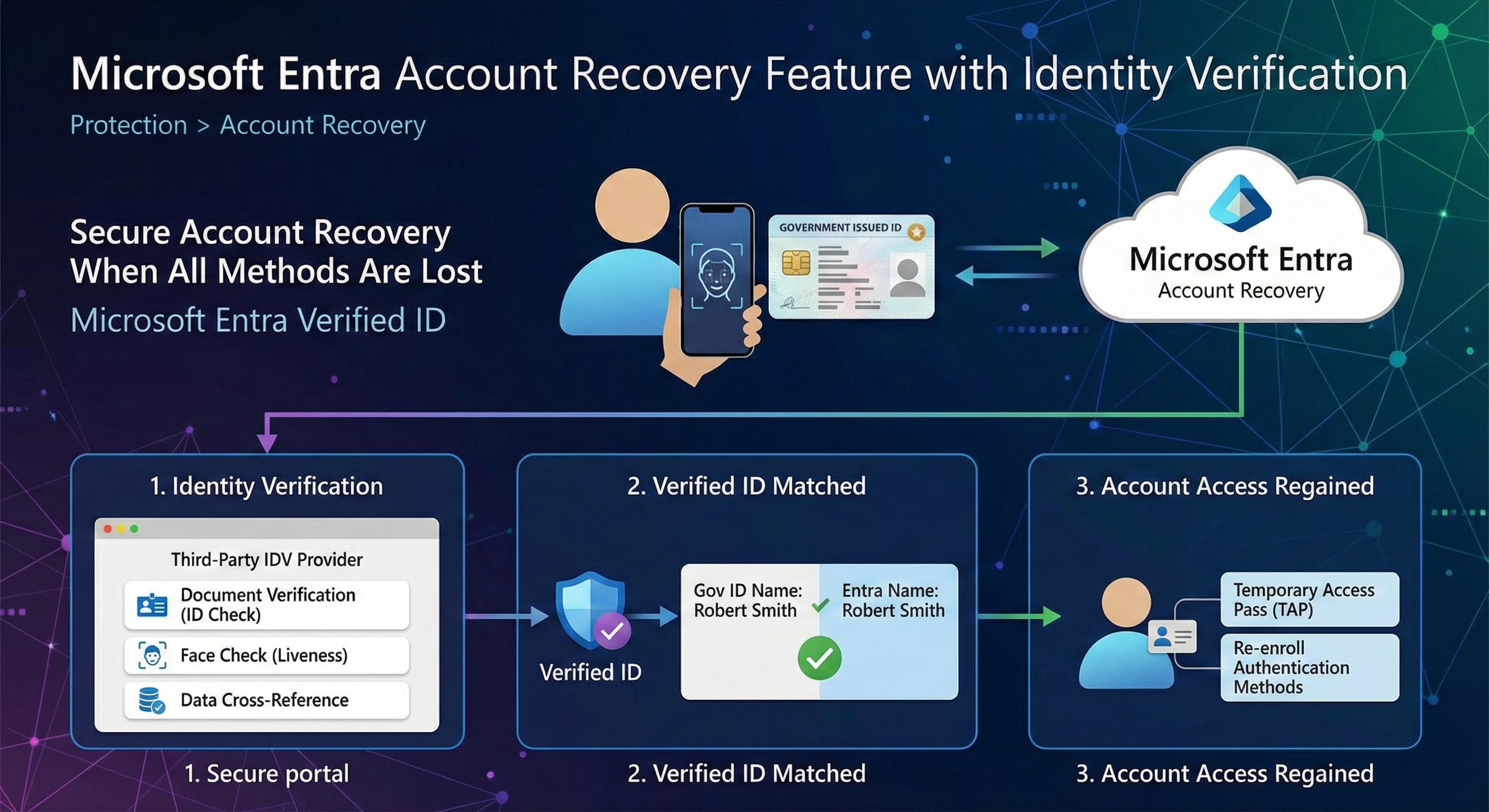
Every organization has users who eventually lose access to their accounts. A phone breaks, a hardware token goes missing, someone onboards a new device and forgets to migrate their authenticator app. The usual resolve? Call helpdesk, wait, get manually verified, if you're lucky in under an hour. Microsoft Entra Account Recovery changes that equation by bringing government-issued ID verification and biometric liveness checks into the recovery flow. I want to walk through how it actually works, what you need to set it up, and where the current limitations sit.
Introduction
Account Recovery is now a fully documented Microsoft Entra ID capability in Public Preview that helps users regain access to their accounts when they lose all their authentication methods, such as losing their phone or hardware token. This capability uses third-party identity verification providers and Microsoft Entra Verified ID technology to securely verify a user's identity through alternative means, allowing them to recover their account and re-enroll authentication methods.
The feature is available in the Microsoft Entra admin center under Entra ID > Account recovery and represents a significant evolution in how organizations can balance user security with account access recovery needs.
This article walks through the complete process of understanding, enabling, and configuring Account Recovery in your Microsoft Entra tenant, from initial setup in evaluation mode through full production deployment.
Account Recovery in Microsoft Entra
Account Recovery is now fully documented in Microsoft Entra and enables organizations to integrate with third-party identity verification providers to securely verify a user's identity through alternative means. The service is currently in Public Preview. When a user loses all their authentication methods, they can initiate account recovery and complete identity verification to regain access to their account.
Key Components
Verified ID & Face Check Technology: Account Recovery uses Microsoft Entra Verified ID technology combined with Face Check, a liveness detection feature. The Face Check process compares a real-time selfie with the photo in the user's government-issued ID to ensure proof of presence and prevent impersonation attacks.
Identity Matching: The system matches the First name and Last name from the verified government ID against the user's Microsoft Entra ID account details. Admins can configure Exact or Relaxed match confidence per profile. Exact requires strict matches, while Relaxed allows cross-field word matching to handle common name format differences.
Audit Trail: Full audit trail and admin controls are available to organizations, allowing security teams to monitor account recovery activities as part of their broader security monitoring strategy.
What are Verified IDs and How Do They Work?
Understanding Verified IDs
Verified IDs are cryptographically signed digital credentials issued by identity verification providers through Microsoft Entra. They serve as a trustworthy proof of identity that can be used for account recovery without requiring the user to have access to their authentication methods.
The Verified ID process involves:
- ID Document Verification: The user provides a government-issued ID, such as a driver's license or passport. The provider verifies the document's authenticity by checking security features like holograms and watermarks.
- Biometric Liveness Check (Face Check): The user takes a real-time selfie or short video. Microsoft's Face Check technology performs a liveness check to ensure the person is present in real-time, the face matches the photo on the ID, and the verification cannot be spoofed with deepfakes or other impersonation techniques.
- Data Verification: The identity verification provider cross-references the personal information from the ID, including name, date of birth, and address, against independent trusted databases such as credit reference agencies or government records.
- Verified ID Issuance: Once all checks pass, the provider issues a Verified ID credential that contains cryptographically signed assertions about the user's identity. This Verified ID is then used to match against the user's Microsoft Entra ID account.
How Verified IDs Are Matched to Microsoft Entra Accounts
When a user attempts account recovery with a Verified ID:
- Face Verification: The system first verifies proof of presence by comparing the photo in the ID with the real-time Face Check selfie.
- Name Matching: The system matches the First name and Last name from the verified ID against the user's Microsoft Entra ID account. The display name is not used, only the First name and Last name properties are checked.
- Match Confidence Options: Admins can use Exact or Relaxed matching. Exact requires strict first-name/last-name matching. Relaxed supports cross-field word matching, which helps with variations in how legal names are represented between IDs and profile records.
- Temporary Access Pass (TAP): If all verification steps succeed, the user receives a Temporary Access Pass that allows them to sign in and re-enroll their authentication methods.
Privacy and Data Handling
During the identity verification process, data is transmitted to the third-party IDV provider. Each provider has their own privacy and data retention policies. Organizations should review their chosen provider's documentation to understand how personal data is handled, stored, and retained.
Self-Service Access Recovery Methods: SSPR vs Account Recovery
Microsoft Entra provides two primary approaches for self-service account recovery, each with distinct advantages for different security postures:
Comparison Table: SSPR vs Account Recovery
| Feature | Self-Service Password Reset (SSPR) | Account Recovery with IDV |
|---|---|---|
| Primary Use Case | User forgot password but still has at least one sign-in method | User has lost access to all authentication methods |
| Authentication Requirement | Uses existing registered authentication methods | Uses government-issued ID and biometric verification |
| Security Level | Medium - Relies on pre-configured recovery credentials | High - Uses real-world identity verification |
| User Experience | Quick process using stored recovery methods | More involved, requires document scanning and selfie |
| Attack Resistance | Vulnerable if recovery methods are compromised | Highly resistant to account takeover attacks |
| Deployment Complexity | Simpler to deploy and manage | Requires integration with third-party IDV provider |
| Cost | Typically included with Entra license | Additional cost from IDV partner per verification |
| Admin Oversight | Limited monitoring capabilities | Full audit trail and admin controls |
| Regulatory Compliance | Supports basic compliance requirements | Meets strict compliance for regulated industries (finance, healthcare) |
| Device Loss Scenario | Can recover if alternate credentials available | Can recover even if all devices are lost or stolen |
| Phishing Resilience | Moderate - Social engineering risk | High - Biometric verification prevents impersonation |
| Multi-Regional Support | Supported globally | Dependent on IDV provider coverage |
| Integration | Works standalone | Integrates with Microsoft Defender for security monitoring |
Choosing Between SSPR and Account Recovery
Choose SSPR when:
- Users are generally tech-savvy and have secure recovery credentials stored
- Your organization has lower security requirements
- You want minimal administrative overhead
- Cost is a primary concern
- Your users are geographically concentrated in well-supported regions
Choose Account Recovery with IDV when:
- You need protection against sophisticated account takeover attacks
- Your organization handles sensitive or regulated data
- You operate in high-risk security environments
- Compliance requirements demand identity verification
- Users frequently travel or may lose devices
- You want to significantly reduce helpdesk burden for account recovery requests
Hybrid Approach: Many organizations implement both methods:
- Primary: Account Recovery with IDV for critical accounts, such as executives, admins, and service accounts
- Secondary: SSPR for standard user accounts
- Escalation: Helpdesk intervention available for failed recovery attempts
Enabling Account Recovery: Prerequisites and Modes
Prerequisites
Before enabling Account Recovery in your Microsoft Entra tenant, ensure you have:
- Licensing: Users need a Microsoft Entra ID P1 license and a Face Check license, via Entra Suite or a standalone add-on, to use the account recovery service
- Roles: You need to be an Authentication Administrator to enable and configure Account Recovery
- Azure Subscription: You need Contributor or Billing Administrator role for your Azure subscription, required to purchase IDV provider services from the Microsoft Security Store
- Verified ID Configuration: You must enable Verified ID and configure Face Check before completing Account Recovery setup
- User Profiles: Ensure the First Name and Last Name properties are populated for all users in scope for account recovery. These are critical for identity matching.
Recovery Modes: Evaluation vs. Production
Account Recovery offers two operational modes:
Evaluation Mode:
- Users can test the identity verification process without actually recovering their accounts
- Perfect for understanding the end-user experience and validating configuration
- Recommended for initial testing with a subset of users
- Users cannot complete full account recovery in this mode
Production Mode:
- Users who complete identity verification can fully recover their accounts
- Users can reset their authentication methods after successful verification
- Recommended only after thorough testing and validation
- Should be deployed carefully with appropriate user scope
Setting Up Account Recovery: Configuration and Deployment
Initial Setup (Sign In as Authentication Administrator)
- Navigate to Microsoft Entra admin center at https://entra.microsoft.com/
- Go to Entra ID > Account recovery
- Select Get started
- Choose your recovery mode, typically start with Evaluation
- Under User group selection, click Select groups
- Choose the groups to include in account recovery testing
- Select Next
Identity Verification Provider Setup
- Under Identity verification providers, choose a provider and select Get solution
- Select Marketplace and sign in to the Microsoft Security Store
- Review the provider offering and select Get solution
- Configure account details: billing subscription, resource group, resource name, and price plan
- Review and Place order
- When your SaaS subscription is ready, sign in to the provider's portal
- Complete the provider setup by providing required details such as contact name, email, and phone number
- Return to the Account Recovery setup and select the configured provider
Finalization
- Review the configuration details
- Select Done to complete the setup
The Account Recovery home page will open in the Microsoft Entra admin center.
Preparing User Profiles
Before users can complete account recovery, ensure their profiles are properly configured:
- Go to Identity > Users > All Users
- Select each user in scope for account recovery
- Select Edit properties
- Verify that First Name and Last Name are filled in
- The display name is not used for matching, only First Name and Last Name matter
In Exact mode, names must match exactly with what appears on the government-issued ID. In Relaxed mode, cross-field word matching can accommodate common naming variations. If matching fails, account recovery will not complete and the user needs the standard helpdesk process.
Transitioning from Evaluation to Production Mode
After testing account recovery in evaluation mode and confirming the identity verification process works as expected:
- Sign in to the Microsoft Entra admin center as Authentication Administrator
- Go to Entra ID > Account recovery
- Select Manage
- Under Choose a recovery mode, select Production
- Under User group selection, review and update the groups as needed
- Review your Identity verification provider selection
- Select Next to proceed
- On the review page, carefully verify recovery mode, user groups in scope, and provider selection
- Select Complete to apply changes
Add Custom Claim Validation (High Priority for Production)
If you run account recovery for larger user populations, the default first name and last name match is usually not enough. Microsoft now documents a dedicated event hook called OnVerifiedIdClaimValidation that lets you validate Verified ID claims against your own authoritative data source before recovery continues.
In practice, this means your account recovery flow can call an Azure Function, Logic App, or REST API that checks claims against HRIS or employee records and returns a pass or fail decision.
How the Event Model Works
- User starts account recovery and completes IDV verification.
- Microsoft Entra triggers
OnVerifiedIdClaimValidation. - Your custom authentication extension calls your API endpoint.
- Your endpoint validates claims, for example employeeId, documentId, dateOfBirth, or UPN, against internal systems.
- Your endpoint returns pass or fail.
- If passed, Microsoft Entra proceeds to TAP issuance and method re-registration.
Implementation Notes from the Microsoft Tutorial
- The tutorial provides a sample Azure Function deployment path for rapid testing.
- The sample uses a C# Azure Function and supports claim matching against structured data.
- Only one custom authentication extension per tenant is allowed for the
OnVerifiedIdClaimValidationevent type. - You need both Application Administrator and Authentication Administrator roles for full setup.
Important: Microsoft guidance explicitly recommends using a custom authentication extension when moving account recovery from evaluation to production for larger groups. This closes the duplicate-name and profile-hygiene gap far better than name-only matching.
Public Announcement Timeline You Should Track
- November 2025: Microsoft Entra release archive announced Account Recovery in Public Preview.
- May 2026: Microsoft Entra Verified ID "what's new" published a note that Account Recovery with Verified ID is generally available.
For operations planning, treat this as a rollout timeline and validate behavior in your own tenant. Feature visibility and controls can differ by configuration, licensing, and release cadence.
How End Users Recover Their Accounts
For end users, the account recovery process is straightforward:
- On the sign-in page, if unable to access authentication methods, they see an option to Recover your account
- Select Other ways to sign in
- Select Recover your account
- Follow the remaining instructions on the device as per the configured identity verification provider
- Complete identity verification by scanning a government-issued ID and taking a selfie for Face Check
- Upon successful verification, receive a Temporary Access Pass
- Sign in with the Temporary Access Pass and re-enroll authentication methods
Cost Analysis and Implementation Considerations
Understanding Costs
Account Recovery involves costs from two sources:
Microsoft Licensing: Users require Microsoft Entra ID P1 licenses, often part of Microsoft 365 E3 or E5 or as a standalone purchase.
IDV Provider Costs: Each identity verification involves a per-verification cost from the chosen IDV provider. These costs vary by provider and verification type.
Cost Savings Potential
Account recovery requests typically affect about 1% to 3% of users each month. By enabling self-service recovery through identity verification, organizations can reduce helpdesk tickets and associated labor costs.
Cost Savings Calculator: Microsoft provides a cost savings estimator in the Account Recovery configuration page. To estimate potential savings:
- Calculate your average helpdesk hourly rate
- Estimate monthly account recovery requests for your organization
- Determine time spent per recovery request, typically 15 to 30 minutes
- Compare that with your IDV provider's per-verification cost
- Calculate monthly savings as helpdesk requests times hourly rate times time, minus provider costs
Many organizations see potential savings of $500 or more monthly, though actual savings depend on your specific costs and recovery request volume.
Implementation Best Practices
Start Small:
- Do not enable Account Recovery for all users initially
- Begin with a small test group in Evaluation mode
- Validate the experience and troubleshoot any issues
- Gradually expand to larger user populations
Exclude Sensitive Accounts:
- For CEO, finance controllers, and service accounts, consider requiring manual helpdesk intervention for additional security
- These accounts may warrant in-person or remote verification processes with human oversight
- The account recovery feature is optional, so you can exclude high-risk accounts entirely
Monitor and Audit:
- Review account recovery activities regularly
- Monitor for unusual patterns or failed recovery attempts
- Integrate with Microsoft Defender for comprehensive security monitoring
- Maintain audit trails for compliance purposes
Important Limitations and Considerations
Name Matching Limitation:
- Users with identical or highly similar names may be blocked if you rely only on default name matching
- Use custom authentication extensions to validate additional attributes and disambiguate users
- Without that extra validation, some users still need the traditional helpdesk recovery path
IDV Provider Restrictions:
- Account Recovery only supports identity verification providers reviewed and approved through the Microsoft Security Store
- You cannot bring your own IDV provider or external contracts
- Provider availability may vary by geographic region
Preview Status:
- Account Recovery is currently in Preview
- Features and capabilities may change based on feedback
- Organizations should plan for potential updates as the feature matures
Identity Verification Providers via Microsoft Security Store
Identity verification providers are now available through the Microsoft Security Store during Account Recovery setup. This provides centralized procurement, streamlined integration, billing integration, and access to multiple reviewed and approved providers through the marketplace.
When purchasing an IDV provider offering:
- You must have Contributor or Billing Administrator role on your Azure subscription
- The SaaS subscription creates a new resource in your chosen resource group
- You configure the provider in their admin portal
- Once activated, the provider integrates with your Account Recovery configuration
Microsoft Entra Account Recovery and Verified ID Technology
Account Recovery is fully integrated with Microsoft Entra Verified ID technology, giving organizations a secure, standards-based approach to identity verification. This integration enables standards compliance, proven liveness technology, audit capabilities, and Microsoft Defender integration for security monitoring.
The combination of Verified ID, Face Check, and Account Recovery addresses a critical gap in account security: what happens when users lose access to all their authentication methods? Rather than relying on help desk personnel to manually verify identity, organizations can use real-world government-issued ID verification with biometric proof of presence.
Microsoft Ignite 2025 Announcement
At Microsoft Ignite 2025, Microsoft announced expanded identity protection features that strengthen account recovery and reduce phishing and impersonation attack risks:
- Support for synced passkeys from Apple, Google, and other third-party providers, with passkey profiles for easier management
- Expanded risk remediation and detection to help identity admins respond faster and enhance security operations center collaboration with Microsoft Defender
- Secure, self-service account recovery for users to regain access with Verified ID Face Check and a government-issued ID if their device is lost or stolen
These features work together to provide users with multiple secure pathways to regain access while maintaining strong security standards. The integration with Microsoft Defender enables security teams to monitor and respond to account recovery activities as part of their broader security posture.
External References and Sources
- How to enable Account Recovery in Microsoft Entra
- Create a custom authentication extension for account recovery claim validation
- Custom authentication extensions overview (OnVerifiedIdClaimValidation event)
- Microsoft Entra self-service account recovery FAQ
- Microsoft Entra Verified ID overview
- Microsoft Entra Verified ID Face Check
- Temporary Access Pass in Microsoft Entra
- How self-service password reset works in Microsoft Entra ID
- Authentication Administrator role in Microsoft Entra
- Microsoft Entra release archive: November 2025 (Account Recovery preview announcement)
- What's new in Microsoft Entra Verified ID (May 2026 update)
- Microsoft Ignite 2025 Book of News
Summary
Account Recovery is now a fully documented Microsoft Entra ID feature that enables organizations to implement secure, self-service account recovery using government-issued ID verification and biometric Face Check technology. By combining identity verification with Verified ID technology, organizations can protect against account takeover attacks, reduce helpdesk burden, maintain strong security, support user accessibility, and achieve measurable cost savings.
The feature requires Microsoft Entra P1 licensing and integration with an approved identity verification provider through the Microsoft Security Store. Organizations should start with Evaluation mode testing on a small user group, then transition to Production mode after validating the experience.
Critical success factors include ensuring user profile data, especially First Name and Last Name, matches government IDs exactly, excluding high-risk accounts that require human oversight, and implementing comprehensive monitoring through Microsoft Defender.
What Sticks
Account Recovery in Microsoft Entra represents a meaningful step forward in balancing security with usability. Here's what stands out:
- It's real and available now - Account Recovery is fully documented and in Preview, ready for organizations to evaluate
- Verified IDs are the foundation - Government-issued ID verification combined with Face Check biometric liveness detection creates a strong trust anchor
- Face Check is genuinely useful - The technology prevents impersonation, deepfakes, and account takeover attacks in ways traditional recovery methods simply cannot
- Licensing is reasonable - Microsoft Entra P1 is required, which most enterprises already have through M365 E3 or E5
- Procurement is streamlined - IDV providers are available through Microsoft Security Store, removing the complexity of external contracts
- Start small, scale up - The Evaluation or Production mode split makes it easy to test before committing
- Data hygiene matters - User profiles must have accurate First Name and Last Name that match government IDs exactly
- The math works - At 1% to 3% of users monthly needing recovery, the savings can justify the rollout for many organizations
- There are gaps - Duplicate-name scenarios remain a real limitation during preview
- Security teams get visibility - Integration with Microsoft Defender provides the audit trails and monitoring that security operations need
My Take: What's Coming Next
During my evaluation of Microsoft Entra ID Account Recovery, I identified a significant limitation in the current preview implementation. The system matches users by comparing FirstName and LastName from government-issued ID against Entra ID account attributes. While this approach seems straightforward, it creates a critical problem: users with duplicate names are completely blocked from self-service recovery. Microsoft acknowledges this in their FAQ, noting they are working on solutions using custom security attributes synced from HR systems.
What I Expect Microsoft Will Implement
I believe the future enhancement will likely involve matching on FirstName + LastName + DateOfBirth + City or a similar multi-attribute combination.
| Matching Criteria | Collision Probability | Impact |
|---|---|---|
| FirstName + LastName only | 1-5% of users | Current, blocks duplicates |
| + DateOfBirth | 0.01-0.1% | Significant improvement |
| + City | <0.001% | Near-perfect uniqueness |
The reasoning behind this direction:
- Data availability - Passports, driver's licenses, and national identity cards already contain these four fields, so IDV providers can verify them without additional friction
- HR system compatibility - Organizations already maintain this data in their HR systems, making synchronization via custom security attributes straightforward
- Privacy balance - Unlike sensitive identifiers such as SSN or government ID numbers, this combination provides strong uniqueness without exposing highly sensitive personal data
- Preserves automation - Maintains the social engineering-resistant, fully automated verification process that makes account recovery valuable at scale
Expected outcome: A solution that evolves from blocking all duplicate names to successfully resolving 99.9% or more of cases automatically, while maintaining the security guarantees that make this feature viable for enterprise deployment.
This is exactly the kind of iterative improvement we have seen Microsoft apply to other Entra features. The foundation is solid, now it is about refining the edge cases. I am optimistic about where this is heading.
Continue To Part 2
Part 2 looks at future direction, policy-driven claims matching, and what this could mean for European organizations as the feature matures.