


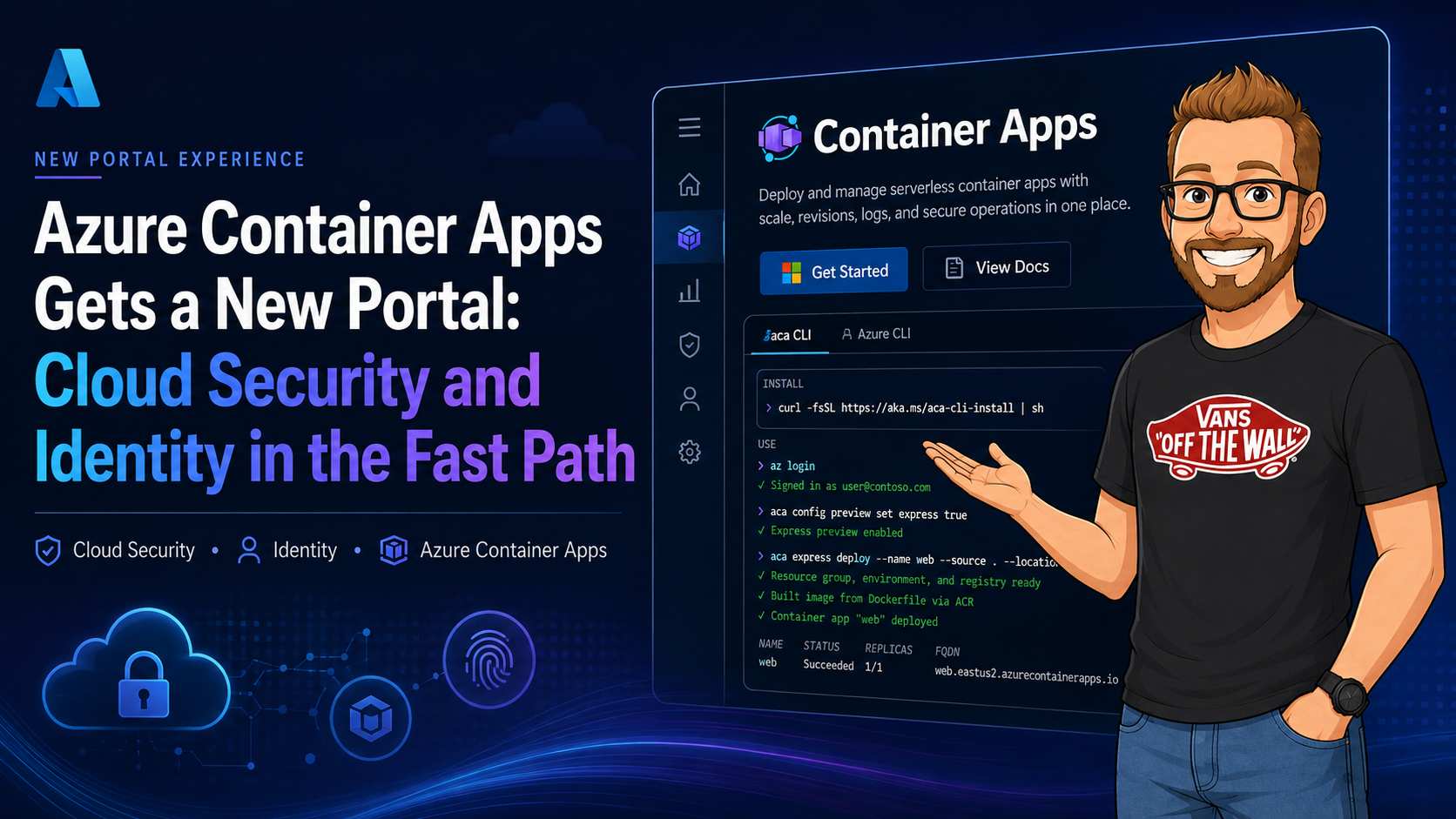
Azure Container Apps has a new home at containerapps.azure.com. The first impression is deliberately simple: start with a container, choose a path into the platform, and get to a running app without spending the morning writing cluster configuration.
That simplicity is useful, but it also creates a security question. When a portal removes infrastructure decisions, which security decisions still belong to the application team? I think that is the interesting part of this release. The portal shortens the path to a working container app, while the design still depends on the same fundamentals: identity, network boundaries, secrets, revision control, and useful telemetry.
This also connects directly to my previous post, Azure Container Apps Sandboxes Public Preview: Isolated Runtime for Agent-Generated Code. The portal is the front door for normal services. Sandboxes add a separate isolation boundary for code that an agent generates or executes. They solve different problems, and together they describe a more complete Container Apps story.
Why Microsoft built a separate Container Apps portal
Microsoft has not published a single sentence saying, "this is why we built a new portal." My reading of the documentation and the product shape is that Container Apps has outgrown the simple resource creation flow it started with. It now covers long-running apps, run-to-completion Jobs, managed Dynamic Sessions, programmable Sandboxes, Dapr microservices, KEDA-driven workers, MCP automation, and serverless GPU workloads. Those are different products from an operator's point of view, even though they share a managed Container Apps foundation.
A general Azure resource page can expose settings, but it does not necessarily explain which compute model fits the workload. The new portal can start with the question a developer or platform engineer actually has: "What am I trying to run?" From there it can point toward an Express HTTP app, a standard environment, a Job, a Dynamic Session, or a Sandbox. That is a product-discovery problem as much as it is a deployment problem.
| Pressure on the old experience | What the new portal provides | Why it matters for security |
|---|---|---|
| Container Apps now serves more than HTTP web apps. | A single place to discover Apps, Jobs, Dynamic Sessions, and Sandboxes. | The lifecycle and isolation boundary can be chosen before deployment. |
| Many teams want containers without cluster operations. | Express deployment with managed ingress, scale-to-zero defaults, and a guided first mile. | Less infrastructure work does not require giving the app broad identity or network access. |
| AI and agent workloads need temporary execution and workspace isolation. | Dynamic Sessions and Sandboxes are visible as first-class choices. | Untrusted code can be routed away from the identity and data boundary of the control service. |
| Operations are spread across revisions, jobs, sessions, and environments. | One focused management experience for discovery, deployment, troubleshooting, and upcoming resource views. | Operators can reach the right resource faster, while Microsoft Entra ID and Azure RBAC remain authoritative. |
There is also a strategic reason visible in the messaging. The portal presents Container Apps as the serverless alternative for teams that do not want to operate Kubernetes, while still offering Kubernetes-grade capabilities such as KEDA scaling, Dapr integration, advanced networking, and revisions. In other words, Microsoft is trying to move the conversation from "which cluster should I build?" to "which managed container execution model fits my workload?"
That matters for adoption. A developer can begin with an image and a simple HTTP endpoint. A platform team can later add private networking, managed identity, traffic splitting, event scaling, or a dedicated GPU profile. An AI team can move from a normal agent API to Dynamic Sessions or Sandboxes without leaving the broader Container Apps platform. The portal is the visible layer that ties those paths together.
My interpretation: The new portal is less about adding another place to click "Create" and more about giving Container Apps a product surface that matches its expanded scope. The wider that scope becomes, the more dangerous it is to treat every workload as just another web container.
What the new portal is for
The portal documentation positions Azure Container Apps as a managed platform for APIs, microservices, jobs, background workers, AI applications, agents, and serverless GPU workloads. You bring an image from Azure Container Registry, Docker Hub, or another registry. Container Apps manages the environment, ingress, revisions, autoscaling, and platform operations around it.
The portal gives that model a focused workspace. It presents the platform in terms an application team can act on:
- Deploy an existing container image or start from a Dockerfile.
- Expose HTTP or gRPC endpoints through managed HTTPS ingress.
- Inspect revisions, logs, metrics, and running replicas.
- Configure scaling from zero to a defined maximum.
- Run jobs on demand, on a schedule, or from events.
- Connect the app to Azure services with managed identity.
The screenshot shows the direction clearly: the product is trying to make the first deployment
legible. The command output is not hidden behind a wizard. The portal and the aca CLI
are shown as two ways of reaching the same managed runtime.
The four compute types matter more than the portal wizard
The new Use Cases documentation makes an important distinction: Azure Container Apps is not one compute shape. It now presents four choices, each with a different lifecycle and security model. Selecting the wrong one can produce unnecessary cost, weak isolation, or an awkward operational model even when the deployment itself succeeds.
| Compute type | Lifecycle | Good fit | Security question |
|---|---|---|---|
| App | Long-running replicas, scaled by HTTP, events, CPU, memory, or KEDA | APIs, web apps, microservices, workers, and continuous event processors | Who can reach the endpoint and what can the runtime identity access? |
| Job | Start, run to completion, then stop | Scheduled, manual, and event-triggered batch work | Who can trigger the execution, and can the job identity write beyond its scope? |
| Dynamic session | Managed by a session pool | Managed execution of untrusted or LLM-generated scripts | What state, packages, network access, and credentials can a session retain? |
| Sandbox | You create, suspend, resume, and delete the isolated runtime | Agent workspaces, customer isolation, CI environments, and stateful code execution | What happens if the executed code is malicious or the tenant boundary is tested? |
The practical split is lifecycle first, then isolation. An API should not be implemented as a job simply because it has occasional traffic. A scheduled export should not be an always-running app that waits idle for its next timer. An LLM-generated script should not run with the identity and network permissions of the API that requested it.
Where each use case fits
APIs and HTTP web apps
For a REST API or HTTP-first web application, the portal's Express path is the most direct starting point. It is designed to reduce configuration and use scale-to-zero defaults. That makes it a good fit for a small service, webhook endpoint, internal tool, or public web backend where the request is the unit that wakes the application.
Security still belongs in the application design. Decide whether authentication is handled by the app, an API gateway, or another edge component. Use managed HTTPS ingress, validate Microsoft Entra access tokens where required, and keep the app's managed identity limited to the resources it must call. Express is a simpler deployment path, not a lower security standard.
Microservices with Dapr and service discovery
When several services need service discovery, internal networking, pub/sub, state stores, or bindings, use a standard Container Apps environment rather than treating each service as an isolated Express deployment. The Use Cases documentation calls out Dapr as the fit for this model. Dapr can simplify service invocation, but it does not remove the need to decide which applications may call which other applications.
Keep internal ingress private where possible and make authorization explicit between services. A platform identity that can invoke a Dapr component is not automatically authorized to read every state store or publish to every topic. Separate application identities and component permissions by trust boundary.
Event and queue processing
For a continuously available event or queue processor, use an App with a custom KEDA scale rule. The scale rule should reflect the source: queue length, event rate, lag, or another measurable signal. The goal is to add replicas when work accumulates and reduce them when the backlog is under control, rather than polling aggressively from one permanently large process.
Give the processor a receiver identity with only the required read, lock, checkpoint, or publish permissions. Record the source partition or queue, message ID, attempt count, and revision name in logs. That makes retries and poison-message handling visible during an incident.
Scheduled, manual, and event-triggered tasks
A Job is the better model when the work has a clear beginning and end. This includes cron schedules, manual runs from an operator or release pipeline, and tasks started after an event. The platform can release compute after completion instead of charging for a process that is waiting for its next trigger.
Protect the trigger as carefully as the job. A manual execution should require an appropriate Azure RBAC permission or approved pipeline identity. A schedule should be treated as code and reviewed for the resources it can change. An event-triggered job should validate the event source and avoid trusting tenant or object identifiers supplied only in the message body.
Agents, swarms, and per-customer workspaces
The Use Cases page recommends Sandboxes for agentic workspaces and swarms, multi-tenant SaaS workspaces, and ephemeral build-and-test environments. This is a useful clarification for teams designing agent platforms. An ordinary App is a good home for the coordinator, API, policy engine, and result service. It is not automatically the right place for every worker an agent can create.
A per-customer workspace should have an explicit tenant correlation ID, isolated storage, restricted outbound access, and a short-lived or separately scoped identity. For swarms, apply the same rule per worker when workers have different tools or data access. Pause and resume can preserve context, but preservation also means that credentials and sensitive files must have a defined expiry and cleanup path.
This is the direct connection to my previous Sandboxes article. Dynamic Sessions are useful when the platform should manage temporary code execution for you. Sandboxes are the stronger choice when you need programmable lifecycle control, stateful suspend modes, per-worker image policy, or explicit egress policy.
MCP and event-driven automation
The documentation also calls out event-driven automation, including MCP connectors paired with triggers such as email triage or document automation. The safe architecture is to keep the trigger, tool authorization, execution identity, and result handling separate. Receiving an email or document event should not by itself grant an agent permission to call every connected tool.
Use an App for the durable API and policy layer, a Job for bounded automation, and a Sandbox when the workflow needs to execute untrusted transformations or maintain an isolated workspace. Log the trigger, approved tool, caller identity, target tenant, and resulting artifact so the automation can be reconstructed later.
Serverless GPUs and TCP services
Serverless GPU workloads use an App on a dedicated GPU workload profile. The Express path does not support GPU workloads, so this is a case where the simplest portal experience is not the right entry point. Plan model files, image provenance, data residency, network access, and quota before deploying inference or image-generation workloads.
TCP-based services also belong in a standard environment because Express is intended for HTTP workloads. That distinction matters for brokers, custom protocols, and services that expose TCP rather than an HTTP API. Review ingress, private networking, client authentication, and egress separately because a TCP listener may not have the same authentication middleware as an HTTP app.
The small environment-variable improvement I noticed
One small portal change is easy to miss: when you add an environment variable, the button is now below the variables instead of above them. That sounds minor, but it matches the way people actually configure a container app. You add a variable, review the rows you have entered, and then add the next one without jumping back to the top of the section.
For a short form, that is a better interaction. For a production app, the more important question is what the row represents in the runtime contract. Container Apps injects environment variables into the container process. The application reads them at startup or when its framework reloads configuration. The value is therefore part of the app configuration surface, not a replacement for an identity boundary.
| Configuration type | Use it for | Security consideration |
|---|---|---|
| Plain environment variable | Port numbers, feature flags, log levels, service names, non-sensitive URLs | Still visible to anyone who can inspect app configuration. Do not put credentials here. |
| Container Apps secret reference | Passwords, connection strings, API keys, signing material | Keep the value in the platform secret store and reference it from the environment variable. |
| Managed identity | Access to Key Vault, Storage, Service Bus, SQL, and other Azure resources | Best option when the target service supports Microsoft Entra authentication and data-plane RBAC. |
There is a second detail that matters: changing environment variables can create a new revision when revision-scope configuration changes. That means a configuration edit is also a deployment event. It should be reviewed like an image update because it can change endpoints, feature flags, authentication settings, log destinations, or the identity path used by the process.
My practical rule is to keep the environment-variable list boring and auditable. Use names such as
LOG_LEVEL, BACKEND_BASE_URL, and KEY_VAULT_URI for non-secret
configuration. Use a secret reference for values that must be injected into the process, and use
managed identity when the application can obtain a token instead of holding a secret at all.
Good small change: Putting the add-variable button below the existing rows makes repeated configuration less awkward. It also encourages a useful review habit: scan the complete list before saving the revision instead of treating each row as an isolated action.
Security starts before the first deployment
A fast deployment path can produce a fast security mistake. Before creating an app, decide which identity will deploy it, which identity the running workload will use, and which identity is allowed to change production traffic.
These are different responsibilities. A developer may need to create a revision in a development environment. The running container may need to read one storage container or call one internal API. A release pipeline may be allowed to shift traffic between revisions. Giving all three the same broad role creates unnecessary blast radius.
| Identity | Purpose | Security boundary |
|---|---|---|
| Human operator | Portal access, troubleshooting, approval | Microsoft Entra ID, MFA, PIM, least-privilege RBAC |
| Deployment identity | Build and release automation | Federated credentials or managed identity, scoped to the target environment |
| Container app identity | Runtime access to Azure resources | System-assigned or user-assigned managed identity with data-plane roles only |
The portal makes the deployment feel like one action, but the identity model should remain explicit in your design review. A container does not become trustworthy because it was launched from a polished interface.
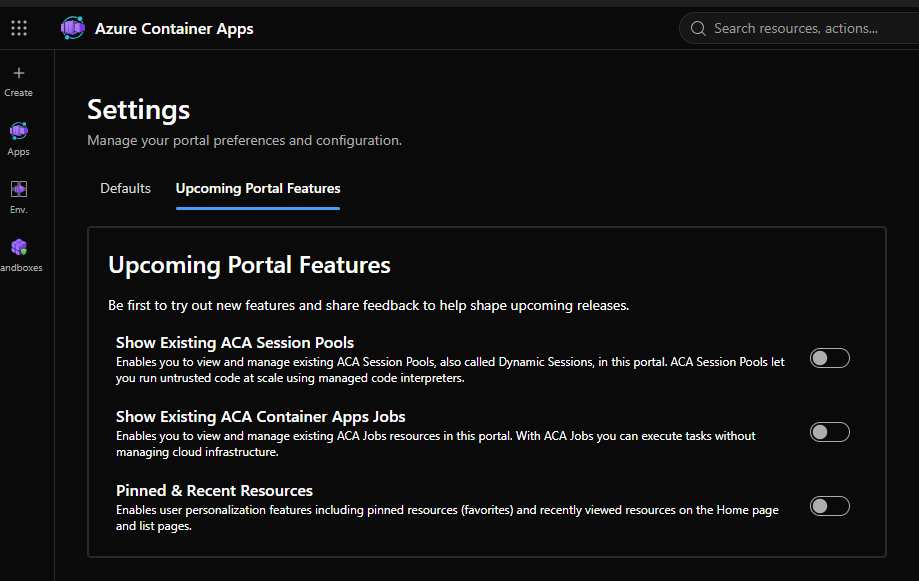
The upcoming features shown in Settings
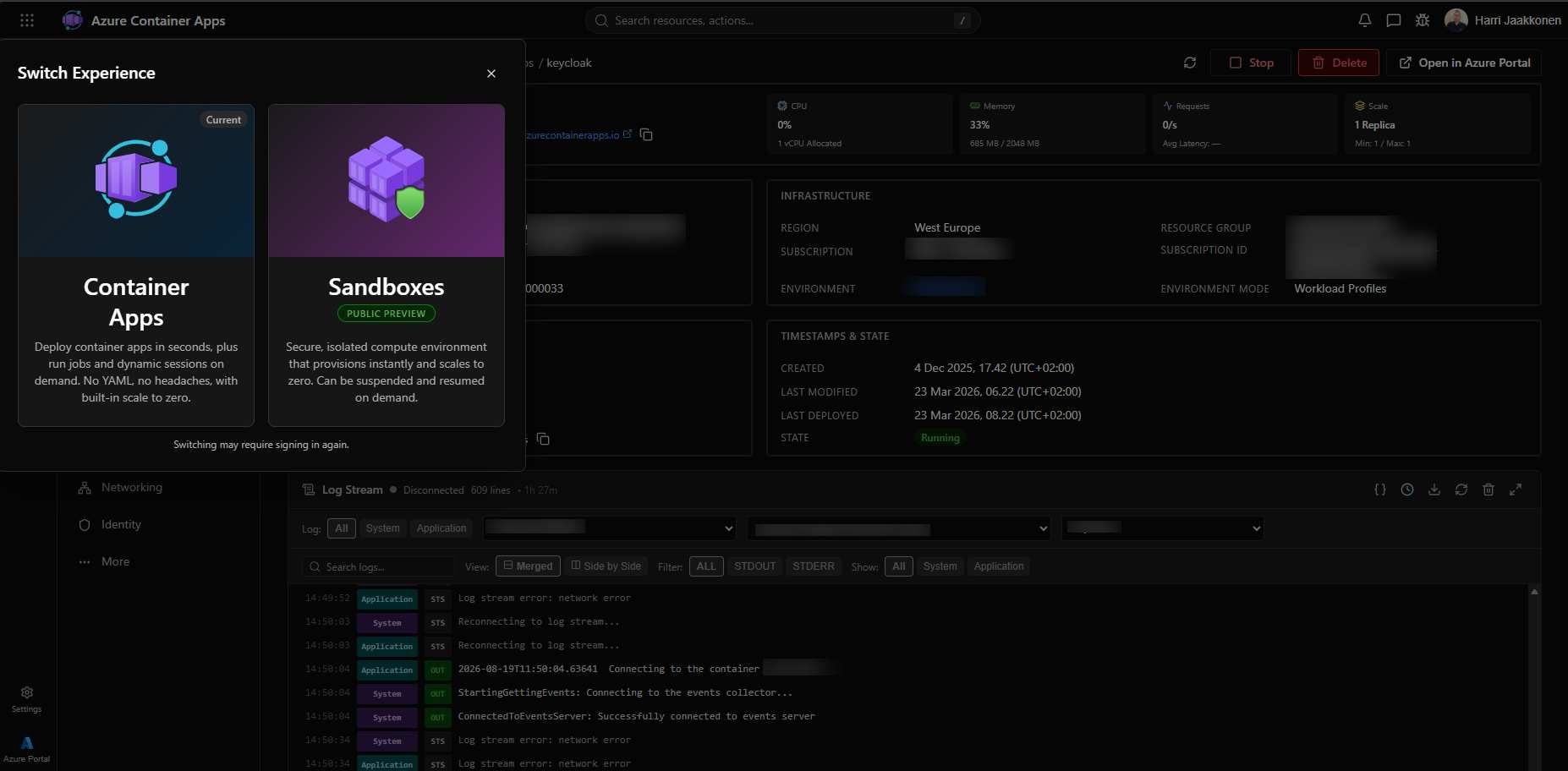
The second screenshot is more interesting than a normal preferences page. It shows the portal growing beyond a deploy button and exposing more of the Container Apps operating model directly to users. The three switches are small signals about where the product experience is going.
Show Existing ACA Session Pools
Session Pools are also described as Dynamic Sessions. The important distinction is lifecycle. A normal Container App is a long-lived application resource with replicas that scale according to traffic or event rules. A session pool is designed to keep execution capacity available for short-lived, interactive workloads so that a request does not always start from a completely cold environment.
That is useful for code interpreters, agent tools, notebooks, and development experiences where startup time is part of the product experience. It is also a security boundary that deserves its own design. A warm session may retain process state, files, package caches, or tokens. Pool sizing and reuse policy must therefore be considered together with tenant isolation, cleanup, outbound restrictions, and credential lifetime.
This is where the feature connects to my Sandboxes post. Dynamic Sessions can make temporary execution convenient. Container Apps Sandboxes are the better place to reason about stronger isolation and lifecycle control when the input is untrusted agent-generated code. The choice depends on the threat model, the state you need to preserve, and how much control you need over the runtime boundary.
Show Existing ACA Container Apps Jobs
Jobs make the distinction between a request-serving app and a finite unit of work visible in the portal. A job can run on demand, on a schedule, or in response to an event. It can process a queue, generate a report, apply a migration, or execute a batch of model-evaluation tasks without keeping an HTTP service alive just to wait for work.
From a security perspective, the job should have its own identity and permissions whenever its data access differs from the API that starts it. A migration job may need write access that a public API must never have. A scheduled export job may need to write to one storage path but should not be able to read customer data outside that scope. Treat the job definition, trigger, image digest, environment variables, secrets, and managed identity as one auditable execution contract.
Jobs also change how you investigate an incident. Capture the job name, execution name, trigger source, image digest, template version, identity, and exit code. Without those fields, a failed batch can look like a generic container restart even though the real issue is an over-privileged or incorrectly triggered execution.
Pinned & Recent Resources
Pinned and recently viewed resources are a quality-of-life feature, but they have an operational consequence. Platform teams often work across several subscriptions, environments, and workload classes. A quick path back to the right app reduces the chance of making a change in the wrong resource group or production environment.
I would still treat the feature as navigation assistance, not authorization. A resource being pinned does not prove that the operator should be allowed to change it. Keep the real control in Microsoft Entra ID, Azure RBAC, Privileged Identity Management, resource locks, policy, and change approval. The portal can help someone find the correct resource; authorization must decide what they can do after they find it.
| Upcoming feature | Technical value | Security review |
|---|---|---|
| Session Pools / Dynamic Sessions | Warm, interactive execution for temporary workloads | State reuse, tenant isolation, cleanup, egress, and token lifetime |
| Container Apps Jobs | Finite work on demand, schedules, or events | Trigger authorization, separate runtime identity, image and output integrity |
| Pinned & Recent Resources | Faster navigation across frequently operated resources | Helpful navigation only; RBAC and approval remain the control plane |
Managed identity is the important default
For an application that reads from Key Vault, writes to Blob Storage, publishes to Service Bus, or queries another Azure service, managed identity should be the first option you evaluate. It removes a long-lived client secret from the container image, environment file, and deployment pipeline.
There are two useful patterns:
- System-assigned identity: tied to the lifecycle of one Container App. This is a good fit when the app and its identity should be created and retired together.
- User-assigned identity: managed as a separate Azure resource. This fits shared platform patterns where several revisions or apps need the same carefully controlled identity.
Whichever pattern you choose, assign only the data-plane roles the process needs. A web API that reads a few secrets should not receive subscription-wide permissions. A job that writes one storage path should not receive owner rights over the storage account.
Security check: Treat secrets configured in the portal as an operational convenience, not as a reason to skip a secret lifecycle. Prefer managed identity, rotate anything that must remain a secret, and keep production values out of images and source control.
Ingress is an identity decision too
Ingress is often discussed as a network setting, but it also defines who can reach the workload and where authentication is enforced. Public HTTPS ingress may be correct for a customer-facing API. Internal ingress may be the right choice for a worker API called only by other apps in the same environment or virtual network.
For each app, write down four answers:
- Is the endpoint public, internal, or private through a controlled network path?
- Which identity provider authenticates callers?
- Does the app validate tokens itself, or does an API gateway do it first?
- Which outbound destinations are required, and which should be blocked?
Container Apps supports VNet integration, private endpoints, and ingress and egress controls. Those features are valuable only when they are tied to an application trust model. A private endpoint is not an authorization policy. A public endpoint is not automatically unsafe. The meaningful control is the combination of reachability, token validation, authorization, and logging.
Revisions are a security control
Container Apps revisions are usually introduced as a deployment feature, but they also give you a clean change boundary. A revision can represent a new image digest, configuration set, identity assignment, or network behavior. That makes it easier to answer a basic incident question: what exactly was running when the event happened?
Use revisions with a deliberate traffic strategy:
- Deploy a new revision without sending production traffic to it.
- Run health checks and inspect application and platform logs.
- Send a small percentage of traffic to the new revision when the risk justifies it.
- Keep a tested rollback target until the observation window has passed.
Logs should carry a request ID, revision name, application identity, and meaningful authorization outcome. Centralize them in the monitoring system your security team already uses. A running app with no useful audit trail is still a blind spot, even if the platform itself is managed.
How the portal connects to Container Apps Sandboxes
My previous Sandboxes post focused on a different risk: an AI agent may produce code that should not run inside the same trust boundary as the orchestration service, customer API, or identity broker.
The new portal and Sandboxes fit together as two layers:
| Layer | Best fit | Primary security question |
|---|---|---|
| Container Apps portal and platform | APIs, services, jobs, workers, agents, and stable application components | Who can deploy, call, change, and observe this workload? |
| Container Apps Sandboxes | Short-lived or stateful execution of untrusted agent-generated code | What can this code access if it behaves unexpectedly? |
A sensible agent architecture keeps the agent API and policy service in an ordinary Container App. The agent runtime sends code execution to a Sandbox. The normal app identity can request a sandbox operation, but the sandbox identity should not inherit the permissions of the API that created it. Results return through an explicit artifact contract, where scanning and policy checks happen before anything is promoted.
This separation matters more than the portal experience. The portal can make the infrastructure easy to create, but it cannot decide whether generated code belongs in the same security boundary as your production API.
A practical first run
For a first pilot, I would keep the app boring and make the controls visible:
- Create a dedicated resource group and Container Apps environment for the workload class.
- Deploy an image with a pinned digest rather than relying on a mutable tag.
- Use a managed identity and grant it one narrowly scoped data-plane role.
- Choose internal ingress unless the service has a clear public requirement.
- Set minimum and maximum replicas deliberately, including the scale-to-zero decision.
- Send logs to the central workspace and verify that revision changes are visible.
- Test rollback, denied access, secret rotation, and an outbound connection that should fail.
The portal is a good place to learn the shape of the platform. For repeatable environments, keep the resulting configuration in infrastructure code and make the portal a troubleshooting and discovery tool rather than the only record of production state.
My view: The new portal is most useful when it gives application teams a fast first mile while platform and security teams keep ownership of identity, policy, network design, and evidence. The experience is simple. The trust model should still be specific.
References
- Azure Container Apps portal documentation
- Azure Container Apps portal use cases
- Use managed identities with Azure Container Apps
- Ingress in Azure Container Apps
- Revisions in Azure Container Apps
- Monitoring and observability in Azure Container Apps