


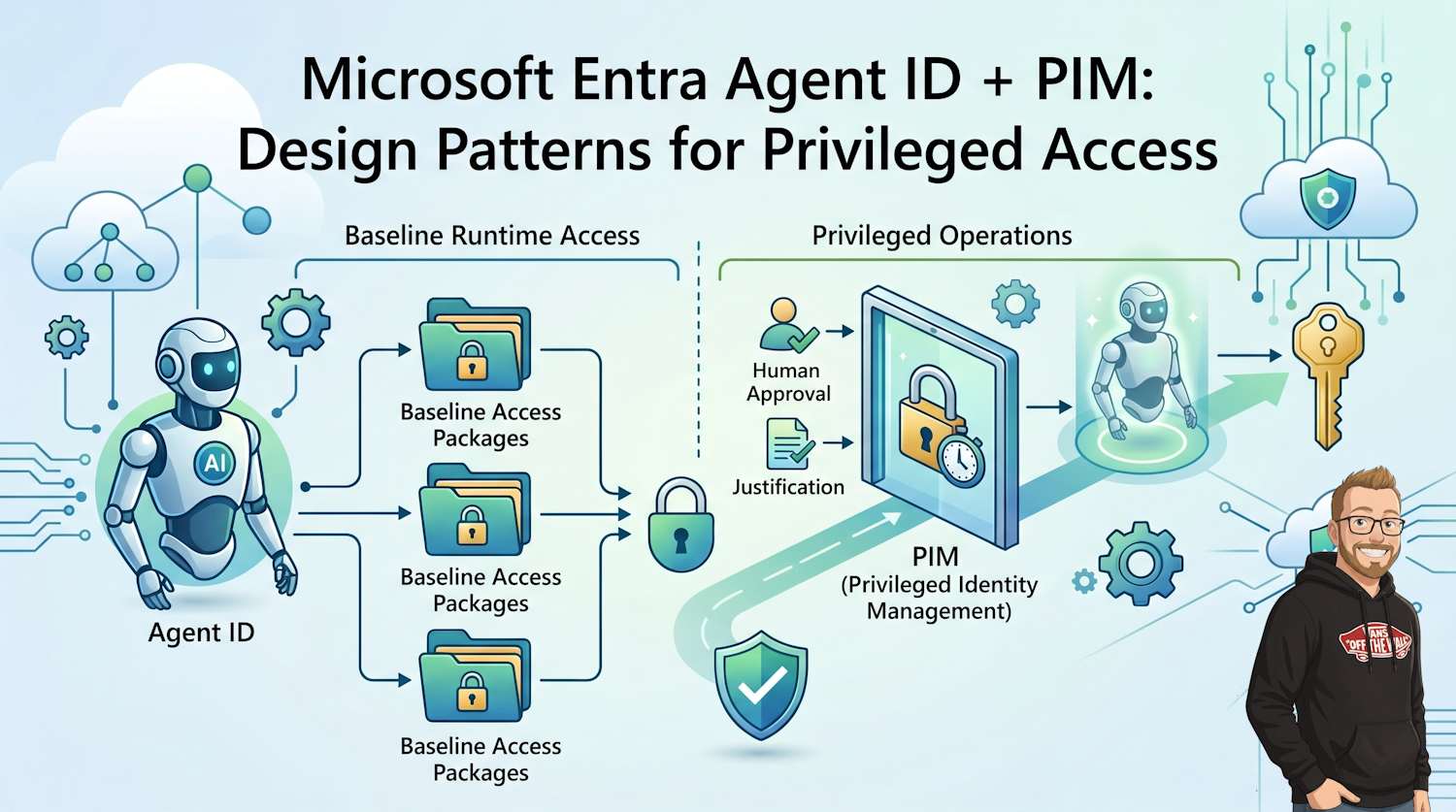
When people ask how to govern privileged actions for AI agents in Microsoft Entra, the hard part is not creating the first assignment. The hard part is activation control: approvals, justification, expiry, auditability, and revocation without long-lived privileged standing access.
For Agent IDs, the clean way to solve that is to combine Entitlement Management access packages with Privileged Identity Management (PIM). Access packages give assignment lifecycle and policy scope, while PIM gives just-in-time controls for privileged boundaries.
Core model: agent identities can request access packages for baseline access, while privileged operations should pass through PIM-governed activation with human accountability and time-bounded elevation.
Series note: This is Part 2. If you have not read Part 1 yet, start here: Part 1: Agent ID Access Packages and Short-Lived Permissions.
Why this part exists
Part 1 covered how agent identities request and receive access packages. This part covers the boundary where teams usually get stuck: privileged operations. Access packages are excellent for lifecycle, but PIM is still the control plane for high-privilege role usage.
Short answer first
- Yes, Agent ID and PIM can be used together.
- No, your normal target should not be autonomous direct activation of privileged PIM roles by an agent.
- Use access packages to govern assignment lifecycle; use PIM to govern privileged activation and approvals.
Platform constraints you must design around
- Agent identities can only use the Microsoft Entra roles that are explicitly allowed for agents.
- Many high-privilege Entra roles are blocked for agents (for example Global Administrator, Privileged Role Administrator, and User Administrator).
- Custom Entra roles are not supported for agent identities.
- Agent identities can't be members of role-assignable groups.
- Entitlement Management guidance now pushes privileged roles to PIM rather than access package role assignments.
What is actually supported
- Agent identities can request access packages programmatically.
- Access packages for agents can include allowed Entra roles, group memberships, and API permissions.
- Many highly privileged Entra roles are blocked for agents.
- Privileged Entra role governance should be handled through PIM.
Role snapshot: Microsoft currently lists 132 built-in Microsoft Entra role sections. Of those, 80 are explicitly allowed for Agent IDs, which leaves 52 roles that cannot be assigned to agents. 31 of those blocked roles are marked as privileged, so the restriction is not just about volume; it is about keeping agents away from the highest-impact directory controls.
Eligibility vs activation mechanics
Most architecture mistakes happen when teams treat "assignment" and "activation" as the same thing. They are different controls.
- Eligible assignment: principal can activate later for a limited time.
- Active assignment: principal already has role permissions in effect.
- PIM activation window: for Microsoft Entra roles, activation is time-bound and documented as up to 8 hours (unless policy lowers it).
For service principals and managed identities, design carefully: Microsoft guidance indicates they can't be assigned as eligible for Microsoft Entra roles, Azure roles, or PIM for Groups. They can still use time-limited active assignment models.
Important: Design for human-accountable privileged activation. Treat fully autonomous privileged elevation as an exception pattern, not the baseline.
Reference architecture
Use two lanes instead of one mixed model.
Lane A: baseline runtime access
- Assignment vehicle: access package.
- Scope: non-privileged operations needed for normal workloads.
- Lifecycle: short expiry, extension rules, sponsor ownership.
Lane B: privileged operations
- Assignment vehicle: PIM-governed role or PIM-managed group path.
- Controls: approval, justification, MFA, time-bounded activation.
- Trigger model: human sponsor or privileged operator initiates activation workflow.
Three patterns that work in production
Pattern 1: Human-activated privileged lane (recommended default)
- Agent runs with baseline access package only.
- When privileged action is needed, sponsor or operator activates the PIM path.
- Agent executes privileged task inside a short execution window.
Pattern 2: PIM for Groups bridge with access packages
- Put sensitive resource access behind PIM-managed groups.
- In access packages, assign eligible group membership roles where supported.
- Keep access package expiration less than or equal to the PIM "Expire eligible assignments after" duration to avoid state drift.
Pattern 3: Time-limited active assignment for service principal agents
- Use this when eligible activation isn't available for your principal type.
- Create short-lived active assignment for the exact scope and role needed.
- Enforce deterministic cleanup with explicit removal after task completion.
Implementation pattern that works
- Create one baseline access package per agent capability.
- Create one privileged package or group path per elevation scenario.
- Require sponsor on each agent identity used in privileged workflows.
- Align lifecycle windows so access package expiry does not outlive PIM eligibility rules.
- Log every request, approval, activation, and removal with shared correlation IDs.
Timing controls
- Access package assignments can use Number of hours or Number of days.
- For days, documented range is 0 to 3660.
- PIM activation windows should be shorter than or equal to the business need window.
- For Entra role activations via PIM, design to the documented 8-hour maximum ceiling and apply stricter policy where possible.
API-level validation checks
Before building workflows, validate your assumptions in your tenant with Graph queries.
1) Identify privileged roles
GET https://graph.microsoft.com/beta/roleManagement/directory/roleDefinitions?$filter=isPrivileged eq true2) Inspect current principal eligibility view (user-centric activation paths)
GET https://graph.microsoft.com/v1.0/roleManagement/directory/roleEligibilityScheduleRequests/filterByCurrentUser(on='principal')3) Inspect current role assignments for drift
GET https://graph.microsoft.com/beta/roleManagement/directory/roleAssignments?$expand=roleDefinitionThese checks catch design drift early: over-privileged roles, unexpected standing assignments, and activation paths that rely on assumptions not supported for your principal type.
Request flow blueprint
agent requests baseline package -> approval -> baseline assignment active
privileged task needed -> sponsor/operator initiates PIM-governed activation
approval + policy checks -> temporary privileged activation
task completes -> explicit removal or automatic expiry
audit review -> recurring access review for drift and stale grants
Design guardrails
- Never mix baseline and privileged scopes in one package.
- Never allow indefinite privileged assignment for agent runtime paths.
- Never rely on manual cleanup only; keep explicit removal requests in automation.
- Keep break-glass separate and monitored with post-incident review.
Operational checklist
- Document which operations are baseline vs privileged.
- Map each privileged operation to one approved elevation workflow.
- Set approval owners and fallback approvers for sponsor unavailability.
- Configure alerts for failed activations, repeated denials, and unusual activation hours.
- Run monthly access reviews for all privileged-capable agent identities.
Failure modes to test before production
- Approval timeout: request never reaches active state.
- PIM-policy mismatch: access package assignment outlives PIM eligibility duration.
- Sponsor unavailable: extension path blocked without fallback approvers.
- Cleanup failure: explicit remove call fails and relies on expiry only.
- Audit gap: request, approval, and activation events cannot be correlated in logs.
Where to start this week
- Pick one agent that currently has broad standing permissions.
- Split its access into baseline package and privileged path.
- Set a short expiration and test full request-to-expiry lifecycle.
- Verify logs can reconstruct who requested, who approved, who activated, and when access ended.
References
- Part 1: Agent ID Access Packages and Short-Lived Permissions
- Authorization in Microsoft Entra Agent ID
- PIM APIs for Microsoft Entra role management
- Assign Microsoft Entra roles in entitlement management
- Assign eligible group membership in access packages via PIM for Groups
- Using PIM-managed groups with access packages
- PIM integration notes for Azure RBAC
- PIM deployment planning constraints