


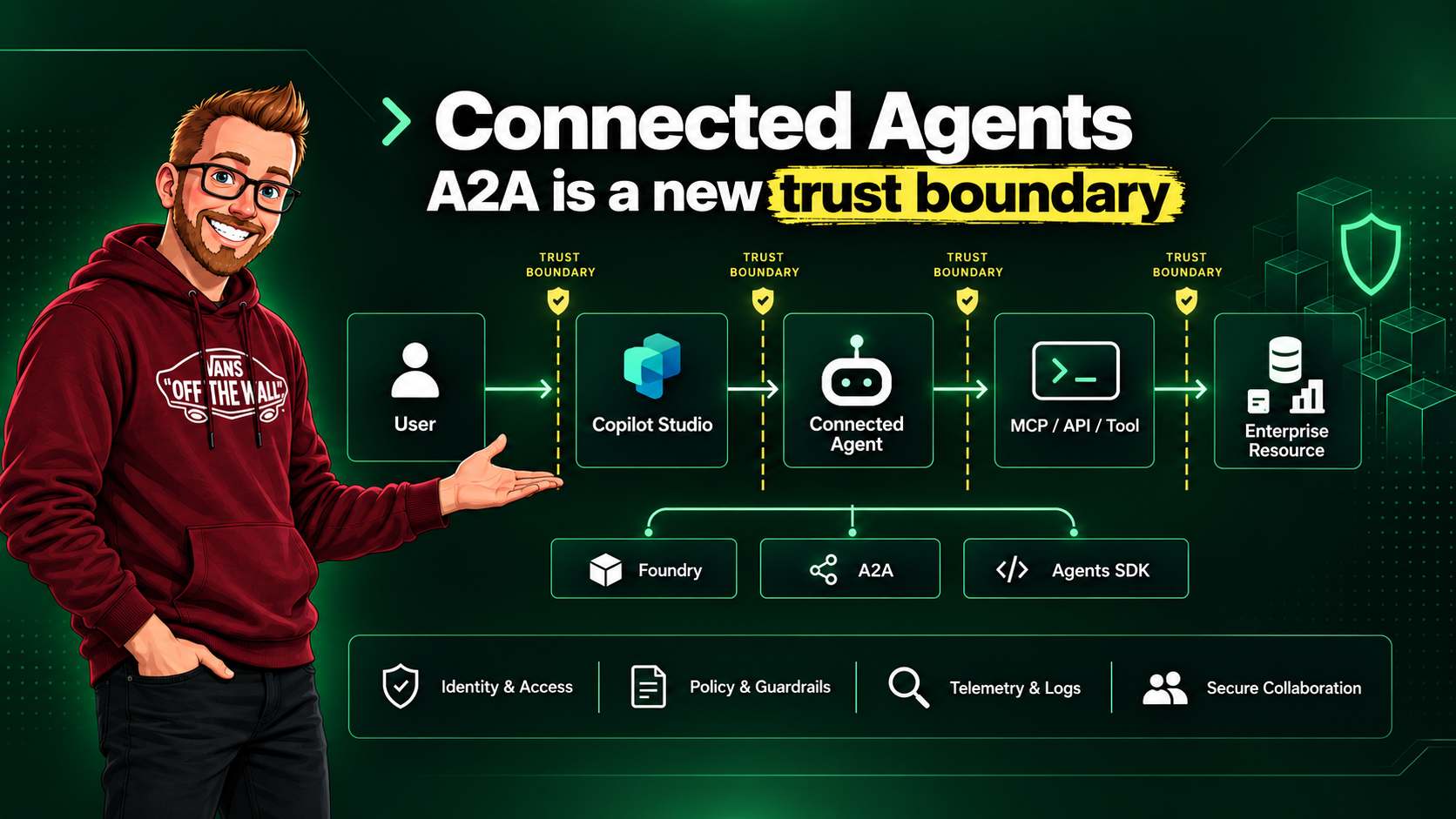
Copilot Studio can now connect an orchestrating agent to agents built in Microsoft Foundry, agents that expose the Agent2Agent protocol, and custom agents built with the Microsoft 365 Agents SDK. That is useful architecture. It also changes the security model in a way that is easy to miss.
An agent calling another agent is a delegation of trust. The first agent passes a task, some amount of context, and an expectation that the second agent will use its own reasoning and tools to finish the job. The downstream agent might run in another Azure subscription, another network boundary, or a runtime managed by a different team.
So the design question is not only, "Can these agents communicate?" The better question is, "What exactly are we allowing one agent to trust another agent to do?"
Three ways to connect, three different boundaries
Microsoft's connected agents overview separates child agents from independently deployed connected agents. Child agents live within the parent solution. Connected agents can have their own models, settings, release process, tools, and owners.
As of September 2026, the Foundry and Microsoft 365 Agents SDK connections are documented as preview features. That matters for production decisions because the behavior, limits, and support model can still change.
| Connection | How it works | Security focus |
|---|---|---|
| Microsoft Foundry agent (preview) | Copilot Studio connects to a Foundry agent with an enabled Activity Protocol endpoint. | Microsoft 365-to-Azure boundary, Foundry project access, model access, tools, Azure resource permissions, and network controls. |
| Agent2Agent (A2A) | Copilot Studio delegates a task to an A2A-compatible endpoint. The remote agent keeps its own reasoning and execution environment. | Endpoint authentication, task authorization, metadata and conversation history, downstream tools, and remote hosting controls. |
| Microsoft 365 Agents SDK (preview) | Copilot Studio calls a pro-code agent through its messaging endpoint and Activity Protocol model. | Runtime ownership, activity validation, conversation state, code-level tool execution, and hosting security. |
The distinction between A2A and a normal HTTP connector is important. A connector invokes an API. A2A delegates a task to another agent. Microsoft's A2A documentation calls out multi-turn interaction, rich contextual metadata, and interoperability across frameworks. The downstream agent can make another reasoning decision after it receives the task.
Map the complete trust chain
A realistic path often has five participants:
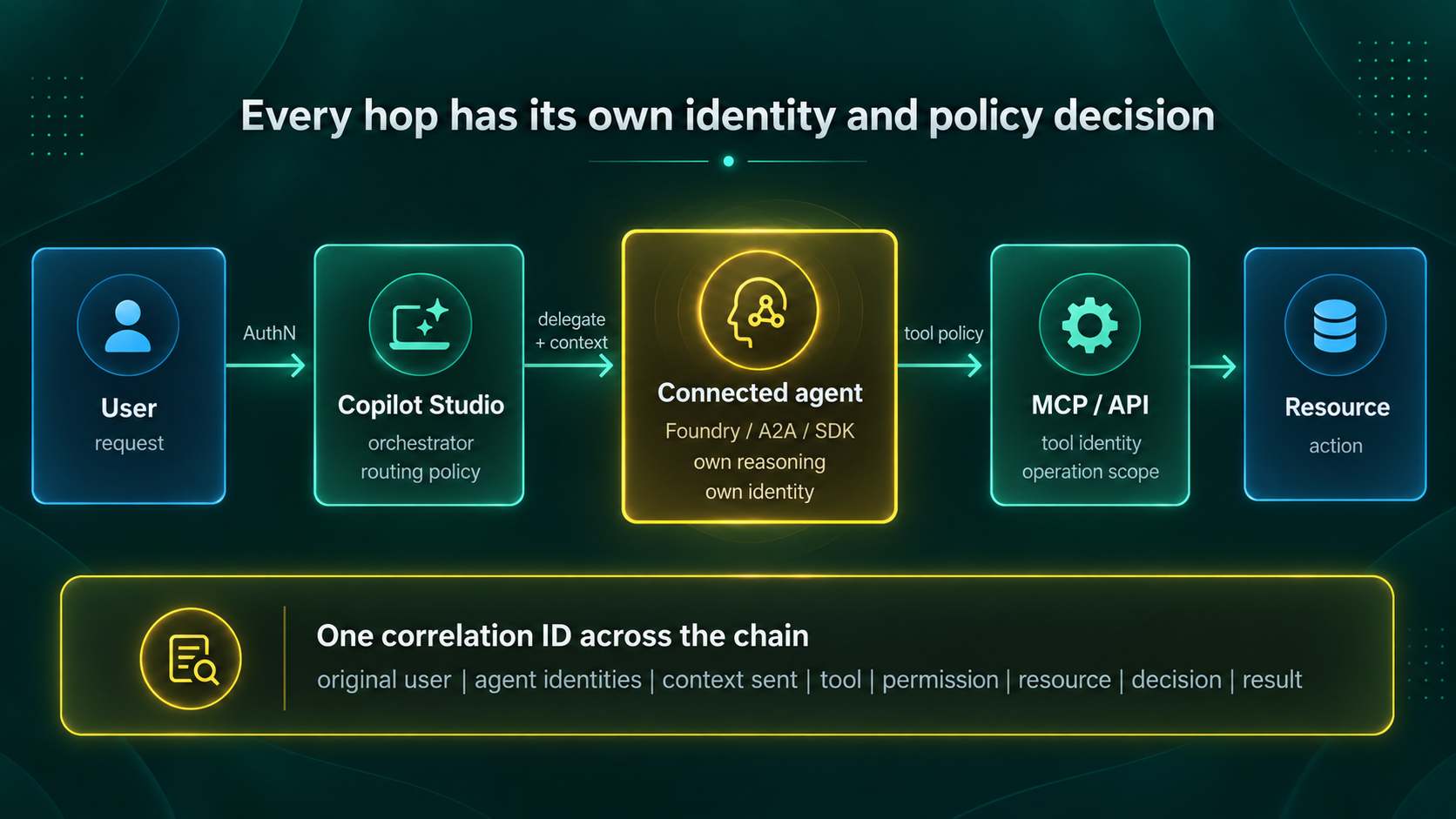
| Hop | Identity question | Policy question | Evidence to retain |
|---|---|---|---|
| User to orchestrator | Which user and tenant started the request? | May this user request this type of task? | User object ID, channel, session, intent, and timestamp. |
| Orchestrator to connected agent | Does the call use user delegation, the orchestrator identity, or a connection identity? | May Agent A delegate this task and this context to Agent B? | Agent IDs, route selected, delegation reason, context fields, and protocol. |
| Connected agent to tool | Which identity obtains the tool token? | May this agent invoke this operation for this user and purpose? | Tool name, operation, scopes or roles, token audience, and policy result. |
| Tool to resource | Which workload or delegated identity reaches the resource? | Is this read, write, destructive, cross-tenant, or regulated-data access? | Resource ID, action, approval, response, and resulting change. |
Identity is visible, authorization is still contextual
Copilot Studio automatically gives new agents a Microsoft Entra Agent ID. Microsoft documents these as service principals with an Agent subtype. Agents created before Agent ID arrived in May 2026 can still use legacy app registrations until migration.
This improves inventory and accountability, but an identity object does not answer every authorization question. At each hop, determine whether the operation uses delegated user permissions, application permissions, an agent-specific identity, or a connector connection owned by someone else.
Copilot Studio connector scopes also need careful interpretation. They describe configured connector
access. They are not raw permissions such as Mail.Read or
Files.Read.All. Runtime connector policies still decide whether the call is allowed.
Microsoft also documents that Conditional Access enforcement on the Agent ID currently applies
end-to-end only when the agent runs in Teams. Custom connectors, MCP servers, and REST API tools do
not add those connector API permissions to the Agent ID.
The confused-deputy problem
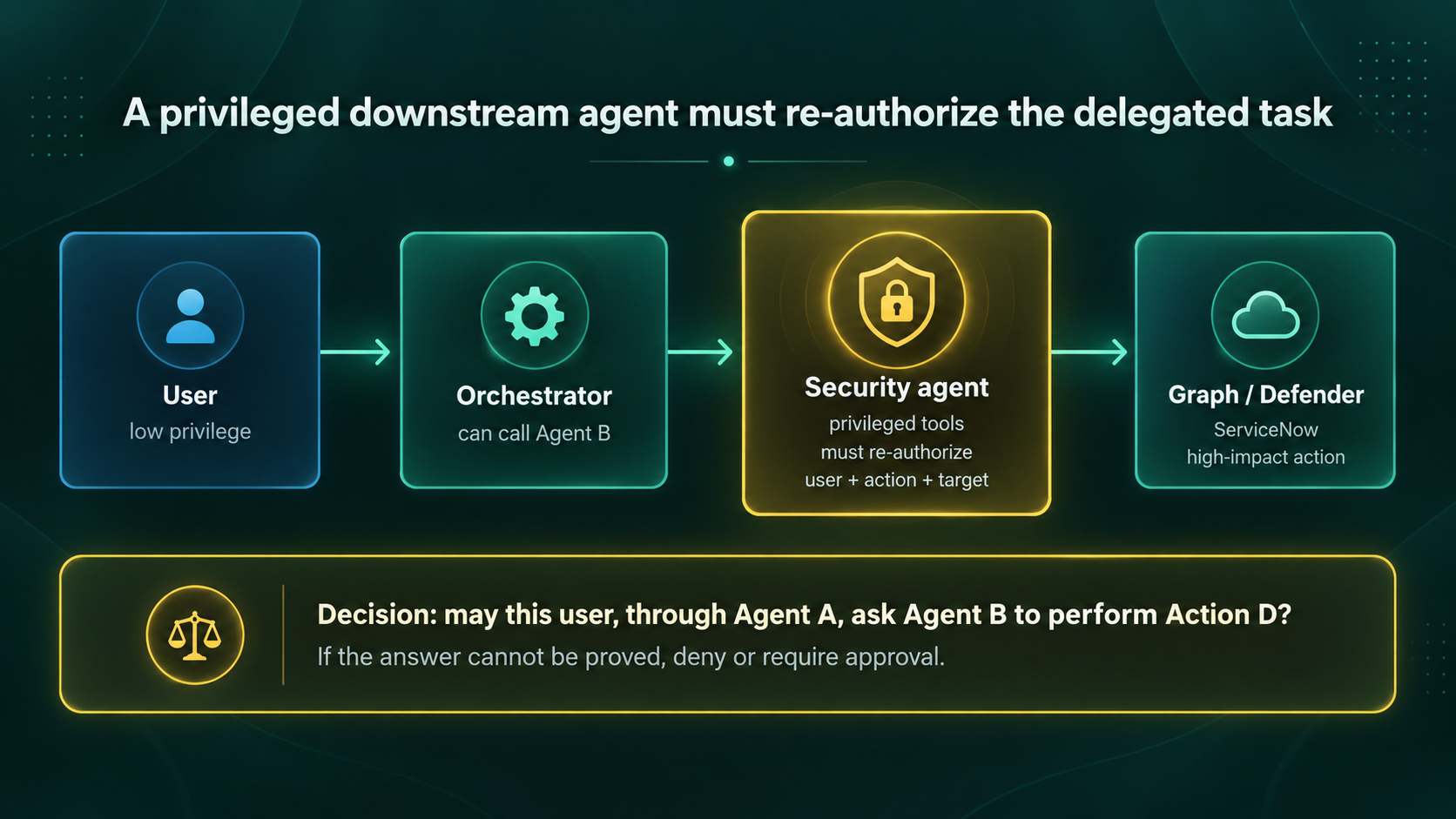
Consider a low-privilege Copilot Studio agent that can call a security operations agent. The security agent has application permissions to Microsoft Graph, access to Defender, and a ServiceNow tool that can close incidents. If the only policy check is "Agent A may call Agent B," the security agent can become a privilege-amplification path.
The authorization decision must include the original user, requested operation, target resource, purpose, and downstream privilege. Agent B needs to enforce the request, not simply trust Agent A's description of it.
Treat conversation context as sensitive data
A2A messages can carry a context ID, message IDs, locale, content parts, and chat history. The Microsoft sample shows full chat history in A2A metadata, not only the latest user message. Activity Protocol messages can also identify sender, recipient, conversation, channel, interaction type, attachments, and custom payload data.
That context is useful for continuity, but it can cross into an agent that has a different owner, data policy, hosting region, or retention policy. A customer support agent should not forward an entire conversation containing payment details to a shipping agent merely because one turn asks for package status.
- Send task-specific fields rather than the complete transcript where possible.
- Remove secrets, unrelated personal data, hidden instructions, and attachments the receiver does not need.
- Validate sender, recipient, conversation, channel, activity type, and payload schema.
- Set retention and logging rules for both sides of the connection.
- Record which context fields crossed the boundary without putting raw secrets into audit logs.
Govern tools separately from agents
Agent B being approved does not mean every tool available to Agent B is approved. The agent-to-tool boundary needs a separate allow decision. This applies to MCP servers, Microsoft Graph, databases, SaaS platforms, custom APIs, and calls to more agents.
| Tool class | Examples | Expected control |
|---|---|---|
| Read-only | Retrieve ticket status, query approved knowledge, read a bounded inventory. | Resource scope, row or object filtering, data classification, rate limit, and complete audit. |
| Write | Create a ticket, update a case, add a comment, or draft a configuration. | Operation allowlist, validation, idempotency, ownership checks, and rollback path. |
| High impact | Delete data, disable an account, change policy, close an incident, or deploy code. | Just-in-time authorization, explicit approval, deterministic policy, narrow scope, and post-action verification. |
The non-deterministic part of the system can recommend a route or tool. A deterministic control should still decide whether the requested operation is permitted. For destructive actions, I would also require a human approval that displays the target, effective identity, exact operation, and expected impact.
Control network egress
A trusted agent does not make every destination trustworthy. Copilot Studio can send traffic to HTTP endpoints, custom connectors, and MCP servers. Microsoft documents Secure Web and AI Gateway controls in Global Secure Access for forwarding this traffic through its proxy on a per-environment or environment-group basis.
The available controls include web content filtering, threat intelligence filtering, network file filtering, and policy evaluation for HTTP node traffic, custom connectors, and the MCP Server Connector. Use those controls with endpoint authentication, private networking where supported, DNS and certificate validation, and destination allowlists. Network policy should match the tools the agent is approved to use, not the full set of destinations its runtime can technically reach.
Build one trace across every delegation
During incident review, the useful question is: Why did Agent A delegate to Agent B, why did Agent B choose Tool C, and under whose authority was Action D executed? Answering that requires more than a transcript from the parent agent.
| Telemetry field | Why retain it |
|---|---|
| Correlation and context IDs | Join parent, downstream agent, tool, and resource events into one trace. |
| Original user and all agent identities | Separate the requesting identity from each workload identity that acted. |
| Delegation reason and route | Explain why orchestration selected the connected agent. |
| Context manifest | Show which fields and classifications crossed the boundary without duplicating secrets. |
| Tool, operation, permission, and resource | Reconstruct the effective authorization and blast radius. |
| Policy and approval decision | Prove which deterministic rule or human approved the action. |
| Result, cost, and usage | Detect failures, loops, unexpected consumption, and repeated delegation. |
Where Microsoft governance controls fit
Copilot Studio security and governance covers identity, data policies, environments, runtime controls, audit, and access governance. These are the controls closest to the orchestrator and its Power Platform environment.
Microsoft Agent 365 adds a broader control plane. Agents built in Copilot Studio, Microsoft Foundry, and Agent Builder are integrated automatically. Existing agents built elsewhere can be synchronized into the registry or integrated with the Agent 365 SDK for identity, observability, notifications, security, and governed Microsoft 365 access.
That helps with inventory, ownership, policy, lifecycle, and cross-platform visibility. It does not remove the need to authorize the individual delegated task or restrict the downstream tool. Think of Agent 365 as a place to see and govern the estate, while per-hop controls still enforce each request.
A review model for every connected agent
I would require the following record before enabling a connected agent in a production environment:
| Area | Required answer |
|---|---|
| Identity | Which Entra Agent ID, service principal, user, or connection identity exists at each hop? |
| Authentication | How is the caller verified, what is the token audience, and how are credentials rotated? |
| Authorization | Which operations and resources are allowed for each principal? |
| Delegation | How is the original user's authority carried, constrained, or re-evaluated? |
| Context boundary | Which fields may cross, where are they processed, and how long are they retained? |
| Tool permissions | Which read, write, and high-impact tools may the downstream agent invoke? |
| Network egress | Which destinations and protocols are allowed, inspected, and logged? |
| Human approval | Which actions require an explicit decision before execution? |
| Audit | Can one correlation ID reconstruct the full path and effective authority? |
| Cost and usage | Which budgets, quotas, rate limits, and loop detection controls apply? |
What I would test before production
- Try the same task as an entitled user, an unentitled user, and the agent identity alone.
- Send a task containing unrelated sensitive context and verify that it is removed before delegation.
- Attempt to invoke every downstream tool directly and through the connected agent.
- Verify that read-only, write, and high-impact operations follow different policies.
- Test replayed tasks, duplicated messages, expired tokens, wrong audiences, and changed tenants.
- Confirm that network policy blocks an unapproved HTTP or MCP destination.
- Trace one allowed and one denied request from the user to the final resource.
- Set a delegation depth and execution budget so agents cannot create expensive or endless loops.
- Repeat the tests after changing the agent description, tools, permissions, or model.