


Overview
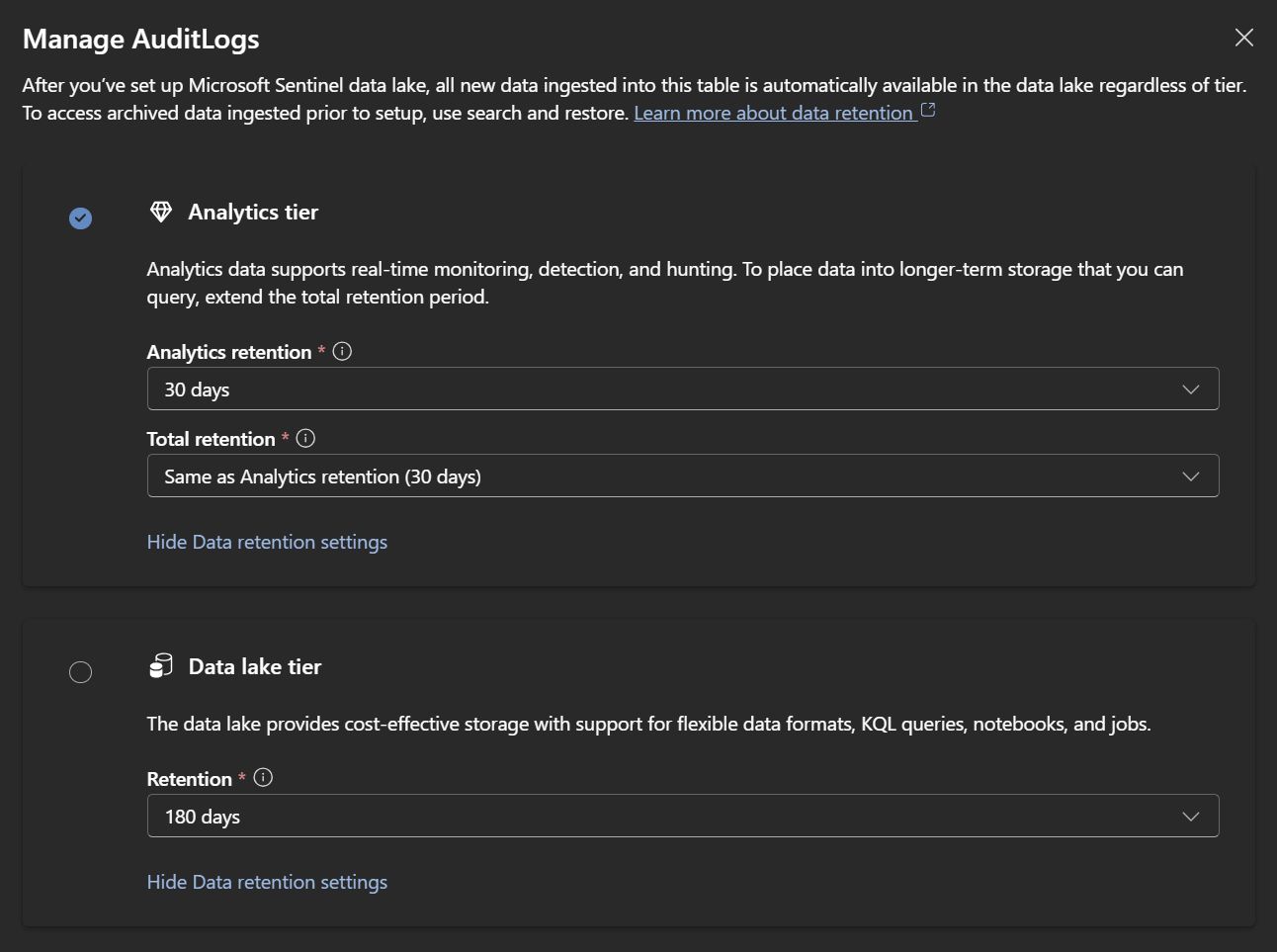
Microsoft Sentinel stores collected logs in different tiers depending on cost, query capabilities, and retention needs. The two primary tiers you should know are:
- Analytics tier — the "hot" tier for real-time investigations, Kusto queries (KQL), analytics rules, alerts, hunting and workbooks.
- Data Lake tier (also called Auxiliary or Basic logs) — a low-cost, long-term storage tier that keeps logs primarily for compliance and historical forensics.
This post focuses on the Data Lake / Auxiliary tier: what it is, when to use it, limitations, and practical guidance.
Data Lake Tier in Microsoft Sentinel
The Data Lake tier (also called Auxiliary Logs or Basic Logs) is a low-cost, long-term log retention tier in Microsoft Sentinel for logs you don't need to query frequently.
Key Characteristics
Cost
- ~80% cheaper than Analytics Logs (standard tier)
Designed for large volumes and cost-effective storage of seldom-used data.
Retention
- Up to 12 years retention.
By default the data lake mirrors analytics retention; you can extend the lake-only retention for long-term needs.
Query Limitations
- No KQL queries in the same interactive way as Analytics Logs during retention period.
- Search jobs only — you must run asynchronous search jobs (KQL jobs) to extract or analyze data.
- No real-time alerting — you can't create analytics rules on Data Lake-only logs.
- No live visualizations in workbooks for lake-only data while it’s stored there.
Use Cases
- ✅ Long-term compliance retention (GDPR/SOC2 audits)
- ✅ Audit logs you rarely query
- ✅ Historical forensics — retrieve data only when needed
- ✅ Cost optimization for verbose logs (firewall, proxy logs, debug traces)
Comparison Table
How to Use It
1. Configure a table as Auxiliary (Data Lake tier)
Set table plan in the Log Analytics workspace settings.
Example:
// In the Azure portal:
// Settings > Tables > Select table > Table plan = Auxiliary
2. Query with Search Jobs (async KQL)
To analyze lake-only data, create a search job. Search jobs are asynchronous and suitable for large historical queries.
Example KQL (search job):
let StartTime = ago(365d);
let EndTime = now();

AuxiliaryLogsTable
| where TimeGenerated between (StartTime .. EndTime)
| where SomeColumn == "value"
// This runs as an async search job, not instant query
Microsoft docs: https://learn.microsoft.com/fi-fi/azure/sentinel/datalake/kql-jobs
3. Restore to Analytics (temporary)
If you need to run interactive queries or create alerts, restore the required time range back to the Analytics tier.
UI path:
Settings > Tables > Restore > Select time range
Restored data becomes queryable for a temporary period (typically 7–14 days), then returns to the Auxiliary tier.
When to Use Auxiliary/Data Lake Tier

Originally published by Microsoft — see the full article and diagrams:
✅ Good Use Cases:
- Compliance logs (e.g., Office 365 audit logs, infrequently queried sign-in logs)
- Historical forensic evidence — keep years of data in case of legal or forensic needs
- Cost optimization for verbose, noisy logs (firewalls, proxies)
- Regulatory requirements to retain logs for long periods
❌ Avoid for:
- Active threat hunting — requires fast KQL queries
- Real-time alerting — Analytics rules won't work on lake-only data
- Dashboards/workbooks — cannot visualize this data live
- Frequent investigations — search jobs are slower and async
Pricing Example (approximate)
Scenario: 100 GB/day of logs
(Estimates — actual prices vary by region and ingestion model)
Architecture Pattern
High-value logs (SecurityEvent, SigninLogs for alerts)
    ↓
Analytics Logs tier (90 days)
    ↓ (auto-archive)
Archive / Data Lake (up to 12 years)

Low-value logs (verbose firewall, audit trails)
    ↓
Auxiliary/Data Lake tier (up to 12 years immediately)
Summary
The Auxiliary / Data Lake tier is a cost-effective long-term storage tier for logs you rarely query but are required to keep. Use it when compliance and retention matter more than real-time analytics.
- Use it for compliance, audits, and historical forensics.
- Don't use it for live hunting, dashboards, or analytics rules.
- Restore data to Analytics when you need temporary interactivity.
References
- Original Microsoft article: Manage data tiers and retention in Microsoft Sentinel — https://learn.microsoft.com/fi-fi/azure/sentinel/manage-data-overview#how-data-tiers-and-retention-work
- Diagram used as preview: https://learn.microsoft.com/fi-fi/azure/sentinel/media/manage-data-overview/tiers-retention-defender-portal.png