Introduction
In today's hybrid work environment, employees access the internet from anywhere using any device to connect to cloud applications, websites and generative AI services. This distributed access creates new security challenges that traditional network perimeters can't adequately address. Microsoft Entra Internet Access provides a modern, cloud-native solution to secure internet and web access at the network level while protecting against emerging AI-related threats.
Entra Internet Access is part of the Microsoft Entra security platform and works in conjunction with Microsoft Entra Private Access to provide zero trust network access. Together, they replace traditional VPN and firewall solutions with a more secure, performant and user-friendly approach.
What is Entra Internet Access?
Microsoft Entra Internet Access is a cloud-native security service that secures user internet access, SaaS apps and web resources. It provides network-level security and visibility for traffic flowing through the internet, regardless of whether employees are on corporate networks or working remotely.
Key capabilities include:
- Web content filtering - Block malicious sites, enforce acceptable use policies and categorize web traffic
- Real-time threat protection - Detect and block malware, ransomware and phishing attacks
- Data loss prevention - Prevent sensitive data from being exfiltrated through web traffic
- Application control - Monitor and control access to software-as-a-service (SaaS) applications
- Network visibility - Gain comprehensive logs and analytics of user internet and app usage
- Generative AI protection - New capabilities to secure employee usage of AI applications
How Entra Internet Access Works
Entra Internet Access functions as a secure web gateway (SWG) in the cloud, sitting between users and internet resources. Here's how it protects your organization:
Architecture Overview
- Traffic routing - User internet traffic is routed through Microsoft's global edge network
- Policy evaluation - Traffic is evaluated against security policies and organizational rules
- Threat detection - Advanced threat engines scan for malware, phishing and data exfiltration
- Enforcement - Traffic is either allowed, blocked or logged based on policies and detections
- Analytics - Comprehensive logging provides visibility and compliance reporting
Zero Trust Integration
Entra Internet Access integrates with Microsoft Entra for zero trust network access:
- Identity-based policies - Apply different security policies based on user identity, device and risk
- Conditional Access - Enhance conditional access policies with network-level controls
- Device compliance - Verify device health before allowing access to sensitive resources
- Risk assessment - Factor identity and behavior-based risk into network access decisions
New AI Security Capabilities (Ignite 2025)
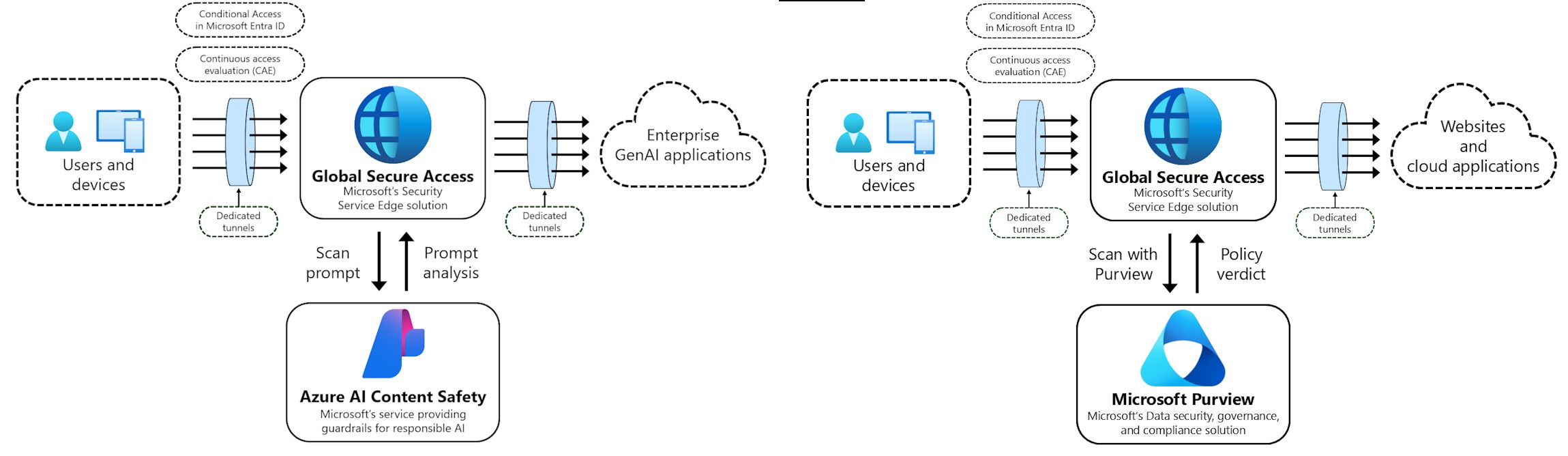
At Microsoft Ignite 2025, Microsoft announced new AI-centric security capabilities in Entra Internet Access to address the risks of generative AI adoption:
Real-Time Protection Against Prompt Injection Attacks
What is prompt injection? Prompt injection attacks exploit generative AI models by injecting malicious instructions into prompts to bypass safety guidelines or extract sensitive information. For example, an attacker might instruct a chatbot to ignore its security policies.
How Entra Internet Access protects against it:
- Real-time analysis of traffic to generative AI applications
- Detection of suspicious patterns and malicious prompts
- Automatic blocking of detected injection attempts
- Applies to sanctioned AI apps, unsanctioned tools and custom applications
Expanded Visibility into Unsanctioned AI Usage
Organizations often lack visibility into employee usage of consumer AI tools. Entra Internet Access now provides:
- Discovery of unsanctioned AI apps - Identify when users access ChatGPT, Claude, Gemini and other consumer AI services
- Custom application detection - Detect when employees use custom-built AI applications
- Usage analytics - Track frequency of access, volume of data interactions and user behavior
- Risk assessment - Categorize AI tool usage by risk level based on organizational policies
Integration with Microsoft Purview for Sensitive Data Protection
The new network file filtering integration combines Entra Internet Access with Microsoft Purview:
- Data classification scanning - Identify sensitive data in files being sent to AI and SaaS applications
- Policy-based blocking - Prevent files containing classified data from being uploaded to unauthorized services
- Automatic remediation - Warn users or automatically stop uploads of sensitive content
- Compliance tracking - Maintain audit logs of blocked data transfers for compliance and investigations
Microsoft Ignite 2025: Internet Access and Private Access Announcements
Entra Internet Access Announcements
- Real-time protection against prompt injection attacks across all generative AI applications
- Expanded visibility into unsanctioned AI usage, including custom applications
- Integration of network file filtering with Microsoft Purview to discover and block sensitive content in files sent to AI and SaaS applications
Entra Private Access: Intelligent Local Access (Preview)
Microsoft also announced significant improvements to Entra Private Access through the Intelligent Local Access (ILA) feature:
What is Intelligent Local Access?
Today, Entra Private Access sends all traffic (both application and authentication) through the Global Secure Access service, regardless of user location. This approach results in network backhauling, which adds latency and slows down the network significantly.
Intelligent Local Access solves this by:
- Enabling intelligent network routing based on user location
- Using DNS probes to determine if the client is inside the corporate network
- Allowing private applications to bypass the cloud service when on corporate networks
- Reducing latency and avoiding network hair pinning
- Maintaining consistent security posture for remote and on-premises workers
Key Benefits of Intelligent Local Access
- Improved performance - Eliminates latency from unnecessary backhauling
- Better user experience - Faster access to local applications when on corporate network
- Reduced network strain - Decreases unnecessary traffic through cloud service
- Flexible access patterns - Adapts to whether user is remote or on-premises
- Security maintained - No compromise on security regardless of routing path
Implementing Intelligent Local Access
Configuration steps:
- Sign in to Microsoft Entra admin center
- Browse to Global Secure Access > Connect > Private networks
- Select Add Private network
- Define network configuration (DNS servers, IP ranges, FQDNs)
- Select Target Resource (Quick Access or PA enterprise app)
- Create the private network
- Verify ILA flow using Advanced Diagnostics
Getting Started with Entra Internet Access
Prerequisites
- Microsoft Entra ID tenant
- Microsoft 365 or standalone Entra Internet Access subscription
- Supported client (Windows, macOS, iOS, Android)
- Client connector installed on user devices or network
Implementation Steps
- Assess current usage - Understand your organization's internet and SaaS app usage patterns
- Define policies - Create acceptable use policies and security requirements
- Configure Entra Internet Access - Set up web filtering categories, threat detection and DLP rules
- Deploy client connector - Install on user devices (or use network deployment)
- Configure Conditional Access - Integrate with Microsoft Entra Conditional Access policies
- Enable analytics - Turn on logging and reporting for visibility
- Monitor and optimize - Review alerts, user feedback and adjust policies
Best Practices for Deployment
Security Best Practices
- Principle of least privilege: Grant access to only necessary resources, use group-based policies, regularly review policies
- Defense in depth: Combine with endpoint protection, use Defender for Endpoint, implement security awareness training
- Monitoring and response: Establish alerts for high-risk activities, review analytics regularly, maintain incident response procedures
Operational Best Practices
- Gradual rollout: Start with pilot group, expand to departments with high-risk users, then deploy organization-wide
- Policy tuning: Monitor blocked traffic and false positives, adjust policies based on business needs
- Regular reviews: Audit policies for effectiveness, review threat intelligence, assess emerging AI tools
Summary
Microsoft Entra Internet Access and Entra Private Access with Intelligent Local Access provide a comprehensive zero trust network access solution for modern organizations. By combining real-time threat protection, data loss prevention, AI security capabilities and intelligent local routing, these services help organizations protect against emerging threats, gain visibility into AI tool usage, prevent data exfiltration, improve performance, and support zero trust security.
Key Takeaways
- ✅ Entra Internet Access provides cloud-native web security without on-premises gateways
- ✅ New AI security capabilities include real-time prompt injection protection
- ✅ Integration with Microsoft Purview prevents sensitive data uploads to AI applications
- ✅ Entra Private Access with Intelligent Local Access improves performance and user experience
- ✅ Provides visibility and control over unsanctioned AI tool usage
- ✅ Reduces latency and network backhauling for on-premises access patterns
- ✅ Zero trust integration with Microsoft Entra enables identity-based policies
- ✅ Reduces costs and complexity compared to traditional network security appliances
Related Resources
- Microsoft Entra Internet Access Documentation
- Microsoft Entra Private Access Documentation
- Intelligent Local Access (preview)
- Microsoft Ignite 2025 Book of News
- Zero Trust Architecture with Microsoft Entra
- Microsoft Purview Data Loss Prevention