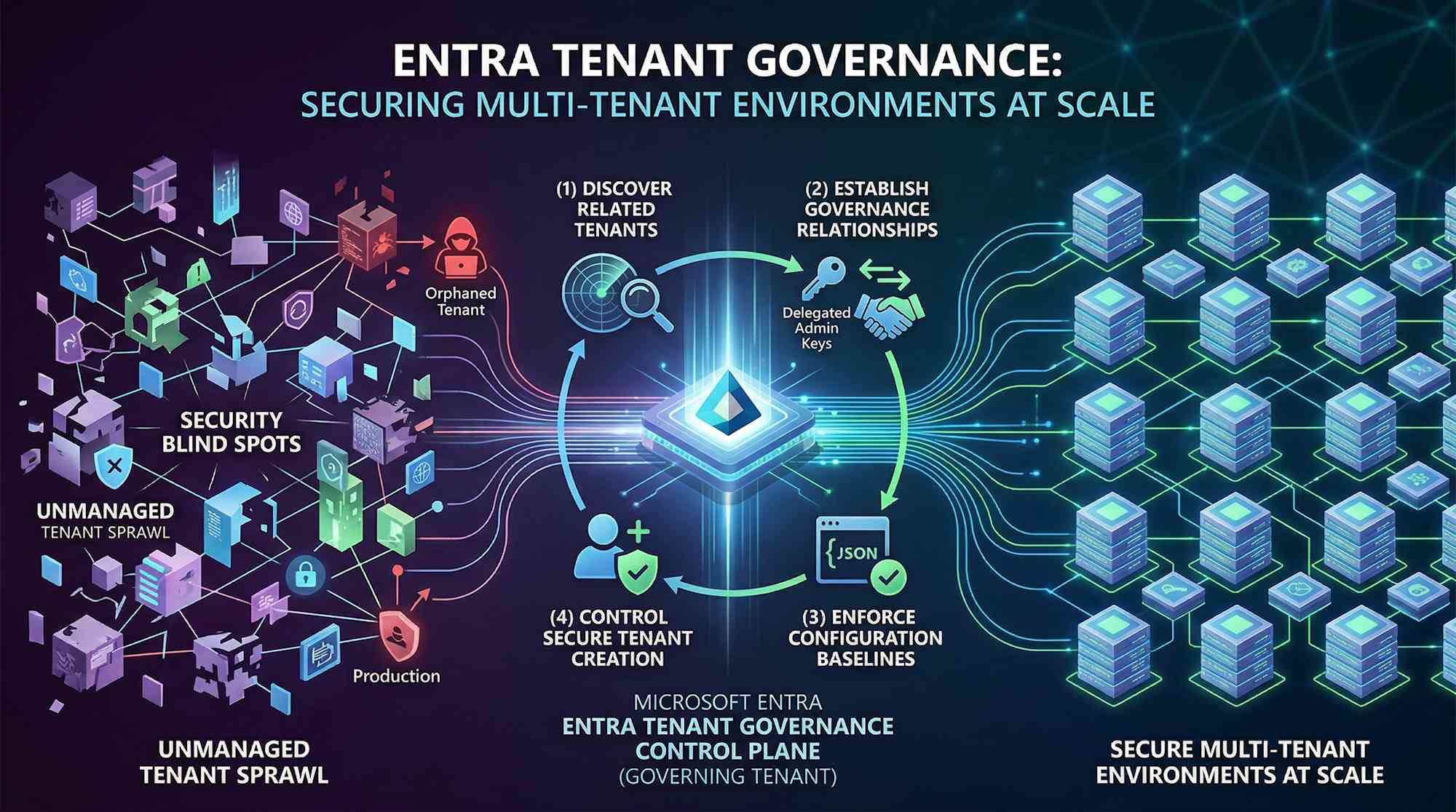
Most organizations have more tenants than they realize. Mergers, acquisitions, shadow IT—they add up. Your identity team thinks they're managing one primary tenant. Really? There's probably dozens of related tenants out there running with mismatched security controls. That creates blind spots. A single poorly secured tenant becomes an attack vector. One weak link, and attackers pivot straight into production, completely bypassing the security controls you thought were protecting you.
The real problem: can you see all those tenants? Can you govern them? Can you secure them at scale?
The Problem: Tenant Sprawl
It's real. Unmanaged tenants without MFA, without Conditional Access, without privilege guardrails—they exist. And we know from incidents that attackers hop from those orphaned tenants into production, past all the controls you thought would stop them. Not theoretical risk. It's happening now.
⚠️ Real talk: Multiple Entra tenants with inconsistent security? That's a blind spot attackers actively find and exploit. Visibility and centralized governance aren't options—they're foundational security controls.
What Is Entra Tenant Governance?
Built on Microsoft's own experience managing a complex, multi-tenant environment at massive scale, Microsoft Entra Tenant Governance lets you discover, govern, and keep all related tenants secure in one place. No custom scripts, no PowerShell orchestration across multiple towers, no fragmented admin models—instead, you get a control plane that actually scales.
Here's what you can do:
- Discover all tenants connected to your organization—production, test, acquired, and employee-created—and understand the relationships between them
- Govern cross-tenant administrative relationships using least-privilege delegation, without managing local accounts or B2B guest accounts in each tenant
- Enforce consistent security configurations across tenants using baseline definitions and automated drift detection
- Control new tenant creation with governance applied from day one
Configuration lives in standard JSON format and covers over 200 resource types across Microsoft 365, Entra, Exchange, Intune, Defender, Purview, and Teams. One framework. Your entire Microsoft environment.
What It Does: Four Main Pieces
1. Related Tenants Discovery
The system spots tenants connected to your primary tenant—not via manual spreadsheets, but through actual usage signals. It finds B2B relationships, apps shared across tenants, and billing connections. The discovery view updates as new relationships emerge, so you're always seeing your actual tenant environment in real time.
Each related tenant shows why it's connected (B2B users accessing admin roles, shared app registrations, billing overlap), so you can triage which tenants need immediate governance attention.
2. Governance Relationships
Once you identify related tenants, you establish formal governance relationships through a request-and-approval workflow. A central "governing tenant" gets delegated administrative rights to "governed tenants" at a defined privilege level.
This replaces the messy pattern of managing separate local admin accounts or B2B guest accounts in each tenant. Administrators sign in from the governing tenant and manage governed tenants directly. All permissions are managed through security group membership in the central tenant. Access is visible, auditable, and kept in sync with organizational changes in one place.
3. Tenant Configuration Management
You define a JSON-based configuration baseline representing the desired state of resources in each tenant. This baseline covers Conditional Access policies in Entra, transport rules in Exchange, device compliance policies in Intune, and hundreds of other settings.
Configuration monitors check each tenant's actual state against the baseline on a schedule you specify, catching any drift right away. When a setting changes (policy modified, approval bypassed, whatever), you get a report showing exactly what changed and how to fix it.
For teams handling operations by service, you can create separate monitors—one for Entra policy enforcement, another for Teams settings, another for Intune compliance—aligned to who owns what.
4. Secure Tenant Creation
Instead of IT teams creating new tenants ad-hoc with inconsistent setup, delegated creation allows approved users to request new tenants while governance is applied automatically. New tenants are created with a built-in governance relationship to your central tenant, linked to your Microsoft billing account, and configured with baseline settings from day one.
No more orphaned tenants or tenants created without security controls.
Three Practical Use Cases
Use Case 1: Post-Acquisition Tenant Consolidation
Your organization acquires a SaaS startup with its own Entra tenant. Your security team needs to understand what's now connected to your production environment and ensure the acquired tenant meets your security baselines (MFA enabled, Conditional Access policies in place, privileged roles restricted).
How Tenant Governance helps: Discovery shows you the relationship between your tenant and the acquired one—billing, B2B, shared apps. You set up a governance relationship that gives your identity team access to audit and enforce controls without touching the acquired company's day-to-day operations. Configuration management checks if they're meeting your compliance requirements and catches any changes. Then you decide: migrate users into your tenant, integrate the apps, or keep it as a governed satellite.
Use Case 2: Managed Service Provider (MSP) Multi-Customer Operations
You're an MSP managing Entra environments for 50+ customers. Each customer has its own tenant that your teams need to administer. Traditionally, this means maintaining local admin accounts in each customer tenant and managing B2B guest accounts across all of them.
How Tenant Governance helps: Your central MSP tenant becomes the governing tenant. Each customer opts in, defining exactly what permissions your team gets. Your staff logs into your own tenant and manages all customer environments from one place. Permissions tied to security groups you already manage. Staff member leaves? Remove them from one group. Need an audit trail? It's right there. Customer wants out? They revoke the relationship. This scales from tens of customers to hundreds without multiplying your headcount.
Use Case 3: Regulated Industry Compliance and Audit Readiness
Your organization operates in financial services or healthcare with strict regulatory requirements (SOX, HIPAA, PCI DSS). You have a main production tenant, test/development tenants, and regional tenants across geographies. Compliance teams need to verify that all tenants maintain consistent security baselines and that policies haven't drifted.
How Tenant Governance helps: Configuration management defines your baseline—MFA for all admin roles, disk encryption on devices, whatever your compliance standard requires. Monitors run on schedule and generate drift reports. When the auditor asks for proof, you pull a report showing desired state vs. actual state with timestamps. If a tenant drifts, you catch it before the auditor does. Compliance stops being something you prove after the fact and starts being something you monitor constantly.
Licensing and What You Get
| License | Included With | Features |
|---|---|---|
| Entra ID P1 | Microsoft 365 E3 | Related tenants discovery, basic governance relationships, configuration management APIs |
| Entra ID P2 | Microsoft 365 E5 | All P1 features plus advanced policy management and secure tenant creation |
| Entra Suite | Microsoft 365 E7 | Full Tenant Governance plus Entra ID Governance and Entra Workload ID |
Current status (April 2026): Tenant configuration management APIs are generally available. Related tenants discovery, governance relationships, and secure tenant creation are in public preview. This means you can start testing now, but features remain subject to change during the preview period.
When DIY Automation Breaks Down
Some teams try to solve this with PowerShell scripts. You write something to enumerate all your tenants, check compliance, spot drift, trigger fixes. Sounds reasonable until you live with it.
- Scripts break when APIs change or permissions shift
- Error handling gets messy fast—silent failures, unexpected behavior
- Maintaining them across teams becomes a nightmare
- No built-in audit trail or compliance reporting
- When you leave, no one understands what the script actually does
Tenant Governance replaces this fragile layer with a supported, managed service. Microsoft handles updates, API changes, performance at scale, and the reporting your auditors want—you don't have to.
Getting Started: Three Steps
1. Discover Your Tenant Environment: Log into your primary tenant and run a related tenants discovery scan. This takes 10-15 minutes depending on your environment size. You'll get a list of all connected tenants with discovery signals (B2B, billing, app registrations). Triage them: what's legitimate, what's shadow IT needing attention, what's acquisitions or partnerships?
2. Establish Governance Relationships: For tenants that should stay connected but need central oversight, initiate a governance relationship. The governed tenant admin approves the relationship, and you're granted delegated admin access. Start with test or non-production tenants if you want to pilot.
3. Define Configuration Baselines: Capture the desired state of a known-good tenant using configuration snapshots, or author baselines from scratch using JSON. Set up monitors to validate actual vs. desired state on a schedule you define. Integrate drift reports into your security operations workflow.
For deeper details, see Microsoft's Tenant Governance docs and the Unified Tenant Configuration Management guide on Microsoft Learn.
The Point
This is the first time Microsoft's given you native tooling to discover and manage multi-tenant environments at enterprise scale. If your organization has more than one Entra tenant (and most do now), seeing those connections, enforcing policies across them, and delegating access properly stops being nice-to-have and becomes table-stakes.
Whether you're managing M&A integration, global operations, or regulated compliance, Tenant Governance gives you a control plane built on what Microsoft learned managing their own complex tenant environments.
Start with discovery. See what's actually connected to your primary tenant. Then decide whether formal governance relationships and configuration management actually help your organization—better security, less operational noise, less firefighting.
© 2026 Cloudpartner. Please attribute the source when reusing content. The views expressed here are my own.