Why You Should Care
Building on the earlier post about Entra tenant governance, I want to cover something that directly impacts how your organization manages identities across systems: the new SCIM 2.0 APIs in Microsoft Entra. If you're dealing with multiple applications, HR systems, or partner integrations, this is relevant to you.
The challenge most teams face is simple: identity data lives everywhere. Your HR system has employees, your SaaS apps need accounts, your legacy systems expect specific attribute formats. Getting all these to sync reliably without custom code is expensive and error-prone. Enter SCIM (System for Cross-Domain Identity Management)—a standard protocol everyone understands.
⚠️ Important: SCIM 2.0 APIs require Microsoft Entra P1 licensing and are a paid consumption-based add-on. Factor in costs before enabling, but most organizations find the automation saves money compared to custom provisioning code.
So, What's SCIM?
SCIM is an industry standard for automating user and group lifecycle across systems. Instead of building custom integrations between each pair of applications, you define provisioning once using SCIM, and any SCIM-compatible system speaks the same language.
Think of it like this: your HR system needs to send new employee data to your employee directory, SaaS applications, and security tools. Without SCIM, you'd write separate code for each integration. With SCIM, you write once, and all three systems understand the same protocol.
The protocol handles create, read, update, delete (CRUD) operations on users and groups. It defines standard attributes (email, phone, groups, etc.), and supports filtering and sorting. The key point: whether you're integrating with Entra, Okta, an HR system, or a custom application, everyone speaks the same SCIM language.
Two Complementary Roles in Entra ID
Here's where it gets interesting. Microsoft Entra plays two different roles in the SCIM space, and understanding the difference is critical:
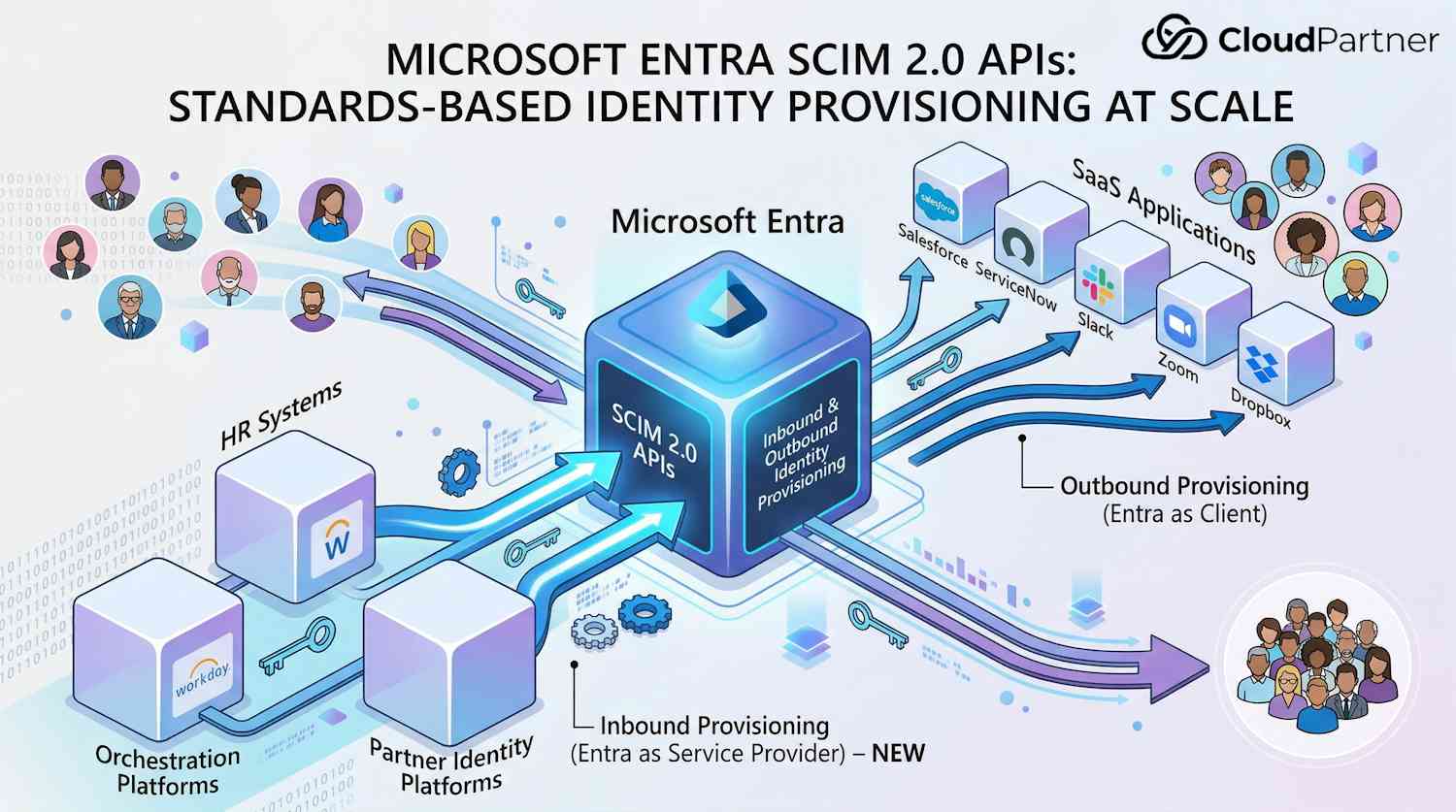
Role 1: Entra as a SCIM Client (Outbound Provisioning)
Entra's the client here: it sends identity data OUT to SaaS applications. You manage users in Entra, and the built-in provisioning service automatically creates, updates, or removes accounts in applications like ServiceNow, Salesforce, Slack, Zoom, Dropbox, and hundreds of others.
This is the older capability that's existed for years. IT admins appreciate this because they control user lifecycle from one place without involving each individual application team. You enable provisioning for an app in the Entra admin center, map attributes (Entra's email field to the app's mail field, for example), and let it run.
Role 2: Entra as a SCIM Service Provider (Inbound Provisioning) – NEW
The new capability flips this around. Now Entra's the server: it exposes SCIM endpoints that let external systems provision users directly INTO Entra. Your HR system, a partner's identity platform, or a custom orchestration tool can use SCIM to manage users in your Entra tenant.
This matters when Entra isn't your source of truth. If your HR system owns the employee data, SCIM 2.0 APIs let you auto-sync users to Entra without writing custom code or being stuck with Entra's connector approach.
The New SCIM 2.0 APIs
In early 2026, Microsoft added support for SCIM 2.0 APIs, making Entra a full SCIM service provider. Your tenant now has REST endpoints that any SCIM-compatible client can call.
Here's what you can do with these endpoints:
- User management – Create, read, update, delete users with SCIM schema attributes
- Group management – Create and manage security groups and Microsoft 365 groups
- Membership management – Add or remove users from groups based on memberships
- Schema discovery – Query supported attributes and capabilities via standard SCIM endpoints
- Attribute mapping – Use SCIM schema to map attributes from your HR system to Entra user properties
The API endpoint structure follows SCIM standards. For example, to get the service provider configuration, you'd call `GET https://graph.microsoft.com/rp/scim/serviceproviderconfig` with a bearer token. The response tells you what SCIM operations are supported, pagination settings, filter capabilities, and more. For a deeper technical walkthrough of how the SCIM API works, this detailed technical breakdown provides valuable insights on endpoint behavior and implementation patterns.
One technical detail worth noting: SCIM endpoints are published under the `/rp` path (reverse proxy) rather than following standard OData conventions. This exemption from OData compliance is rare—very few Microsoft Graph endpoints use the `/rp` path. It's a sign Microsoft wanted to prioritize standards compliance with the SCIM specification over their usual API patterns.
What SCIM Does for You
Attribute Flexibility
SCIM lets you map attributes from your source system (HR, partner platform, etc.) to Entra user properties. Common mappings include email, phone, department, and custom attributes. Different HR systems use different field names—SCIM handles that translation for you.
Lifecycle Management
Beyond just creating accounts, you can manage transitions. When an employee leaves, your HR system can send a deprovisioning request through SCIM, which disables the user in Entra. Some workflows even trigger secondary operations—like removing from groups or archiving mailboxes.
Group Synchronization
Your HR system might have organizational groups (departments, cost centers, project teams). Through SCIM, you can sync these groups to Entra and keep memberships current automatically. Your Entra groups stay in sync with your source of truth.
Custom Extensions
SCIM supports extensions for custom attributes. If your organization tracks employee IDs, cost center codes, or office locations, you can store these as custom Entra attributes and sync them through SCIM. This is useful for applications that query Entra and need additional data.
Standards-Based Automation
Here's the real win: you can reuse SCIM patterns across your environment. If you're already using SCIM to connect your HR system to other platforms, the same tooling and workflows work for Entra. No learning curve.
Real-World Scenarios
Scenario 1: HR System as Single Source of Truth
Your organization uses Workday or another HR system as your source of truth for employee data. Previously, you were locked into Entra's HR-driven provisioning (tied to specific connectors). Now you can use SCIM 2.0 APIs with your existing HR SCIM connector or any custom code you build.
When a new employee is hired in Workday, they're automatically created in Entra with the correct department, manager, custom attributes, and group memberships. When they're terminated, the same system disables them in Entra. All driven by your HR system through SCIM.
Scenario 2: Multi-Tenant MSP (Managed Service Provider)
You're an MSP managing Entra tenants for multiple customers. Each customer has their own identity provisioning system or HR platform. With SCIM 2.0 APIs, you can build a single integration that connects their system to their Entra tenant using standard SCIM operations.
No more custom per-customer code. You define the SCIM integration once, document the customer's HR system's SCIM capabilities, and connect them. Updates and maintenance are simplified because you're using industry standards.
Scenario 3: Custom Orchestration Platform
Your organization has a custom identity orchestration platform that coordinates provisioning across multiple systems (databases, on-premises directories, cloud platforms, etc.). Previously, Entra required a separate integration path.
With SCIM 2.0 APIs, your orchestration platform can send standard SCIM requests to Entra just like it does to your HR system or other platforms. This unifies your provisioning pipeline and simplifies operational complexity.
Licensing, Costs, and Gotchas
Before you flip the switch on SCIM 2.0 APIs, understand the costs.
Licensing Requirements
You need Entra P1 or higher. That covers Microsoft 365 E3, E5, Office 365 Enterprise plans bundled with Entra, or standalone Entra P2.
Consumption-Based Pricing
Unlike many Azure services, SCIM APIs use consumption-based pricing. You pay per API call. The exact pricing depends on your region and is updated regularly, so check the official pricing page for current rates. Generally, expect pricing in the microcentage range per call.
10,000 employees syncing daily? Cheap. Polling constantly or super-frequent updates? Costs climb fast. Think about your actual sync frequency and budget accordingly.
Honest take: The decision to make this a paid API tier is contentious. Most organizations already have Entra ID. SCIM is an industry standard that should make Entra stickier by enabling more integrations—benefiting Microsoft long-term. Metering API calls feels counterintuitive when other Microsoft Graph endpoints are free. That said, it's Microsoft's policy, so factor it into your budget if you use SCIM 2.0 APIs at scale.
Billing Setup
To enable SCIM APIs, you must link an Azure subscription for billing. You'll provide a resource group where usage will be tracked as a cost line item. This is set up in the Entra admin center when you enable the feature. If you don't have an Azure subscription, you'll need to create one.
Regional Availability
As of early 2026, SCIM 2.0 APIs are available in the public cloud. Availability in US Government clouds was expected by mid-2026. If you're in a sovereign cloud, check the current documentation.
Who Should Actually Use This?
Here's the truth: SCIM adoption across the industry is still limited. Lots of organizations have Entra ID but haven't needed standards-based inbound provisioning because they're already using Entra's outbound provisioning to apps, or they have no third-party HR system driving identity.
Use SCIM 2.0 APIs if you fall into one of these patterns:
- Your HR system is your source of truth, not Entra
- You're building a multi-tenant platform or MSP solution
- You have a custom identity orchestration layer requiring standards-based integration
- You need to integrate with a partner's identity platform that speaks SCIM
If none of these apply, you might not need it. That's fine—this is a specialized capability for specific scenarios, not essential for everyone.
Bulk Operations Not Supported
Standard SCIM defines a bulk endpoint for batching requests. Microsoft's implementation doesn't support it yet. So you can't submit 100 user creates in one call—they go one at a time. If you're migrating large batches, factor that into your planning.
Getting Started: Implementation Steps
Step 1: Enable SCIM API in the Admin Center
Sign in to the Entra admin center, expand ID Governance, and select Dashboard. Find the SCIM Provisioning API tile and select Get Started. Link an Azure subscription, choose or create a resource group, and enable the feature. This takes a few seconds.
Step 2: Set Up Credentials
Your SCIM client needs authentication to call the API. You have two options:
- Option 1: Register an application and use client credentials flow – Create an app registration, assign Microsoft Graph application permissions (like User.ReadWrite.All or Group.ReadWrite.All depending on your needs), generate a client secret, and use OAuth 2.0 client credentials to get tokens.
- Option 2: Use a managed identity – If your SCIM client is running on an Azure resource (VM, Azure Functions, etc.), use a managed identity instead of managing secrets. Assign the managed identity the necessary Graph permissions and let it acquire tokens automatically.
The second option is more secure because you don't manage client secrets, so prefer it if your provisioning system runs in Azure.
Step 3: Grant Required Permissions
The most commonly needed permissions are:
- User.ReadWrite.All – Create, update, read, delete users
- Group.ReadWrite.All – Manage groups and memberships
- User.EnableDisableAccount.All – Disable/enable user accounts
- User-Mail.ReadWrite.All (least privileged) – Update email attributes only
- User-Phone.ReadWrite.All (least privileged) – Update phone attributes only
Follow the principle of least privilege. If your integration only needs to read user data, assign User.Read.All instead of User.ReadWrite.All.
Step 4: Configure Your SCIM Client
Configure your HR system, orchestration platform, or custom application with the following:
- SCIM API endpoint: https://graph.microsoft.com/rp/scim
- Authentication: Bearer token from OAuth 2.0 authorization
- Tenant ID: Your Entra tenant ID
- Attribute mappings: Map your source system's fields to SCIM attributes
Then define your provisioning rules. For example, "when a user is created in our HR system, POST a user request to the SCIM endpoint," or "every 4 hours, sync all active users."
Step 5: Test and Monitor
Don't go all-in immediately. Create a test user in your source system, verify it shows up in Entra, check that attributes map correctly, test updates and deletions. Hit errors? Microsoft Learn has troubleshooting guides (permission issues, attribute mapping mistakes, duplicate detection conflicts are the usual culprits).
Once it's working, push to production and keep an eye on things. Check your Azure subscription's cost analysis regularly so SCIM spending doesn't catch you off guard.
For detailed setup instructions and troubleshooting, see Microsoft's guide to enabling SCIM APIs and the full SCIM support documentation.
The Bottom Line
SCIM 2.0 APIs in Entra are now generally available, allowing external systems to provision users directly into your tenant using industry standards. Here's what sticks:
- Two roles, one service: Entra can act as a SCIM client (provisioning to apps) or service provider (receiving from HR systems). You likely use both.
- Standards matter: SCIM is an industry standard. If your HR system, orchestration platform, or partner systems already speak SCIM, integrating with Entra is straightforward.
- Costs are predictable if you plan: Pricing is consumption-based, so high-volume provisioning is still inexpensive compared to building custom code. Estimate your call volume and budget accordingly.
- Licensing dependency: You need Entra P1 or higher and an Azure subscription linked for billing. No exceptions.
- Practical for real scenarios: This is particularly valuable for organizations where Entra isn't the identity source, for MSPs managing multiple customers, or for organizations with custom provisioning infrastructure.
- Start small: Pilot with a handful of users before going org-wide. Test attribute mappings, watch the costs, refine your logic as you learn.
If you're designing identity provisioning and standards-based integration fits your setup, SCIM 2.0 APIs are solid. Worth exploring. Microsoft announced the expanded SCIM 2.0 APIs in the Entra blog, and the APIs are now generally available for organizations ready to implement standards-based provisioning at scale.