


Series Navigation
📍 You are here: Part 4 - Protecting AI Agents with ID Protection
This is the fourth and final post in a detailed 4-part series on Microsoft Entra ID Governance:
- Part 1: Entitlement Management Fundamentals - Core concepts, architecture, and practical implementation scenarios
- Part 2: Advanced Entitlement Management & AI Agent Governance - Privileged access management, managing AI agents at scale, and advanced implementation patterns
- Part 3: ID Protection-Based Approvals Fundamentals - Securing access requests with risk intelligence and approval workflows
- Part 4: Protecting AI Agents with ID Protection (This post) - Detailed walkthrough of monitoring and securing autonomous agents with risk-based controls
Introduction
Welcome to the final post in our 4-part series on Microsoft Entra ID Governance. We've covered a lot of ground:
- Part 1: The fundamentals of entitlement management and how to govern access at scale
- Part 2: Advanced scenarios including privileged access and AI agent governance frameworks
- Part 3: ID Protection-based approvals for human users and securing sensitive data access
Now we're tackling the latest challenge: protecting autonomous AI agents with risk-based controls.
This is the post you need to read if you're deploying AI agents in your organization. Because here's the hard truth: most organizations don't have a security strategy for their agents. They deploy agents, give them permanent broad permissions, and hope for the best. That's not governance—that's a disaster waiting to happen.
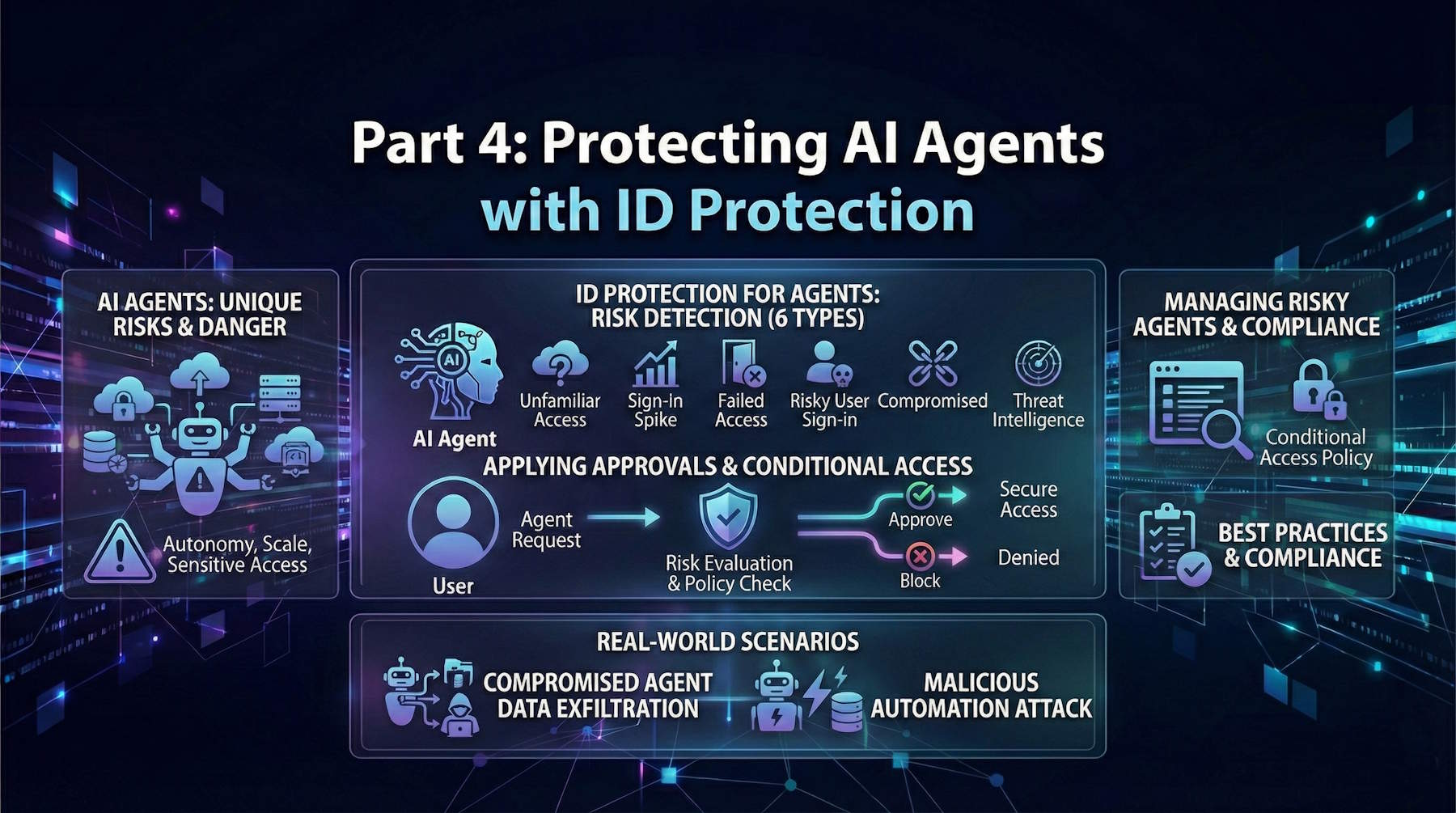
In this post, we'll go deep on:
- Why AI agents are fundamentally different (and more dangerous) when compromised
- The 6 risk detection types specifically designed for agents
- How to apply ID Protection-based approvals to agent access requests
- Managing risky agents: identifying, investigating, and remediating compromised agents
- Real-world scenarios showing agent compromise detection and response
- Best practices and compliance considerations for agent security
- Complete runbook for handling a compromised agent incident
By the end of this post, you'll understand not just how to protect agents, but why it matters so much. Let's dive in.
Why AI Agents Are Different (And More Dangerous)
Let me be direct: when a human account gets compromised, it's bad. When an AI agent gets compromised, it can be catastrophic.
They Operate at Machine Speed
Human Account Compromise:
- Attacker logs in, makes a few access requests
- Maybe performs some reconnaissance
- Typical attack unfolds over hours or days
- Security team might notice suspicious activity within 24-48 hours
Compromised AI Agent:
- Attacker has the agent's token
- Agent can make thousands of API calls per second
- Attacker can enumerate users, resources, permissions in minutes
- Exfiltrate data at megabytes per second
- By the time your security team notices, the damage is done
Example: A compromised data analysis agent could extract your entire customer database (10 GB) in under a minute. A human attacker would take hours or days and trigger multiple alerts along the way.
They Have Broad Permissions by Design
Think about what agents are designed to do. They're not like regular users who need access to a few files or applications. Agents are designed to:
- Analyze data across systems
- Make decisions based on that analysis
- Take actions to implement decisions
- Access resources without human interaction
That means agents typically have:
- Read access to sensitive databases
- Write permissions to production systems
- API permissions to make changes at scale
- Cross-system access to correlate information
A human with these permissions is carefully vetted and monitored. An agent with these permissions is often deployed and largely forgotten.
They Don't Sleep
Human attackers need rest. They work 9-to-5 (or maybe a few hours per day). They take weekends off. They get caught or move on to other targets.
Compromised AI agents? They work 24/7 without rest, fatigue, or hesitation. An agent set to exfiltrate data will run continuously until stopped. An agent set to modify systems will keep making changes. An agent set to escalate privileges will keep trying new vectors relentlessly.
They Can Be Subtle
This is the hardest part for defenders. When a human does something suspicious—logging in from an unusual location, accessing resources outside their job function, downloading enormous amounts of data—it stands out.
When an AI agent accesses thousands of records? That might be exactly what it's supposed to do. An analytics agent accessing a million customer records is normal. Detecting when it crosses from "normal operation" to "malicious behavior" is genuinely difficult.
Example Scenario:
Your customer service AI agent normally processes 100 customer tickets per day, accessing 500-1000 customer records.
One day, the agent accesses 100,000 customer records—a 100x increase. Is this:
- A legitimate spike (bulk processing of requests)?
- A compromised agent exfiltrating data?
- A configuration change (the agent was updated to handle more requests)?
Without context, it's hard to tell. Without baseline behavior understanding, you might not even notice.
They Can Pivot and Escalate Rapidly
When an attacker compromises a human account, they're limited by what that human can access. They need to perform multiple steps to escalate.
With a compromised agent, the attacker has:
- The agent's existing broad permissions
- Access to request additional permissions through entitlement management
- Ability to create new service principals or agents
- Ability to make configuration changes
- Ability to cover their tracks by modifying logs or settings
An agent with write access to Azure resources can create new identities, configure backdoors, and escalate their position all within minutes.
ID Protection for Agents: Risk Detection
Microsoft Entra ID Protection now includes agent-specific risk detection (currently in preview). This is specifically designed to catch agent compromise patterns that differ from human account compromise.
The 6 Risk Detection Types for Agents
1. Unfamiliar Resource Access
What It Detects:
The agent suddenly starts accessing resources it's never touched before. This is a key indicator because agents usually operate within narrow, defined scopes.
Why It Matters:
- Agents are designed for specific purposes
- A security analysis agent should only access security logs, not customer data
- A data processing agent should only access its designated data lake, not the HR system
- Sudden access to unfamiliar resources indicates either misconfiguration or compromise
Real Example:
Baseline:           New Behavior:
- Security logs     - Security logs ✓
- Audit logs        - Audit logs ✓
- User activity     - User activity ✓
- [Normal scope]    - Financial database ✗ (ALERT)
                    - HR data ✗ (ALERT)
                    - Code repository ✗ (ALERT)
Investigation Questions:
- Was the agent recently configured to access new resources?
- Is there a legitimate business reason for the new resource access?
- Did the agent owner request this expanded scope?
- Are the new resources sensitive (finance, HR, IP)?
Risk Level: Medium to High (depends on sensitivity of new resources)
2. Sign-in Spikes
What It Detects:
The agent's authentication frequency dramatically increases compared to its normal baseline.
Why It Matters:
- Normal agent authentication follows predictable patterns
- Agents performing scheduled tasks authenticate at consistent times
- Sudden spikes indicate either:
- Attacker trying to do more with the agent
- Attacker testing what the agent can access (reconnaissance)
- Misconfigured agent retrying failed operations
- Brute force or enumeration attack using the agent
Real Example:
Day 1-7 Baseline:
- Monday-Friday: 500 authentications/day (business hours)
- Saturday-Sunday: 50 authentications/day (off-hours)
- Pattern: Regular, predictable

Day 8 (Spike):
- Monday: 25,000 authentications (50x normal)
- Tuesday: 50,000 authentications (100x normal)
- Pattern: Chaotic, constant, all hours
Investigation Questions:
- When did the spike start?
- Was there a configuration change or update?
- Are the authentications from the same location?
- What API endpoints is the agent calling?
- Is the agent making repeated failed attempts?
Risk Level: Medium (could be benign misconfiguration or reconnaissance)
3. Failed Access Attempts
What It Detects:
The agent attempts to access resources it's not authorized for. Repeated failures indicate the agent is trying to explore what's accessible or break out of its permission scope.
Why It Matters:
- Well-behaved agents only access resources they have permission for
- Failed access attempts indicate:
- Attacker probing for additional access
- Attacker testing permission escalation vectors
- Agent misconfiguration causing repeated failures
- Brute force attempt on API resources
Real Example:
Normal Behavior:
- Agent attempts access to allowed resources
- Success rate: 99%+
- Occasional failure: Expected

Suspicious Pattern:
- Agent attempts access to resources it shouldn't touch
- HR system - DENIED
- Financial database - DENIED
- Admin API - DENIED
- CEO's mailbox - DENIED
- Failure rate: 50%+ of all attempts
- Repeated attempts to same forbidden resources
Investigation Questions:
- What resources is the agent trying to access?
- Are these resources related to the agent's purpose?
- Is this a permission escalation attempt?
- Did the agent recently receive a token with broader permissions?
- Are there patterns suggesting systematic enumeration?
Risk Level: Medium to High (likely probing/reconnaissance)
4. Sign-in by Risky User
What It Detects:
The agent authenticated using delegated permissions from a user who's flagged as risky. This creates a chain of compromise: compromised user → agent → broader access.
Why It Matters:
- Some agents use delegated permissions (on-behalf-of flow)
- If the user delegating to the agent is compromised, the agent becomes a vector for attack
- Attacker can use compromised user's token to authenticate as the agent
- Agent then has both the user's permissions AND the agent's permissions
- This creates privilege amplification
Real Example:
Scenario: Email Processing Agent

Normal Flow:
1. User (alice@contoso.com) authenticates
2. User delegates to Email Agent
3. Agent gets delegated permission to read/send emails for alice@contoso.com
4. Agent processes emails

Compromised Flow:
1. Attacker compromises alice@contoso.com (RISK: HIGH)
2. Attacker uses alice's token
3. Attacker delegates to Email Agent
4. Agent now operates as alice (who is compromised)
5. Agent's actions are attributed to alice but controlled by attacker
6. Agent can now send phishing emails, steal data, etc.
Investigation Questions:
- Which user is delegating to the agent?
- Is that user's account compromised?
- Has the user been informed?
- When was the delegation established?
- What permissions does the delegation grant?
- Can we revoke the delegation immediately?
Risk Level: High (indicates chain of compromise)
5. Confirmed Compromise
What It Detects:
A security administrator manually confirms the agent's token or credentials are compromised. This is a human judgment trigger: "We've investigated and yes, this agent is definitely compromised."
Why It Matters:
- This is the most definitive risk detection
- When confirmed, the agent should immediately be blocked
- No ambiguity, no investigation needed
- Immediate incident response should be triggered
Triggers for Confirmation:
- Investigation found agent's credentials in attacker's tools
- Forensics confirmed agent token was used for unauthorized actions
- Agent token appeared in dark web leak
- Law enforcement or threat intelligence confirmed compromise
- Anomalous actions definitively traced to agent token
Investigation Questions:
- How was the compromise discovered?
- What evidence confirms compromise?
- What actions did the compromised agent take?
- How long was the agent compromised?
- What data or systems were accessed?
- What's the scope of the breach?
Risk Level: Critical (agent is definitely compromised)
6. Microsoft Threat Intelligence
What It Detects:
Microsoft's global threat intelligence identified patterns matching known attack techniques. This is based on data from:
- Billions of daily authentications across Microsoft services
- Security incident investigations
- Threat actor behavior patterns
- Attack technique signatures
- IP addresses and infrastructure known to be malicious
Why It Matters:
- Microsoft sees attack patterns across thousands of organizations
- If an attack matches known TTPs (Tactics, Techniques, Procedures), we can flag it
- Attacker using a compromised agent from an IP known to host malware
- Agent behavior matching known data exfiltration patterns
- Authentication patterns matching known credential harvesting campaigns
Real Example:
Detection Trigger:
- Agent authenticates from IP address 203.0.113.45
- Microsoft threat intelligence flags this IP as:
  - Associated with Lazarus group (known APT)
  - Recently used in credential theft campaign
  - Source of multiple ransomware deployments

Result:
- Agent flagged as High risk
- Immediate investigation recommended
- This is not a false positive—this is known bad activity
Investigation Questions:
- Where is the agent authenticating from?
- What threat actor is associated with this IP/behavior?
- What's the typical attack pattern?
- How does our incident match the known pattern?
- What sectors/organizations typically target this threat actor?
- Should we escalate to incident response immediately?
Risk Level: Critical (known malicious activity)
Applying ID Protection-Based Approvals to AI Agents
Now that you understand the 6 risk detection types, let's apply them to agent access requests. When an agent requests access to resources, ID Protection-based approvals can automatically route risky requests to Security Administrators.
Configuration for Agent Access
When creating access packages that agents will request, enable ID Protection-based approvals:
Access Package: "Security Agent - Investigation Access"
Configuration:
Eligible Requesters: Specific service principals
  - SecurityAnalysisAgent
  - ThreatInvestigationAgent

Resources:
  - SecurityEvents.Read.All
  - AuditLog.Read.All
  - Directory.Read.All
  - User.Read.All

Policies:
- Policy: Standard Investigation
  - Approvers: SOC Manager
  - Duration: 7 days
  - ID Protection: ENABLED (Medium + High risk)

- Policy: Elevated Investigation (for confirmed incidents)
  - Approvers: SOC Manager + Security Director (two-stage)
  - Resources: SecurityEvents.ReadWrite.All, Policy.Read.ConditionalAccess
  - Duration: 3 days
  - ID Protection: ENABLED (Medium + High risk)
Request Workflow:
Agent Requests Access
         │
         ▼
Risk Assessment
         │
    ┌────┴────┐
    │          │
No Risk    Medium/High Risk
    │          │
    ▼          ▼
Proceed to    Route to
Policy        Security Admin
Approver      Review
    │          │
    │      ┌───┴───┐
    │      │       │
    │   APPROVE  DENY
    │      │       │
    │      ▼       ▼
    │    Proceed  Deny
    │    to Policy Request
    │    Approver
    │      │
    ├──────┤
    │      │
    ▼      ▼
  Policy Approver Review
    │      │
APPROVE  DENY
    │      │
    ▼      ▼
 Access   Denied
Granted
Security Administrator Review Process for Agents
When a risky agent requests access, the Security Administrator sees:
Agent Information:
- Agent name and type (service principal)
- Agent owner/sponsor
- Agent's normal behavior baseline
- Agent's permissions history
- Recent agent activity
Risk Information:
- Current risk level (Medium/High)
- Specific risk detections triggered
- Unfamiliar resource access? Which resources?
- Sign-in spike? How much increase?
- Failed attempts? To what?
- Risk user delegation? Which user is risky?
- Risk detection timeline
- Related incidents
Request Details:
- What access is being requested?
- Which resources?
- Duration needed?
- Business justification (from agent sponsor or documentation)
- How does requested access relate to agent's purpose?
Decision Framework:
APPROVE when:
- Risk detection is explained (e.g., authorized operational change)
- Request aligns with agent's stated purpose
- Agent sponsor confirms the need
- Risk has been remediated (e.g., new credentials issued)
- Investigation cleared the agent
DENY when:
- Risk suggests genuine compromise
- Requested resources don't align with agent's purpose
- No legitimate explanation for the risk
- Agent sponsor can't confirm the request
- Related to known security incident
Example Approval:
Security Admin Reviews Request:

Agent: ThreatInvestigationAgent
Risk: Medium (unfamiliar resource access)
Detected: Agent accessed HR database (not normal)
Requested: Elevated security investigation access

Investigation:
- Contact SOC Manager (agent sponsor)
- SOC Manager explains: "We're investigating potential insider threat involving HR
- Executive's account compromised, investigating data access patterns"

Decision: APPROVE with conditions
- Reduce duration from 7 to 3 days (shorter for incident response)
- Enable enhanced monitoring
- Require post-incident review
- Document incident ticket number

Comments: "Approved - Agent needed for incident investigation INC-45782. Risk
detection verified as legitimate. Reduced duration to 3 days. Enhanced monitoring
enabled."
Viewing and Managing Risky Agents
The Risky Agents Dashboard
Microsoft Entra ID Protection includes a "Risky Agents" report showing all agents flagged for suspicious behavior.
Accessing the Dashboard:
1. Navigate to Microsoft Entra admin center (https://entra.microsoft.com/)
2. Select Protection > ID Protection
3. Select Risky agents (preview)
4. View full list with details:
- Agent name and ID
- Risk level (Medium/High)
- Risk detections
- Detection date/time
- Investigation status
Taking Action on Risky Agents:
For each risky agent, you have four actions:
1. Confirm Compromise
Use this when you've investigated and confirmed the agent is definitely compromised.
When to use:
- Investigation found agent's credentials leaked
- Forensics confirmed unauthorized agent actions
- Agent behavior matches known attack pattern
- Credentials or tokens found in attacker's tools
What happens:
- Agent risk is set to Critical (High)
- All agent access is blocked immediately (via Conditional Access)
- All existing access package assignments are revoked
- Incident response procedures triggered
- Agent is disabled until remediated
Next steps:
- Rotate agent credentials
- Revoke existing tokens
- Review agent's historical access (what did it access while compromised?)
- Investigate data exfiltration (was sensitive data accessed?)
- Update security detection rules (to catch similar agents)
- Notify data owners of potentially exposed data
2. Confirm Safe
Use this when you've investigated and determined the risk detection was a false positive.
When to use:
- Risk detection explained by legitimate activity
- Agent was legitimately reconfigured
- Risk detection is too sensitive for this agent's purpose
- Behavior verified as normal for this agent
What happens:
- Agent risk is cleared/dismissed
- Risk detection is removed from agent's profile
- If no other risk detections exist, agent returns to normal status
- ID Protection system learns from this case (helps tune detection)
- Agent can proceed with normal operations
Next steps:
- Document why this was a false positive
- Consider policy adjustment if this is common for this agent
- Monitor agent for genuine compromise indicators
- Follow up if similar detections occur
3. Dismiss Risk
Use this when the risk detection is technically accurate but not concerning for this agent.
When to use:
- Risk detection is correct but expected (legitimate reconfiguration)
- Agent's purpose justifies the risky behavior
- You want to keep flagging this behavior for other agents, just not this one
- Temporary concern that's been resolved
What happens:
- Risk is dismissed for this agent
- Detection remains in system's knowledge base
- Similar detections in other agents still trigger
- Agent returns to normal status
- Risk can be re-flagged if behavior continues
Next steps:
- Document why this was dismissed
- Monitor for pattern continuation
- Follow up with agent owner to ensure awareness
4. Disable
Use this as an emergency response for confirmed compromised agents.
When to use:
- Agent compromise confirmed
- Agent is actively causing damage
- Immediate containment needed
- Emergency response in progress
What happens:
- Agent is immediately disabled
- Agent cannot authenticate under any circumstances
- All agent sessions are terminated
- Agent cannot make API calls
- Existing access is revoked
- Agent remains disabled until you manually re-enable it
Next steps (After Disable):
1. Immediate containment:
- Notify stakeholders
- Begin incident response
- Preserve logs and evidence
2. Investigation (24-48 hours):
- Determine scope of compromise
- Identify what data was accessed
- Trace attacker activities
- Collect forensic evidence
3. Remediation (24-72 hours):
- Rotate all agent credentials
- Update agent code if tampered
- Re-deploy agent with new credentials
- Test thoroughly before re-enabling
4. Re-enable (After verification):
- Verify remediation complete
- Test agent in non-production
- Re-enable with monitoring
- Monitor closely for first 7 days
Conditional Access Policies for Agents
Beyond ID Protection-based approvals, you can create Conditional Access policies specifically targeting risky agents.
Policy 1: Block High-Risk Agents from Sensitive Resources
Purpose: Immediately block high-risk agents from accessing critical resources
Policy Name: Block High-Risk Agents from Sensitive Data

Conditions:
- Target Applications:
  - Microsoft Graph API
  - Azure Management
  - Sensitive databases (via apps)

- User/Agent Risk: High

- Resources:
  - Customer Database
  - Financial Systems
  - HR Data
  - Intellectual Property

Grant Control: BLOCK ACCESS

Result: When an agent hits High risk, it's immediately blocked from these resources
Benefit: Instant protection while investigation happens
Risk: Could impact legitimate agent operations if agent is actually safe
Mitigation:
- Have quick process to "Confirm Safe" and clear blocks
- Test policies thoroughly before production
- Monitor for false positives
Policy 2: Require Enhanced Verification for Medium-Risk Agents
Purpose: Allow medium-risk agents to continue operating but with additional controls
Policy Name: Enhanced Verification for Medium-Risk Agents

Conditions:
- Target Applications: Azure Management, Microsoft Graph

- User/Agent Risk: Medium

- Time: During business hours only (9 AM - 5 PM)

Grant Control: Require
  - Compliant device (agent running on managed device)
  - Approved client app (official agent, not unauthorized)

Result: Medium-risk agents can work but only during business hours on managed infrastructure
Benefit: Balance security and operations
Tradeoff: Some legitimate agents might be unexpectedly restricted
Policy 3: Enable Audit-Only for Investigation
Purpose: Monitor suspicious agent activity without blocking
Policy Name: Monitor Suspicious Agents (Audit-Only)

Conditions:
- User/Agent Risk: Medium or High

- Specific apps: Risky agent requesting unusual resources

Report-Only Mode: YES (Audit, don't block)

Logging: Enhanced (capture all access attempts)

Result: Suspicious agent activity is monitored and logged for investigation
without blocking legitimate operations
Benefit: Gather evidence while maintaining operations
Use When: Investigating suspected compromise
Real-World Scenarios: Compromised Agent Detection and Response
Let me walk you through three realistic scenarios showing how agent protection works in practice.
Scenario 1: Data Exfiltration via Compromised Analytics Agent
Day 1 - 10 AM:
Your organization deploys "Customer Analytics Agent" to analyze purchasing patterns. The agent is configured to access customer data through approved APIs.
Legitimate Activity Baseline:
- Authenticates: 500 times/day (daily scheduled tasks)
- Accesses: Customer purchase data (normal scope)
- Volume: Processes 50,000 records/day (standard workload)
- Pattern: Regular, predictable, business hours only
Day 5 - 2 AM:
Agent's credentials are compromised (attacker gains access to agent's stored credentials).
Day 5 - 2:15 AM:
Attacker begins exfiltration:
- Agent starts authenticating from attacker's IP address (different from normal)
- Authentication frequency spikes to 100,000/day (200x normal)
- Agent accesses all available customer records (not just daily batch)
- Agent attempts to access customer payment methods (outside normal scope)
- Agent requests access to "Advanced Data Export" package
ID Protection Detection (Day 5 - 2:30 AM):
Detection 1: Sign-in Spike
Normal baseline: 500 authentications/day
Current: 25,000 authentications in first 30 minutes
Detection: SIGN-IN SPIKE (Medium Risk)
Detection 2: Unfamiliar Resource Access
Normal scope: Customer purchase data
New attempt: Payment methods, credit card data
Detection: UNFAMILIAR RESOURCE ACCESS (High Risk)
Detection 3: Failed Access Attempts
Agent attempts to access:
- HR database (failed - not authorized)
- Executive email (failed - not authorized)
- Accounting system (failed - not authorized)
Detection: FAILED ACCESS ATTEMPTS (Medium Risk)
Combined Risk Assessment: HIGH RISK
ID Protection Response (Day 5 - 2:31 AM):
1. Agent flagged as High Risk
2. Conditional Access policy triggers: Block High-Risk Agents from Sensitive Resources
3. Agent blocked from customer data immediately
4. Alert sent to Security Operations Center (SOC)
5. Agent access package request automatically routed to Security Administrator (not auto-approved)
Day 5 - 2:45 AM (Security Administrator Response):
Security on-call team receives alert:
- Customer Analytics Agent flagged as High Risk
- Multiple risk detections (spike, unfamiliar access, failed attempts)
- Agent blocked from sensitive resources
- Agent requesting elevated access package
Immediate Actions:
1. Disable the agent:
```
Action: Confirm Compromise
Result: Agent disabled, all sessions terminated, all access revoked
```
2. Investigate:
- Check audit logs: What did agent access in past 30 minutes?
- Review failed attempts: What was attacker probing?
- Trace attacker IP: Where is this attack coming from?
- Check if other agents compromised: Any similar patterns?
3. Contain the damage:
- Identify customers whose data was accessed
- Determine if payment data was extracted
- Check if attacker gained any other access
Day 5 - 3:30 AM (Investigation Complete):
Findings:
- Agent was compromised 40 minutes ago
- Attacker downloaded 15 GB of customer data (500,000 customer records with PII)
- Attacker attempted (but failed) to access payment systems
- Attack appears to be data theft for resale on dark web
Day 5 - 3:45 AM (Remediation):
1. Notify stakeholders:
- Data breach incident opened
- Legal notified of potential GDPR/PCI-DSS violation
- Customers affected need notification
2. Rotate agent credentials:
- New API key generated
- Old credentials revoked globally
- Verify old credentials cannot be used
3. Review agent code:
- Verify agent wasn't tampered with
- Check for backdoors or persistence mechanisms
- Update agent to latest secure version
4. Redeploy agent:
- Deploy with new credentials in limited test environment
- Verify operations normal
- Deploy to production with enhanced monitoring
5. Post-Incident:
- Review how credentials were compromised (strong password? secure storage?)
- Implement credential rotation (quarterly, not annually)
- Add behavior-based alerting for other agents
- Conduct security awareness training
Key Takeaway:
Without ID Protection-based approvals and agent monitoring, attacker would have had unfettered access. Instead, the attack was detected and contained in 40 minutes. The remaining detection/response/remediation took 2-3 hours instead of the weeks a traditional incident might take.
Scenario 2: Privilege Escalation via Compromised Infrastructure Agent
Setup:
Infrastructure Automation Agent has permissions to provision Azure resources. Normal function: create VMs, configure networking, manage infrastructure per automation policies.
Normal Activity:
- Creates 5-10 resources/day
- Has Azure Contributor role on specific subscriptions
- Accesses only authorized resource groups
- Operations during business hours
Day 10 - 3 AM:
Agent's token is stolen (developer left credentials in GitHub commit history).
Day 10 - 3:15 AM:
Attacker begins exploring what the agent can do:
- Tests creating resources in different subscriptions (some succeed, some denied)
- Attempts to assign roles to other identities
- Requests "Infrastructure Admin" access package (elevated permissions)
- Attempts to read secrets from Key Vaults
ID Protection Detection (Day 10 - 3:20 AM):
Detection 1: Failed Access Attempts
Attempts to unauthorized subscriptions - DENIED
Attempts to modify RBAC - DENIED
Key Vault access attempts - DENIED

Pattern: Systematic enumeration of what agent can access
Detection: FAILED ACCESS ATTEMPTS (Medium Risk)
Detection 2: Unfamiliar Resource Access
Normal: Create VMs, networks in Subscription A
Detected: Attempted access to:
- Subscription B (no authorization)
- Subscription C (no authorization)
- Key Vault "ProductionSecrets" (unauthorized)

Detection: UNFAMILIAR RESOURCE ACCESS (High Risk)
Combined Risk Assessment: HIGH RISK
ID Protection Response (Day 10 - 3:21 AM):
1. Agent flagged as High Risk
2. Conditional Access policy triggers:
```
Block High-Risk Agents from Azure Management
Agent immediately blocked from any Azure modifications
```
3. Infrastructure Admin access package request denied automatically
4. Alert: "Infrastructure Agent - Privilege Escalation Attempt Detected"
Day 10 - 3:30 AM (Security Response):
Immediate Investigation:
- Audit logs show attempts to access multiple subscriptions
- All attempts to Key Vaults were blocked by RBAC
- Attacker couldn't escalate beyond agent's existing permissions
- Agent was contained before causing damage
Decision: Confirm Compromise
Evidence: Systematic permission probing is clear privilege escalation attempt
Action: Disable agent immediately
Day 10 - 3:45 AM (Remediation):
1. Investigate token compromise:
- Review where credentials were exposed (GitHub history)
- Determine if credentials were used elsewhere
- Check all systems where agent's credentials might be stored
2. Revoke all agent tokens:
- Old credentials invalidated globally
- Existing Azure operations stopped
- Agent cannot execute further commands
3. Secure new credentials:
- Generate new API credentials
- Store in Azure Key Vault (not in code/configs)
- Use managed identities instead of stored credentials for future
4. Enhanced security for redeployment:
- Use Azure Managed Identity (no stored credentials)
- Implement JIT (Just-In-Time) access
- Add Conditional Access policies
- Enable enhanced audit logging
5. Post-Incident Review:
- Why were credentials in GitHub? (Implement secret scanning)
- Why wasn't JIT access already in place?
- How do we prevent this in the future?
Outcome:
Attack was detected and contained before attacker could escalate permissions or access sensitive data. Without agent monitoring, attacker might have successfully escalated to Global Administrator role.
Scenario 3: False Positive - Legitimate Agent Activity Flagged as Risk
Setup:
Compliance Reporting Agent normally generates quarterly reports. Activity is highly seasonal (nothing for 2 months, then intense for 2 weeks).
Day 1 of Quarter:
Compliance period begins. Agent needs to pull data for reports.
Activity (Expected but Unusual):
- Sign-in frequency jumps from 50/day to 5,000/day (100x increase)
- Accesses all data sources simultaneously (normally staggered)
- Requests access to "Extended Compliance Data" (needed quarterly, not normally requested)
- Accesses historical data from previous quarters (not part of normal scope)
ID Protection Detection (Day 1 - 8 AM):
Detection 1: Sign-in Spike
Normal baseline: 50 authentications/day
Current: 5,000 authentications/day
Detection: SIGN-IN SPIKE (Medium Risk)
Detection 2: Unfamiliar Resource Access
New: Historical data archives (not accessed in 3 months)
New: Extended data sources (outside normal scope)
Detection: UNFAMILIAR RESOURCE ACCESS (Medium Risk)
Combined Risk Assessment: MEDIUM RISK
ID Protection-Based Approval (Day 1 - 8:05 AM):
Agent's request for "Extended Compliance Data" package routes to Security Administrator (not auto-approved due to Medium risk).
Day 1 - 8:15 AM (Security Administrator Review):
Security Admin sees:
- Agent: Compliance Reporting Agent
- Risk Level: Medium (spike + unfamiliar access)
- Requested Access: Extended Compliance Data package
- Sponsor: Compliance Officer
- Business Justification: "Quarterly compliance report generation"
Investigation:
Security Admin reaches out to Compliance Officer:
- "Is the compliance agent requesting elevated access expected?"
- "We're seeing a spike in agent activity and access to historical data."
Compliance Officer confirms:
- "Yes, absolutely. We're starting quarterly compliance reporting."
- "The agent needs historical data for trend analysis."
- "This is normal for Q1, Q2, Q3, Q4 starts."
Decision: Confirm Safe
Security Admin approves:
- Risk is legitimate quarterly spike
- Agent sponsor confirmed need
- Behavior matches expected pattern for Q-start
- Activity is within agent's design purpose

Action: Confirm Safe
Result: Risk detection dismissed, agent proceeds to normal approval workflow
Approval Workflow (Day 1 - 8:20 AM):
Request proceeds to normal approver (Compliance Officer):
- Approves extended compliance access (as expected)
- Duration: 30 days (Q reporting period)
- Access granted
Day 1 - 8:30 AM:
Agent successfully generates quarterly compliance reports with extended data access.
Post-Event (Day 2):
Security Admin documents:
False Positive Case: Compliance Agent Q-Start Activity

Detection: Sign-in spike + Unfamiliar resource access (Medium risk)
Root Cause: Expected seasonal behavior pattern (Q1, Q2, Q3, Q4 starts)

Resolution:
1. Confirmed with agent sponsor - activity is expected
2. Dismissed as false positive
3. Updated documentation: Quarterly spikes expected for Compliance Agent

Future Improvement:
- Consider creating scheduled exception for agents with seasonal patterns
- Auto-dismiss Medium risk on expected dates for known agents
- Implement baseline learning to recognize seasonal patterns automatically
Key Takeaway:
Not all risk detections indicate compromise. ID Protection-based approvals enable human decision-making while maintaining security. False positives are investigated and resolved quickly, enabling legitimate work to proceed.
Best Practices for Agent Protection at Scale
Based on real deployments and incident response experiences, here are the practices that actually work:
1. Establish Clear Baselines
When you deploy an agent, establish its normal behavior:
Document:
- Expected authentication frequency (per hour, per day)
- Resources normally accessed
- Time windows for normal operation
- Data volume processed
- Geographic locations (on-premises, cloud regions)
Don't trust ID Protection immediately:
- Give the system 2-4 weeks to establish baseline
- Most false positives happen in first weeks
- After baseline established, anomalies are more meaningful
2. Use Short-Lived Access by Default
Never give agents indefinite access:
Standard practice:
- Daily scheduled tasks: 24-hour access
- Weekly jobs: 7-day access
- Monthly reports: 30-day access
- Special investigations: 7-day access (renewable)
- Never grant 90+ day access unless there's specific business reason
Benefit:
- Even if compromised, attacker has limited window
- Forces regular re-validation of agent need
- Enables quick response (access expires anyway)
3. Separate Permissions by Function
If an agent needs read AND write permissions, use two separate agents:
Example:
❌ BAD: Single "Data Manager" Agent
- Read access to all data
- Write access to all data
- If compromised: Complete database compromise

✅ GOOD: Two specialized agents
- "Data Reader" Agent: Read-only access (for analysis)
- "Data Writer" Agent: Write access only to specific outputs (for updates)
- If Data Reader compromised: Data cannot be modified
- If Data Writer compromised: Limited to update pipeline, not analysis data
4. Monitor Agent Sponsors
The human sponsor of an agent is critical:
If agent sponsor becomes risky:
- Scrutinize their agent's behavior extra carefully
- Consider temporarily reducing agent's access
- Investigate if risky sponsor might have modified agent
If agent sponsor leaves organization:
- Assign new sponsor immediately
- Review agent's permissions (should they be reduced?)
- Ensure new sponsor understands agent's purpose and operations
5. Test Policies Before Production
Before deploying Conditional Access policies that block agents:
Test process:
1. Deploy policy in "Audit-only" mode first
2. Run for 1-2 weeks, gather data
3. Verify no false positives for legitimate agents
4. Then enable policy in "Block" mode
5. Have quick "Confirm Safe" process ready for legitimate agents
Example:
If you deploy "Block High-Risk Agents" policy, test it thoroughly. Don't want to discover at 2 AM production emergency that a critical agent is blocked.
6. Implement Full Audit Logging
For agents with sensitive permissions, log everything:
What to log:
- Every API call the agent makes
- Every resource accessed
- Authentication success/failure
- Authorization success/failure
- Data volumes transferred
- Time of operations
- Source IPs
Retention:
- Minimum 90 days (regulatory minimum)
- Consider 7 years for compliance industries (finance, healthcare)
Alerts:
- Unusual volume spike
- Access to resources outside normal scope
- Failed authorization attempts
- After-hours operations (if unexpected)
7. Create Agent Compromise Runbook
Document exactly what to do if an agent is compromised:
Immediate (0-30 minutes):
1. Confirm compromise
2. Disable agent
3. Notify stakeholders
4. Begin evidence collection
5. Stop agent-related operations
Investigation (30 min - 24 hours):
1. Review audit logs: What did agent access?
2. Trace attacker: Where did compromise originate?
3. Assess damage: How much data exposed?
4. Identify scope: Are other agents compromised?
Remediation (24-72 hours):
1. Rotate all credentials
2. Update agent code (if tampered)
3. Deploy with new credentials in test environment
4. Verify operations normal
5. Deploy to production with monitoring
Post-Incident (1 week):
1. Root cause analysis: How were credentials compromised?
2. Update security procedures
3. Implement preventive measures
4. Notify customers if required by law
8. Regular Agent Access Reviews
Conduct quarterly reviews of all agent access:
Review Questions:
For each agent:
- Is this agent still in active use?
- Does it need its current access level?
- Have its permissions grown (should they be reduced)?
- Should its access duration be changed?
- Are there compliance/security concerns?
Decisions:
- Attest: Agent still needed, access appropriate, approved to continue
- Modify: Reduce access, change duration, update scope
- Revoke: Agent no longer needed or high-risk, disable it
9. Use Managed Identities, Not Stored Credentials
For Azure agents specifically, use managed identities:
Stored Credentials (Bad):
- API keys stored in configuration files
- Database passwords in application code
- Credentials in GitHub/repositories
- Long-lived, static credentials
Managed Identities (Good):
- Azure-managed service principal
- Credentials automatically rotated
- No credentials to leak
- Federated identity (can use external identity)
- Built-in to Azure services
10. Plan for Decommissioning
When agents are no longer needed:
Decommissioning Checklist:
- [ ] Stop agent from running (disable in scheduler/deployment)
- [ ] Revoke all access package assignments
- [ ] Rotate/revoke credentials
- [ ] Delete/disable service principal
- [ ] Review historical access (document what it accessed)
- [ ] Confirm no dependent systems affected
- [ ] Archive documentation for future reference
- [ ] Verify agent no longer running anywhere
Don't:
- Leave agent disabled indefinitely (clean up properly)
- Leave credentials active (full rotation)
- Leave orphaned permissions (clean audit trail)
Compliance and Regulatory Considerations
Agent governance isn't just a security best practice—it's increasingly a compliance requirement.
SOC 2 Type II
Requirement: Document and demonstrate access controls
How Agent Governance Helps:
- ID Protection-based approvals document every agent access decision
- Audit logs show who approved what and why
- Regular access reviews demonstrate ongoing governance
- Disabled/decommissioned agents show cleanup practices
ISO 27001
Requirement: Implement least privilege access
How Agent Governance Helps:
- Short-lived access implements time-limited privileges
- Separated permissions by function
- Regular reviews verify least privilege maintained
- Audit trails demonstrate compliance
GDPR
Requirement: Demonstrate data processing safeguards
If agents access PII:
- Agent access must be logged and auditable
- Data Processing Agreements required
- Access limited to necessary purposes
- Quick ability to demonstrate what data agents accessed
- Removal of access when no longer needed
Compliance Advantage:
With agent governance, you can instantly answer: "Which agents accessed customer data and when?"
PCI-DSS
Requirement: Restrict access to cardholder data
If agents access payment data:
- Must demonstrate approval for agent access
- Multi-stage approval for sensitive access
- Regular access reviews (quarterly minimum)
- Immediate deprovisioning when not needed
- Complete audit logs of agent access
HIPAA
Requirement: Log and monitor access to PHI
If agents access health data:
- Comprehensive audit logging required
- Access reviews documented
- Approval trail for sensitive access
- Immediate access revocation procedures
- Agent compromise investigation procedures
Agent Governance Provides:
- Automatic approval documentation
- Comprehensive audit logging
- Access review mechanisms
- Incident response procedures
Conclusion: The Future of Identity Governance
We've covered a lot of ground across this 4-part series. Let me pull back and give you the big picture.
Five years ago, identity governance was mostly about:
- Managing user access
- Handling onboarding/offboarding
- Occasional compliance audits
Today, identity governance has to handle:
- Human users (still the majority)
- Service principals and applications
- Autonomous AI agents
- Hybrid work patterns
- Zero trust architectures
- Sophisticated threat actors
The future will include:
- Agents that are more autonomous and powerful
- Threat actors specifically targeting agent infrastructure
- Regulatory requirements around agent governance
- Complex supply chains of agents (agents managing other agents)
- AI-driven security operations (ML detecting agent compromise)
The good news? Microsoft Entra Entitlement Management and ID Protection are designed for this future. They're not yesterday's governance tools—they're built for the identity space we're actually living in now.
Your Action Items
If you take nothing else from this series, implement these three things:
1. Deploy Entitlement Management
- Start with one department (Parts 1-2 guidance)
- Get wins, demonstrate value
- Expand to other departments
- Estimated timeline: 3-6 months
2. Enable ID Protection-Based Approvals
- Configure for sensitive access packages
- Train Security Administrators
- Implement decision framework (Part 3)
- Estimated timeline: 1-2 months
3. Implement Agent Governance
- Inventory all agents/service principals
- Create agent-specific access packages
- Configure ID Protection for agents
- Establish agent review process
- Estimated timeline: 2-3 months
Total: 6-12 months to fully implemented governance
Is that fast? Not particularly. Is it disruptive? Minimally if done right.
Is it worth it? Absolutely. You'll reduce security risk, improve compliance readiness, enable faster business velocity, and prepare for the AI-driven future.
Series Wrap-Up
We've completed our 4-part walkthrough of Microsoft Entra ID Governance:
Part 1: Fundamentals—what access governance is and why it matters
Part 2: Advanced scenarios—privileged access and AI agents
Part 3: Risk-based controls—protecting human users and data
Part 4: Agent protection—securing the autonomous systems reshaping your organization
You now understand:
- How modern access governance actually works
- When to use each governance pattern
- How to protect both humans and AI agents
- Real-world scenarios and decision frameworks
- Best practices from organizations at scale
The governance framework we've described isn't theoretical—it's deployed in enterprises managing millions of identities across dozens of countries, handling billions of access requests annually. It works.
Your organization doesn't need to be a 10,000-person enterprise to benefit. Even organizations with 500-1000 users see massive value in reducing manual access management, preventing access creep, and catching compromised accounts before they cause damage.
The question isn't whether to implement this. The question is when—before you have a security incident, or after?
I recommend: before.

References
- Microsoft Entra ID Protection Overview
- ID Protection for Agents (Preview)
- Risk Detections in ID Protection
- Risk-Based Conditional Access
- Investigating Risky Users and Sign-ins
- Entitlement Management for Service Principals
- Manage Risk in Azure AD
- Azure Managed Identities
Series Complete! You've now mastered Microsoft Entra ID Governance from fundamentals through modern agent protection. Go forth and govern.