


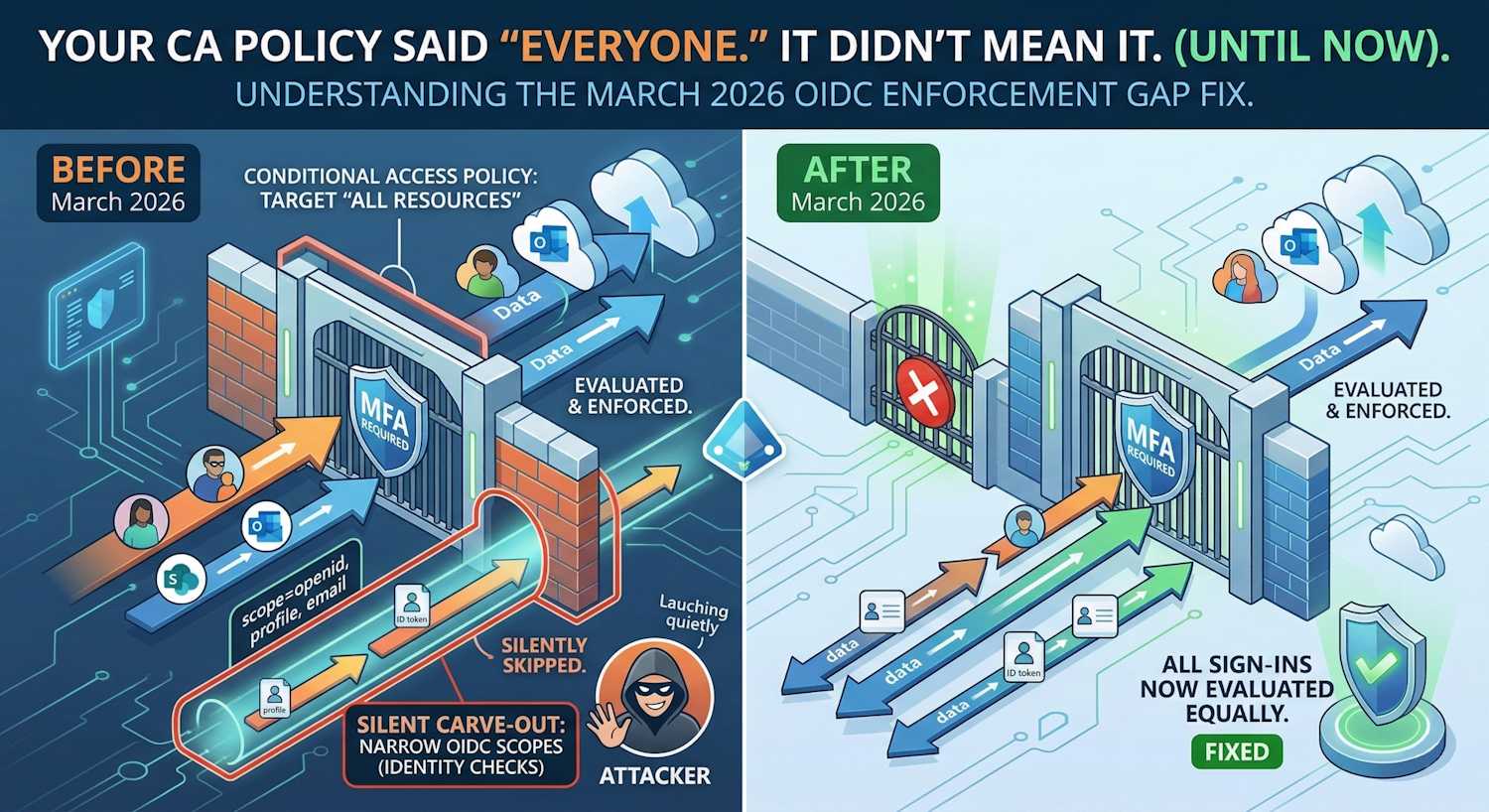
Somewhere in your tenant right now, there is almost certainly a Conditional Access policy set to target All resources. Maybe it requires MFA. Maybe it enforces device compliance. Maybe it blocks legacy authentication entirely. You wrote it to mean everyone, every app, every sign-in — and you assumed that is what it did.
It didn't. Not entirely.
There was a class of sign-in that your policy quietly skipped. Not the excluded apps you configured. Something else — a hidden carve-out baked into the evaluation engine itself, triggered the moment you added any exclusion to an All resources policy. Sign-ins requesting only minimal OIDC scopes: identity verification flows, background token checks, lightweight "who are you?" authentications. None of them were evaluated against your policy. No MFA prompt. No compliance check. No controls of any kind. The policy said all resources. The engine said: not these.
Microsoft closed that gap in March 2026. A week earlier, their security team published a blog post about attackers who had already found the lane and were driving through it. This is the technical story of how the gap worked, why it was built that way, how it was being exploited, and what closing it actually changes in your environment.
Background: What "All Resources" Actually Means
When you create a Conditional Access policy and set the target resource condition to All resources (previously called "All cloud apps"), you are telling Entra ID to evaluate that policy for every authentication event across every application registered in your tenant. It is the broadest possible scope for a CA policy, and it is exactly what most baseline security policies use — "everyone must use MFA for everything," for example.
The catch has always been exclusions. A policy targeting All resources with one or more resource exclusions is extremely common: exclude the Azure portal from MFA for break-glass accounts, exclude a legacy app from device compliance while migration is in progress, exclude a service principal from a blocking policy. These are normal, necessary configurations.
What nobody documented clearly — until now — is that adding any resource exclusion to an All resources policy also silently enabled a second, undocumented exemption: sign-ins where the client application requests only narrow OIDC scopes or minimal directory scopes were skipped entirely, regardless of what the policy said.
The Scope of Each Authentication Request
To understand the gap, it helps to understand OAuth 2.0 scope sets. When a client
application initiates an authentication flow against Entra ID, the authorization request
includes a scope parameter. This tells the identity platform what the
application wants access to. Scopes fall into a few categories:
Standard OIDC scopes: these are defined by the OpenID Connect specification and are considered "identity" scopes rather than "resource" scopes:
openid— enables the identity layer, causes the IdP to return an ID tokenprofile— requests basic profile claims (name, locale, picture)email— requests the user's email address claimoffline_access— requests a refresh token for long-lived sessions
Directory scopes: these target the Azure AD Graph or Microsoft Graph and are narrow by nature:
https://graph.microsoft.com/User.Readhttps://graph.microsoft.com/openid- Scopes targeting Azure AD Graph directly (
https://graph.windows.net/)
Resource scopes: these are the broader service permissions:
https://outlook.office.com/Mail.Readhttps://management.azure.com/user_impersonation- Application-specific permission scopes
The enforcement gap existed specifically for sign-ins where the scope set contained only the first two categories — basic OIDC scopes and/or narrow directory scopes — with no broader resource scopes present. For those requests, the CA evaluation engine was skipping your All resources policies whenever those policies had any resource exclusion.
Why the Gap Existed: The Engineering Reasoning
This wasn't an accident or an undiscovered bug sitting unnoticed for years. The exemption was put in place intentionally to avoid breaking a very common authentication pattern.
Consider how a modern application like Outlook (or any Microsoft 365 app) actually
authenticates. A typical sign-in to Outlook requests scopes like
openid profile email offline_access https://outlook.office.com/.default.
The OIDC scopes and the resource-level .default scope are bundled together.
That combined request hits one authentication flow and gets evaluated against your CA
policy. All good.
But what happens when the same user's device makes a background token refresh? Or when an app does a pre-flight check to test session state before showing the user a full sign-in prompt? These lighter authentication flows often request only the OIDC scopes — they don't need the full resource scope because they're just checking identity, not accessing mailbox data. These requests happen constantly in the background of every Microsoft 365 session.
The concern that drove the exemption: if you excluded Application X from your CA policy and that exclusion caused all narrow-scope sign-ins to be evaluated differently, you might accidentally break those background flows for other unrelated applications. The exclusion might "bleed" into unintended areas of evaluation. So Microsoft took the conservative path: when a policy has an exclusion, skip narrow-scope sign-ins entirely rather than risk false positives.
That reasoning made sense in isolation. The problem is that it created a lane that attackers eventually learned to drive through.
The Before: How the Enforcement Gap Worked
The diagram below shows the CA evaluation flow before the March 2026 change. Follow the decision path for a narrow-scope sign-in when your All resources policy has any exclusion configured.
Key insight: The gap was not about the excluded application itself. It was a systemic side-effect: adding any exclusion to an All resources policy switched on an undocumented "narrow scope bypass" that applied to all sign-ins using only OIDC or directory scopes, regardless of which application was excluded.
The After: What Changed in March 2026
The change is described in the Microsoft Entra What's New page as follows:
"Microsoft Entra Conditional Access is strengthening how policies that target All resources with resource exclusions are enforced in a narrow set of authentication flows. After this change, in user sign-ins where a client application requests only OIDC or specific directory scopes, Conditional Access policies that target All resources with one or more resource exclusions, or policies that explicitly target Azure AD Graph, will be enforced."
— Microsoft Entra What's New, March 2026
In plain terms: the silent exemption is gone. The evaluation engine now treats narrow OIDC-only and directory-only sign-ins the same way it treats any other sign-in. Your "All resources" policy means all resources now, including flows that previously slipped through.
What Specifically Is Affected
Microsoft's announcement is precise about the scope of change. The affected flows are:
- Sign-ins where the client requests only standard OIDC scopes
(
openid,profile,email,offline_access) with no additional resource scopes — and the CA policy targets All resources with at least one exclusion - Sign-ins where the client requests only narrow directory scopes — specifically directory-level scopes targeting Azure AD Graph or Microsoft Graph's directory endpoints
- Sign-ins explicitly targeting Azure AD Graph
(
https://graph.windows.net/) — this is notable because Azure AD Graph is a legacy API surface that Microsoft has been deprecating; policies targeting Azure AD Graph will now also be enforced in these flows
What is not affected: any sign-in that already requests broader resource scopes
was already being evaluated. If your app requests
openid profile https://outlook.office.com/.default, the presence of the
resource scope meant CA was already applying. This change only closes the gap for the
narrow subset where resource scopes were absent.
Where This Shows Up in Real Environments
The practical question is: what sign-ins in your tenant fall into this category? Here are the patterns most likely to surface after the change:
1. Custom-built or legacy internal applications: Apps built before the
modern Microsoft Graph client libraries were common often authenticated with minimal
scopes. A .NET application using ADAL, for instance, might have been written to request
only openid to verify user identity before handling authorization itself in
application code. These apps will now trigger whatever controls your CA policy requires.
2. Lightweight identity verification flows: Some applications perform a "who are you?" pre-authentication step before presenting a full sign-in. These lightweight flows intentionally request only OIDC scopes. If your CA policy requires MFA, these flows will now prompt for MFA.
3. Applications explicitly targeting Azure AD Graph: Despite
Microsoft's deprecation campaign, Azure AD Graph endpoints are still in use in many
environments. Apps calling https://graph.windows.net/ with directory scopes
were previously slipping past CA controls. They won't now.
4. Test harnesses and developer tooling: Developer workflows that authenticate against Entra ID using minimal scopes for testing purposes will now be subject to policy. If developers are exempt from certain CA policies, those exemptions should be explicit application or user exclusions, not implicit scope-based ones.
The Connection to OAuth Redirect Abuse
Now here is where it gets interesting — and where I want to be precise about something that most coverage of this change has glossed over. Microsoft published OAuth redirection abuse enables phishing and malware delivery on March 2, 2026, and the CA enforcement change reached general availability days later. They are related — but they describe two distinct attack vectors that share a common root.
The first vector is the CA enforcement gap itself as an enabler. This is
the passive hole. When a CA policy has any exclusion, narrow OIDC-only sign-ins bypass
evaluation entirely. An attacker who persuades a user to authenticate through a
malicious or attacker-controlled application — anything from a rogue OAuth app
registered in the tenant to a consent-phishing redirect — doesn't need to request
powerful scopes to complete the attack. They just need the user to authenticate. Basic
openid profile email scopes are enough to retrieve the user's identity,
confirm an active session, and redirect the browser to an attacker-controlled
destination. Before the fix, none of those narrow-scope authentication flows would
trigger MFA, device compliance, or any other CA control — because the policy silently
skipped them. The attacker didn't need high-privilege scopes. The CA gap was
the privilege escalation.
The second vector is the active OAuth redirect abuse technique documented in Microsoft's security blog. This one is more deliberate and technically distinct. Here an attacker crafts a malicious OAuth authorization URL targeting a legitimate Entra ID endpoint. The crafted URL includes specific parameters designed not to succeed — but to fail in a controlled way that delivers the payload through the OAuth error response mechanism itself.
The key parameters in the active attack:
prompt=none— instructs the identity provider to attempt silent authentication without showing a UI. If the user is already authenticated, sign-in completes silently. If conditions are not met, an error is returned.- An intentionally invalid or malformed
scopevalue — the attacker doesn't want the authentication to succeed. They want it to fail and trigger the error redirect. - A
redirect_uripointing to attacker infrastructure — when the error is generated, the browser follows the redirect to the attacker's server, which delivers a payload.
The critical insight here is that the attacker does not need or want the
authentication to succeed. The invalid scope is intentional — it forces an
invalid_scope error response from Entra ID. But because the
redirect_uri in the request points to attacker infrastructure, Entra ID
dutifully delivers that error back to the attacker's server via an HTTP 302 redirect.
The victim's browser follows it. No token was issued. No credential was stolen. The
error redirect is the attack — it carries the victim's browser to a landing
page hosting a phishing kit or malware download.
Most email filters and browser defences do not catch this because the initial URL points
to login.microsoftonline.com — a legitimate, trusted Microsoft endpoint.
The redirect out to attacker infrastructure comes from an OAuth error response, which
looks indistinguishable from a normal post-authentication redirect to automated security
tooling. The trust model of OAuth is being turned against the very users it is meant to
protect.
Where the two vectors converge is in how both exploit the special
treatment Conditional Access gave to narrow OIDC scope flows. For the passive CA gap: a
phishing app requesting only openid profile email would never trigger MFA,
device compliance, or any blocking condition — because CA skipped evaluation entirely if
the policy had any exclusion. For the active redirect abuse: using
prompt=none with a deliberately invalid scope also falls into that same
narrow-scope category — and before the fix, CA would skip those flows too, meaning the
attacker's silent session-probe fired without hitting any CA controls at all. Before the
fix, that combination looked like this:
- Attacker crafts a
login.microsoftonline.comURL withprompt=none, an invalid scope, andredirect_uri=https://attacker.io/land - Victim's browser silently hits the Entra ID endpoint — no UI, no MFA prompt, because CA didn't evaluate the flow
- Entra ID returns an
invalid_scopeerror to the registeredredirect_uri - Browser follows the HTTP 302 to attacker infrastructure — delivering the payload
- From the victim's perspective: nothing happened. From the attacker's: mission accomplished.
After the fix, step 2 changes materially: CA now evaluates even these narrow flows. An
attacker attempting a silent prompt=none probe against a user who is
subject to an MFA policy will now trigger CA evaluation — which at minimum introduces
noise into the attack chain, and in many configurations will require an interactive MFA
challenge that breaks the silence the attack depends on.
Two vectors, one shared root, closed simultaneously. The CA enforcement gap (passive: legitimate narrow-scope sign-ins bypass policy) and the OAuth redirect abuse technique (active: deliberately crafted invalid-scope requests exploit the same bypass for error-redirect payload delivery) both root in the same design decision: narrow OIDC scope flows were treated as below the threshold of CA enforcement. Microsoft published the threat advisory on March 2, 2026 and shipped the enforcement fix to general availability days later. The publications are almost certainly coordinated — one closing the gap at the policy-engine layer, the other informing defenders about how adversaries had already learned to exploit it.
What Azure AD Graph Policies Have to Do With This
The announcement specifically calls out policies targeting Azure AD Graph as part of the change. This is worth explaining separately because it is not obvious why an old, deprecated API surface has its own carve-out in this enforcement change.
Azure AD Graph (https://graph.windows.net/) is Microsoft's original graph
API for Azure AD, predating Microsoft Graph. It has been in deprecation since 2020, with
the final sunset on September 30, 2024. Despite this, many applications — particularly
older enterprise software, legacy ADAL-based clients, and some third-party SaaS apps —
still authenticate against Azure AD Graph endpoints.
Before this change, a CA policy explicitly targeting Azure AD Graph as the resource could be bypassed using the same narrow-scope mechanism. If your All resources policy had any exclusion, sign-ins that explicitly requested Azure AD Graph scopes with no broader scopes attached would slip past CA enforcement. After the change, explicit Azure AD Graph-targeted policies are enforced in those flows.
This has a practical implication for environments still running Azure AD Graph-dependent applications: those apps may now be subject to CA controls they were not seeing before. If you have legacy apps on Azure AD Graph that you intentionally did not want to block during a migration window, verify that your exclusions are explicit app-level exclusions, not relying on the implicit scope-based bypass that just closed.
Comparison: Before and After the Change
| Scenario | Before March 2026 | After March 2026 |
|---|---|---|
| All resources policy, no exclusions, narrow OIDC scopes | Evaluated normally | Evaluated normally (no change) |
| All resources policy, has exclusion, narrow OIDC scopes | Skipped — not evaluated | Evaluated and enforced |
| All resources policy, has exclusion, broad resource scopes | Evaluated normally | Evaluated normally (no change) |
| Policy targeting Azure AD Graph explicitly, narrow scopes | Skipped — not evaluated | Evaluated and enforced |
| Specific app-targeted policy (not All resources) | Evaluated normally | Evaluated normally (no change) |
| OAuth redirect abuse using prompt=none + invalid scope | CA may not evaluate — attacker exploits gap | CA enforced — controls apply to flow |
What to Check in Your Environment
If you are managing CA policies, here is what I would recommend reviewing following this change:
1. Audit your All resources policies with exclusions
Any CA policy in your tenant that targets All resources and has at least one resource exclusion is now enforcing differently for narrow-scope sign-ins. Review those policies and confirm the controls are appropriate. If you have an MFA policy with an exclusion for a legacy app, verify that the MFA requirement is what you want for users authenticating with OIDC-only scopes.
You can find these policies in the Entra admin center under Protection → Conditional Access → Policies. Filter for policies with target resources set to "All resources" and check the Exclude tab of each.
2. Check your sign-in logs for newly enforced flows
In Entra admin center, go to Monitoring → Sign-in logs and filter by date range covering the rollout period (March 2026 onward). Look for sign-in events where:
- Conditional Access result changed from "Not Applied" to "Success" or "Failure"
- Applications you did not expect to be evaluated are now showing CA policy matches
- Users are receiving unexpected MFA prompts from apps they have been using silently
3. Look for Azure AD Graph dependencies
Run a review of your application sign-in logs filtered for resource ID
00000002-0000-0000-c000-000000000000 (the Azure AD Graph app ID). Any
applications still using Azure AD Graph are now subject to CA controls they may not have
seen before. Begin migration to Microsoft Graph if not already in progress — Azure AD
Graph is no longer receiving feature investments and security fixes are limited.
4. Review OAuth URL patterns in your phishing awareness program
Given the connection to OAuth redirect abuse, this is a good moment to update security awareness training. Teach users that:
- A URL starting with
login.microsoftonline.comis not inherently trustworthy if the destination after authentication is unexpected - Silent sign-in flows (
prompt=none) that suddenly redirect to non-Microsoft domains are a red flag - Unexpected MFA prompts from background authentication flows (the new behavior) are not necessarily a breach — they may be the CA fix in action
5. Check that app exclusions are intentional and specific
The reason this gap existed was the practice of adding exclusions to All resources policies. Those exclusions are often necessary — but verify each one is explicit about which application is excluded, not relying on implicit behavior that may have changed. If an exclusion covers an app during a migration window, set a review date and remove it when the migration is complete.
The Broader Pattern: Hardening at the Evaluation Layer
This change is part of a broader pattern I have been tracking in Microsoft's Entra releases over the past year. The product team is systematically closing gaps in the CA evaluation engine where policy intent was not matching policy effect. Earlier examples include tightening how guest user policies interact with external tenant auth, closing loopholes around app-level CA bypass in delegated vs. application permission contexts, and strengthening how risk-based policies interact with federated identity providers.
The consistent theme: policies that say "everyone" or "everything" were sometimes silently not enforcing on certain edge-case authentication patterns. Each of these gaps, individually, might seem narrow. Collectively, they form an attack surface that sophisticated adversaries learn to map and exploit.
Closing the OIDC scope enforcement gap is the right call. It is the kind of hardening that makes your policy intent actually match your policy effect. Zero Trust is not just about writing the right policies — it is about ensuring the evaluation engine enforces them without hidden carve-outs.
Note: Microsoft is rolling this out in phases starting March 2026. The specific rollout cadence per tenant type (GCC, DoD, commercial) may vary. Monitor your Entra message center for tenant-specific notifications about when this is active in your environment.
Further Reading
- Microsoft Learn — Target resources in Conditional Access policy — includes the "New Conditional Access behavior when an ALL resources policy has a resource exclusion" section
- Microsoft Entra What's New — March 2026 entry: "General Availability — Improved enforcement for All resources policies with resource exclusions"
- Microsoft Security Blog — OAuth redirection abuse enables phishing and malware delivery (March 2, 2026)