


Over the past few years, a quiet trend has been playing out in organizations everywhere: the database administrator headcount has been cut. Sometimes it was labelled as consolidation. Sometimes cloud migrations, with the pitch that managed services handle the operational side now. Sometimes it was the explicit AI justification: "the AI can do what the DBA used to do." Whatever the framing, the outcome is the same. The databases are still there. The schemas are still there. The institutional knowledge walked out the door with the people who held it.
And it's not just DBAs. The developer who designed that PostgreSQL schema left eighteen
months ago. The architect who knew why the MongoDB collections are structured the way
they are got caught in a round of redundancies. The senior backend developer who had
all the SQL Server quirks in their head — the xp_cmdshell thing, the
linked server that nobody uses but nobody dares remove, the sysadmin app account
because "it was easier at the time" — that person is gone too. The comment in the
old Confluence wiki says "see Bob," and Bob doesn't work there anymore.
What gets left behind is a pile of databases, a lack of documentation, and a team that is responsible for them without having the context to understand what they're looking at. This isn't a hypothetical. I've walked into this situation more than once, and the organizations involved weren't small. This is the normal state of things now for a lot of teams.
So now someone on your team inherits a production SQL Server with 60 databases, a PostgreSQL cluster nobody documented, and a MongoDB deployment that the developer who built it left the company two years ago. Where do you even start?
That's the problem I built this tool to solve. It's free, it's open-source, and it runs on Windows, Linux, and macOS. Here's what it does and why I built it the way I did.
The Knowledge Gap Nobody Budgeted For
When we talk about database security, we almost always start from the assumption that someone in the organization understands the database. They know the schemas. They know which tables hold PII. They know why that stored procedure exists. They know which applications break if you change a column name. That knowledge lives in people — not in documentation, not in tools, not in the managed service portal. In people.
The tech layoff cycle that kicked off in 2023 — and is still going as of 2026 — hit database and backend engineering roles hard. DBAs were an easy target because their value isn't always visible until something goes wrong. Backend developers who owned complex data models were cut in the same waves as everyone else. Mid-level engineers with five years of institutional context got replaced by cheaper headcount or simply not replaced at all. The AI narrative gave CFOs additional justification: "the AI handles that now."
The AI doesn't handle that. Not yet. It can't tell you which stored procedure is
called by three different applications and will silently break two of them if you
rename it. It can't tell you that the orders_archive table stopped
being written to in 2021 and is safe to remove — or that it actually feeds a
monthly finance report and very much isn't. That knowledge is gone. And the
cost of not having it shows up slowly, in subtle ways, right up until it
shows up all at once in a breach report or a regulatory finding.
If you don't know what's in your databases, you can't:
- Assess your data exposure in a breach scenario
- Scope a GDPR or DPDPA data subject access request accurately
- Identify which databases are in scope for PCI DSS or HIPAA
- Understand the blast radius of a ransomware incident
- Explain to an auditor why the app account has sysadmin rights
- Prioritize patching and hardening efforts
The tool addresses two distinct but connected problems: understanding what you have, and understanding how secure it is. It won't replace the person who left. But it gives you a fighting chance of understanding what they left behind.
What the Tool Does
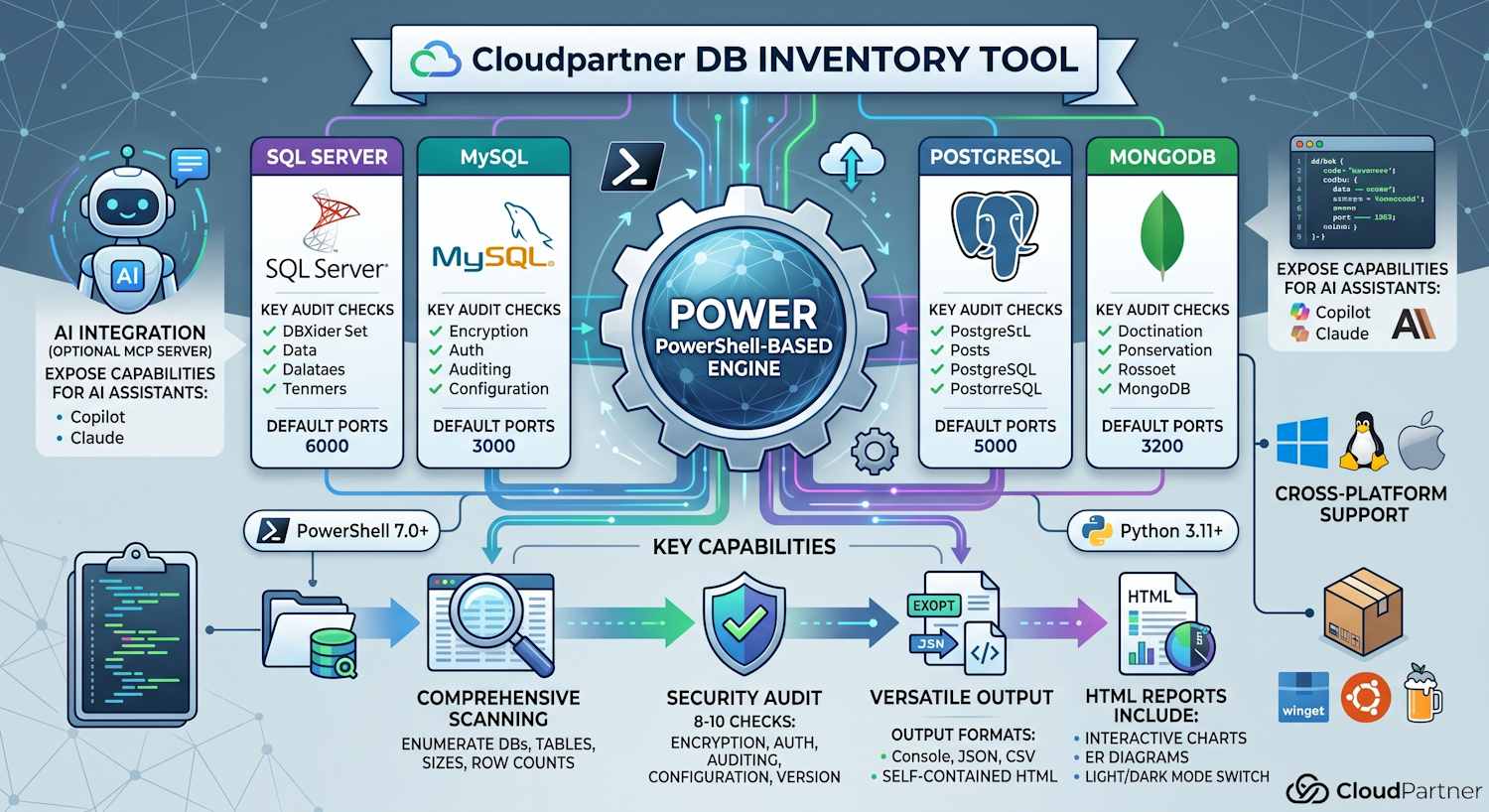
The Cloudpartner DB Inventory Tool is a cross-platform PowerShell toolkit with three components:
- Database inventory — enumerate databases, tables and collections, row counts, sizes, foreign key relationships, and indexes across SQL Server, MySQL, MariaDB, PostgreSQL, and MongoDB.
- Security audit — run approximately 8–10 checks per engine covering encryption, authentication, authorisation, auditing, network exposure, dangerous configuration flags, and version currency.
- MCP server — an optional Python-based Model Context Protocol server that wraps both tools and exposes them to AI assistants (GitHub Copilot, Claude, etc.) so you can ask questions about your database inventory in natural language.
Output can go to the console, JSON, CSV, or a self-contained HTML report that includes interactive charts, ER schema diagrams, and a light/dark mode toggle — so you can hand a report to a manager or a compliance auditor without them needing any tooling installed.
Schema Visualization
The HTML report generates entity-relationship (ER) diagrams using Mermaid.js rendered directly in the browser. No external services, no data leaving your network, no account required. Open the HTML file, and you get a visual map of each database's table structure, including foreign key relationships.
This turned out to be the feature people immediately understood the value of. "Oh, I had no idea that table connects to that one." That's the conversation I wanted to enable. Understanding schema relationships is foundational to everything else — data classification, access reviews, blast radius analysis.
The ER diagrams are theme-aware: they re-render correctly when you switch between light and dark mode, which sounds like a small thing until you've stared at white boxes on a white background trying to read a schema diagram.
For large schemas the diagrams can get dense. The HTML report scopes them per-database, which keeps individual diagrams readable even when the full server inventory spans dozens of databases.
The 10-Step Security Audit
The security audit component runs a set of checks against each database engine and classifies findings as Critical, High, Medium, Low, or Info. The tool exits with code 2 if any Critical or High findings are present — making it suitable for use in CI/CD pipelines or automated compliance checks.
The checks cover seven categories:
| Category | What is checked |
|---|---|
| Encryption | TLS in transit; encryption at rest (TDE on SQL Server) |
| Authentication | Password policies; anonymous or passwordless accounts |
| Authorisation | Overprivileged users; public schema exposure |
| Auditing | Whether database-level audit logging is enabled |
| Network | Listening interfaces; public access exposure |
| Configuration | Dangerous features enabled (xp_cmdshell, local infile, etc.) |
| Version | Whether the engine is running a supported and patched release |
The audit is intentionally scoped to what I call the "obvious holes" — not a full penetration test, not a replacement for a specialist database security review, but a sweep of the most common misconfigurations that exist in real-world environments and that get exploited in real-world incidents.
SQL Server specifics: checks include whether
xp_cmdshell is enabled (it's a command shell from inside the
database — it should almost never be on), whether TDE is configured,
whether the sa account is enabled, and whether linked servers
exist (common lateral movement path). The audit handles Azure SQL gracefully —
some system views aren't available there, and the tool produces Info findings
rather than crashing.
PostgreSQL specifics: checks include
pg_hba.conf trust entries (passwordless access), public schema
privileges, SSL configuration, and whether log_connections is
enabled.
MySQL/MariaDB specifics: checks for anonymous users,
local_infile (a file read vector), password expiry policy,
and whether the root account allows remote login.
MongoDB specifics: checks authentication configuration, TLS, whether the instance binds to all interfaces, and whether audit logging is configured. Works with Cosmos DB's MongoDB API as well.
The MCP Server — AI Meets Your Database Inventory
This is the part that makes the tool genuinely different from a script you'd write yourself in an afternoon.
The MCP server wraps the PowerShell inventory and audit scripts and exposes them as tools that AI assistants can call directly, using the Model Context Protocol. Configure it in VS Code, and GitHub Copilot can query your database inventory, run security audits, and help you understand what the results mean — all from a chat interface.
The available MCP tools are:
| Tool | What it does |
|---|---|
| run_database_inventory | Full inventory — databases, tables/collections, row counts, sizes |
| list_databases | Database names and sizes only — fast overview |
| get_database_details | Detailed inventory for a single database or schema |
| test_database_connection | Test connectivity and return the server version |
| generate_visual_report | Save a self-contained HTML report with charts and ER diagrams |
| run_security_audit | Run the security audit and return findings |
| list_saved_reports | List all previously saved reports |
| read_saved_report | Read a specific saved report by file name |
The practical use case: you inherit an unfamiliar database environment. You run the inventory, generate the HTML report, then open VS Code and ask Copilot:
"What tables in the
CustomerDatadatabase look like they might contain PII based on their column names?"
"The security audit flagged
xp_cmdshellas enabled onsql01. What's the risk and what's the remediation?"
"Which tables have foreign key relationships to the
Orderstable and what would break if I archived that table?"
The AI has full context of your actual inventory — not a hypothetical. That's what makes the MCP integration useful rather than just a demo.
To configure it in VS Code, add this to your MCP configuration:
{
  "servers": {
    "database-inventory": {
      "type": "stdio",
      "command": "python",
      "args": ["${workspaceFolder}/mcp_server.py"]
    }
  }
}
Supported Engines
The tool supports the five most common database engines you'll encounter in enterprise and cloud environments:
| Engine | Default Port | Auth options |
|---|---|---|
| SQL Server | 1433 | Windows auth, SQL login, connection string |
| MySQL | 3306 | Username/password |
| MariaDB | 3306 | Username/password |
| PostgreSQL | 5432 | Username/password |
| MongoDB | 27017 | Username/password with optional TLS; Cosmos DB compatible |
SQL Server uses .NET's System.Data.SqlClient directly — no
external CLI required. MySQL/MariaDB require the mysql or
mariadb CLI, PostgreSQL requires psql, and MongoDB
requires mongosh. A prerequisite installer script handles
all of this automatically, detecting your OS and package manager
(winget, choco, apt, dnf, brew, etc.).
Getting Started
Requirements: PowerShell 7.0+. Python 3.11+ only if you want the MCP server.
# Install prerequisites for all engines
.\Install-DatabaseInventoryPrerequisites.ps1

# Inventory — SQL Server with Windows Authentication
.\Invoke-DatabaseInventory.ps1 -DatabaseType SQLServer -Server sql01 -WindowsAuth

# Inventory — PostgreSQL, scoped to a single database, HTML output
.\Invoke-DatabaseInventory.ps1 -DatabaseType PostgreSQL -Server pg01 -Username app_ro -Database myapp -OutputFormat HTML -OutputPath ./inventory.html

# Security audit — MySQL, HTML report
.\Invoke-DatabaseSecurityAudit.ps1 -DatabaseType MySQL -Server mysql01 -Username dba -OutputFormat HTML

# MCP server
python mcp_server.py
The HTML output is fully self-contained — no CDN dependencies in the generated file, no external calls when you open it. You can email it, store it as evidence for a compliance audit, or open it on an air-gapped machine.
Security Design of the Tool Itself
A few decisions I made deliberately because a tool that connects to production databases should be held to a higher standard:
Credentials are never placed on the command line. SQL Server
uses an ADO.NET connection string in-process. MySQL/MariaDB pass the password
via the MYSQL_PWD environment variable, cleared immediately in
a try/finally block. PostgreSQL uses PGPASSWORD,
same pattern. MongoDB embeds credentials in the connection URI (percent-encoded)
rather than on the command line, where they would be visible in process
listings.
The MCP server never mutates os.environ.
Passwords are passed to the PowerShell subprocess via a copy of the
environment — the original process environment is not modified.
Input validation prevents SQL injection. Database and schema
names supplied via -Database are validated against
^[\w\- .]+$ before interpolation into any query. Names
containing characters outside that set are rejected immediately.
Path traversal prevention in the MCP server. The
export_inventory_to_file tool resolves output paths to absolute
paths and rejects any path containing .. components.
Summary
The DB Inventory Tool is my answer to a problem that's more widespread than organizations want to admit: nobody knows what's in their databases anymore, and the people who did know have been let go. That's a data governance problem, a security problem, and a compliance problem simultaneously.
Three things in one package:
- Schema visualization and inventory: interactive ER diagrams, table counts, sizes, and foreign key relationships in a self-contained HTML report
- Security audit: encryption, authentication, authorisation, configuration, and version currency checks with severity ratings and CI/CD-compatible exit codes
- MCP server: connects your AI assistant directly to your inventory so you can ask real questions about your actual data, not hypotheticals
The tool is on GitHub: HarriJaakkonen/DB-Inventory-Tool. Free to use, free to build on.