


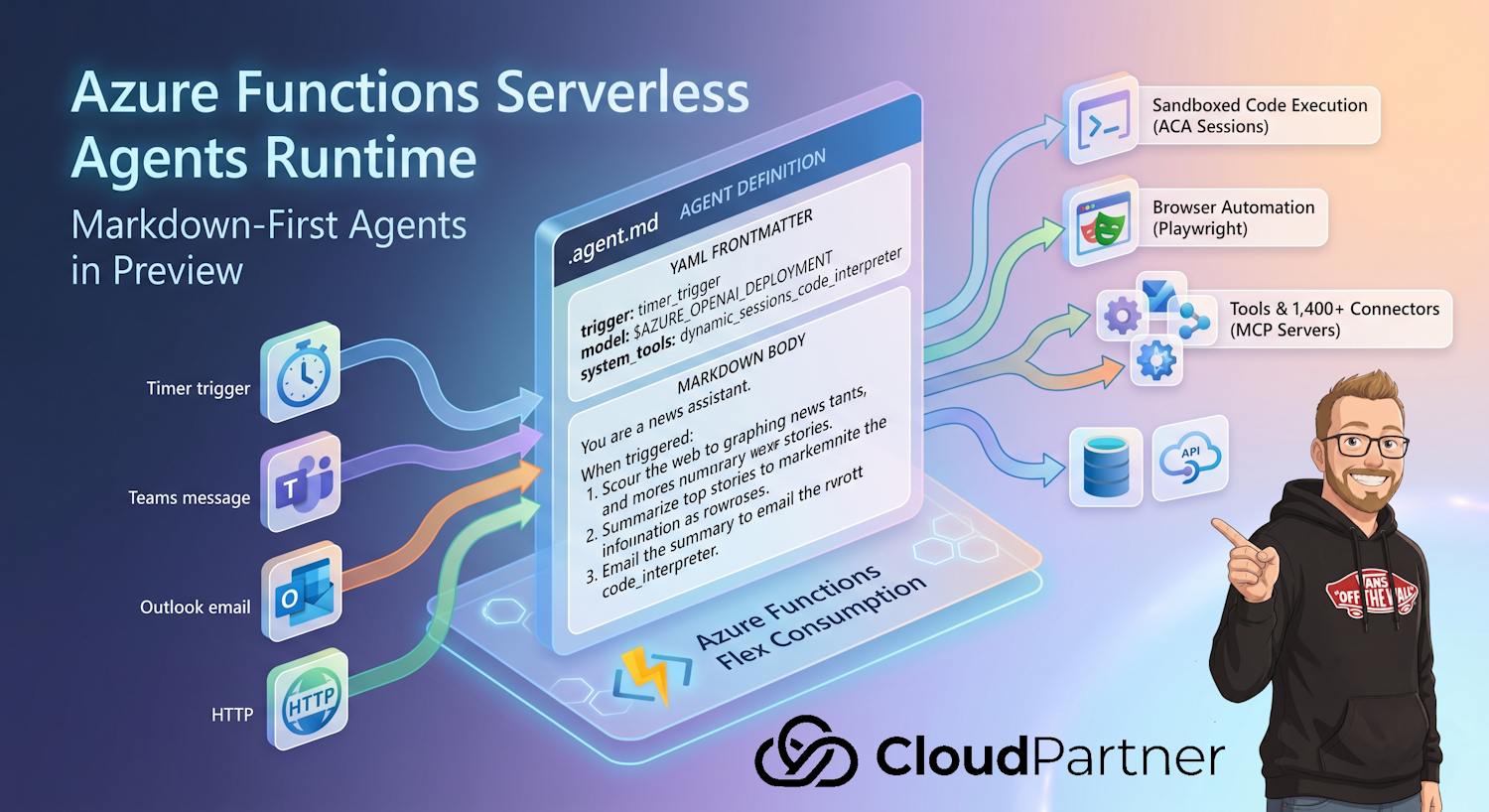
Microsoft just put agents on the same footing as every other Azure Functions trigger type. The Azure Functions serverless agents runtime went into public preview, and it changes how I'd scope a chunk of the "build me an agent" requests I keep getting from clients: instead of standing up LangGraph or Semantic Kernel plus a hosting layer plus a queue plus a secrets store, you write a markdown file, point it at a trigger, and deploy it like any other function app.
This post walks through what's actually in the preview, what an agent file looks like end to end, and where I think it fits versus a full agent framework.
What's actually shipping
The headline feature is a markdown-first programming model for agents inside
Azure Functions. An agent is a single .agent.md file: YAML frontmatter declares the
trigger and metadata, the markdown body underneath is the agent's instructions. No SDK
boilerplate, no separate runtime to provision.
Three examples Microsoft used to frame the preview, and ones I've already seen requested in some form by actual customers:
- A daily briefing agent that wakes up on a timer, scours the web, and drops a summary in an Outlook inbox every morning.
- A Teams chat agent that triggers on every message and answers questions by looking up data across connected systems.
- An on-call troubleshooting agent that investigates incidents by querying logs in Azure Data Explorer and reports back what it found.
Each one deploys on the Flex Consumption plan, so you keep scale-to-zero economics and per-second billing instead of paying for an always-on agent host that sits idle most of the day.
The plumbing problem this is solving
Building a production agent today usually means stitching together a framework, a hosting layer, message queues, identity, secrets, observability, and a long list of per-service integrations. Most of that work isn't the agent itself, it's everything around it.
Azure Functions has spent years making event-driven compute boring in a good way: declare a trigger, write the handler, get autoscale and managed identity for free. The serverless agents runtime applies the same pattern to agents:
- Agents are the unit of work. You define behavior in natural language, not boilerplate.
- Trigger agents from almost any event, including HTTP, timers, queues, database changes, Teams messages, and Outlook mail.
- Tools, MCP servers, connectors, and sandboxed execution are declared, not coded.
- Deploy and operate like any function app, with Flex Consumption, managed identity, VNet integration, Application Insights, and the deployment tooling you already use.
Note: "Markdown-first" doesn't mean no-code in the sense of a drag-and-drop builder. It means the agent's behavior lives in plain instructions instead of a framework's chain-of-calls API. You still need to think carefully about what tools the agent can reach and what permissions back those tools.
Anatomy of an agent.md file
Here's the timer-triggered daily news agent from Microsoft's own example, reproduced because it's a clean illustration of the whole model in one file:
---
name: Daily Tech News Email
description: Fetches top tech news and emails a summary daily.

trigger:
  type: timer_trigger
  args:
    schedule: "0 0 15 * * *"
---

You are a news assistant. When triggered, do the following:

1. Scour the web for today's top tech news headlines. Use reputable sources;
   Include links to the original articles.
2. Summarize the top stories in a concise, well-formatted HTML email body.
3. Email the summary to $TO_EMAIL with the subject "Daily Tech News Summary"
   followed by today's date.
That's the entire function. Drop the file into a function app, deploy, and it runs on schedule. There's no framework wiring and no service-specific integration code in the file itself, that part is handled by shared configuration alongside it.
Shared configuration across agents
An app can hold multiple agents, and they can share configuration and capabilities through a small set of files next to the agent definitions:
agents.config.yamldeclares system tools and the default model.mcp.jsonlists the MCP servers an agent can call, including MCP-enabled Azure connections.- A
/toolsfolder holds custom Python tools. - A
/skillsfolder holds reusable prompt fragments.
Everything in that list is optional, and available to every agent automatically when present. Here's the daily news agent's actual wiring, using a Container Apps dynamic session to browse the web with Playwright and a Microsoft 365 connection exposed as an MCP server to send the email:
# agents.config.yaml
system_tools:
  dynamic_sessions_code_interpreter:
    endpoint: $ACA_SESSION_POOL_ENDPOINT

model: $AZURE_OPENAI_DEPLOYMENT
// mcp.json
{
"servers": {
"office365": {
"type": "http",
"url": "$MICROSOFT_365_CONNECTION_MCP_ENDPOINT",
"auth": {
"scope": "https://apihub.azure.com/.default"
}
}
}
}The function app's managed identity authenticates to the connection's MCP endpoint, so there are no secrets sitting in config. Any Azure connector that supports MCP, or any remote MCP server, gets added the same way. Any of these global settings can also be overridden per agent in that agent's own frontmatter.
What's actually doing the authenticating here
It's worth being precise about what "managed identity authenticates to the MCP endpoint" means in this preview, because it's easy to conflate it with Microsoft's separate agent identity work in Microsoft Entra ID.
What's documented for this runtime is plain Azure Functions managed identity, either
system-assigned or user-assigned, the same mechanism Functions has used for years to call Azure
SQL, Key Vault, or Storage without a connection string. When an agent calls an MCP-enabled Azure
connection, the function app's own identity requests a token and presents it to the connection's
MCP endpoint. In the mcp.json example above, the scope is
https://apihub.azure.com/.default, which is the resource identifier for Azure API
Connections (the same connection infrastructure Logic Apps and Power Automate use), not an
agent-specific scope. For a custom remote MCP server the auth.scope field is just
pointed at whatever resource that server expects.
That's a different thing from Microsoft Entra Agent ID, where each agent gets its
own dedicated identity object, created and managed under an agent identity blueprint, with its
own sponsor, its own audit trail in sign-in logs, and its own lifecycle independent of the app
hosting it. Agent ID is what Microsoft Foundry and Copilot Studio use today to give administrators
a per-agent identity to govern. I've covered the mechanics of that model elsewhere, including the
fmi_path token exchange and the blueprint-to-identity relationship.
Based on what Microsoft has published about this preview so far, the serverless agents runtime
doesn't provision a distinct Entra Agent ID for each .agent.md file. Every agent in
the app shares whatever identity is attached to the function app itself. That's fine for a
single-purpose agent app, but if you're running several agents with meaningfully different trust
levels in one app, for example a read-only reporting agent next to one that can write to
Salesforce, they currently share the same blast radius unless you split them into separate
function apps with separate identities and separately scoped role assignments. Whether Agent ID
governance gets wired into this runtime as it matures is worth watching, but I wouldn't assume it
today.
Practical takeaway: until per-agent identity shows up here, treat each function app as the actual security boundary, not each agent file inside it. Scope the connections and role assignments on that managed identity to the narrowest set of agents that need them, and put agents with different trust levels in different apps.
What you actually get in the preview
| Capability | What it covers |
|---|---|
| Triggers across the Functions catalog | HTTP, Timer, Queue, Service Bus, Event Hubs, Cosmos DB, Blob, Event Grid, plus new connection-backed triggers like Teams messages, Outlook mail, and calendar events |
| 1,400+ Azure connectors as tools | Create a connection, enable its MCP endpoint, and an agent can send mail, post to Teams, create records, or query data without integration code or auth plumbing |
| Any remote MCP server as tools | Not limited to Microsoft-hosted connectors |
| Sandboxed code and browser automation | Run code or a Playwright-driven browser in Azure Container Apps dynamic sessions, isolated per agent session |
| Built-in chat UI, HTTP API, and MCP server endpoint | No extra code required to expose any of these |
| Custom Python tools and reusable skills | tools/ and skills/ folders, shared across every agent in
the app |
| Pluggable model providers | Microsoft Foundry, Azure OpenAI, and OpenAI out of the box |
Where this fits
This isn't pitched as a replacement for a full agent orchestration framework on a complex multi-agent workload. It's aimed squarely at the agents most organizations actually need to build day to day:
- Scheduled background agents that summarize, monitor, or reconcile on a timer.
- Event-driven assistants that react to messages, emails, alerts, and database changes.
- Cross-system agents that tie multiple SaaS and enterprise apps together through connections: trigger from a Teams message, look up a customer in Salesforce, send an email, update a database record, all from one agent.
- Conversational front-ends that pair an HTTP or chat-UI entry point with the same agents your event triggers invoke.
- Agents as MCP servers that other agents and MCP clients can integrate with directly.
If you've already invested in LangGraph, Semantic Kernel, or a custom orchestration layer for a genuinely complex multi-step reasoning workload, this preview doesn't ask you to rip that out. Where it earns its keep is the long tail of single-purpose, event-triggered agents that don't need that machinery, the kind that today often get built as a quick script and a cron job because a proper agent framework feels like overkill.
How it stacks up against Foundry Agent Service, Copilot Studio, and a DIY framework
Microsoft now has four reasonable answers to "where do I run this agent," and they're not interchangeable. Here's how I'd separate them, with the pricing figures Microsoft has published so far. All of this is preview-stage and subject to change, so treat the numbers as a snapshot, not a quote.
| Option | Hosting model | Pricing model | Best fit |
|---|---|---|---|
| Azure Functions serverless agents runtime | Your own function app, agents as .agent.md files, Flex Consumption
plan |
Standard Flex Consumption billing: scale-to-zero, per-second compute and memory, no separate per-agent surcharge documented in the preview | Single-purpose, event-triggered agents you want under your own deployment and observability stack |
| Microsoft Foundry Agent Service (hosted agents) | Fully managed Foundry runtime; can run external frameworks like Microsoft Agent Framework or LangGraph in customer-dedicated containers | Hosted-agent compute billed at $0.0994/vCPU-hour and $0.0118/GiB-hour (preview billing started April 22, 2026); memory billing (short-term, long-term, retrieval) started June 1, 2026; Foundry-native prompt/workflow agents add no extra runtime charge beyond model token usage | Teams that want a managed agent runtime with built-in observability and governance, or that need to lift an existing LangGraph agent onto managed infrastructure |
| Microsoft Copilot Studio | Managed SaaS, low-code/no-code agent builder, no infrastructure to run yourself | Copilot Credits: pay-as-you-go at $0.01/credit (US list, June 2026), or tenant-wide capacity packs of 25,000 credits for $200/month; some quota included with Microsoft 365 Copilot licenses for internal-use agents | Business users and makers building conversational agents without writing code, where tenant-wide credit pooling is acceptable |
| LangGraph / Semantic Kernel (self-hosted) | Open-source framework, you choose and pay for the compute (your own AKS, App Service, VM, or now Foundry hosted agents) | No framework licensing cost; you pay only for the compute and model usage you provision | Complex multi-agent orchestration with custom control flow that doesn't map well to a single markdown-defined agent |
The practical split I keep coming back to: Copilot Studio is for makers who shouldn't be touching code at all, Foundry Agent Service is for teams that want a managed runtime (including one that can run their existing LangGraph code), the Functions runtime is for developers who already think in triggers and want agents to be one more trigger type, and a self-hosted framework is for the workloads complex enough that none of the managed options give you enough control over the reasoning loop.
Getting started, and what's still rough
This is a public preview, and Microsoft has said they're actively shaping it from real customer workloads. A few things worth checking before you commit a production workload to it:
- Confirm current regional availability for the Flex Consumption plan in the region you need.
- Treat the markdown instructions like any other prompt: test them against edge cases, not just the happy path shown in the docs.
- Review the MCP endpoint auth scope on each connection carefully, since the managed identity pattern means the agent inherits whatever access the connection grants.
- Watch for preview SLA and pricing terms changing as the feature moves toward general availability.
Docs: aka.ms/azure-functions-agents-docs
Further reading
- Azure Functions serverless agents runtime documentation
- Azure Functions Flex Consumption plan overview
- Azure Container Apps dynamic sessions for code interpretation
- Exposing Azure connectors as MCP servers
- Agent identity blueprints in Microsoft Entra Agent ID
- Foundry Agent Service pricing
- Copilot Studio pricing