


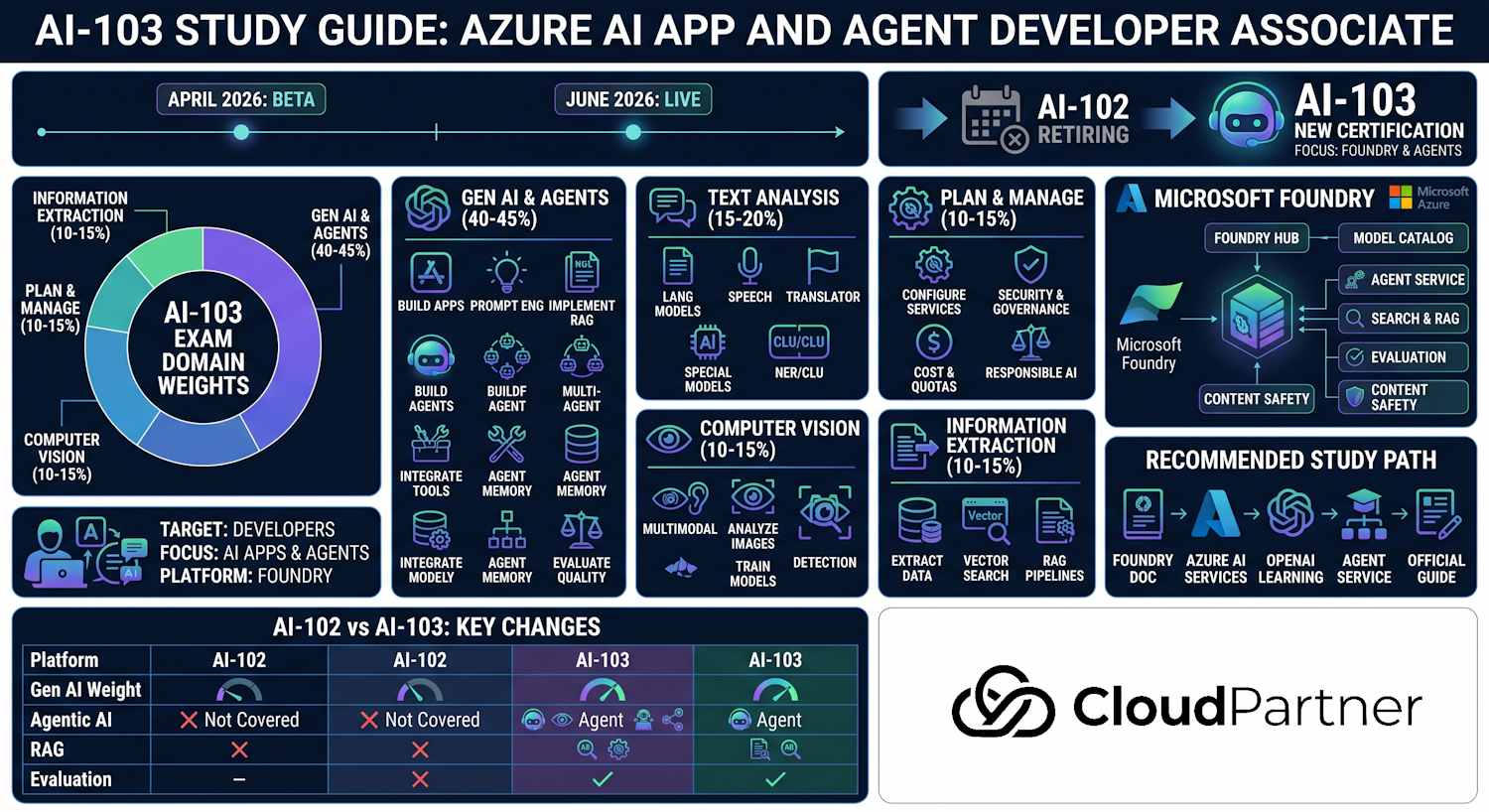
Part 2 of 5 — 30–35% of the AI-103 exam (largest domain). This domain covers Azure OpenAI deployments, advanced prompt engineering, RAG with Azure AI Search, the Azure AI Agent Service, multi-agent patterns with Semantic Kernel and AutoGen, and evaluating generative AI applications in Foundry.
Exam Objectives
This domain has the highest weighting on the exam. Expect scenario-based questions asking you to choose between deployment types, select the right agent tool, design a RAG pipeline, or identify the correct SDK method call.
Implement Azure OpenAI Solutions
- Deploy and configure Azure OpenAI resources using Standard and Provisioned deployment types
- Call chat completion and embedding APIs using the latest stable API version
- Implement structured outputs and JSON mode
- Monitor token usage and manage deployment quotas
Apply Prompt Engineering Techniques
- Design system prompts that define role, rules, and output format
- Use few-shot examples and chain-of-thought reasoning
- Control output determinism with temperature and top_p parameters
- Build reusable prompt templates with Jinja2-style variable substitution
Build RAG Solutions
- Generate embeddings with Azure OpenAI embedding models
- Configure an Azure AI Search index with vector fields and hybrid search
- Apply semantic ranking to improve retrieval quality
- Ground LLM responses and include source citations
Build Agentic Applications
- Create and manage agents, threads, and runs with Azure AI Agent Service
- Use built-in agent tools: File Search, Code Interpreter, and Function
- Implement multi-agent orchestration patterns
- Evaluate generative AI apps using Foundry evaluation runs
Azure OpenAI Deployments
Azure OpenAI resources are created at the Azure resource level, with model deployments configured within each resource. Deployment type determines billing model and throughput characteristics.
Deployment Types
| Type | Billing | Best for |
|---|---|---|
| Standard | Pay-per-token (input + output) | Variable or unpredictable traffic; development and testing |
| Provisioned (PTU) | Reserved capacity (Provisioned Throughput Units) billed hourly | Predictable high-volume production traffic; latency-sensitive workloads |
Creating a Model Deployment via CLI
Use az cognitiveservices account deployment create with the
--model-format OpenAI flag. Always specify the model version explicitly
to avoid unexpected changes when Microsoft releases a newer default version.
az cognitiveservices account create \
  --name my-openai \
  --resource-group myresourcegroup \
  --kind OpenAI \
  --sku s0 \
  --location eastus

az cognitiveservices account deployment create \
  --resource-group myresourcegroup \
  --name my-openai \
  --deployment-name gpt-4o-deployment \
  --model-name gpt-4o \
  --model-version "2024-11-20" \
  --model-format OpenAI \
  --sku-capacity 10 \
  --sku-name Standard
Chat Completion API
Use the AzureOpenAI client from the openai Python package.
The model parameter in the API call is the deployment name you
assigned — not the underlying model name. Use the latest stable API version to access
features like structured outputs and vision inputs.
from openai import AzureOpenAI

client = AzureOpenAI(
    api_key="<api-key>",
    api_version="2024-12-01-preview",
    azure_endpoint="https://my-openai.openai.azure.com/"
)

response = client.chat.completions.create(
    model="gpt-4o-deployment",   # deployment name, not model name
    messages=[
        {"role": "system", "content": "You are a helpful assistant."},
        {"role": "user", "content": "What is Azure AI Foundry?"}
    ],
    temperature=0.7,
    max_tokens=500
)

print(response.choices[0].message.content)
Prompt Engineering Techniques
Prompt engineering is the practice of structuring instructions to get reliable, high-quality outputs from an LLM. The exam expects you to identify which technique applies to a given scenario and understand the trade-offs between approaches.
System Prompt Design
The system prompt establishes the model's persona, constraints, and expected output format. A well-designed system prompt typically contains three elements: a role definition ("You are a customer support agent for Contoso"), a set of behavioural rules ("Always respond in English; never discuss competitor products"), and an output format specification ("Return your answer as a JSON object with keys: answer, confidence, sources").
Prompt Components
| Component | Purpose | Example |
|---|---|---|
| System | Role, rules, output format | "You are a concise technical writer. Return a JSON object." |
| Few-shot examples | Show desired input/output patterns (3–5 examples is usually optimal) | User/assistant pairs demonstrating the exact format expected |
| User | The actual request or question | "Summarise the following document in 3 bullet points." |
| Context (RAG) | Retrieved documents injected into the prompt | Source passages retrieved from Azure AI Search |
Few-Shot Prompting
Few-shot prompting embeds example input/output pairs in the conversation history before the actual user request. The model infers the pattern from the examples. Three to five examples is typically the sweet spot — too few and the pattern is ambiguous; too many and you waste context window tokens.
messages = [
    {"role": "system", "content": "Classify the sentiment of customer reviews as Positive, Negative, or Neutral."},
    {"role": "user", "content": "The delivery was fast and the product works perfectly."},
    {"role": "assistant", "content": "Positive"},
    {"role": "user", "content": "The item arrived broken and customer service was unhelpful."},
    {"role": "assistant", "content": "Negative"},
    {"role": "user", "content": "The product is okay, nothing special."},
    {"role": "assistant", "content": "Neutral"},
    {"role": "user", "content": "Absolutely love this, exceeded all my expectations!"}
]
Chain-of-Thought and Structured Outputs
Chain-of-thought (CoT) prompting instructs the model to reason step-by-step before producing a final answer. This dramatically improves accuracy on mathematical, logical, and multi-step reasoning tasks. Add "Think step by step" to the system or user prompt, or use a structured CoT format where reasoning steps are explicit.
Structured outputs (JSON mode) force the model to produce syntactically valid JSON that
matches a specified schema. Use response_format={"type": "json_object"}
for unstructured JSON, or pass a Pydantic model to the newer structured outputs API
for schema-validated responses.
from pydantic import BaseModel

class AnalysisResult(BaseModel):
    sentiment: str
    confidence: float
    key_phrases: list[str]

response = client.beta.chat.completions.parse(
    model="gpt-4o-deployment",
    messages=[
        {"role": "system", "content": "Analyse the sentiment of the review. Think step by step."},
        {"role": "user", "content": "The product quality has declined but shipping is still great."}
    ],
    response_format=AnalysisResult
)

result = response.choices[0].message.parsed
print(result.sentiment, result.confidence)
Temperature and top_p
Use temperature=0 (or close to 0) for deterministic, fact-based tasks
like data extraction, classification, and code generation — the model will almost
always produce the same output for the same input. Use higher temperatures (0.7–1.0)
for creative tasks like brainstorming or marketing copy where variety is desirable.
top_p works similarly by limiting the token pool to the top cumulative
probability mass; adjust one or the other but not both simultaneously.
Retrieval-Augmented Generation (RAG)
RAG is the dominant pattern for grounding LLM responses in enterprise data. Instead of relying on the model's parametric knowledge (which has a training cutoff and may hallucinate), RAG retrieves relevant passages from a search index and injects them into the prompt as context. The model generates its answer exclusively from that context, reducing hallucination risk significantly.
RAG Pipeline Steps
- Ingestion: Chunk documents into smaller passages (typically
512–1024 tokens). Generate embeddings for each chunk using an Azure OpenAI
embedding model (
text-embedding-3-smallortext-embedding-3-large). Store embeddings in an Azure AI Search index with a vector field. - Retrieval: At query time, embed the user's question with the same model. Run a hybrid search (BM25 keyword + vector similarity) against the index. Apply semantic ranking to re-score the top results using an L2-reranker model.
- Augmentation: Inject the top-k retrieved passages into the system or user prompt as context. Include source document titles so the model can cite them.
- Generation: Send the augmented prompt to Azure OpenAI. The model generates a grounded response that references the retrieved material.
Azure AI Search Index with Vector Field
A vector field in the index stores the embedding as a collection of single-precision
floats. The number of dimensions must match the embedding model output
(text-embedding-3-small produces 1536 dimensions;
text-embedding-3-large produces 3072).
from azure.search.documents.indexes import SearchIndexClient
from azure.search.documents.indexes.models import (
    SearchIndex, SimpleField, SearchableField,
    SearchField, SearchFieldDataType, VectorSearch,
    HnswAlgorithmConfiguration, VectorSearchProfile
)

index = SearchIndex(
    name="my-rag-index",
    fields=[
        SimpleField(name="id", type=SearchFieldDataType.String, key=True),
        SearchableField(name="content", type=SearchFieldDataType.String),
        SimpleField(name="source_title", type=SearchFieldDataType.String, filterable=True),
        SearchField(
            name="content_vector",
            type=SearchFieldDataType.Collection(SearchFieldDataType.Single),
            searchable=True,
            vector_search_dimensions=1536,
            vector_search_profile_name="my-hnsw-profile"
        )
    ],
    vector_search=VectorSearch(
        algorithms=[HnswAlgorithmConfiguration(name="my-hnsw")],
        profiles=[VectorSearchProfile(name="my-hnsw-profile", algorithm_configuration_name="my-hnsw")]
    )
)

index_client.create_or_update_index(index)
Hybrid Search with Semantic Ranking
Hybrid search combines traditional BM25 keyword scoring with vector similarity scoring. Azure AI Search merges the two result sets using Reciprocal Rank Fusion (RRF). Applying a semantic configuration on top of hybrid search adds an L2-reranker pass that re-scores the merged results based on semantic relevance, further improving the quality of retrieved context for the LLM.
from azure.search.documents import SearchClient
from azure.search.documents.models import VectorizedQuery
from openai import AzureOpenAI

# Generate query embedding
openai_client = AzureOpenAI(...)
embedding_response = openai_client.embeddings.create(
    model="text-embedding-3-small-deployment",
    input=user_query
)
query_vector = embedding_response.data[0].embedding

# Hybrid search with semantic ranking
search_client = SearchClient(endpoint, "my-rag-index", credential)
results = search_client.search(
    search_text=user_query,              # BM25 keyword search
    vector_queries=[
        VectorizedQuery(
            vector=query_vector,
            k_nearest_neighbors=5,
            fields="content_vector"
        )
    ],
    query_type="semantic",
    semantic_configuration_name="my-semantic-config",
    top=3,
    select=["content", "source_title"]
)

# Build grounded context
context_parts = []
for doc in results:
    context_parts.append(f"[{doc['source_title']}]\n{doc['content']}")
context = "\n\n".join(context_parts)
Azure AI Agent Service
The Azure AI Agent Service (accessed through Azure AI Foundry) provides a fully managed runtime for agentic applications. Rather than building your own tool-execution loop, the service manages the conversation state, tool dispatch, and run lifecycle automatically. This is the key architectural difference from raw function calling with the OpenAI chat completions API.
Core Concepts
- Agent: A managed entity configured with a model, instructions, and a list of enabled tools. Agents are reusable across multiple conversations.
- Thread: A conversation session. Each thread maintains its own ordered list of messages and can have files attached. Threads persist automatically — you do not manage conversation history yourself.
- Run: A single execution step on a thread, where the agent reads the current messages, decides whether to call tools, and generates a response. Runs transition through statuses: queued → in_progress → requires_action (tool call needed) → completed.
- Built-in tools:
- File Search — automatically chunks and indexes uploaded files into a managed vector store. No separate AI Search index needed. The agent queries this store at run time.
- Code Interpreter — executes Python in an isolated sandbox. Can analyse data files, produce charts, and perform calculations. It cannot access the internet or external APIs.
- Function — calls external APIs or custom business logic you implement. You provide the function schema; the service determines when to call it.
Agent SDK Lifecycle Example
from azure.ai.projects import AIProjectClient
from azure.ai.projects.models import (
    AgentsApiToolChoiceOptionMode,
    FileSearchTool,
    FunctionTool,
    ToolSet
)
from azure.identity import DefaultAzureCredential

project_client = AIProjectClient(
    subscription_id="<sub-id>",
    resource_group_name="myresourcegroup",
    project_name="my-ai-project",
    credential=DefaultAzureCredential()
)

# 1. Create the agent
agent = project_client.agents.create_agent(
    model="gpt-4o",
    name="support-agent",
    instructions=(
        "You are a helpful support agent. "
        "Answer questions using the uploaded documentation. "
        "Always cite the source document title in your response."
    ),
    tools=FileSearchTool().definitions,
    tool_resources=FileSearchTool(
        vector_store_ids=["<vector-store-id>"]
    ).resources,
)

# 2. Create a thread (conversation session)
thread = project_client.agents.create_thread()

# 3. Add a user message
project_client.agents.create_message(
    thread_id=thread.id,
    role="user",
    content="What are the system requirements for the product?"
)

# 4. Create and wait for a run to complete
run = project_client.agents.create_and_process_run(
    thread_id=thread.id,
    agent_id=agent.id
)

print(f"Run status: {run.status}")

# 5. Read the assistant's response
messages = project_client.agents.list_messages(thread_id=thread.id)
for msg in messages.data:
    if msg.role == "assistant":
        for block in msg.content:
            print(block.text.value)
Agent Tools, State, and Approval Boundaries
An agent combines instructions, a model deployment, conversation state, knowledge, and tools. A thread or equivalent conversation store preserves messages across turns; it is not the same as long-term business memory. Durable memory should be explicit, scoped to the user or task, and governed with retention and deletion controls. Keep authoritative facts in a searchable knowledge source rather than relying on the model to remember them.
Choose tools by capability. File search is useful for agent-scoped uploaded documents. Azure AI Search is better for centrally managed enterprise indexes, hybrid retrieval, filtering, and reusable grounding. Code Interpreter runs calculations and file transformations in a sandbox. Function, OpenAPI, and custom tools call deterministic business operations. Define narrow tool schemas with clear parameter descriptions because the model selects and populates tools from those schemas.
Tool access must follow least privilege. Read-only retrieval can often run automatically, but destructive, financial, identity, or externally visible actions should require validation and a human approval checkpoint. Validate arguments outside the model, apply timeouts and idempotency, restrict destination hosts, and log the requested action, approval decision, and result. The model proposes an action; trusted application code decides whether it is allowed.
Reflection and Hybrid Orchestration
Reflection and self-critique add a review step in which a model checks an answer against requirements or evidence and revises it. They can improve difficult outputs, but they add latency and tokens and do not prove correctness. Use an independent evaluator, deterministic rule, or human reviewer for high-impact decisions. Hybrid orchestration is often strongest: rules handle permissions, routing, thresholds, and transaction state, while the model handles interpretation, generation, and tool selection.
Multi-Agent Patterns
Complex AI workloads often require multiple specialised agents working together. The AI-103 exam expects you to understand the common orchestration patterns and when to apply each.
Orchestrator-Worker Pattern
An orchestrator agent receives the original user request, decomposes it into subtasks, and delegates each subtask to a specialist worker agent. The orchestrator then aggregates the results and produces a final response. This is the most common pattern for complex, multi-domain tasks — for example, an HR assistant that delegates payroll queries to a payroll agent and policy questions to a compliance agent.
Sequential and Parallel Patterns
- Sequential: Agent A processes the input and passes its output to Agent B, which then passes to Agent C. Use when each step depends on the previous result — for example, extract → translate → summarise.
- Parallel: Multiple agents work simultaneously on independent subtasks; results are merged at the end. Use when subtasks are independent and latency matters — for example, simultaneously searching multiple knowledge bases.
Semantic Kernel and AutoGen
Semantic Kernel is Microsoft's open-source SDK for building AI agents and multi-agent workflows. It provides agent groups with configurable selection strategies (round-robin, role-based) and a plugin system for integrating external tools. Semantic Kernel integrates natively with Azure AI Foundry and supports both Python and .NET. It can target Azure OpenAI directly or use the Azure AI Agent Service as its runtime.
Azure AutoGen (formerly Microsoft AutoGen) is a research-oriented framework for multi-agent conversation. It supports programmable agent-to-agent conversations and is well-suited for code-generation and problem-solving workflows that require iterative back-and-forth between agents. AutoGen can use Azure OpenAI as the underlying model provider and can also integrate with the Azure AI Agent Service for managed execution.
When agents are backed by the Azure AI Agent Service, each agent can be secured with its own Entra identity and RBAC assignments — useful for compliance and auditing in multi-agent systems.
Evaluating Generative AI Applications
Evaluation in Azure AI Foundry measures the quality of a generative AI application against a labelled dataset. Running evaluations systematically is essential before promoting a new model version, prompt, or RAG configuration to production.
Built-in Evaluation Metrics
| Metric | What it measures | Required inputs |
|---|---|---|
| Groundedness | Whether the response is supported by the provided context | query, response, context |
| Relevance | Whether the response addresses the question asked | query, response |
| Coherence | Logical consistency and flow of the response | query, response |
| Fluency | Grammatical correctness and readability | response |
| Similarity | How closely the response matches a ground-truth reference answer (requires labelled data) | query, response, ground_truth |
| Violence / Hate / Sexual / Self-harm | Safety evaluation — detects harmful content in model responses using Content Safety | response |
Evaluations can be run from the Foundry portal under Evaluate > New
evaluation, or programmatically via the
azure.ai.evaluation SDK. The evaluation dataset is a JSONL file where
each line contains the query, the generated response, and (for groundedness) the
context passages used to generate that response.
Exam Tips & Key Takeaways
- Agent Service vs manual function calling: Agent Service manages thread state, tool dispatch, and run status automatically. Manual function calling with the chat completions API requires you to implement the agentic loop yourself, handling tool_calls finish_reason and submitting results back.
- File Search tool: Automatically chunks and indexes uploaded files into a managed vector store — you do not need a separate Azure AI Search index for agent-level document search.
- Code Interpreter: Runs Python in an isolated sandbox. It can process uploaded data files and generate charts, but it cannot access the internet or call external endpoints.
- Multi-agent identity: Each agent in a multi-agent system has its own Entra Agent ID and can be secured independently with RBAC — useful for compliance and auditing.
- RAG citations: Always include source document titles in the context you inject into the prompt. This enables the model to cite sources in its response and helps groundedness detection identify unsupported claims.
- Deployment name vs model name: In API calls, the
modelparameter is the deployment name you configured, not the underlying model name likegpt-4o. - Standard vs Provisioned: Standard deployments are pay-per-token and suit variable traffic. Provisioned (PTU) deployments offer reserved, consistent throughput and lower latency for high-volume production workloads.
Exam tip: For questions about reducing hallucination in agent responses, the correct answers typically involve enabling groundedness detection in Content Safety and including source citations in the RAG context — not lowering temperature, which affects randomness rather than factual accuracy.
Exam tip: The
create_and_process_run()method polls until the run completes, including handling any required tool calls in the loop. Use it when you want synchronous-style code. For production applications that need webhook or event-based notification, usecreate_run()and poll the run status asynchronously.