


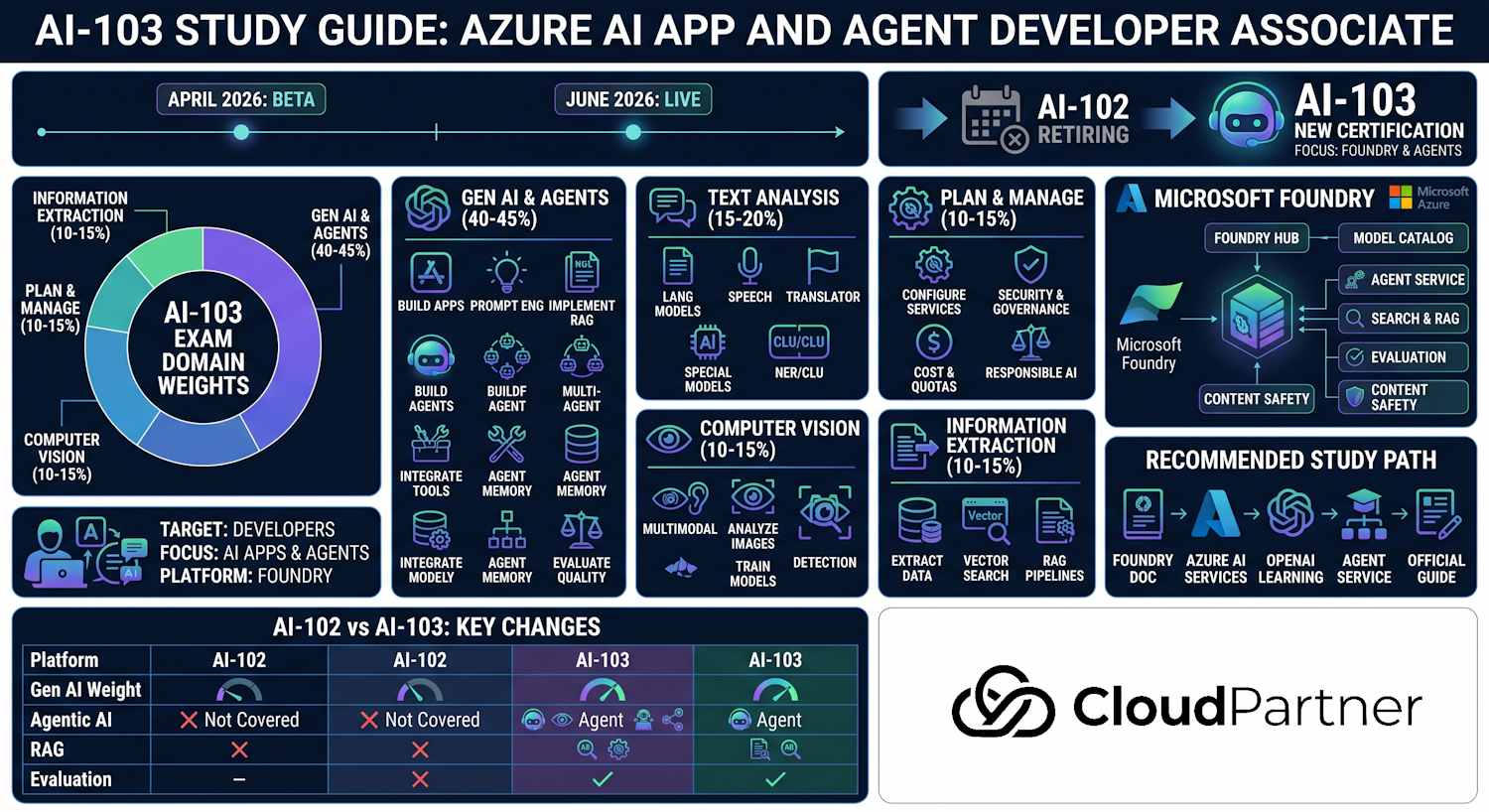
Part 1 of 5 — 25–30% of the AI-103 exam. This domain covers planning AI and agentic solutions, selecting the right Azure AI services, configuring Microsoft Foundry hubs and projects, implementing secure authentication, and applying responsible AI practices including content safety.
Exam Objectives
The official study guide breaks this domain into four skill areas that you must demonstrate on the exam:
Plan AI and Agentic Solutions
- Identify appropriate use cases for AI and agentic applications
- Choose the right Azure AI service for each workload
- Design a solution architecture using Foundry hubs and projects
- Evaluate build-vs-buy decisions for AI capabilities
Manage Azure AI Resources
- Create and configure Azure AI resource groups and naming conventions
- Manage access with RBAC and managed identities
- Monitor resource usage, quotas, and costs with Azure Monitor
- Apply tags for cost tracking at the resource group level
Set Up Microsoft Foundry Projects
- Create and configure Foundry hubs and child projects
- Connect Azure OpenAI, AI Search, Storage, Key Vault, and Container Registry
- Configure RBAC at hub and project level
- Understand the difference between Foundry and Azure OpenAI Studio
Implement Secure Authentication and Responsible AI
- Use managed identity and service principals with least-privilege RBAC
- Retrieve secrets from Azure Key Vault rather than storing in code
- Apply content safety filters and prompt shields
- Detect and mitigate groundedness issues (hallucination)
Microsoft Foundry Architecture
Azure AI Foundry is the unified platform for building, deploying, and managing AI applications and agents on Azure. It introduces a two-level resource hierarchy — the Hub and the Project — backed by a standard Azure resource type.
The Hub is an Azure resource of type
Microsoft.MachineLearningServices/workspaces with kind=Hub. It
provides the governance boundary: shared connections to dependent services, billing
consolidation, and the RBAC policies that flow down to child projects. A Hub exists in a
single Azure region and resource group.
A Project is the same resource type with kind=Project, linked to a parent
hub
via its hub-id. Projects are where individual AI applications live — each
project gets its own workspace for agents, prompt flows, evaluation runs, and datasets,
while inheriting the hub's shared service connections.
Azure AI Foundry replaces the older Azure OpenAI Studio for most workflows. Foundry supports multi-service AI applications, agent orchestration, and evaluation pipelines in a single interface, whereas the older Azure OpenAI Studio was limited to OpenAI-specific resources.
Project Connections and Shared Resource Access
A Foundry project connection is the reusable configuration that tells project workloads how to reach an external resource such as Azure AI Search, Azure OpenAI, Storage, or Application Insights. Create the connection once at project scope when several agents or flows use the same resource. Each workload then refers to the named connection instead of carrying its own endpoint and credential configuration. This centralizes rotation and reduces configuration drift.
Do not confuse a connection with authorization. The connection identifies the target and authentication method; the calling identity still needs the required data-plane RBAC role. Prefer a managed identity and keyless connection for production. If a secret is unavoidable, keep it in the connection or Key Vault rather than prompts, tool arguments, source code, or telemetry attributes. A managed private endpoint solves network reachability from a managed network, while the project connection solves reusable resource configuration. Many scenarios require both.
Foundry RBAC Roles
| Role | Scope | What it allows |
|---|---|---|
| Azure AI Hub Admin | Hub | Full hub management, creating/deleting projects, managing shared connections |
| Azure AI Developer | Project | Build and deploy AI apps within a project; cannot modify hub settings or connections |
| Reader | Hub or Project | Read-only access to view resources and configurations |
Selecting Azure AI Services
The AI-103 exam expects you to choose the correct service for a given business scenario. Memorise this matrix: the category column maps to what the user is trying to do, and the "when to use" column gives you the exam-question signal words to look for.
| Service | Category | When to use |
|---|---|---|
| Azure OpenAI (GPT-4o, o3) | Generative AI | Chat completion, text generation, embeddings, code generation, summarisation |
| Azure AI Agent Service | Agentic AI | Multi-step agentic apps with tools, memory, file search, and code interpreter |
| Azure AI Search | Search & Grounding | Vector/hybrid search, semantic ranking, RAG grounding for LLM responses |
| Azure AI Vision | Vision | Image analysis, OCR, object detection, face analysis, video retrieval |
| Azure AI Speech | Speech | Speech-to-text (STT), text-to-speech (TTS), real-time transcription, speaker diarisation |
| Azure AI Language | Language | Sentiment analysis, NER, key phrase extraction, CLU (Conversational Language Understanding) |
| Azure AI Translator | Language | Multi-language text translation, document translation, custom translator models |
| Azure AI Document Intelligence | Extraction | Structured extraction from PDFs, invoices, receipts, forms, and custom document layouts |
| Azure AI Content Safety | Safety | Content filtering (hate, violence, self-harm, sexual), prompt shields, groundedness detection |
| Azure AI Content Understanding | Extraction & Analysis | Foundry-native service for structured extraction from documents and images; outputs markdown or structured JSON ready for agents and RAG pipelines |
Choosing the Right Model Type
The official study guide tests "selection of large language models, small language models, and Foundry Tools". The Foundry Model Catalog organises models into three categories, each suited to different cost, capability, and deployment constraints:
- Large Language Models (LLMs) — GPT-4o, GPT-4o mini, o3, o4-mini. Use when the task needs complex reasoning, long-context understanding, code generation, or chain-of-thought steps. Higher cost per token.
- Small Language Models (SLMs) — Phi-4, Phi-4-mini. Use when cost efficiency, low latency, or on-device deployment matters. Well-suited for structured extraction, classification, and lightweight agents. Significantly cheaper than GPT-4o.
- Multimodal models — GPT-4o (image+text), Phi-4-multimodal, Florence-2. Use when the input includes images, charts, or documents that the model must reason over alongside text.
- Foundry Tools — specialised services like Azure AI Search (vector/hybrid grounding), Azure AI Content Understanding (structured document and image extraction), and Azure AI Agent Service (tool-calling orchestration). Use these alongside LLMs rather than as replacements.
| Workload | Best choice | Example |
|---|---|---|
| Complex reasoning, multi-step problem solving | LLM — o3 or GPT-4o | Financial analysis, legal document review |
| Cost-sensitive classification or intent detection | SLM — Phi-4-mini | Ticket routing, short-text classification |
| Image + text understanding | Multimodal — GPT-4o or Phi-4-multimodal | Chart reading, visual inspection, diagram analysis |
| Structured extraction from documents or images | Foundry Tool — Content Understanding | Invoice processing, contract clause extraction |
| Grounding agents against a document corpus | Foundry Tool — AI Search + LLM | Enterprise knowledge base Q&A |
| Multi-step agent with tool calling | Agent Service + GPT-4o | Research assistant, code-generation + execution |
Creating a Foundry Hub and Project
The correct CLI for working with Foundry hubs and projects is az ml from the
azure-ai-ml extension, not az foundry (which does not
exist). Install the extension first with
az extension add --name ml.
Creating a Hub
az ml workspace create \
  --name my-ai-hub \
  --resource-group myresourcegroup \
  --location eastus \
  --kind hub
Creating a Project Under the Hub
A project must reference the fully qualified resource ID of its parent hub.
az ml workspace create \
  --name my-ai-project \
  --resource-group myresourcegroup \
  --hub-id /subscriptions/<sub-id>/resourceGroups/myresourcegroup/providers/Microsoft.MachineLearningServices/workspaces/my-ai-hub \
  --kind project
Connecting to a Project from Python
Use AIProjectClient from the azure.ai.projects package to
interact with a Foundry project programmatically. The client discovers the project's
connected resources and exposes agents, connections, and inference endpoints.
from azure.ai.projects import AIProjectClient
from azure.identity import DefaultAzureCredential

client = AIProjectClient(
    subscription_id="<subscription-id>",
    resource_group_name="myresourcegroup",
    project_name="my-ai-project",
    credential=DefaultAzureCredential()
)

# List connections available in the project
connections = client.connections.list()
for conn in connections:
    print(conn.name, conn.type)
CI/CD Integration for Foundry Projects
Integrating Foundry provisioning into a CI/CD pipeline ensures that hub and project configurations are reproducible across environments (dev, staging, production). The recommended approach is OIDC-based federated identity from GitHub Actions — no long-lived secrets in your pipeline.
# .github/workflows/deploy-foundry.yml
name: Deploy AI Foundry
on:
  push:
    branches: [main]
jobs:
  deploy:
    runs-on: ubuntu-latest
    permissions:
      id-token: write   # required for OIDC login
      contents: read
    steps:
      - uses: actions/checkout@v4
      - name: Azure login (OIDC — no secrets stored)
        uses: azure/login@v2
        with:
          client-id: ${{ secrets.AZURE_CLIENT_ID }}
          tenant-id: ${{ secrets.AZURE_TENANT_ID }}
          subscription-id: ${{ secrets.AZURE_SUBSCRIPTION_ID }}
      - name: Deploy Foundry hub and project (Bicep)
        run: |
          az deployment group create \
            --resource-group my-ai-rg \
            --template-file infra/foundry-hub.bicep \
            --parameters projectName=my-ai-project env=prod
      - name: Deploy model configuration
        run: |
          az ml online-deployment create \
            --file deploy/gpt4o-deployment.yaml \
            --workspace-name my-ai-hub \
            --resource-group my-ai-rg
Security note: Configure a federated credential on your service principal scoped to the specific branch (e.g.,
ref:refs/heads/main). This means the pipeline can only authenticate for pushes to main, not feature branches — reducing blast radius if the pipeline is compromised.
Authentication and Authorization
The exam tests three authentication patterns: managed identity (preferred for Azure-hosted workloads), service principal with client secret (for CI/CD pipelines), and Key Vault secret retrieval. Never hard-code API keys or client secrets in application code.
Managed Identity with DefaultAzureCredential
DefaultAzureCredential from the Azure Identity SDK tries a chain of
credential types in order — environment variables, workload identity, managed identity,
Visual Studio Code, Azure CLI, and others. When your app runs in Azure (App Service,
AKS, VM, Container Apps), it automatically uses the system-assigned managed identity
without any secrets in the code.
from azure.identity import DefaultAzureCredential
from azure.ai.projects import AIProjectClient

# In Azure: picks up managed identity automatically
# Locally: falls through to Azure CLI credentials
credential = DefaultAzureCredential()

client = AIProjectClient(
    subscription_id="<subscription-id>",
    resource_group_name="myresourcegroup",
    project_name="my-ai-project",
    credential=credential
)
Service Principal Authentication
For automated pipelines where managed identity is unavailable, use
ClientSecretCredential. The client secret must be stored in Azure Key Vault
or a CI/CD secret store — not in source code or environment variables committed to
version control.
from azure.identity import ClientSecretCredential

credential = ClientSecretCredential(
    tenant_id="<tenant-id>",
    client_id="<client-id>",
    client_secret="<retrieved-from-key-vault>"
)
Retrieving API Keys from Key Vault
AI service API keys should be stored in Azure Key Vault and retrieved at runtime. Grant the app's managed identity the Key Vault Secrets User RBAC role (or an access policy with Get permission) on the vault.
from azure.keyvault.secrets import SecretClient
from azure.identity import DefaultAzureCredential

vault_url = "https://myvault.vault.azure.net/"
credential = DefaultAzureCredential()
secret_client = SecretClient(vault_url=vault_url, credential=credential)

# Retrieve the AI service key at runtime — never store it in code
ai_service_key = secret_client.get_secret("ai-service-key").value
Responsible AI and Content Safety
Microsoft's Six Responsible AI Principles
The AI-103 exam expects you to name and apply Microsoft's six Responsible AI principles. These principles govern how all Microsoft AI products — including Azure AI services and Foundry — are designed and used.
| Principle | What it means |
|---|---|
| Fairness | AI systems should treat all people equitably — they must not produce biased outputs that disadvantage groups based on race, gender, age, disability, or other characteristics. |
| Reliability & Safety | AI systems should perform reliably and safely across expected and unexpected conditions, failing gracefully without causing harm. |
| Privacy & Security | AI systems should respect individual privacy, handle data securely, and give people control over how their data is used. |
| Inclusiveness | AI systems should be accessible and useful to all people, including those with disabilities, and should not exclude or disadvantage any group. |
| Transparency | AI systems should be understandable — it should be possible to explain how and why a system makes decisions, and those explanations should be honest. |
| Accountability | People should be accountable for AI systems they design, build, and deploy. Governance processes should ensure AI development follows ethical guidelines and legal obligations. |
Azure AI Content Safety provides harm detection for both input prompts and model outputs. It classifies content across four harm categories and returns a severity level for each. Content Safety applies to both Azure OpenAI deployments and the Azure AI Agent Service.
Harm Categories and Severity Levels
| Harm Category | Severity Levels | Default action at High |
|---|---|---|
| Hate | Safe · Low · Medium · High | Block and return error |
| Violence | Safe · Low · Medium · High | Block and return error |
| Self-harm | Safe · Low · Medium · High | Block and return error |
| Sexual | Safe · Low · Medium · High | Block and return error |
A default content filter is automatically applied to every Azure OpenAI model deployment. You can create a custom filter policy in the Azure AI Foundry portal under Safety + security > Content filters to adjust thresholds per category — for example, allowing Medium-severity violence content for a medical training application with appropriate approvals.
Prompt Shields
Prompt shields protect against two attack vectors that content category filters alone do not catch. Direct jailbreak attacks are attempts by users to override the system prompt and make the model ignore its instructions. Indirect prompt injection occurs when malicious instructions are embedded in documents, websites, or other data that the model processes during a RAG or agent run. Enable prompt shields in the content filter policy to block both attack types.
Groundedness Detection
Groundedness detection evaluates whether a model's response is supported by the retrieved context documents. When a response contains claims that are not present in the source material, it is flagged as ungrounded (a hallucination). This is particularly important in RAG pipelines and agent tools that summarise or answer questions from retrieved documents.
Cost and Quota Management
Azure OpenAI quota is measured in Tokens Per Minute (TPM) per model per deployment per region. Running out of GPT-4o TPM quota in East US does not affect your quota in Sweden Central — quotas are regional and per resource.
- View quota: Azure Portal → Azure OpenAI resource → Model deployments → Manage quota
- Token usage metrics: Azure Monitor → Metrics → select the Azure OpenAI resource → metric Total Tokens or Processed Prompt Tokens
- Cost visibility: Azure Cost Management → filter by resource group
or tag; use tags like
project=ai-103-appon all AI resources to track per-project spend - Foundry project cost: Each Foundry project reports usage via the portal under Project settings > Usage and quotas
- Budget alerts: Set a budget in Cost Management with an alert threshold (e.g., 80%) to notify by email before the limit is reached
Monitoring Model Performance and System Health
The exam tests monitoring at two levels: the model deployment level (token usage, latency, error rates) and the application quality level (grounding failures, safety events, response relevance). Both surface through Azure Monitor but require different data sources.
Telemetry Correlation and Data Exposure
Foundry traces and application telemetry can share one Application Insights resource. Keep telemetry distinguishable by setting stable service metadata such as service.name, deployment environment, agent name, and application version. Preserve the W3C trace context so an incoming request, model call, retrieval query, and tool invocation appear in one trace tree even when different SDKs create the spans.
Content recording is a separate privacy decision from tracing. Disabling prompt and completion capture still allows useful operational fields such as duration, status, token counts, model deployment, and correlation IDs. Never place API keys, connection strings, access tokens, personal data, or full tool payloads in span attributes. Apply sampling and retention deliberately, and use access control on the Log Analytics workspace because traces can reveal user intent and agent behavior even when content recording is disabled.
Key Monitoring Signals
| Signal | Source | What it tells you |
|---|---|---|
| Total Tokens / Prompt Tokens | Azure Monitor Metrics → Azure OpenAI resource | Cost trajectory, unexpected usage spikes |
| End-to-end latency (E2E) / Time to first token (TTFT) | Azure Monitor Metrics | User experience degradation, PTU saturation |
| Content Safety violations | Content Safety diagnostic logs | Jailbreak attempts, harmful content hits |
| Groundedness failure rate | Foundry evaluators → Application Insights | RAG hallucination rate, grounding quality drift |
| AI Search relevance (NDCG, query latency) | AI Search diagnostics | Index health, ranking quality |
Trace Logging and Audit Trail
When you instrument a Foundry application with OpenTelemetry, every agent run, LLM call, tool invocation, and retrieval step is captured as a span in Application Insights. This trace log is the compliance audit trail — it shows which tools were called, what prompts were sent, which documents were retrieved, and what the model returned.
from azure.monitor.opentelemetry import configure_azure_monitor
from opentelemetry import trace

# Configure at application startup
configure_azure_monitor(connection_string="InstrumentationKey=...")

tracer = trace.get_tracer(__name__)

with tracer.start_as_current_span("agent-run") as span:
    span.set_attribute("user.id", user_id)
    span.set_attribute("session.id", session_id)
    # Agent invocation produces child spans automatically
    result = agent.run(user_message)
Agent Behavior Governance
Governance controls what an agent is allowed to do at runtime. This is distinct from content filtering — it constrains which tools an agent can call, what data it can access, and when it should pause for human confirmation.
- Tool access controls: Only attach the tools a specific agent needs. A customer-facing agent answering product questions should not have write access to backend systems.
- Oversight modes: The Azure AI Agent Service supports pausing for human confirmation before executing high-stakes tool calls (sending emails, modifying records, initiating transactions). Configure this at the tool-call level.
- Input/output validation: Validate structured outputs before acting on them — particularly function-calling payloads that trigger real-world side effects.
- Audit logging: Log every tool call with input parameters, output, and a correlation ID that links back to the originating user request.
- Rate limiting and access policies: Limit tool calls per agent run and require re-authorisation for sensitive tools accessed after a session timeout.
Exam Tips & Key Takeaways
- Six Responsible AI principles: Memorise all six — Fairness, Reliability & Safety, Privacy & Security, Inclusiveness, Transparency, Accountability. The exam may ask you to identify which principle applies to a given scenario (e.g., auditing a model for gender bias tests the Fairness principle).
- Hub vs Project: Hub = shared infrastructure and governance boundary; Project = individual application workspace. Multiple projects share one hub's connections and billing.
- RBAC: The Azure AI Developer role can build and deploy within a project but cannot manage hub settings or modify shared connections — that requires Azure AI Hub Admin.
- Content Safety scope: Content Safety applies to both Azure OpenAI and the Azure AI Agent Service — any model call going through Foundry is covered by the filter policy you configure.
- DefaultAzureCredential: Automatically tries multiple auth methods in order and prefers managed identity when running in Azure. Use it as the default credential everywhere — no special configuration needed for production deployments.
- Quota is regional: Running out of GPT-4o quota in East US does not affect Sweden Central. To increase quota, submit a request per region via the Azure portal.
- CLI command: The correct CLI for Foundry hubs and projects is
az ml workspace create --kind hub(azure-ai-ml extension), notaz foundry. - Prompt shields vs content filters: Content filters catch harmful output categories; prompt shields specifically block jailbreak attempts and indirect prompt injection from external data.
Exam tip: Questions about choosing between Azure OpenAI Studio and Azure AI Foundry: Foundry is the current unified platform and should be used for new projects. Azure OpenAI Studio is a subset experience available within Foundry for OpenAI-only tasks.
Exam tip: If a question asks where to store an API key in an application, the correct answer is always Azure Key Vault — never environment variables in source code, appsettings.json, or any file committed to a repository.