


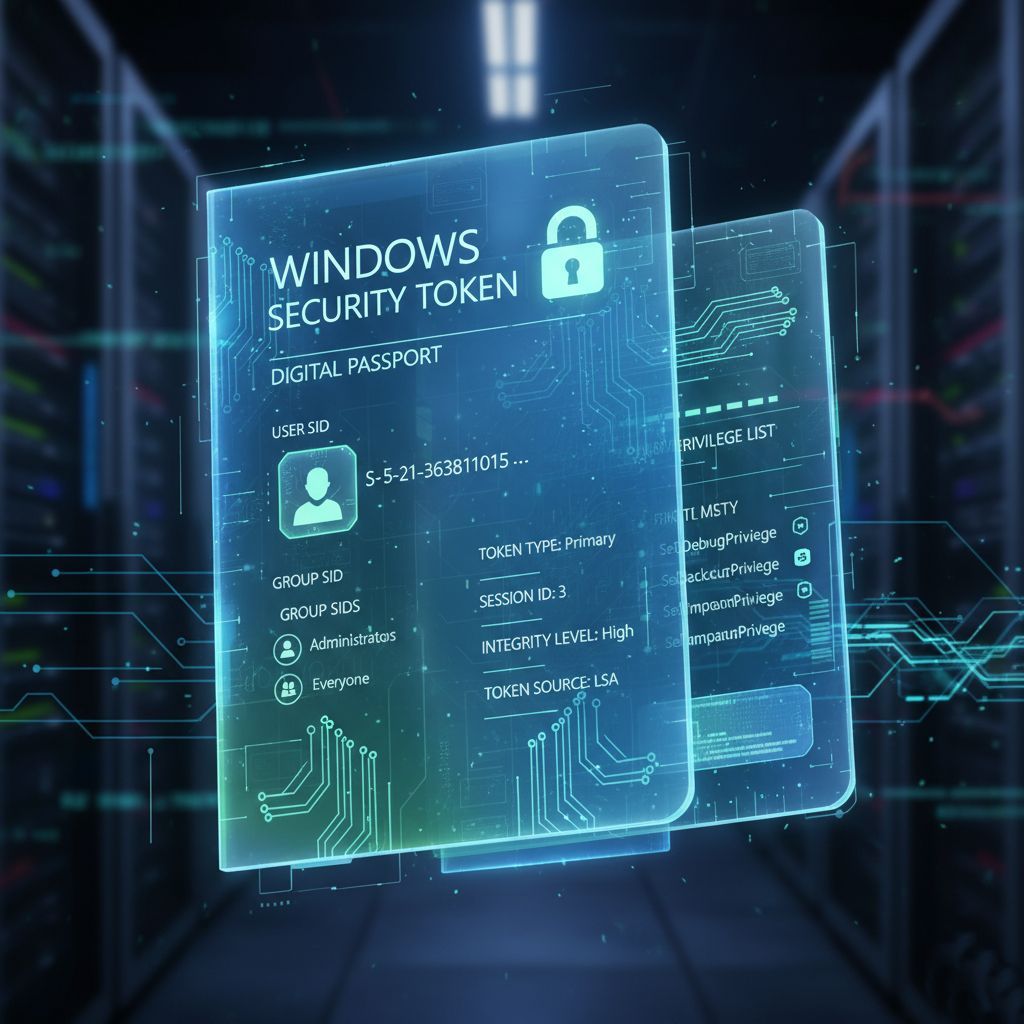
In Part 1, we explored what security tokens are, how they've traditionally been managed, and why their persistent nature creates a vulnerability that attackers have learned to exploit. With 39,000 token theft incidents per day, it's clear that incremental improvements to existing approaches aren't sufficient.
Microsoft's answer is Administrator Protection—a fundamental change in how Windows manages privileged tokens. This feature redesigns the architecture of privilege elevation by treating administrative access not as a persistent state, but as a transient, highly controlled operation with true security isolation.
Administrator Protection: A Fundamental Change in Token Management
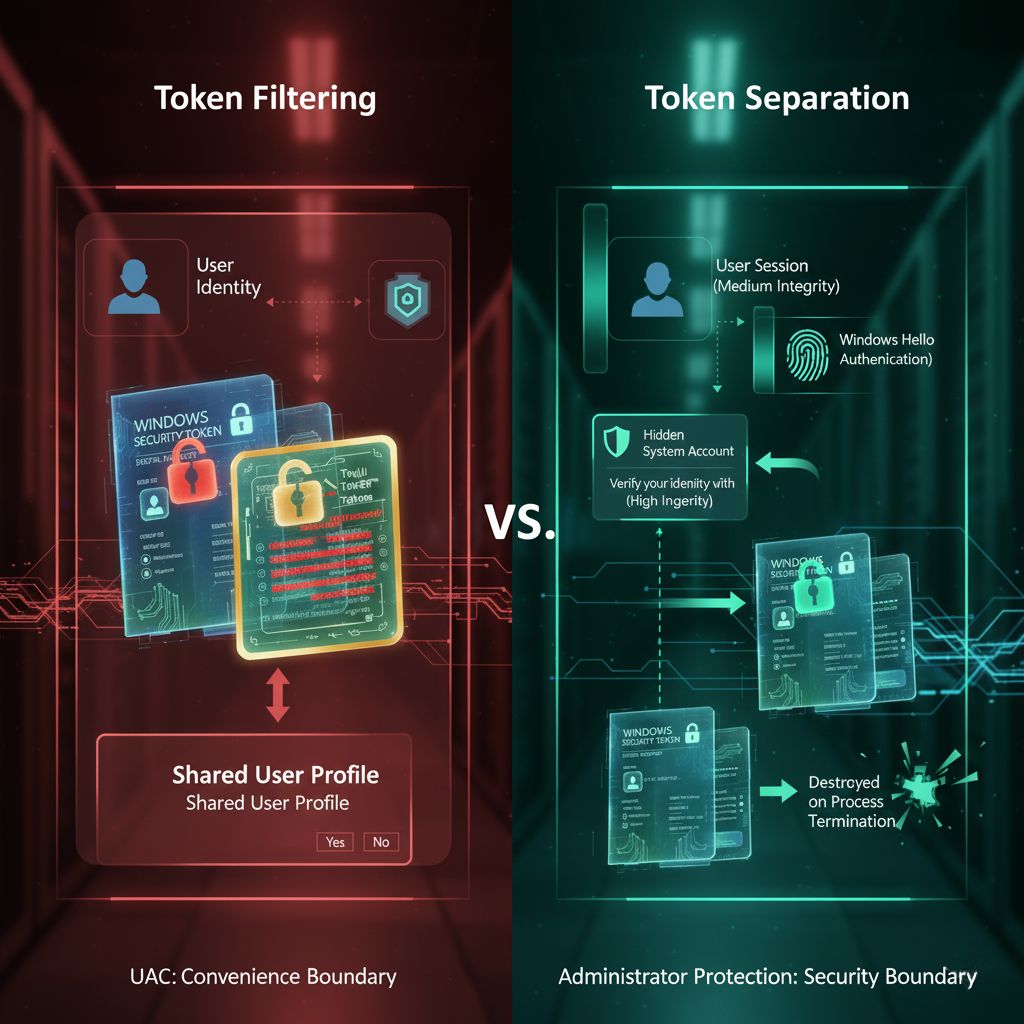
Administrator Protection recognizes that the problem isn't with tokens themselves, but with how they're traditionally managed. Instead of granting a persistent admin token at logon and letting it persist for hours or days, Administrator Protection implements a sophisticated just-in-time elevation model with true isolation.
The Architecture of Isolation
When you enable Administrator Protection, the security model changes dramatically:
At Logon: You receive only a deprivileged token. Your administrator privileges are not present in this token at all—not even in a filtered state like with UAC. You're operating as a standard user from the moment you log in.
At Elevation Time: When you need administrative privileges, Windows doesn't simply pull out a pre-existing elevated token. Instead, it:
1. Prompts you to authenticate with Windows Hello (biometric or PIN)
2. Creates a hidden, system-generated, profile-separated user account
3. Generates a completely new admin token under this separate account
4. Issues this token to the requesting process
5. Destroys the token when the process terminates
This is revolutionary because it breaks the fundamental assumptions that attackers rely on.
Profile Separation: The Key Difference
The hidden, profile-separated user account is the critical innovation that makes Administrator Protection a true security boundary. This means:
- Complete isolation: The elevated process runs in a completely different user profile with its own registry hive, temporary files, and user directory
- No memory sharing: Malware in your user session cannot access memory, files, or resources in the elevated session
- Independent security context: There's no shared state between your standard session and elevated session, eliminating traditional attack vectors
- Reduced attack surface: The attack surface for token theft is dramatically reduced because the token is isolated in a separate security context
This creates what Microsoft explicitly calls a security boundary. Unlike UAC, Administrator Protection is architecturally designed to withstand attacks from user-mode malware attempting to compromise elevated sessions. It's not just a convenience boundary—it's an actual security boundary that even sophisticated adversaries must work around.
Token Lifecycle Management: Burn After Reading
Traditional elevated tokens had indefinite lifespans—they existed as long as the elevated process ran, which could be hours or days. Administrator Protection implements aggressive token lifecycle management:
- Created on-demand: Tokens are generated only when needed for a specific elevated operation
- Process-specific: Each token is tied to a single process and cannot be transferred
- Destroyed immediately: Tokens are destroyed the moment the process terminates
- No persistence: There's no token persistence between operations; each administrative action requires a fresh authentication and token generation
- Automatic cleanup: The system automatically reclaims resources when the elevated session ends
This "burn after reading" approach to tokens fundamentally changes the attacker's calculus. Even if an attacker could somehow steal a token through sophisticated techniques, it would be useless moments later when the process terminates. The window of opportunity shrinks from hours to seconds.
How Administrator Protection Disrupts Token Theft
Recall from Part 1 that the traditional token theft attack chain looks like this:
1. Initial compromise with user-level malware
2. Wait for administrative operation
3. Inject into elevated process or dump LSASS memory
4. Copy elevated token or credentials
5. Achieve persistent administrative access
Administrator Protection breaks this kill chain at multiple critical points:
Profile Separation Prevention: Malware in the user session cannot inject into the elevated session because they operate under different user profiles with different security boundaries. The isolation is enforced at the OS level, not just at the privilege level.
Transient Tokens: Even if a token could somehow be stolen through a highly sophisticated attack, it's destroyed within seconds or minutes when the administrative task completes. An attacker would need to use the token within an extremely narrow time window.
Authentication Requirement: Each administrative action requires fresh Windows Hello authentication. This makes automated, silent token abuse nearly impossible. An attacker cannot trigger elevation attacks without explicit user interaction.
No Auto-Elevation: There are no hidden opportunities for silent elevation that malware can trigger. The user must explicitly authorize each elevated operation, and Windows Hello provides hardware-backed authentication that resists phishing and credential replay attacks.
Credential Isolation: Elevated operations don't create new entries in LSASS that can be dumped. The credentials are transient and exist only within the isolated profile.
The Technical Implementation Details
Understanding how Administrator Protection works at a technical level reveals why it's so effective as a security boundary.
Token Filtering vs. Token Separation
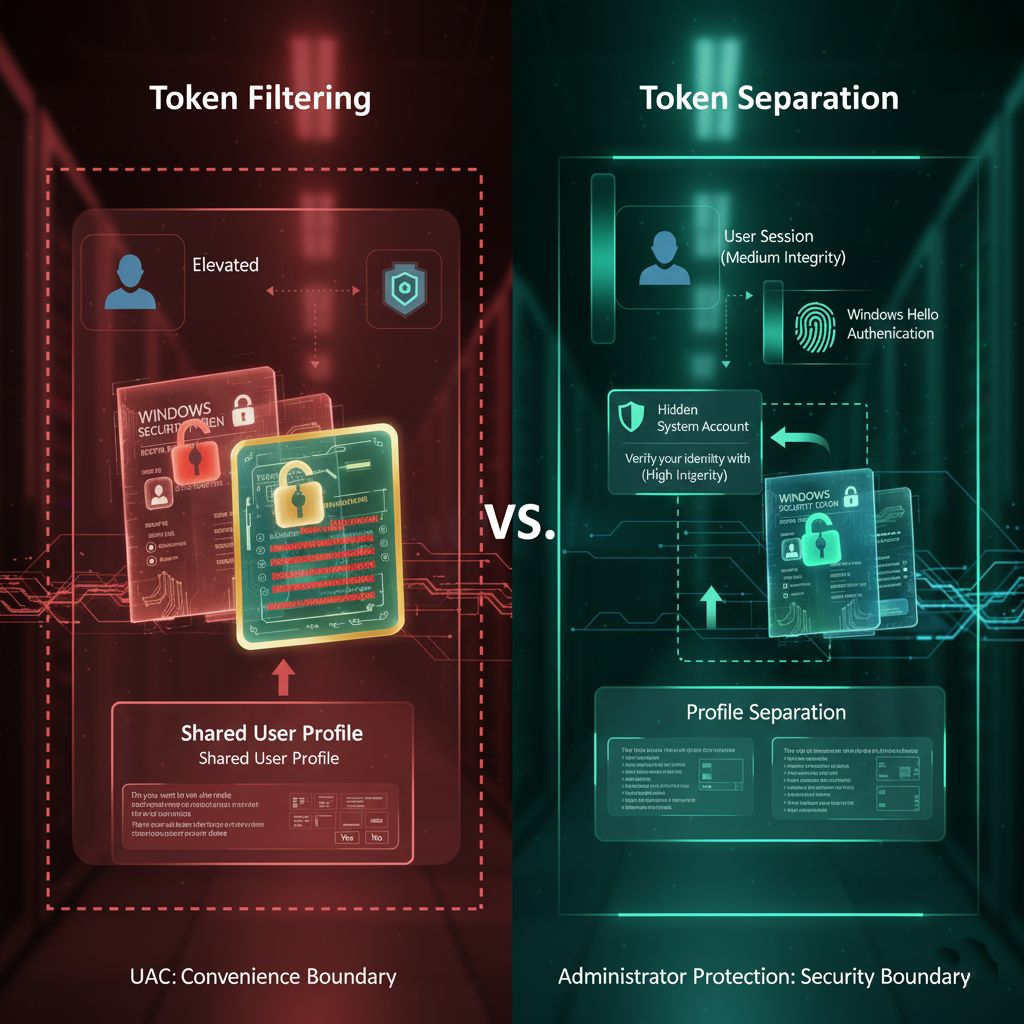
The distinction between UAC's approach and Administrator Protection's approach is fundamental:
UAC Token Filtering: Takes your full admin token and removes certain privileges and groups to create a filtered token. The filtered and full tokens share the same user identity and profile. Both exist in the same security context.
Administrator Protection Token Separation: The elevated token belongs to a completely different security principal (the hidden system account), with its own profile, own registry hive, own temporary files, and own security context. It's a different user account entirely, not just a filtered version of your account.
This is the architectural difference that makes all the difference. You're not just getting fewer privileges; you're operating under a completely different user account.
The Hidden System Account
When Administrator Protection creates the profile-separated account, it's not something you'll see in User Management (lusrmgr.msc) or Traditional User Accounts control panel. It's generated dynamically by the system and exists only for the duration of elevated operations.
This account has unique characteristics:
- No password: Cannot be logged into directly—this account has no password at all
- No persistent profile: The profile is created in memory rather than on disk, leaving no artifacts
- System-managed: Managed entirely by the system kernel, not accessible to user-mode code
- No user interaction: Cannot be accessed or manipulated by user-mode code or standard administrative tools
- Ephemeral: Destroyed when no longer needed, leaving minimal traces on the system
The beauty of this design is that even if an attacker compromises user-mode code with administrative privileges, they still cannot access or interact with the hidden account that handles elevated operations.
Windows Hello Integration: Hardware-Backed Authentication
The integration with Windows Hello is crucial to making the just-in-time model practical. Instead of typing a password (which could be keylogged or credential-stuffed), you use biometric authentication (fingerprint, facial recognition) or a PIN protected by the Trusted Platform Module (TPM).
This provides multiple security benefits:
- Phishing resistance: Biometrics cannot be stolen remotely through phishing emails or credential harvesting attacks
- Replay protection: TPM ensures the authentication cannot be replayed or reused after the fact
- Hardware-backed security: The credential is protected by dedicated hardware, not just stored in software
- User convenience: Faster and more user-friendly than typing passwords repeatedly
- Forensic resistance: TPM prevents offline attacks on authentication credentials
Windows Hello doesn't just make Administrator Protection more convenient; it's essential to the security model. Without hardware-backed authentication, attackers could use keyloggers or other credential theft techniques.
Elevation Prompt Behavior Options
Administrator Protection offers different prompt behaviors, allowing organizations to balance security and usability:
Prompt for credentials: User must provide Windows Hello authentication each time an elevation is requested. Maximum security but highest user friction.
Prompt for consent: User must click "Yes" to approve elevation but doesn't need to re-authenticate. Balanced approach for many scenarios.
Prompt for consent with Windows Hello: Hybrid approach requiring Windows Hello verification for particularly sensitive operations while allowing simpler consent for routine operations.
IT administrators can choose the appropriate balance between security and usability for their organization through Group Policy or Intune Mobile Device Management (MDM) configuration.
Real-World Implications and Use Cases
Let's look at practical scenarios where Administrator Protection makes a tangible difference:
Installing Software
Without Administrator Protection: You approve a software installation. The installer runs with your persistent admin token. If the installer is malicious or compromised by a supply chain attack, it has full system access for the entire installation process and could install rootkits or backdoors. Your malware infection persists indefinitely.
With Administrator Protection: You approve with Windows Hello. The installer runs in an isolated profile under a hidden temporary account. When installation completes, the elevated token is destroyed and the temporary account is torn down. Any malware would be trapped in the temporary profile and cannot persist to the main user profile. The attacker's foothold evaporates.
Modifying System Settings
Without Administrator Protection: Opening Registry Editor as admin gives persistent elevated access. Malware could inject into regedit.exe and make arbitrary system changes—modify policies, create backdoors, disable security software.
With Administrator Protection: Each registry modification requires authorization. The elevated Registry Editor session is isolated in a separate profile. When you close it, the elevated access disappears and the elevated session is terminated. Malware cannot establish persistence through registry modifications during elevated operations.
Credential Dumping Attacks
Without Administrator Protection: Attackers use tools like Mimikatz to dump credentials from LSASS memory. If an admin is logged in, they get admin credentials or tokens that can be replayed.
With Administrator Protection: Admin tokens only exist briefly in isolated sessions. Attackers would need to compromise multiple security boundaries (user-mode malware would need to break into the isolated profile, act during the narrow window when the token exists, and successfully extract it). The attack becomes exponentially more difficult.
Driver Installation
Without Administrator Protection: Installing a driver grants persistent elevated access. A malicious or compromised driver can run at kernel level indefinitely.
With Administrator Protection: Driver installation happens in an isolated context. While the driver itself still runs at kernel level if installed, the installation process itself cannot be abused to install malicious drivers during other operations. The separation of the installation process from user-context malware prevents many infection chains.
Deployment Considerations for Organizations
For IT administrators considering Administrator Protection deployment, several factors are worth considering:
Compatibility: Most software should work fine with Administrator Protection. However, applications that depend on persistent elevation or expect to run in the same profile as administrative operations might need adjustments. Test critical applications in a pilot group first before broad deployment.
User Experience: Users will authenticate more frequently, typically each time an elevation is needed. The Windows Hello integration makes this relatively painless—just a fingerprint or face scan instead of a password prompt. However, it is a change in workflow that requires communication and training.
Policy Management: Use Intune or Group Policy to deploy consistently across organizations. The Settings Catalog in Intune provides granular control over elevation behaviors. Group Policy supports similar controls through Windows Update for Business Group Policy.
Monitoring and Logging: Implement logging to track elevation events and identify any problematic applications or workflows. Event Viewer captures elevation attempts, which can help identify applications that rely on persistent elevation.
Phased Rollout: Start with a pilot group of tech-savvy users or IT staff, gather feedback, address issues, then expand gradually to larger populations. Quick iterations help identify and resolve problems before organization-wide deployment.
Communication: Help users understand that more frequent authentication is a security improvement, not an inconvenience. The biometric-based authentication with Windows Hello makes this relatively painless.
The Future of Token Security and Privilege Management
Administrator Protection represents Microsoft's vision for the future of privilege management. Several trends are worth watching:
Default Enablement: Microsoft plans to enable Administrator Protection by default in Windows, making just-in-time elevation the standard security posture rather than an opt-in feature. This signals Microsoft's commitment to this model as the future direction.
Industry Adaptation: As more organizations adopt this model, software vendors will optimize their applications for just-in-time elevation workflows. Tools will be built with the assumption that elevated access is transient, not persistent.
AI and Behavioral Analysis: Future versions might use machine learning to detect anomalous elevation patterns that could indicate compromise. For example, unusual elevation frequency, time of day patterns, or operations not matching user profiles could trigger alerts.
Zero Trust Architecture: Administrator Protection aligns with zero trust principles—verify explicitly, use least privilege access, and assume breach. The model treats every elevation as a security checkpoint.
Hardware Requirements: Future versions might require TPM 2.0 or similar hardware security modules as baseline requirements, further hardening the authentication and token protection mechanisms.
Comparing to Other Operating Systems
This approach has parallels—and important differences—in other operating systems:
Linux/Unix sudo: Requires password (or passwordless sudo) for privilege escalation. Elevated processes still run in the same user context with full access to user files and environment. No profile separation. The security model is more about command auditing than isolation.
macOS: Similar to Windows UAC in many ways, with Touch ID integration for convenience but not true profile separation. Elevated processes run in the same user session. Recent versions have added additional isolation mechanisms, but not at the level of Administrator Protection.
Android/iOS: Apps run in individual sandboxes with explicit permission requests—a different model but philosophically aligned with least privilege. However, this is application-level isolation rather than user-level privilege elevation.
ChromeOS: Uses continuous integration of security isolation with a minimal OS, but the model is fundamentally different for cloud-based systems.
Administrator Protection goes further than most operating systems by combining authentication, profile isolation, and transient tokens into a comprehensive security boundary specifically designed to resist sophisticated attacks from within the operating system.
Conclusion: Tokens as the New Security Perimeter
In modern cybersecurity, the network perimeter has dissolved. Attackers are inside the network. They're on endpoints. The new perimeter is identity and privileges—specifically, the tokens that represent those privileges.
Administrator Protection recognizes this reality and acts on it. By treating tokens as ephemeral, highly controlled resources that exist only when needed and within strict isolation boundaries, Windows 11 implements a fundamentally more secure model for managing administrative privileges.
The 39,000 daily token theft incidents Microsoft reports aren't just statistics—they represent real attacks on real organizations. Every stolen token is a foothold for ransomware, data exfiltration, or system compromise. Administrator Protection dramatically raises the bar for attackers by eliminating the persistent, privileged tokens they rely on.
As Windows continues to evolve toward making Administrator Protection the default, understanding tokens—how they're created, managed, exploited, and protected—becomes essential knowledge for anyone involved in Windows security, IT administration, or application development.
The era of "log in once with admin rights and forget about it" is ending. The era of just-in-time, explicitly authorized, isolated administrative access is beginning. And at the heart of this transformation is a deeper, more sophisticated understanding of what tokens are, how they work, and why protecting them matters.
For organizations serious about modern security practices, Administrator Protection represents a significant step forward in the zero trust journey. The cost is minimal—some additional authentication prompts mitigated by Windows Hello biometrics. The benefit is substantial—a true security boundary that fundamentally changes the calculus of privilege-based attacks.

Additional Resources
- Microsoft Digital Defense Report 2025: Comprehensive threat analysis with latest token theft and attack statistics
- Windows Security Book & Documentation: In-depth guide to Windows 11 security features and architecture
- Administrator Protection Deployment Guide: Technical details on implementing Administrator Protection
- Windows Hello Enhanced Sign-in Security: Technical breakdown of hardware-backed authentication
- Token-based Attacks and Defenses: MITRE ATT&CK framework with token manipulation, theft, and defense techniques
- Windows Privilege Escalation Techniques: Understanding elevation mechanisms and security boundaries
Summary from Part 1 & 2
- Security tokens are fundamental to Windows privilege management
- Traditional approaches with persistent tokens create extended attack windows
- Token theft has become a primary attack vector affecting thousands of organizations daily
- Administrator Protection introduces true security boundaries through profile separation
- Just-in-time elevation with transient tokens fundamentally changes attacker economics
- Hardware-backed authentication (Windows Hello) is essential to the security model
- Organizations should plan for Administrator Protection as it becomes the Windows default